Question

Calculating Values Across Multiple Types Within a Group in an Acumatica Report

  • December 29, 2025
  • 6 replies
  • 54 views

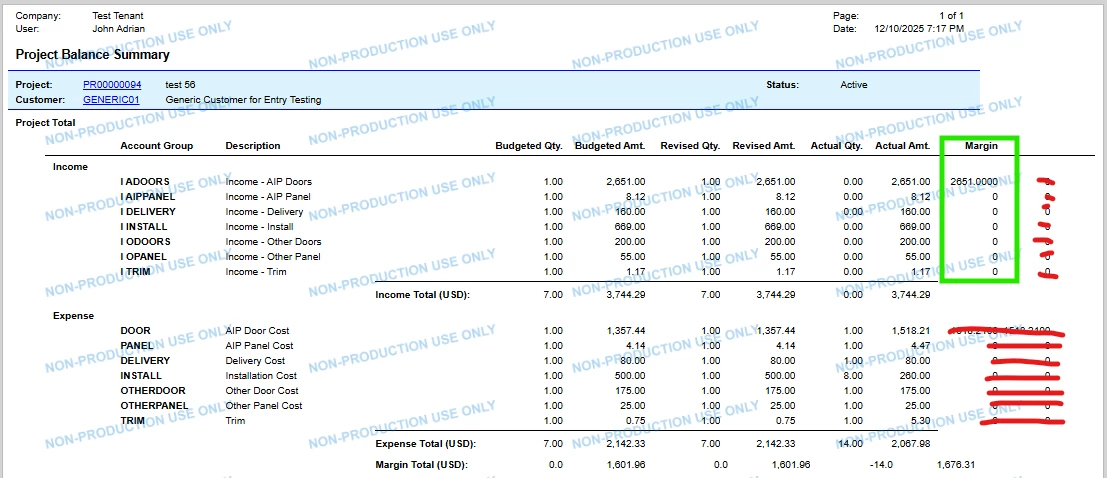
I have grouped the report by Type. Now I need to calculate a value in a new column that depends on data from both Type records (e.g., Type = I and Type = E). The calculation should use values from both Types within the same group and display the result. Is this achievable in an Acumatica report?

6 replies

nickcerri32
Semi-Pro II
Forum|alt.badge.img+6
  • Semi-Pro II
  • December 29, 2025

@prathameshlad16 Can you provide the GI or Report XML? When you group by a specific field, a GI will aggregate by that specific field.  Generally speaking, you can create a GI that performs the calculation and then create another GI based on the first GI that does the grouping, but without seeing the details of what you have, it would be hard to say. 


We need to have the Margin column the following calculation:


(Income Actual Amount LESS Expense Actual Amount/ Income Actual Amount.


Example:

For I ADOORS Margin, it would be...

    (2,651 LESS 1518.21) / 2,651

    = 42.73%


WillH
Semi-Pro I
Forum|alt.badge.img+4
  • Semi-Pro I
  • January 5, 2026

Hi ​@prathameshlad16 ,

You’ve provided a copy of the RPS file, not the RPX file.  RPS files are just a link to access your site, whereas the RPX files are the actual report definitons.

If you want other users to be able to see your report code to provide help you’ll need to save the RPX from the report designer, not the RPS file.

Unfortunately what you’ve doing here (separating Income and Expense lines out) runs directly against how margins are calculated.  You’re likely to need to rearchitect the report significantly to get what you want.


I recommend talking to a consultant with your exact business needs so they can help you get the information you need displayed in a way that works for your business.


Please check — I have attached the RPX file for your review.


Forum|alt.badge.img+1

We would need to see the subreport, pm621002.rpx also.  


The report, as is, won’t be able to do what you’re asking since the head of AccountGroupGroup is similar to a “detail section” in that it’s running in real time, line by line.  So the expenses calculation happen after the income, there’s no way to reference a future value.  


What I would do is what you have, a sub report.  The goal would be to pass the variables to the subreport to “find” the corresponding expense and use that in the the calculation like this:  


=(SUM([PMBudget.CuryActualAmount]) - $subReport1_ExpenseTotal) / SUM([PMBudget.CuryActualAmount]


I have attached the subreport PM621002.rpx, as the margin calculation in the main report relies on parameters and values returned from this subreport to fetch the corresponding expense data.