Question

Business Event not updating all Lines when it has same Inventory ID

  • April 29, 2026
  • 7 replies
  • 46 views

Good day,

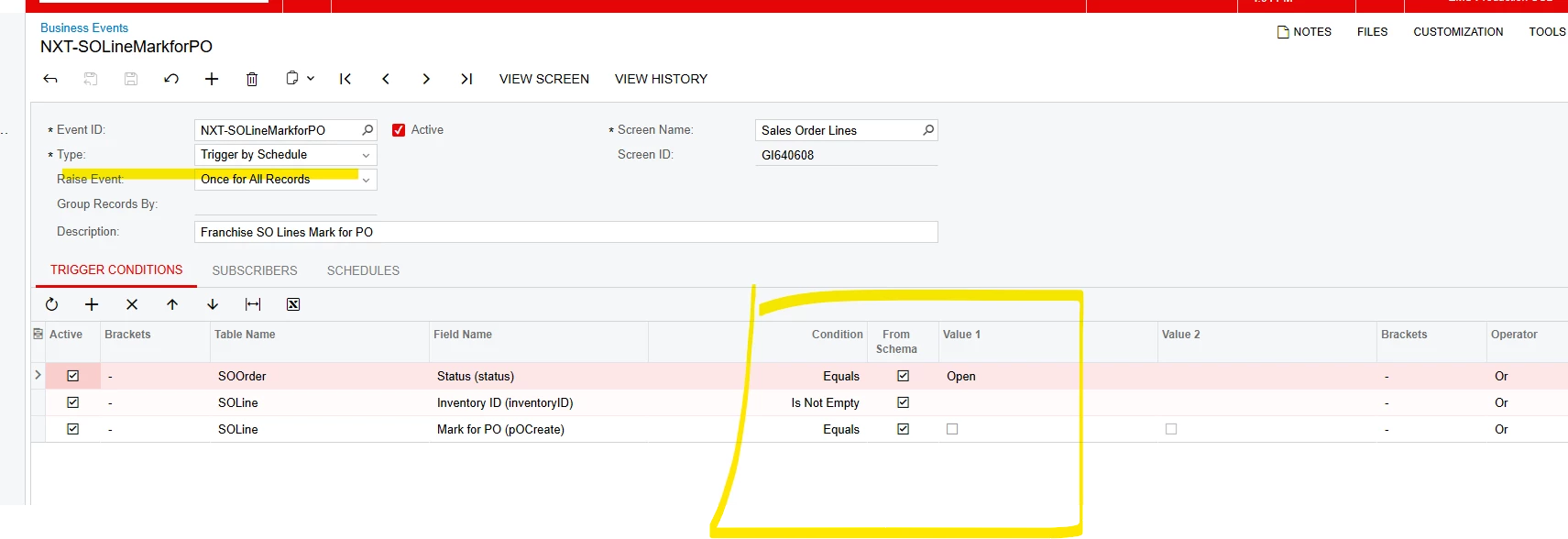
I have business event that updates the SO Line as Mark for PO.  It works fine.  However, we have come across an issue with it updating the SO Line when the Order has the same inventory ID.  The Business Event update only one line correct and leaves the rest.  The trigger conditions are below.

Has anyone run into this situation?  My thoughts are it is due to with Raise Event selection. 

Thank you.


7 replies

BenjaminCrisman
Acumatica Employee
Forum|alt.badge.img+4
  • Acumatica Support Team
  • April 30, 2026

@evangrill What are you using to mark the lines? An import scenario? Can you share the details of this since it’s not the BE that is the issue I’m sure.


Naveen Boga
Captain II
Forum|alt.badge.img+20
  • Captain II
  • April 30, 2026

@evangrill   I think there are actually two things worth checking here:

1. Raise Event setting — "Once for All Records" fires the subscriber a single time for the whole result set. If multiple SO Lines share the same Inventory ID on an order, only one may get processed. Try switching this to "Once per Record" so the subscriber fires individually for each matching line.

2. Trigger Conditions using OR — All three conditions are joined with OR, meaning the event fires if any condition is true — not all three together. An SO Line with any Inventory ID would always qualify. You likely want these joined with AND so the event only triggers when the order is Open, the line has an item, and Mark for PO is currently false.

Also, what subscriber action are you using? That would help confirm whether the "Once per Record" change alone would solve it.


bwhite49
Captain II
Forum|alt.badge.img+12
  • Captain II
  • April 30, 2026

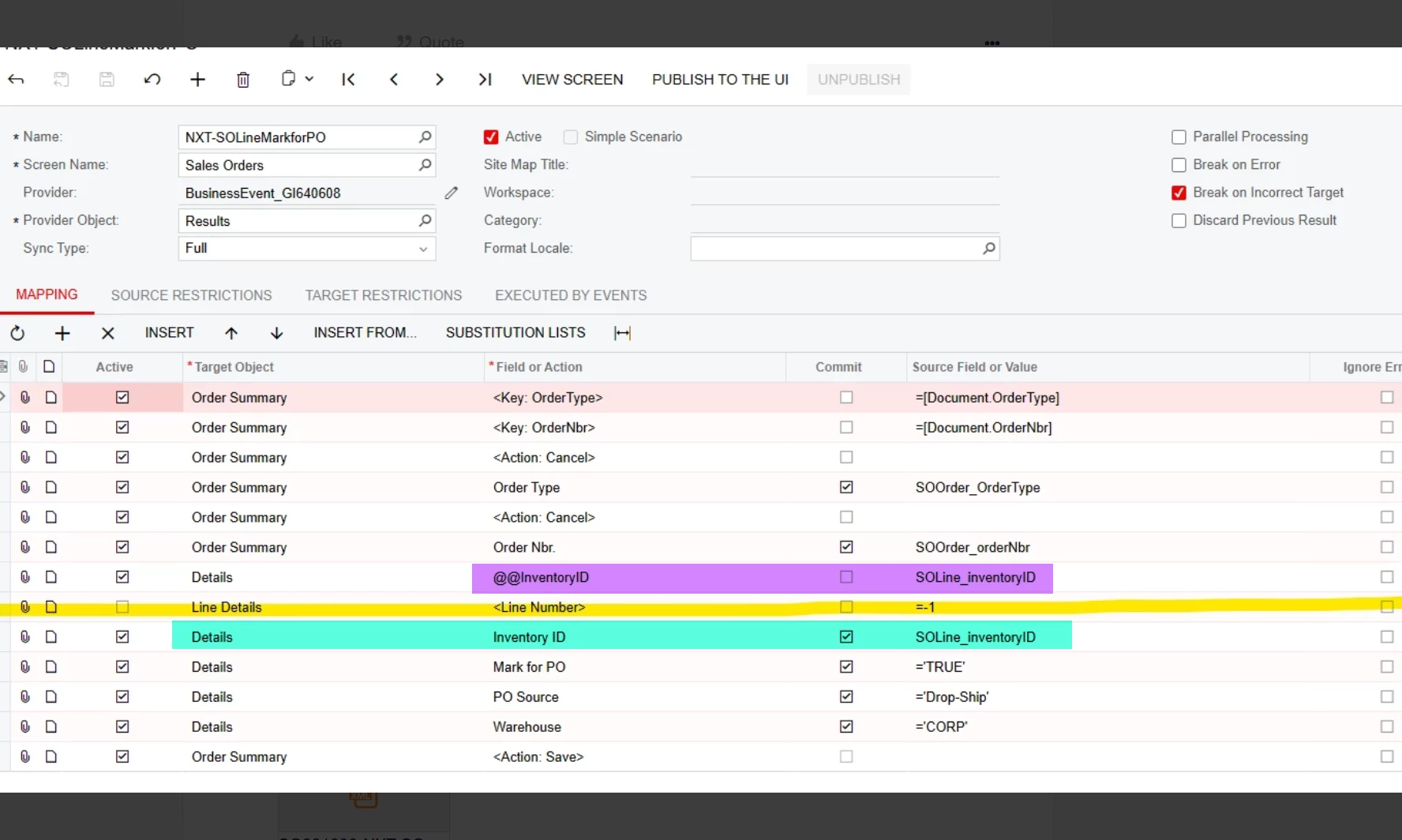
If you use @@InventoryID as the key to update each line, it will only update the first record with that inventory ID. You will need to use @@LineNbr to update all lines.


BenjaminCrisman
Acumatica Employee
Forum|alt.badge.img+4
  • Acumatica Support Team
  • April 30, 2026

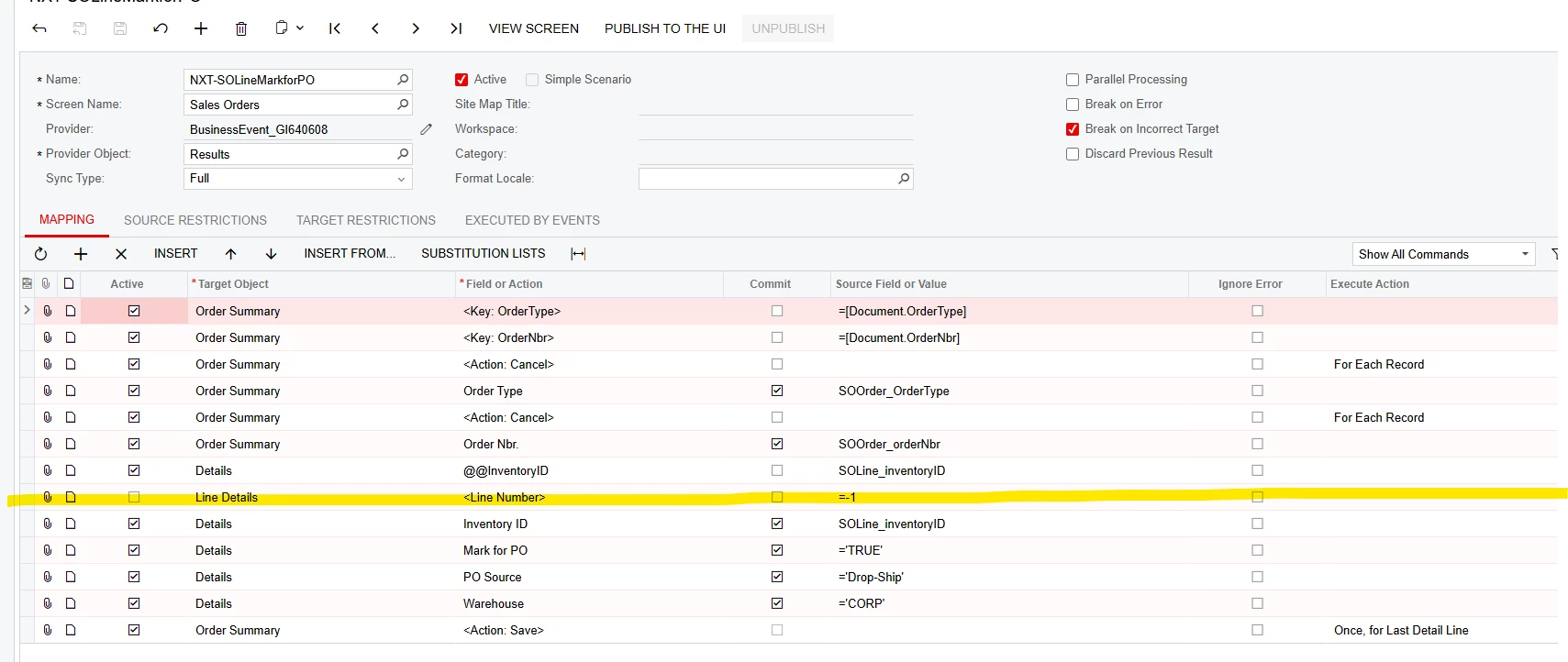
Right, assuming he’s using an import he’ll need to include LineNbr and maybe a =Every line also


  • Author
  • Freshman I
  • April 30, 2026

@BenjaminCrisman; ​@bwhite49; ​@Naveen Boga 

Thank you for your insights and suggestions.  Attached the import scenario that runs the Business Event.  It is an inherited one when I took on this role.  It does seem that the prior person did have the Line Number but then inactivated the record.  Also, they didn’t use the @@ wild card key to help.

Any thoughts?


bwhite49
Captain II
Forum|alt.badge.img+12
  • Captain II
  • April 30, 2026
  1. Add the SOLine.LineNbr field to your inquiry GI640608.
  2. Go to data provider screen and refresh the columns in the data provider
  3. Replace the purple with @@LineNbr = [Transactions.LineNbr] (internal field)
  4. replace the blue/teal with LineNbr = SOline_LineNbr


MissyMain41
Jr Varsity I
Forum|alt.badge.img
  • Jr Varsity I
  • April 30, 2026
  1. Add the SOLine.LineNbr field to your inquiry GI640608.
  2. Go to data provider screen and refresh the columns in the data provider
  3. Replace the purple with @@LineNbr = [Transactions.LineNbr] (internal field)
  4. replace the blue/teal with LineNbr = SOline_LineNbr


This is exactly it -- a common mistake I see is including the data in both the custom key config as well as the second line where the data should be specified.

This is outlined in the following webinar I hosted last year for import scenarios.

I definitely recommend checking out my custom key breakdown section of this webinar -- it may help in the future!