Answer

Business Event is sending two emails to same email address

  • June 10, 2025
  • 8 replies
  • 93 views

Forum|alt.badge.img

I have set up a business event to notify approvers when they have a timecard that is pending approval. The business event has one trigger and that is: 
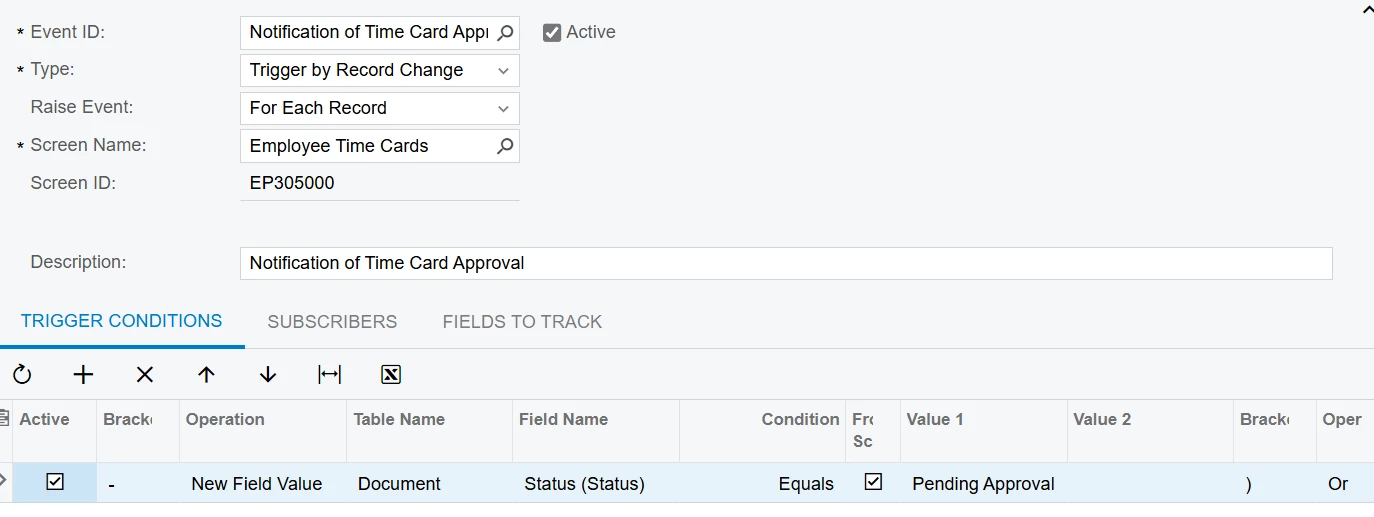
I’m not sure why it is sending 2 emails. In the email history, one email is created by the user that created the business event and one email is created by the person submitting the timesheet. 

Can someone tell me what I am doing wrong? Any help would be greatly appreciated. 

Best answer by BenjaminCrisman

@paigeh It might be a better idea to use a GI which shows the timecard and then use the same condition on the BE Trigger Conditions. Often times when using New Field Value it is advisable to also include Old Field Value so the BE can recognize the other statuses. I would also make sure to only track necessary fields and not select “Track All Fields”.

8 replies

Manikanta Dhulipudi
Captain II
Forum|alt.badge.img+15

@paigeh Do you have a document goes for 2 step approvals?


Forum|alt.badge.img
  • Author
  • Freshman I
  • June 10, 2025

Hi ​@Manikanta Dhulipudi . I’m not trying to do a 2 step approval so I’m not sure what your question is. The timecard just needs to be approved by one person but they are getting the email to approve it twice. 


Manikanta Dhulipudi
Captain II
Forum|alt.badge.img+15

@paigeh Can you check by changing the status = Pending approval to Open/Hold for testing purpose.


If still it is sending two emails please check the email template configuration of “TO”


BenjaminCrisman
Acumatica Employee
Forum|alt.badge.img+4
  • Acumatica Support Team
  • Answer
  • June 10, 2025

@paigeh It might be a better idea to use a GI which shows the timecard and then use the same condition on the BE Trigger Conditions. Often times when using New Field Value it is advisable to also include Old Field Value so the BE can recognize the other statuses. I would also make sure to only track necessary fields and not select “Track All Fields”.


Forum|alt.badge.img
  • Author
  • Freshman I
  • June 10, 2025

@Manikanta Dhulipudi If I change the status from pending approval to open/hold it won’t send the email when I want it to so I’m confused. 

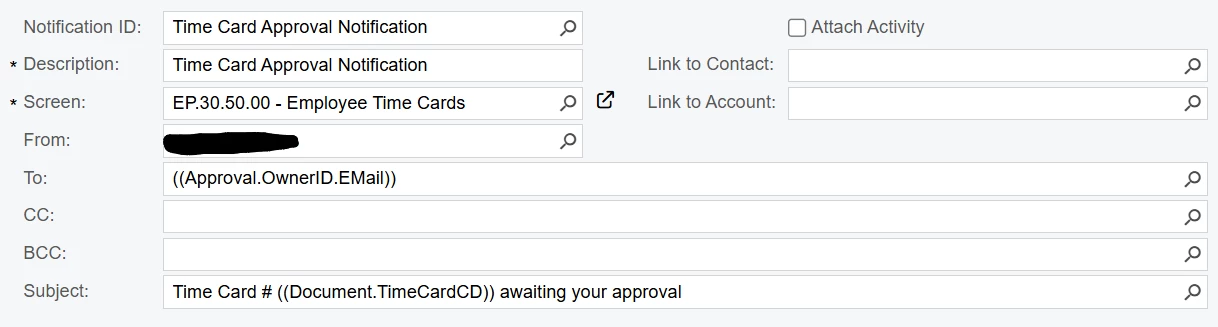
Here is how the To: is set up and it is sending 2 emails to the same approver. 


Manikanta Dhulipudi
Captain II
Forum|alt.badge.img+15

@paigeh 

I thing one email is triggering from Business events and other one is approval notifcations to approver about the document is pending for approval.


Forum|alt.badge.img
  • Author
  • Freshman I
  • June 10, 2025

@BenjaminCrisman Thanks for the suggestion! I am tracking on the status field but I will look more at my trigger condition. Worst case I will rewrite it using a GI. Thank you. 


Forum|alt.badge.img
  • Author
  • Freshman I
  • June 10, 2025

@Manikanta Dhulipudi Oh! I understand why you were asking now. If I inactivate the business event, no emails are sent to the approver. So, I think I have something wrong in the business event.