Hey all! I’m building a new version of the Batch Packing Slip report, and in order to make it do what I need, I need to add the SOOrder, SOLine and SOLineSplit tables. However- once I added them, it caused the report to loop line items thousands upon thousands of times.
How do I fix this? I’ve attached the report.
Best answer by BenjaminCrisman
@ALEXSLUSSER15 I was in the same boat when I first started trying to tackle them! They are just a report running within a report, but the only way the subreport can get data is from what is sent to it via the main report.
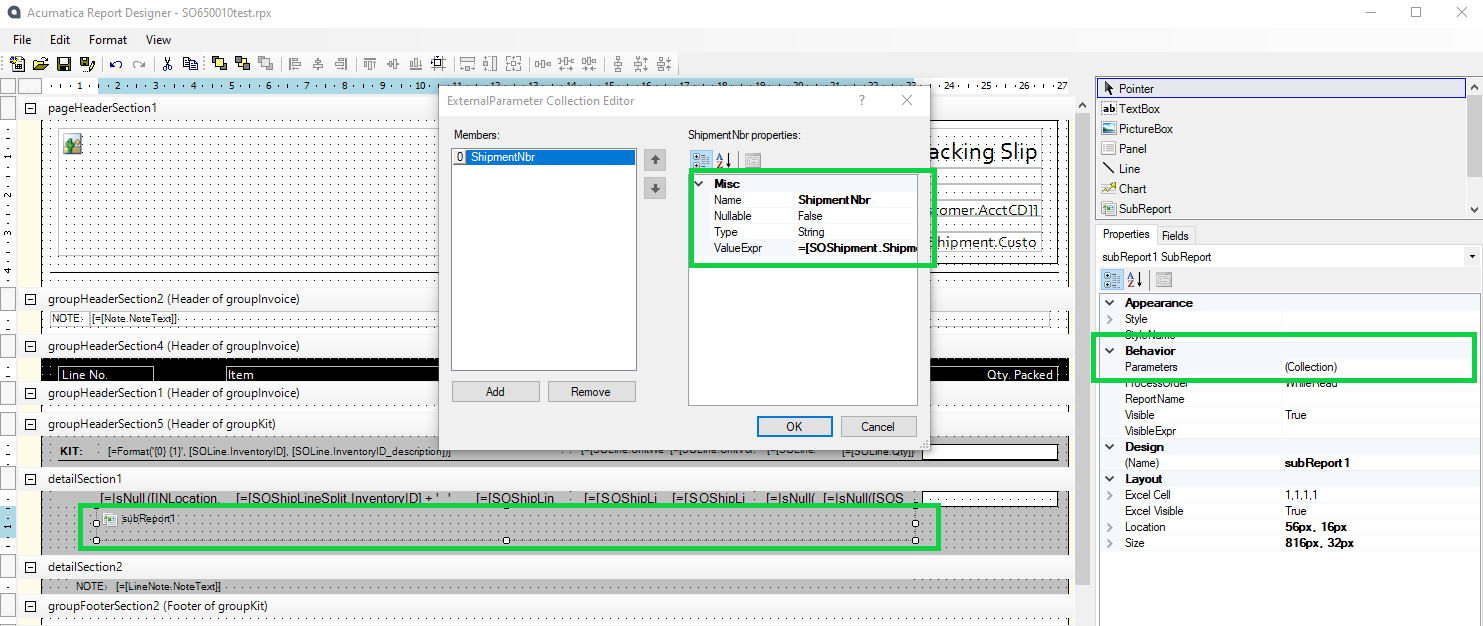
For this issue I would add a subreport and set a collection parameter called ShipmentNbr and use SOShipment.ShipmentNbr as the value:
Create a new report and add the SOShipLineSplit table in there, set a parameter for shipment number and a filter condition where SOShipLineSplit.ShipmentNbr = @ShipmentNbr
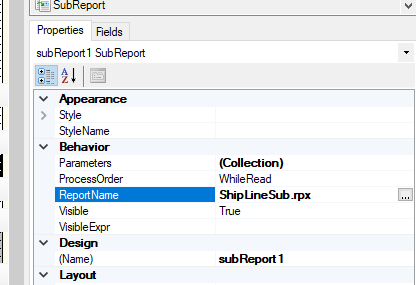
Then put your fields into the Details or groupFooter section and update the main report with the name you’ve given the subreport:
You can then remove the SOShipLineSplit fields from the section they print in and it should work as expected
@ALEXSLUSSER15 I was in the same boat when I first started trying to tackle them! They are just a report running within a report, but the only way the subreport can get data is from what is sent to it via the main report.
For this issue I would add a subreport and set a collection parameter called ShipmentNbr and use SOShipment.ShipmentNbr as the value:
Create a new report and add the SOShipLineSplit table in there, set a parameter for shipment number and a filter condition where SOShipLineSplit.ShipmentNbr = @ShipmentNbr
Then put your fields into the Details or groupFooter section and update the main report with the name you’ve given the subreport:
You can then remove the SOShipLineSplit fields from the section they print in and it should work as expected