Answer

Adding a Sum Value to Generic Inquiry

  • October 1, 2025
  • 2 replies
  • 66 views

Forum|alt.badge.img

Hello - 

We are creating a generic inquiry to be able to search for Freight values by vendor and/or property, and want to be able to have the system generate the Total Freight amount depending on the filters the user selects. 

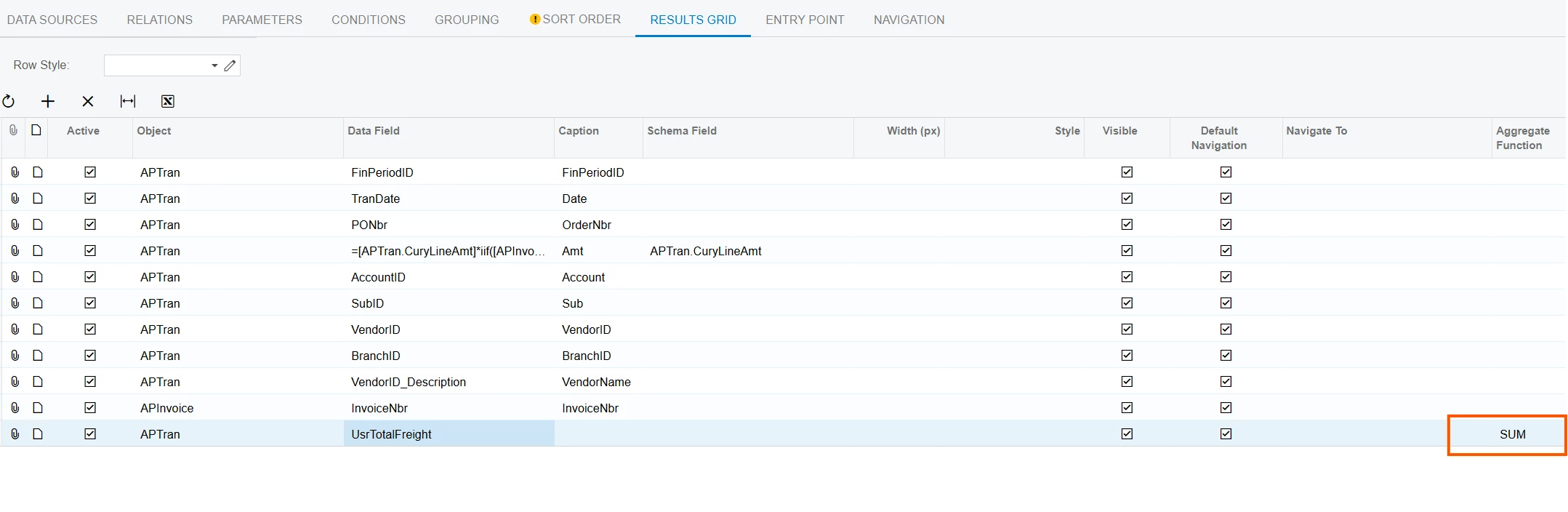
We have experimented with adding the ‘Sum’ to the Aggregate Function column for the Data Field usrTotalFreight, but that does not seem to be generating anything. Am I missing a step? 

Attached is the GI for reference as well. Thank you!!


Best answer by bwhite49

In order for the aggregate calculations to work, you need to have some sort of grouping in the grouping tab of the generic inquiry. So if you wanted the GI to group on invoice (1 row per invoice), then you would need to add the invoice type and invoice ref nbr into the grouping to group correctly. When grouped, the UsrFreightTotal field will sum up across all AP Tran lines that exist within that invoice. If you want the freight total per vendor, then you would add the VendorID/AcctCD to the grouping and adding a SUM to the aggregate function will give you sum total for each vendor.

 Are you looking for a sum total at the bottom of the GI?

If so, there is a column called “total aggregate function” and that that can be added through the field selector highlighted with the arrow below. 


2 replies

bwhite49
Captain II
Forum|alt.badge.img+11
  • Captain II
  • Answer
  • October 1, 2025

In order for the aggregate calculations to work, you need to have some sort of grouping in the grouping tab of the generic inquiry. So if you wanted the GI to group on invoice (1 row per invoice), then you would need to add the invoice type and invoice ref nbr into the grouping to group correctly. When grouped, the UsrFreightTotal field will sum up across all AP Tran lines that exist within that invoice. If you want the freight total per vendor, then you would add the VendorID/AcctCD to the grouping and adding a SUM to the aggregate function will give you sum total for each vendor.

 Are you looking for a sum total at the bottom of the GI?

If so, there is a column called “total aggregate function” and that that can be added through the field selector highlighted with the arrow below. 


Forum|alt.badge.img
  • Author
  • Jr Varsity II
  • October 2, 2025

Ah thank you!!


