Answer

Adding a $ sign to my GI

  • September 26, 2025
  • 4 replies
  • 48 views

Forum|alt.badge.img

I am trying to add a $ sign to my GI. I saw this formula “ =’$’ + CStr([ARTran.CuryTranAmt]) ” in the community but there is one challenge with it. It resulted in 4 decimal places. I’ve tried a lot of formulas to reduce it to 2 decimal places per my company requirement but its not working. 
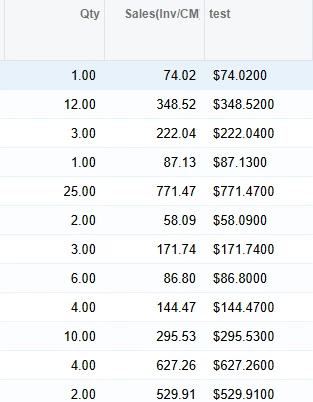
Is there any way to make this work.

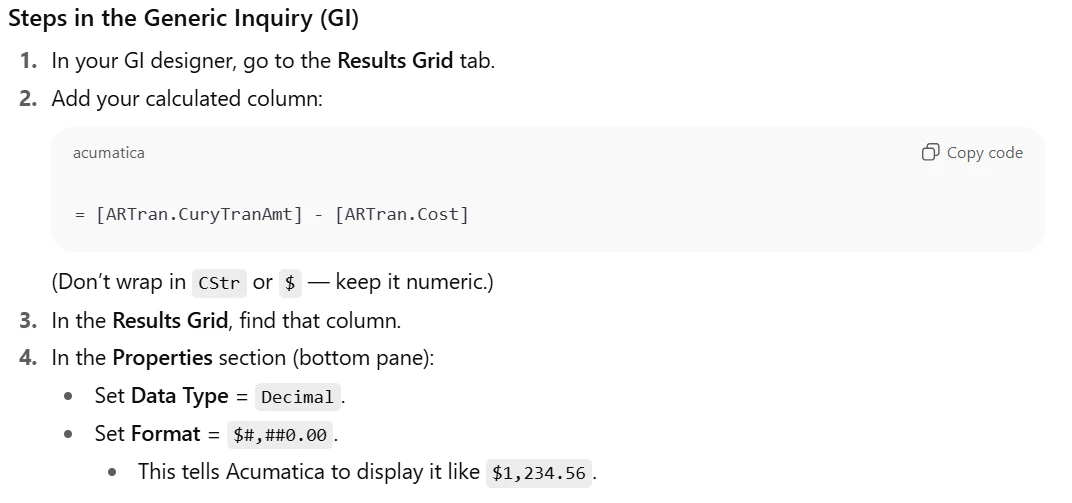
ChatGPT gave me this instructions to apply but for some reason I can't find the properties to apply the Data Type = Decimal. and format Format = $#,##0.00.
 

Best answer by darylbowman

I think I ‘mathed’ the wrong direction. Try this:

=Concat('$',Substring(CStr(Round([ARTran.CuryTranAmt],2)),0,Len(CStr([ARTran.CuryTranAmt]))-1))

4 replies

darylbowman
Captain II
Forum|alt.badge.img+15
  • September 26, 2025

This is a perfect example of a ‘hallucination’. The ‘Format’ function is available in Report Designer but not GIs.

To eliminate the extra decimals, you will probably need to do something like:

=Concat('$',Substring(CStr(Round([ARTran.CuryTranAmt],2)),0,Len(CStr([ARTran.CuryTranAmt]))-3))


Forum|alt.badge.img
  • Author
  • Freshman II
  • September 26, 2025

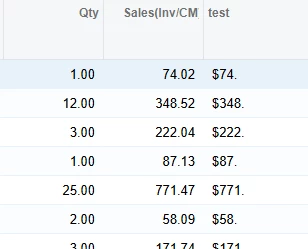
@darylbowman thanks for the feedback. This is the result it produce.

I want it with 2 decimal places.


darylbowman
Captain II
Forum|alt.badge.img+15
  • Answer
  • September 26, 2025

I think I ‘mathed’ the wrong direction. Try this:

=Concat('$',Substring(CStr(Round([ARTran.CuryTranAmt],2)),0,Len(CStr([ARTran.CuryTranAmt]))-1))


Forum|alt.badge.img
  • Author
  • Freshman II
  • September 26, 2025

@darylbowman thanks a lot. You the best of my day