Answer

Add note or update user-defined field specific to GI row result

  • February 4, 2025
  • 10 replies
  • 103 views

Forum|alt.badge.img

Hi all,


I know that’s possible to write a generic inquiry and pull in a note from say a Customer or a Sales Order Line.

But I would like to be able to add a note that is specific to a generic inquiry itself. For instance, I just wrote a GI for our team that identifies potential issues (undercharged on a sales order, for instance). But I don’t want to use the notes attached to the sales order, because many of the notes attached to the so are important and don’t want them overwritten.

Basically, I’m looking for a way so our team can ‘tag’ or highlight a row result in a GI (ie, a tage could mean ‘investigate further’ or ‘ignore’).

Maybe I could create a user-defined field called “mark” and then could the end user somehow glag that UDF from the GI?

 

Best answer by lauraj46

Hi ​@swartzfeger ,

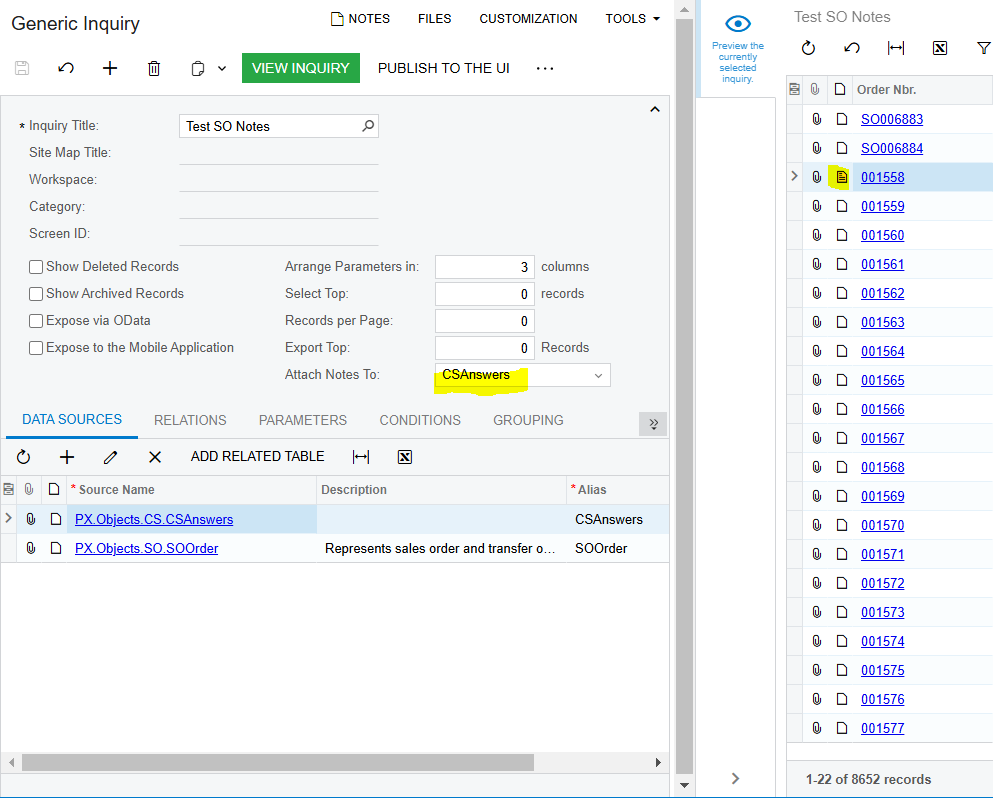
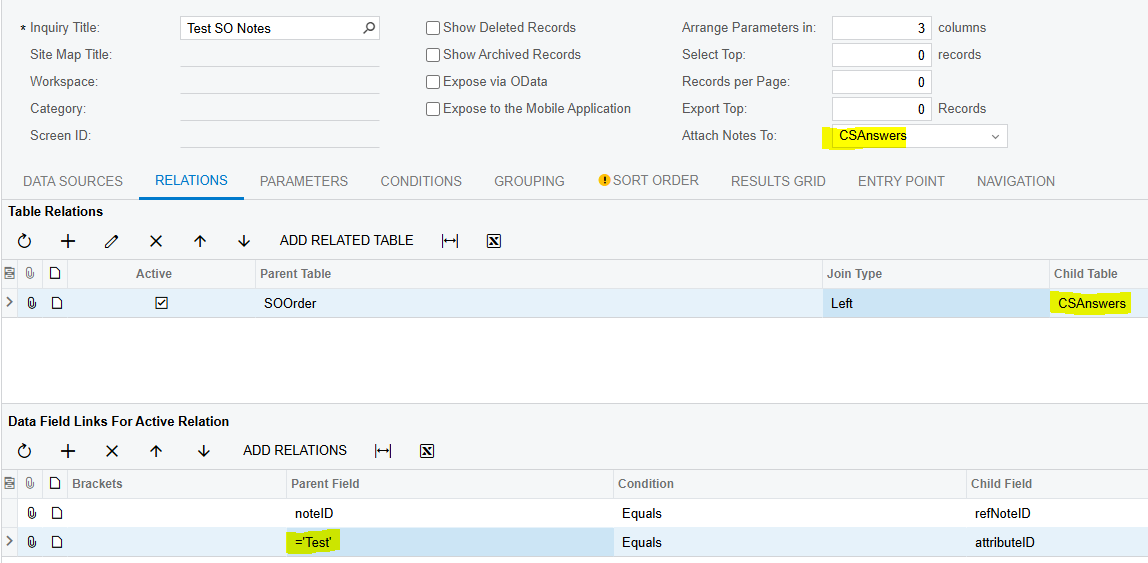
That is a VERY cool idea.  In my limited testing, it seems to work.  I don’t think you even need to expose the attribute as a UDF on the sales order.  Just create the attribute, add a left join to the CSAnswers table, and make sure to choose ‘CSAnswers’ as the table to Attach Notes To.

Give it a try and let us know how it works!

Laura

10 replies

lauraj46
Captain II
Forum|alt.badge.img+8
  • Captain II
  • Answer
  • February 4, 2025

Hi ​@swartzfeger ,

That is a VERY cool idea.  In my limited testing, it seems to work.  I don’t think you even need to expose the attribute as a UDF on the sales order.  Just create the attribute, add a left join to the CSAnswers table, and make sure to choose ‘CSAnswers’ as the table to Attach Notes To.

Give it a try and let us know how it works!

Laura


Forum|alt.badge.img
  • Author
  • Jr Varsity II
  • February 5, 2025

Hi ​@swartzfeger ,

That is a VERY cool idea.  In my limited testing, it seems to work.  I don’t think you even need to expose the attribute as a UDF on the sales order.  Just create the attribute, add a left join to the CSAnswers table, and make sure to choose ‘CSAnswers’ as the table to Attach Notes To.

Give it a try and let us know how it works!

Laura

Awesome I will try this first thing tomorrow Laura!

Then what i can do is have a row style if ‘Test’ = true, then ‘red0’ or ‘bold’ or whatever. Thanks for idea!


Forum|alt.badge.img
  • Author
  • Jr Varsity II
  • February 5, 2025

Hi ​@swartzfeger ,

That is a VERY cool idea.  In my limited testing, it seems to work.  I don’t think you even need to expose the attribute as a UDF on the sales order.  Just create the attribute, add a left join to the CSAnswers table, and make sure to choose ‘CSAnswers’ as the table to Attach Notes To.

Give it a try and let us know how it works!

Laura

Laura I think where I’m getting hung up on this I did the relations, join etc -- but what CSAnswers field am I displaying in the results grid to have the user enter a note?

I created an an attribute called ‘TAG’ (text), I did the left join to CSAnswers and had =’TAG’ equals attributeID, set Attach Notes To CSAnswers… I’m just scratching my head on how the user actually interacts with the GI to enter a note.


lauraj46
Captain II
Forum|alt.badge.img+8
  • Captain II
  • February 5, 2025

Hi ​@swartzfeger ,

With this setup, the notes can be entered directly on the clipboard icon directly on the GI row - no field is necessary.


Forum|alt.badge.img
  • Author
  • Jr Varsity II
  • February 5, 2025

Hi ​@swartzfeger ,

With this setup, the notes can be entered directly on the clipboard icon directly on the GI row - no field is necessary.

That’s the thing though -- I see no clipboard/note icon on the GI (23R2). And I checked the column configurator and saw no note field/clipboard to add.


lauraj46
Captain II
Forum|alt.badge.img+8
  • Captain II
  • February 6, 2025

Hi ​@swartzfeger ,

Did you specify the CSAnswers table on the Attach Notes To: field?  See screenshot below.  I tested with 2023 R2 and 2024 R1, and both worked the same.

Hope this helps!

Laura


Forum|alt.badge.img
  • Author
  • Jr Varsity II
  • February 6, 2025

Hi ​@swartzfeger ,

Did you specify the CSAnswers table on the Attach Notes To: field?  See screenshot below.  I tested with 2023 R2 and 2024 R1, and both worked the same.

Hope this helps!

Laura

Yes, our GIs are nearly identical except for the name. Yours was hidden/no OData exposure, so I even hid my UI visibility to match yours. Re-saved, re-viewed, and still no clipboard.

It’s odd because this GI is based upon a previous one that I wrote (I forget if it was a copy or an XML import). And I just checked that older GI and it indeed has a clipboard/notes icon.

Baffling! :D


lauraj46
Captain II
Forum|alt.badge.img+8
  • Captain II
  • February 6, 2025

Hi ​@swartzfeger ,

I’ve attached my GI, in case that’s helpful.  I don’t know why the clipboard wouldn’t be there.  Maybe open a case with support to investigate this further.

Laura


Forum|alt.badge.img
  • Author
  • Jr Varsity II
  • February 6, 2025

Hi ​@swartzfeger ,

I’ve attached my GI, in case that’s helpful.  I don’t know why the clipboard wouldn’t be there.  Maybe open a case with support to investigate this further.

Laura

Thanks Laura, I am attaching mine for reference.


Forum|alt.badge.img
  • Author
  • Jr Varsity II
  • February 6, 2025

Hi ​@swartzfeger ,

I’ve attached my GI, in case that’s helpful.  I don’t know why the clipboard wouldn’t be there.  Maybe open a case with support to investigate this further.

Laura

I think I figured it out… I took a quick look at yours and noticed there was no grouping, not realizing I had some things grouped. I ungrouped, saved, re-viewed and the icons immediately appeared… now I just need to make sure the report shows correctly without the grouping… thank you!