Question

Add Date Range Inventory Valuation report (IN615500)

  • February 12, 2026
  • 3 replies
  • 44 views

Forum|alt.badge.img

Hi Community,

I’m working with the Inventory Valuation report (IN615500) in Acumatica and I need to filter the report by a date range.

In my report schema, the main table used is INCostStatus, and it only contains fields like:

  • InventoryID

  • CostSiteID

  • QtyOnHand

  • TotalCost

  • ReceiptDate

There is no transaction date or financial period field available in this dataset.

My requirement is to:
Filter the Inventory Valuation report based on a selected date (for example, valuation as of a specific date or between a date range).

I’m considering adding a parameter and filtering using:
INCostStatus.ReceiptDate

But I’m not sure if this is the correct approach for inventory valuation in Acumatica, or if there is a standard/recommended way (such as using financial periods or another table).

Could anyone advise:

  • What is the correct way to set a date range for Inventory Valuation (IN615500)?

  • Is filtering by INCostStatus.ReceiptDate valid?

  • How does standard Acumatica handle valuation as-of date?

Any guidance or best practice would be greatly appreciated.

Thank you!

3 replies

nhatnghetinh
Captain II
Forum|alt.badge.img+13
  • Captain II
  • February 12, 2026

Hi ​@tharinduweerasooriya90 

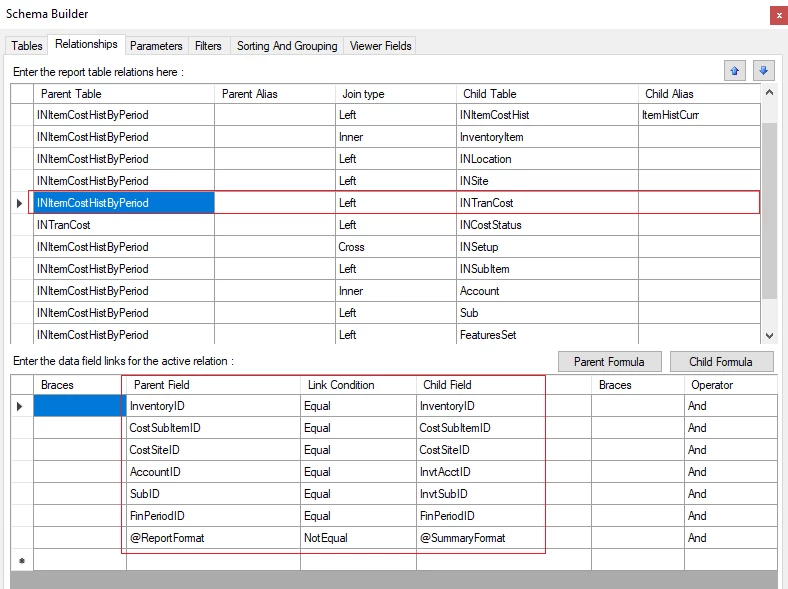
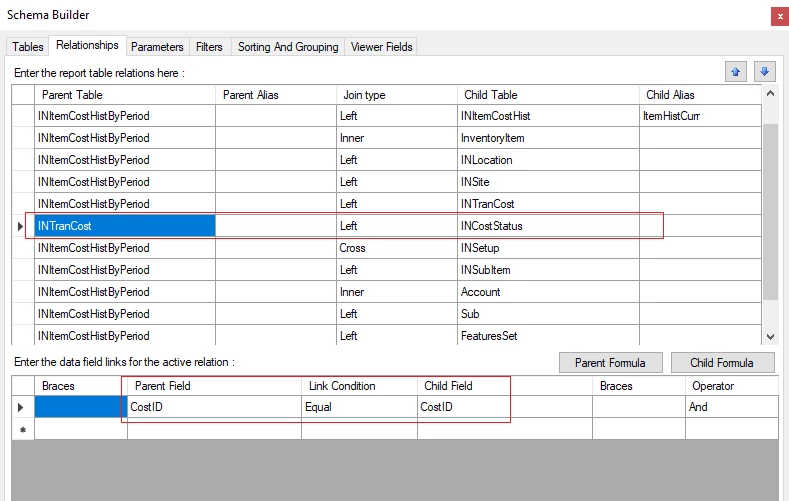
You can modify the IN615500 report by joining the INItemCostHistByPeriod table to retrieve inventory data by period. The INItemCostHistByPeriod table will then become the main table. Please refer to the screenshots below.


Best Regards,

NNT


lauraj46
Captain II
Forum|alt.badge.img+9
  • Captain II
  • February 12, 2026

Hi ​@nhatnghetinh ,

You might take a look at the Historical Inventory Valuation Report (IN617000) which is configured OOB to provide the inventory valuation as of a specific date.

Hope this helps!

Laura 


aryanjadhav50
Jr Varsity I
Forum|alt.badge.img
  • Jr Varsity I
  • February 13, 2026

Hi ​@tharinduweerasooriya90 

In the standard Inventory Valuation report (IN615500), valuation is calculated as of a specific financial period or date using the inventory costing engine. It is not designed to be filtered directly by fields such as INCostStatus.ReceiptDate.

The correct way to get inventory valuation as of a specific date is to use the Financial Period or As Of Date parameter provided in the standard report. Acumatica reconstructs inventory balances based on transaction history (INTran) and cost layers up to the selected date or period.

If you need valuation for a date range, inventory valuation should be treated as a snapshot report. You would typically compare the ending inventory value as of the end date with the value as of the start date, rather than filtering cost layers by receipt date.

So filtering by INCostStatus.ReceiptDate is not recommended. It is best to rely on the standard report parameters or base any customization on transaction history rather than directly filtering INCostStatus.