Solved

Acumatica Report Designer Guide

  • January 5, 2026
  • 4 replies
  • 82 views

Forum|alt.badge.img

I have found the following Report Designer resources:

I can’t find documentation for things like:

  • Behavior:
    • CommonSettings:
      • AlternativeEngine
      • PrintAllPages
      • ViewPdf
    • MailSettings:
      • ActivitySource
      • ParentSource
    • ProcessOrder
    • ProcessUnbound
    • RequestContext
    • RequestParams
    • ViewerFieldsMode
  • Data:
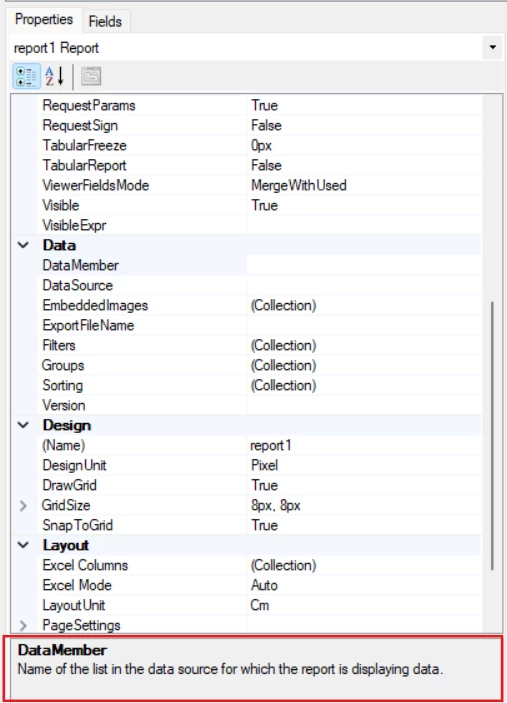
    • DataMember
    • DataSource

Is there more comprehensive documentation available somewhere? The amount of information available inside the program is very limited. 
Best answer by DipakNilkanth

Hi ​@PBSA ,

I believe these are the currently available resources for the Report Designer. To better understand the behaviour of the attributes you mentioned, I recommend reviewing standard Acumatica reports and observing how they are configured. This often provides useful insight into how specific properties are intended to be used.

Additionally, below is a brief description of some of the commonly referenced attributes. You can also search the Acumatica Community for existing discussions on these topics, and feel free to create a new post if you encounter any issues while using these attributes.

Property Typical Purpose
AlternativeEngine Switches between print engines
PrintAllPages Controls report printing behavior
ViewPdf Determines whether the viewer loads the report as PDF by default
MailSettings.ActivitySource Used when a report is attached via Business Events
ParentSource Defines the context field source (for example, NoteID)
ProcessOrder Controls the execution order for subreports
RequestParams Passes external parameters to the report
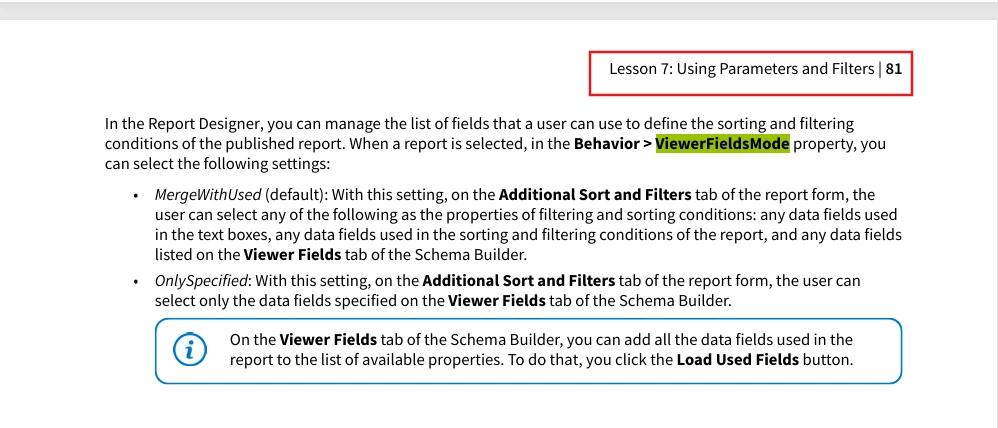
ViewerFieldsMode Controls how parameters are displayed in the report viewer
DataMember / DataSource  Used for dataset configuration
Check descriptions for each attribute
ViewerFieldsMode

Hope this helps

4 replies

DipakNilkanth
Pro III
Forum|alt.badge.img+14
  • Pro III
  • Answer
  • January 6, 2026

Hi ​@PBSA ,

I believe these are the currently available resources for the Report Designer. To better understand the behaviour of the attributes you mentioned, I recommend reviewing standard Acumatica reports and observing how they are configured. This often provides useful insight into how specific properties are intended to be used.

Additionally, below is a brief description of some of the commonly referenced attributes. You can also search the Acumatica Community for existing discussions on these topics, and feel free to create a new post if you encounter any issues while using these attributes.

Property Typical Purpose
AlternativeEngine Switches between print engines
PrintAllPages Controls report printing behavior
ViewPdf Determines whether the viewer loads the report as PDF by default
MailSettings.ActivitySource Used when a report is attached via Business Events
ParentSource Defines the context field source (for example, NoteID)
ProcessOrder Controls the execution order for subreports
RequestParams Passes external parameters to the report
ViewerFieldsMode Controls how parameters are displayed in the report viewer
DataMember / DataSource  Used for dataset configuration
Check descriptions for each attribute
ViewerFieldsMode

Hope this helps


Forum|alt.badge.img
  • Author
  • Jr Varsity III
  • January 9, 2026

@DipakNilkanth Do you know any standard reports that use any of the fields I called out? Especially DataMember / DataSource which have very little information available.


DipakNilkanth
Pro III
Forum|alt.badge.img+14

Hi ​@PBSA.I reviewed the existing standard Acumatica reports to look for references or usage examples of the DataMember and DataSource properties, but I wasn’t able to find any relevant examples.


Forum|alt.badge.img
  • Author
  • Jr Varsity III
  • January 12, 2026

@DipakNilkanth Thank you for trying.