Solved

Account Report customisaztion

  • March 21, 2024
  • 4 replies
  • 76 views

Forum|alt.badge.img

Hi, 
I run an “account details” report from Finance/ Inquiries/ Account details. Is it possible to add more column in the report (e.g. project number)?

Thank you.

Regards,

Raymond

Best answer by RohitRattan88

@Rmak0501 

Follow the documentation @ Adding Columns to a Grid

Maybe ask your system admin/developer or partner for assistance if required. But this is customization 101. Shouldnt be too tough. Maybe try on a dev/sandbox instance first.

4 replies

Sagar Greytrix
Captain II
Forum|alt.badge.img+3

Hi @Rmak0501 ,

Which columns you need to add whether these are custom or standard?

If you are looking to add custom columns then you need to add those columns in Custom tab of customization editor for the respective grid.

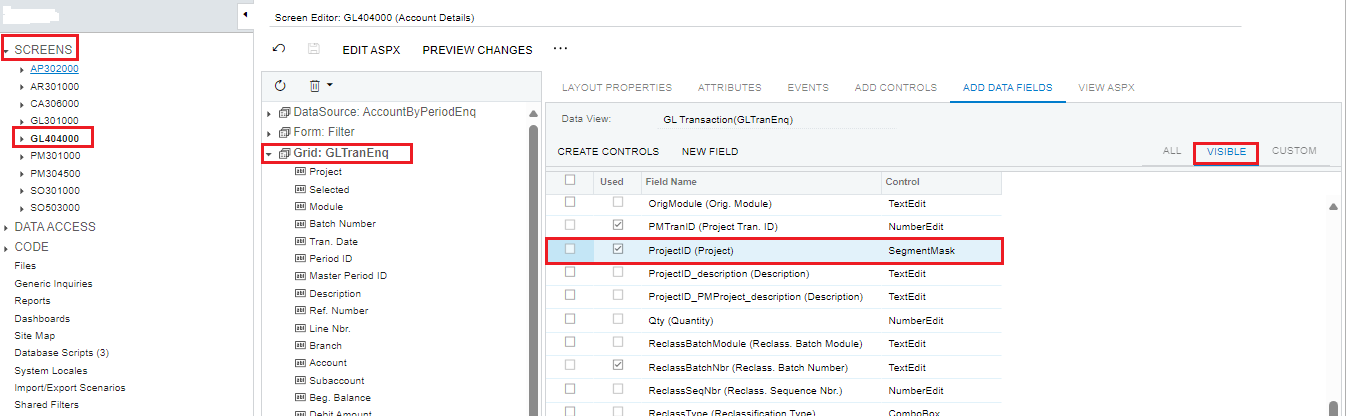
I have added Project ID field from Customization editor. (refer below image).

Hope, it helps!

Regards,

Sagar, Greytrix


Added Project ID field in Account Details


Forum|alt.badge.img
  • Author
  • Jr Varsity III
  • March 21, 2024

Thank you, Sagar.

I want to add a column for “project number (one start with PRXXXX)” in the “account details” report so I can tell which project is the transaction belong to.

I am not familiar with “customization editor”. I know it sound silly , but may I ask how to get to those screens that you show above?


RohitRattan88
Acumatica Moderator
Forum|alt.badge.img+4
  • Acumatica Moderator
  • Answer
  • March 21, 2024

@Rmak0501 

Follow the documentation @ Adding Columns to a Grid

Maybe ask your system admin/developer or partner for assistance if required. But this is customization 101. Shouldnt be too tough. Maybe try on a dev/sandbox instance first.


Sagar Greytrix
Captain II
Forum|alt.badge.img+3

Hi @Rmak0501,

You can navigate to the "Customization Projects (SM204505)" screen and create a new project. After creating the project, click on it to access the Customization Editor screen, as I've shown you before. From there, you can add custom columns to the screen.

Hope, it helps!

Regards,
Sagar, Greytrix