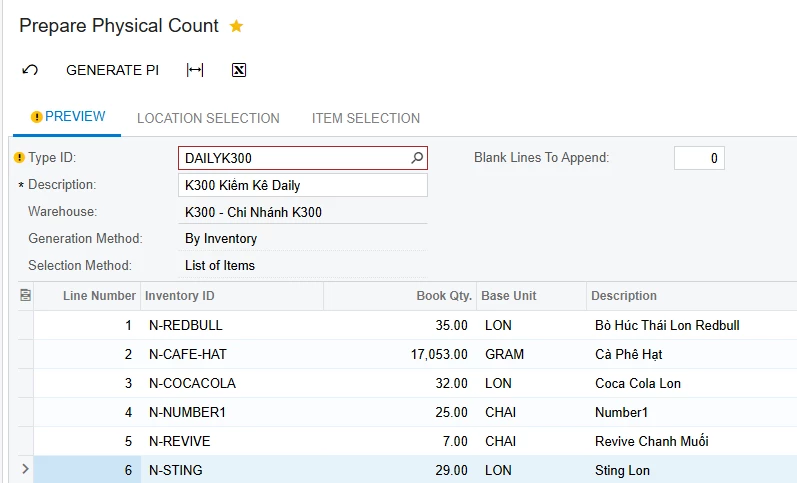
We are using the Prepare Physical Count screen (ScreenId=IN504000) to manually generate physical count documents every day. Currently, we use a specific Physical Inventory Type with a predefined list of items and warehouse filter.
Our goal is to automate the process by scheduling the system to generate a physical inventory document every day at 2:00 AM, using a specific Type ID.
My questions are:
Is there a supported way to do this with Automation Schedules, Business Events?
Can this be done using a custom import scenario, API, or customization project?
Are there best practices or samples from other implementations?
Any insights or guidance would be highly appreciated.
Thank you!
Best answer by Yuri Karpenko
@sinhpham34 , I don’t think this screen or action can be automated / scheduled.
Web Services Endpoint doesn’t have this screen added. Of course, you can potentially create a customization to expose this screen to API and then build your processor outside of Acumatica to trigger this action. Some research is needed by an experienced Acumatica developer to confirm if this is a viable route.
Import scenarios are in general not a good idea (read, don’t work) for screens where you need to run an action (like Generate PI). I tried it in my Acumatica instance, and the import runs without an error, but nothing happens as far as generating a PI.
This screen can not be on a schedule directly. If it could, you would see a stopwatch icon alongside “Export to Excel”, “Save”, etc.
So, in your case, if this is absolutely paramount to have this functionality, I would go straight to your VAR and ask them for a development service.
@sinhpham34 , I don’t think this screen or action can be automated / scheduled.
Web Services Endpoint doesn’t have this screen added. Of course, you can potentially create a customization to expose this screen to API and then build your processor outside of Acumatica to trigger this action. Some research is needed by an experienced Acumatica developer to confirm if this is a viable route.
Import scenarios are in general not a good idea (read, don’t work) for screens where you need to run an action (like Generate PI). I tried it in my Acumatica instance, and the import runs without an error, but nothing happens as far as generating a PI.
This screen can not be on a schedule directly. If it could, you would see a stopwatch icon alongside “Export to Excel”, “Save”, etc.
So, in your case, if this is absolutely paramount to have this functionality, I would go straight to your VAR and ask them for a development service.
@sinhpham34 , I don’t think this screen or action can be automated / scheduled.
Web Services Endpoint doesn’t have this screen added. Of course, you can potentially create a customization to expose this screen to API and then build your processor outside of Acumatica to trigger this action. Some research is needed by an experienced Acumatica developer to confirm if this is a viable route.
Import scenarios are in general not a good idea (read, don’t work) for screens where you need to run an action (like Generate PI). I tried it in my Acumatica instance, and the import runs without an error, but nothing happens as far as generating a PI.
This screen can not be on a schedule directly. If it could, you would see a stopwatch icon alongside “Export to Excel”, “Save”, etc.
So, in your case, if this is absolutely paramount to have this functionality, I would go straight to your VAR and ask them for a development service.