Solved

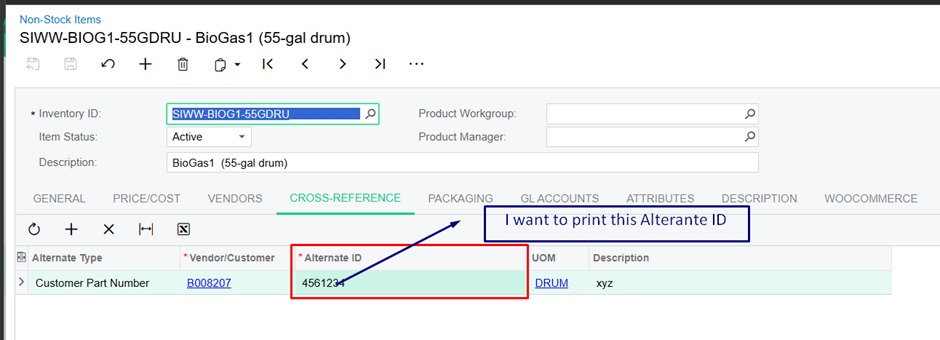
In the Print-Quote-Form: Screen ID SO641000 I want to know the table and relationship to print the Customer Part No from Cross Reference on the Item.

  • January 17, 2024
  • 4 replies
  • 158 views

Sales Order Quote Report 

 Print-Quote-Form: Screen ID SO641000

Best answer by sbond84

@carmelinem89 

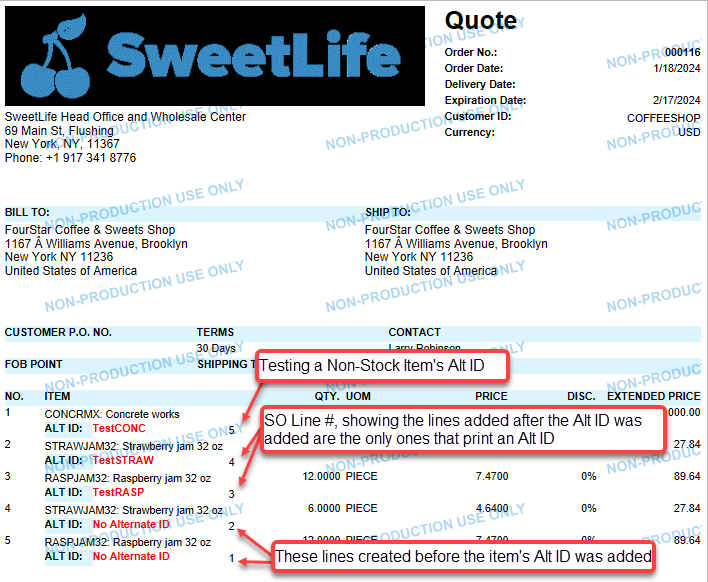
Was your Alternate ID added after the Quote was created? If so, your Quote/Sales Order does not automatically update. If you add a new line with the item, the Alt ID should populate and carry over to the printed document, if the Alternate ID field is on the report.

If you are trying to print the Alt ID, regardless of whether or not it is on the Quote/SO Line, I believe you need the Cross Reference Table - INItemXRef.


Hope this helps :)
Sarah


4 replies

Forum|alt.badge.img+1
  • Varsity I
  • January 17, 2024

@carmelinem89 

Have you tried adding the SOLine.AlternateID to the report?

Does that get you what you are looking for?


  • Author
  • Freshman II
  • January 18, 2024

@sbond84  Thank you for your response.


Yes, with SOLine AlternateID I have tried, but not giving what I am looking for.


Forum|alt.badge.img+1
  • Varsity I
  • Answer
  • January 18, 2024

@carmelinem89 

Was your Alternate ID added after the Quote was created? If so, your Quote/Sales Order does not automatically update. If you add a new line with the item, the Alt ID should populate and carry over to the printed document, if the Alternate ID field is on the report.

If you are trying to print the Alt ID, regardless of whether or not it is on the Quote/SO Line, I believe you need the Cross Reference Table - INItemXRef.


Hope this helps :)
Sarah


  • Author
  • Freshman II
  • January 18, 2024

@sbond84 

Yes, first adding a Cross-reference on the Stock-Item-Screen, then creating a new Quote. The Soline AlternateID gets updated automatically. Issued is resolved. Thank you.