Answer

Why does Acumatica allow changing the Customer on a Project that already has transactions or invoices?

  • October 29, 2025
  • 3 replies
  • 49 views

Forum|alt.badge.img

We noticed that in Acumatica, the Customer field on a Project can still be changed even after the project is active and has existing transactions or invoices.

From an accounting and audit standpoint, this appears risky because the existing AR invoices remain linked to the original customer, while new invoices would go to the updated customer — which can lead to inconsistent reporting and billing.

I just wanted to confirm — is there a specific business scenario or setup where this behavior is intentional, or am I missing something in the configuration that should prevent changing the customer once transactions exist?

If it is intentional, could you please clarify Acumatica’s recommended best practice for handling situations where a project’s customer needs to be changed after billing has started (for example, whether the preferred approach is to close the old project and create a new one under the new customer)?
Best answer by PaulMainard55

@jvarughese23 - As a consultant, I appreciate your question.  I suppose the issue is more of a “your miles may vary” situation.  

I actually have a client who was quite thankful for this feature.  They are an Engineer-to-Order manufacturer and there have been situations where a project was originally created to meet the needs of one customer, but was later taken over by another.  This could be in the case where the second customer had an affiliation with the original (think Parent/Child customer relationships), or simply a situation where the original customer decided to move away from the project, but the use case fit the needs of the secondary customer.  

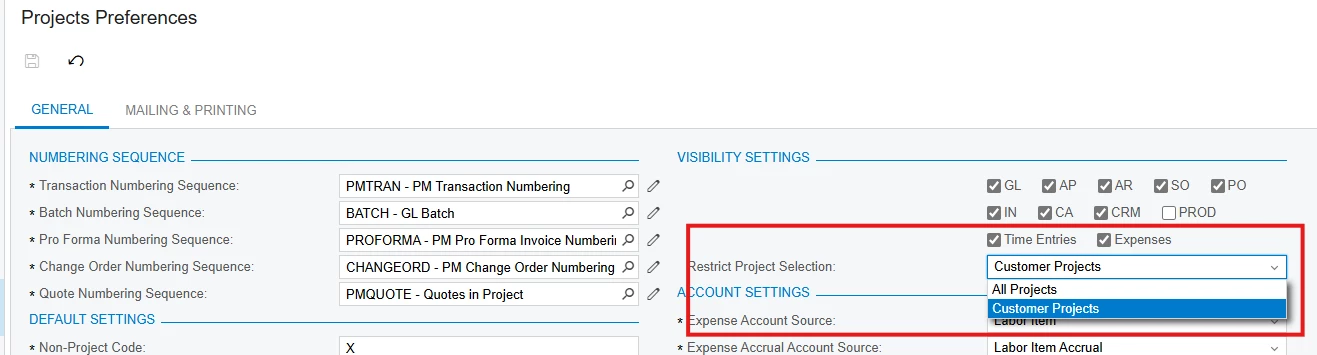
Acumatica does allow project-related invoices to be created for secondary customers (see the “All Projects” option of the “Restrict Project Selection” settings in the “Project Prefernces” screen above), so re-assigning the project should also be fine, regardless as to whether a customer has been changed at the project level. I imagine that this happens at times within the construction industry where a job has been taken over by another contractor.  In these cases, the job hasn’t changed, only the customer associated with the job has. 

From an audit perspective, I would think that so long as the invoices are paid and cleared, the bank account is clean, and open invoices are confirmed, there shouldn’t be much of a problem.  With that said, you do have the option to have the system track and maintain a change history for the customers on contracts. 

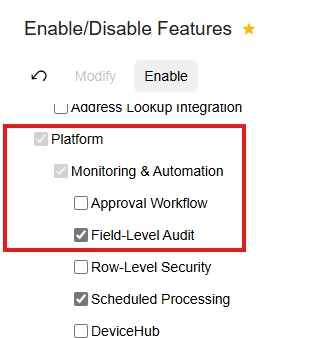
You can work with your Acumatica partner on the configuration, but this is a good use case for the “Field-level Audit” feature.  It allows the system to monitor and record all changes made to those area of the system you consider to be vulnerable, and will tell you who and when the change was made along with the old and new values.


3 replies

PaulMainard55
Captain I
Forum|alt.badge.img+2
  • Captain I
  • Answer
  • October 30, 2025

@jvarughese23 - As a consultant, I appreciate your question.  I suppose the issue is more of a “your miles may vary” situation.  

I actually have a client who was quite thankful for this feature.  They are an Engineer-to-Order manufacturer and there have been situations where a project was originally created to meet the needs of one customer, but was later taken over by another.  This could be in the case where the second customer had an affiliation with the original (think Parent/Child customer relationships), or simply a situation where the original customer decided to move away from the project, but the use case fit the needs of the secondary customer.  

Acumatica does allow project-related invoices to be created for secondary customers (see the “All Projects” option of the “Restrict Project Selection” settings in the “Project Prefernces” screen above), so re-assigning the project should also be fine, regardless as to whether a customer has been changed at the project level. I imagine that this happens at times within the construction industry where a job has been taken over by another contractor.  In these cases, the job hasn’t changed, only the customer associated with the job has. 

From an audit perspective, I would think that so long as the invoices are paid and cleared, the bank account is clean, and open invoices are confirmed, there shouldn’t be much of a problem.  With that said, you do have the option to have the system track and maintain a change history for the customers on contracts. 

You can work with your Acumatica partner on the configuration, but this is a good use case for the “Field-level Audit” feature.  It allows the system to monitor and record all changes made to those area of the system you consider to be vulnerable, and will tell you who and when the change was made along with the old and new values.


Forum|alt.badge.img
  • Author
  • Varsity I
  • November 6, 2025

@PaulMainard55 

thanks — this does help clarify why Acumatica allows the customer reassign.

one follow-up if I may — what is the recommended handling if the project is re-assigned while there are still open AR documents?

example scenarios:

  • invoices exist for customer A
    project customer then changed to customer B

    • AR invoices for A are still open (not paid / not released / not cleared)

    • or later they get voided / credited / re-billed

questions:

  1. do Project Balances / WIP / PM reports stay aligned in those cases?

  2. is there a supported way to “shift” those open AR docs to the new customer — or is the best-practice strictly:

  • close the old project

  • create new project under new customer?

want to make sure I’m not missing a configuration setting here.


PaulMainard55
Captain I
Forum|alt.badge.img+2

@PaulMainard55 

thanks — this does help clarify why Acumatica allows the customer reassign.

one follow-up if I may — what is the recommended handling if the project is re-assigned while there are still open AR documents?

example scenarios:

  • invoices exist for customer A
    project customer then changed to customer B

    • AR invoices for A are still open (not paid / not released / not cleared)

    • or later they get voided / credited / re-billed

questions:

  1. do Project Balances / WIP / PM reports stay aligned in those cases?

  2. is there a supported way to “shift” those open AR docs to the new customer — or is the best-practice strictly:

  • close the old project

  • create new project under new customer?

want to make sure I’m not missing a configuration setting here.

@jvarughese23 - 

Thanks for the feedback.  I’m glad that my explanation was helpful. 

Project Balances, WIP etc. should retain all balances recorded to the project, regardless as to whom was billed in the process.

As far as transferring the AR balances, there is no process per se, other than the standard process of correcting customer balances when we make billing mistakes, which is reverse the AR Invoice and apply the corresponding credit memo to the orignal invoice, then rebill the project to the correct customer.  😀

There are allocation tools that can be used to move balances from one project to another if you want to create another project, but you’ll lose the link from the original transactions.  It’s much easier to simply change the customer.  I hope this is helpful.

Good luck!