


I love that there is now an option to adjust for PTO adjustments that is separate from Paychecks and Adjustments screen. However, I just entered a bunch of carryover adjustments, and it does not update to the user profile screen under the Dashboard. Is this a glitch? Something that will need to be updated by Acumatica to reflect real time PTO balances? It appears that they reference numbers that I see are related to PTO adjustment are not being reflected in the User Profile screen. Any ideas?
Solved
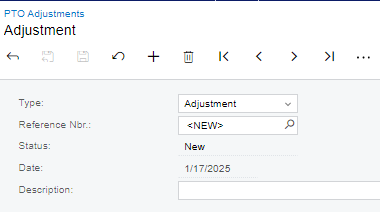
Payroll - Transactions - PTO Adjustments screen
Best answer by Kristen Hanson
Starting in 24R1, PTO usability has changed. The PTO Adjustments form (PR306000) is for creating and processing adjustments. These adjustments, once Released, will show on the Employee PTO Balances form (PR406000), on the Paycheck, and on the Paid Time Off Details by Employee Report (PR641050). The Employee Payroll Settings, PTO tab, is for entry only and is not for viewing the balances.
The new functionality is in the 24R1 release notes, https://acumatica-builds.s3.amazonaws.com/builds/24.1/ReleaseNotes/AcumaticaERP_2024R1_ReleaseNotes_full.pdf, though not fully explaining the above. Thus I hope this helps.
If the issue you’re mentioning is in the Dashboard, you may want to open a case for support where it can be reported.





Enter your E-mail address. We'll send you an e-mail with instructions to reset your password.