

Answer

Employees screen triggering the following error

  • January 10, 2025
  • 2 replies
  • 66 views

Forum|alt.badge.img

Hello all,

I am trying to create a new employee but when I try to save it, triggers the below error:
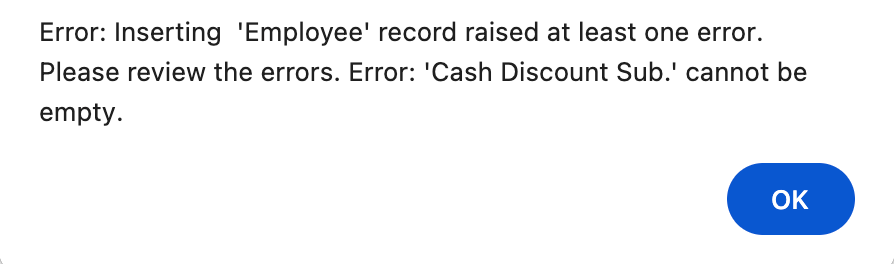
How to resolve this?

Best answer by nhatnghetinh

Hi ​@Harry 

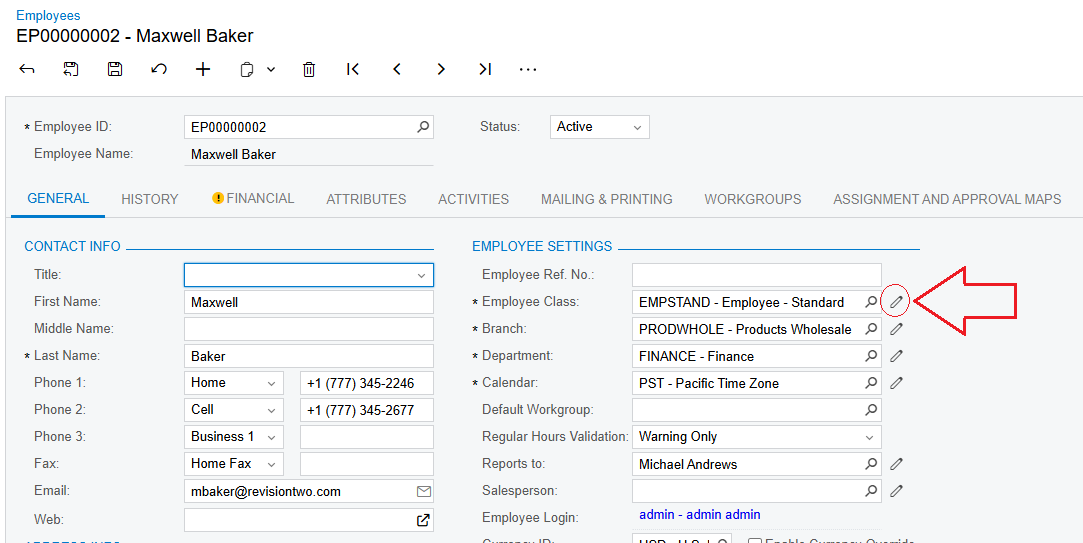
On the Employees screen > Click on Employee Class as shown in the screenshot.
 

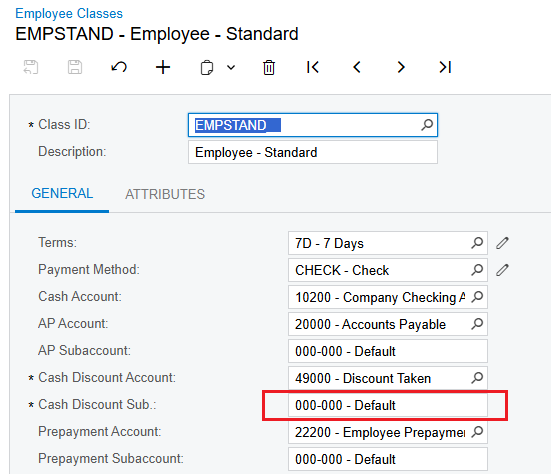
On the Employee Classes screen > Enter Cash Discount Sub. if there is none.
 

Best Regards,

NNT

2 replies

nhatnghetinh
Captain II
Forum|alt.badge.img+11
  • Captain II
  • Answer
  • January 10, 2025

Hi ​@Harry 

On the Employees screen > Click on Employee Class as shown in the screenshot.


On the Employee Classes screen > Enter Cash Discount Sub. if there is none.


Best Regards,

NNT


DipakNilkanth
Pro III
Forum|alt.badge.img+13

Hi ​@Harry,

When creating master records in Acumatica, predefined settings from the Class (e.g., Employee Class) are automatically applied. This allows you to copy all the settings from the class, eliminating the need to manually fill in every detail each time.

Please ensure that the Cash Discount Sub field is properly configured in your Employee Class.

Hope, it helps!


