Question

Certified Payroll

  • May 6, 2025
  • 10 replies
  • 173 views

I am wanting to set up prevailing wages, and fringe benefits for our certified projects in Acumatica. I was able to figure out how to set up the wages, but need assistance with the fringe benefits. 

Can anyone teach me how to set this up? Or point me in the right direction? Thank you!

10 replies

mblassingame35
Semi-Pro II
Forum|alt.badge.img+3

I found this information for you and hopefully this will help.


Certified Projects: Fringe Benefits
Specific types of employees that work on certified projects may have guaranteed fringe benefits that the
organization is required to pay its employees. You use the Fringe Benefits tab of the Certified Projects (PR209900)
form to set up these fringe benefits as follows:
• In the Rates table, you specify fringe benefit rates that should be added to the pay rates specified for
particular combinations of labor item and project task on the Earning Rates tab. You do not link a rate to a
particular project task, this rate will be used for all project tasks of the project.
• In the Benefits Reducing the Rate table, you specify the benefits that the organization pays its employees
and that may be used to offset the fringe benefit rates. That is, if the organization already pays the benefits
required by the government contract, it can use these benefits to reduce the rate of fringe benefits so that
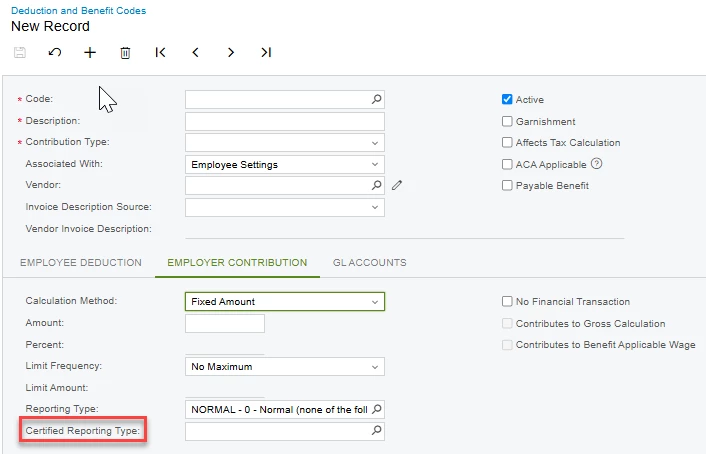
it doesn't have to pay same benefits twice. Only benefits with a certified reporting type specified on the
Employer Contribution tab of the Deduction and Benefit Codes (PR101060) form can be added to the table.
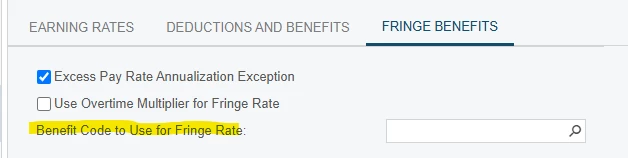
If the Benefit Code to Use for the Fringe Rate box in the Summary area of the tab is empty, the calculated
fringe benefits will be included in the earning details of the paycheck—a separate earning line will be created for
each combination of labor item, project, and project task on the Earning tab of the Paychecks and Adjustments
(PR302000) form. If you specify a benefit code in the Benefit Code to Use for the Fringe Rate box, the fringe
benefits will be added to that benefit code, and you will be able to see this information on the Deductions tab of
the Paychecks and Adjustments form when the paycheck has been calculated.
Only a benefit code with the Certified Project option selected in the Associated With box on the
Deduction and Benefit Codes form can be selected in the Benefit Code to Use for the Fringe Rate box.
After the paycheck has been calculated, you can review the calculation details for the deductions and benefits
related to certified projects on the Certified Project tab of the Paychecks and Adjustments form.


Annualization Requirements
Normally, it is required that the benefit that reduces the fringe rate is annualized. This means that the benefit rate
is calculated as the benefit amount divided by the number of working hours within the pay period. For a weekly
payment, the number of working hours within the pay period is calculated as the yearly number of working hours
divided by the number of pay periods within the year, which is normally 52 weeks.
A benefit rate is annualized if the Annualization Exception check box is cleared for the benefit in the Benefits
Reducing the Rate table on the Fringe Benefits tab of the Certified Projects (PR209900) form.
If annualization is not required, you select the Annualization Exception check box for the benefit. In this case,
the benefit rate will be calculated as the benefit amount divided by the total number of hours the employee spent
on various certified projects within the pay period, as displayed in the table on the Certified Project tab of the
Paychecks and Adjustments (PR302000) form.
Also, you can annualize the excess pay rate by clearing the Excess Pay Rate Annualization Exception check box in
the Summary area of the Fringe Benefits tab of the Certified Projects form, which is selected by default because the
excess pay rate is already calculated as an hourly rate and usually there is no need to annualize it.


Forum|alt.badge.img+1
  • Semi-Pro I
  • May 7, 2025

This may be obvious, but be sure that you have the “Certified Project” flag checked on the project so that you can choose it on the Certified Projects screen in Payroll.  The other important piece of information to setup the Fringe is having the Certified Reporting Type filled in on any Fringe Benefit.  If this field is not completed, then you cannot add it to the Certified Project’s “Fringe Tab”.


  • Author
  • Freshman I
  • May 7, 2025

I appreciate this feedback, it was extremely helpful! I do have a couple other questions on this though. 

  1. How do you add the PTO and Sick Time accrual to the fringe benefits? We have these currently set up as Earning Type Codes, so it doesn’t show up in the benefit rate table.
  2. I assume it is necessary to add a “benefit code to use for fringe rate”. If so, how to do you add a code? 


Forum|alt.badge.img+1
  • Semi-Pro I
  • May 7, 2025
  1. Setting up PTO and Sick Time for Certified benefits is more complicated and requires a Deduction & Benefit Code and some calculation for the “rate”. There is no way to link the PTO Accrual to the Benefit.
  1. Do the employees get paid the Fringe Rate in their paycheck or does it go into a “Pension” type of Benefit?  If they get paid in their paycheck, leave that box empty.  If it goes to a Pension type of benefit, then the code must have the “Certified Project “ chosen in the Associated With box on the Benefit record. 


Benefit Code to Use for Fringe Rate

The deduction and benefit code to which the fringe benefits are added. You can see this information on the 

Deductions

 tab of the Paychecks and Adjustments (PR302000) form after the paycheck has been calculated.If this box is empty, the calculated fringe benefits are included in the earning details of the paycheck—a separate earning line is created for each combination of labor item, project, and project task on the 

Earnings

 tab of the Paychecks and Adjustments (PR302000) form.In this box, you can select only a deduction and benefit code with the Certified Project option selected in the Associated With box on the Deduction and Benefit Codes (PR101060) form.


Forum|alt.badge.img
  • Jr Varsity I
  • May 28, 2025

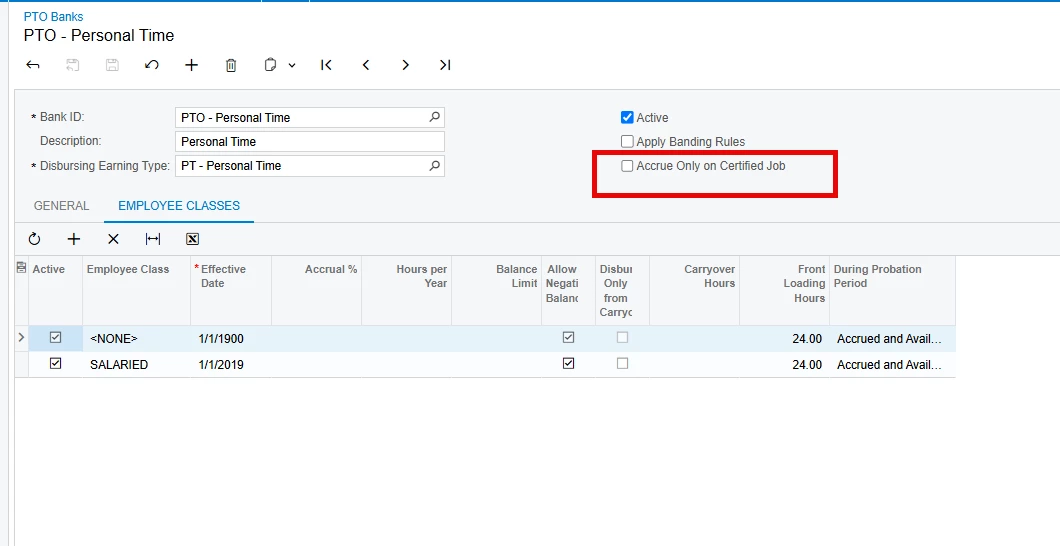
@khigh - I am not sure what version of Acumatica you are on but if you are on 24R2 there is a new box on the PTO bank specifically for certified projects accruals.


If you haven’t gotten all of your questions answered I can probably help.  


Shannon


  • Author
  • Freshman I
  • May 28, 2025

We are on 24R1, but we do have that option to select. I may need further support, as I have set everything up, but this last payroll it wouldn’t calculate the hourly or fringe benefits properly. 


Forum|alt.badge.img
  • Jr Varsity I
  • May 28, 2025

@khigh - Everything is connected to the non-stock labor code did you have these set on the earning details lines? If you want to post screen shots of the check earning details tab and the certified project tab I can try to trouble shoot for you.


Shannon Landreth


Chris Hackett
Community Manager
Forum|alt.badge.img
  • Acumatica Community Manager
  • July 3, 2025

Hi ​@khigh were you able to find a solution? Thank you!


  • Author
  • Freshman I
  • July 9, 2025

@Chris Hackett it still does not calculate correctly in payroll. We are going to retry with our next CP project, and have support help us. 


  • Freshman I
  • October 31, 2025

Hello, I am wondering if someone can help me figure out how to create an earnings code for the fringes we pay to our employees. Currently, it calculates the fringe under the earnings code the wage is under. I would like to break it out on the paycheck and we can do this by earnings codes. We also don’t like fringes included in our OT earnings code because it is not at our 1.5 earnings rate which throws off our WC reporting. Could someone assist me with this please?