Answer

When click on Navigation button it is not load in Grid

  • October 14, 2025
  • 6 replies
  • 69 views

Forum|alt.badge.img

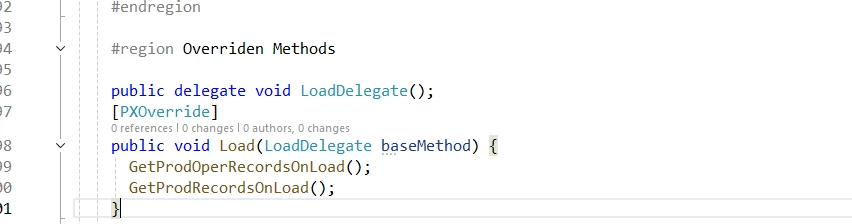
I have insert data in View (which is Temporary DAC) on LoadDelegate. But when use navigation it is not load the data.


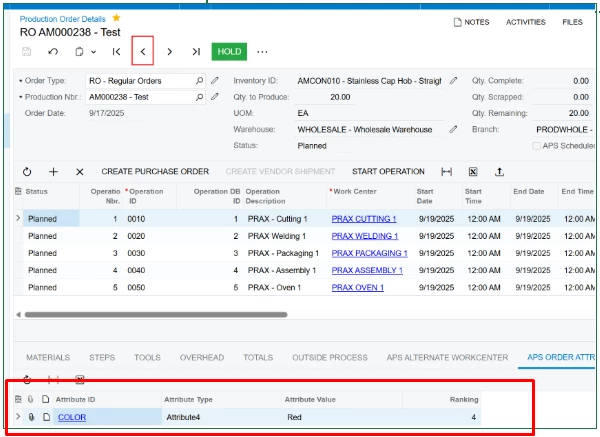
When accessing a production order through the Production Order Detail menu, it is possible to view and edit the Order Attributes.

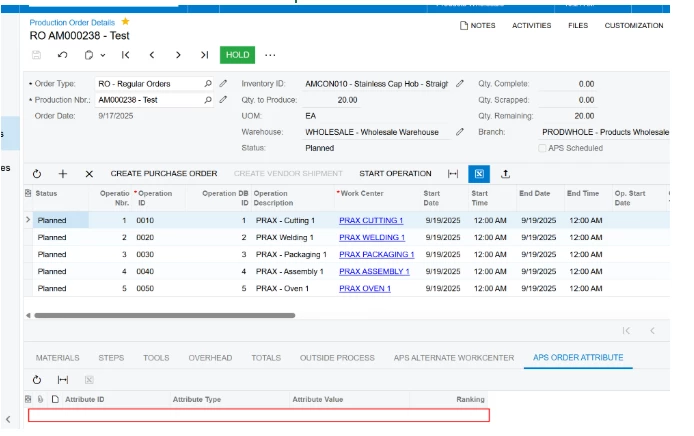
However, after navigating among orders using the header arrows and returning to the same order, the Order Attributes are no longer visible.
They only become visible again after reloading the page.


Example :- 


Best answer by hyadav08

I have found the solution. In aspx page Use 
<AutoCallBack Command="Refresh" Target="gridAPSProdAttributes" />

6 replies

darylbowman
Captain II
Forum|alt.badge.img+15

I've never seen a 'LoadDelegate' before. I would construct a data view and data view delegate which returned the appropriate records.


Forum|alt.badge.img
  • Author
  • Jr Varsity III
  • October 14, 2025

I've never seen a 'LoadDelegate' before. I would construct a data view and data view delegate which returned the appropriate records.


But it is working in my case. But on Navigation it is also called and Records in View cache it is available. But in grid it is not showing i also use
EWSFProdAttributeRecords.View.RequestRefresh();
But data is not show


darylbowman
Captain II
Forum|alt.badge.img+15

But it is working in my case.

I would argue it's not.


Forum|alt.badge.img
  • Author
  • Jr Varsity III
  • October 14, 2025

But it is working in my case.

I would argue it's not.

Okay No Problem. This issue is related Refreshing when Refresh the page or Grid it shows data this is my actual problem. If you have any idea please suggest


Forum|alt.badge.img+2

But it is working in my case.

I would argue it's not.

Okay No Problem. This issue is related Refreshing when Refresh the page or Grid it shows data this is my actual problem. If you have any idea please suggest

  • Initialize() / Load() overrides run only when the graph instance is first created.

  • Using the header arrows does not recreate the graph, so your Load(LoadDelegate baseMethod) never runs again.

  • Result: your temporary/virtual table is filled on the first load, then goes stale/empty after you navigate to another order and back.

I would suggest follow ​@darylbowman approach because he knows better with such things. Its not about who is right or who is wrong. its about suggesting a better solution or ideas for future viewers also to follow best practices. (I hope you get it).


OR you can go with Rowselected - RequestRefresh() additionally.


I hope it helps!


Forum|alt.badge.img
  • Author
  • Jr Varsity III
  • Answer
  • October 16, 2025

I have found the solution. In aspx page Use 
<AutoCallBack Command="Refresh" Target="gridAPSProdAttributes" />