Question

REST Login Headers

  • July 29, 2025
  • 33 replies
  • 374 views

Show first post

33 replies

JSpikowski
Jr Varsity II
Forum|alt.badge.img
  • Author
  • Jr Varsity II
  • August 3, 2025

CURL  allows you to perform multiple requests between the init and the finish. All options set are passed in the next call without having to set them again. This only uses one handle for the calls.

This is a great way to pass the Cookie: and   Content-Type: headers without having to define it again. Basically all your changing is the endpoint URL between entity calls.

I'll post an optimized example of the code I posted previously.


JSpikowski
Jr Varsity II
Forum|alt.badge.img
  • Author
  • Jr Varsity II
  • August 4, 2025

Here is a rework of my script. I was unable to do all the cURL commands between Init() and Finish(). The cURL module doesn’t seem to transition well between POST and GET without the Init(). Doing repetitive entity GET calls should work fine in one Init() / Finish() block. I moved the MakeCookies() function into the webext.sbi extension module.

' Acumatica REST - Customer by ID

IMPORT curl.sbi
IMPORT webext.sbi
IMPORT t.sbi

base_url = "http://localhost/acumaticadb/entity/auth/"
auth_str = web::base64_encode("admin:password")

jstr = """
{
"name": "admin",
"password": "password",
"company": "Demo"
}
"""

' Login
ch = curl::init()
curl::option(ch, "URL", base_url & "Login")
curl::option(ch, "HEADER")
curl::option(ch, "HTTPHEADER", "Content-Type: application/json")
curl::option(ch, "HTTPHEADER", "Authorization: Basic " & auth_str)
curl::option(ch, "POSTFIELDS", jstr)
response_headers = curl::perform(ch)
crumbs = web::MakeCookies(response_headers)
curl::finish(ch)

' Customer
ch = curl::init()
curl::option(ch, "URL", "http://localhost/acumaticadb/entity/Default/24.200.001/Customer/ABARTENDE")
curl::option(ch, "HTTPHEADER", "Content-Type: application/x-www-form-urlencoded")
curl::option(ch, "HTTPHEADER", "Cookie: " & crumbs)
curl::option(ch, "HTTPHEADER", "Authorization: Basic " & auth_str)
json = curl::perform(ch)
curl::finish(ch)

' Logout
ch = curl::init()
curl::option(ch, "URL", base_url & "Logout")
curl::option(ch, "POST")
curl::option(ch, "HTTPHEADER", "Cookie: " & crumbs)
curl::option(ch, "HTTPHEADER", "Authorization: Basic " & auth_str)
curl::option(ch, "HTTPHEADER", "Content-Length: 0")
curl::perform(ch)
curl::finish(ch)

web::json2sba(json)
web::sbadump(json)

END

OUTPUT

C:\Acumatica>sbc customer.sb
id = 6a113b2c-d87f-e411-beca-00b56d0561c2
rowNumber = 1
note
   value =
ApplyOverdueCharges
   value = FALSE
AutoApplyPayments
   value = FALSE
BAccountID
   value = 4899
BillingAddressOverride
   value = TRUE
BillingContactOverride
   value = TRUE
CreatedDateTime
   value = 2023-12-31T16:00:00-08:00
CreditLimit
   value = 0
CurrencyID
   value = USD
CustomerCategory
   value = I
CustomerClass
   value = KEY
CustomerID
   value = ABARTENDE
CustomerName
   value = USA Bartending School
Email
   value = barkeep@usabartend.con
EnableCurrencyOverride
   value = TRUE
EnableRateOverride
   value = FALSE
EnableWriteOffs
   value = TRUE
EntityUsageType
   value = Default
LastModifiedDateTime
   value = 2023-12-31T16:00:00-08:00
LeadTimedays
   value = 0
LocationName
   value = Primary Location
MultiCurrencyStatements
   value = FALSE
NoteID
   value = 6a113b2c-d87f-e411-beca-00b56d0561c2
OrderPriority
   value = 10
PrimaryContactID
   value = 9977
PrintDunningLetters
   value = FALSE
PrintInvoices
   value = FALSE
PrintStatements
   value = FALSE
ResidentialDelivery
   value = FALSE
RestrictVisibilityTo
   value = PROD
SaturdayDelivery
   value = FALSE
SendDunningLettersbyEmail
   value = TRUE
SendInvoicesbyEmail
   value = TRUE
SendStatementsbyEmail
   value = FALSE
ShippingAddressOverride
   value = TRUE
ShippingContactOverride
   value = TRUE
ShippingRule
   value = Back Order Allowed
ShippingTerms
   value = CFR
StatementCycleID
   value = EOM
StatementType
   value = Open Item
Status
   value = Active
Terms
   value = 30D
WriteOffLimit
   value = 20
_links
   self = /acumaticadb/entity/Default/24.200.001/Customer/6a113b2c-d87f-e411-beca-00b56d0561c2
   files:put = /acumaticadb/entity/Default/24.200.001/files/PX.Objects.AR.CustomerMaint/BAccount/6a113b2c-d87f-e411-beca-00b56d0561c2/{filename}

C:\Acumatica>


JSpikowski
Jr Varsity II
Forum|alt.badge.img
  • Author
  • Jr Varsity II
  • August 4, 2025

This example gets a customer by ID along with its contact info. Instead of doing a dump of the associative array, I’m accessing the array directly printing its elements.


' Acumatica REST - Customer by ID

IMPORT curl.sbi
IMPORT webext.sbi
IMPORT t.sbi

base_url = "http://localhost/acumaticadb/entity/auth/"
auth_str = web::base64_encode("admin:WordPass52!")

jstr = """
{
"name": "admin",
"password": "WordPass52!",
"company": "Demo"
}
"""

' Login
ch = curl::init()
curl::option(ch, "URL", base_url & "Login")
curl::option(ch, "HEADER")
curl::option(ch, "HTTPHEADER", "Content-Type: application/json")
curl::option(ch, "HTTPHEADER", "Authorization: Basic " & auth_str)
curl::option(ch, "POSTFIELDS", jstr)
response_headers = curl::perform(ch)
crumbs = web::MakeCookies(response_headers)
curl::finish(ch)

' Customer
ch = curl::init()
curl::option(ch, "URL", "http://localhost/acumaticadb/entity/Default/24.200.001/Customer/ABARTENDE?$expand=MainContact,MainContact/Address")
curl::option(ch, "HTTPHEADER", "Content-Type: application/x-www-form-urlencoded")
curl::option(ch, "HTTPHEADER", "Cookie: " & crumbs)
curl::option(ch, "HTTPHEADER", "Authorization: Basic " & auth_str)
json = curl::perform(ch)
curl::finish(ch)

' Logout
ch = curl::init()
curl::option(ch, "URL", base_url & "Logout")
curl::option(ch, "POST")
curl::option(ch, "HTTPHEADER", "Cookie: " & crumbs)
curl::option(ch, "HTTPHEADER", "Authorization: Basic " & auth_str)
curl::option(ch, "HTTPHEADER", "Content-Length: 0")
curl::perform(ch)
curl::finish(ch)

web::json2sba(json)

PRINT json{"CustomerID"}{"value"},"\n\n"
PRINT json{"CustomerName"}{"value"},"\n"
PRINT json{"MainContact"}{"Address"}{"AddressLine1"}{"value"},"\n"
PRINT json{"MainContact"}{"Address"}{"City"}{"value"},", "
PRINT json{"MainContact"}{"Address"}{"State"}{"value"}," "
PRINT json{"MainContact"}{"Address"}{"PostalCode"}{"value"},"\n\n"
PRINT json{"MainContact"}{"Phone1"}{"value"},"\n"
PRINT json{"MainContact"}{"Email"}{"value"},"\n"

END

OUTPUT

C:\Acumatica>sbc fullcust.sb
ABARTENDE

USA Bartending School
201 Lower Notch Rd
Little Falls, NJ 07424

+1 (908) 532-9522
barkeep@usabartend.con

C:\Acumatica>


JSpikowski
Jr Varsity II
Forum|alt.badge.img
  • Author
  • Jr Varsity II
  • August 4, 2025

The IMPORT t.sbi line can be eliminated as it isn’t used in this example.


JSpikowski
Jr Varsity II
Forum|alt.badge.img
  • Author
  • Jr Varsity II
  • August 4, 2025

** DELETED **


JSpikowski
Jr Varsity II
Forum|alt.badge.img
  • Author
  • Jr Varsity II
  • August 4, 2025

If ScriptBasic isn't your cup of tea, PHP supports libcurl and has a cookie store emulation.


JSpikowski
Jr Varsity II
Forum|alt.badge.img
  • Author
  • Jr Varsity II
  • August 4, 2025

As a code challenge of sorts, it might be helpful to others if the members would post an example in the language of their choice to produce the results I did in ScriptBasic.


JSpikowski
Jr Varsity II
Forum|alt.badge.img
  • Author
  • Jr Varsity II
  • August 4, 2025

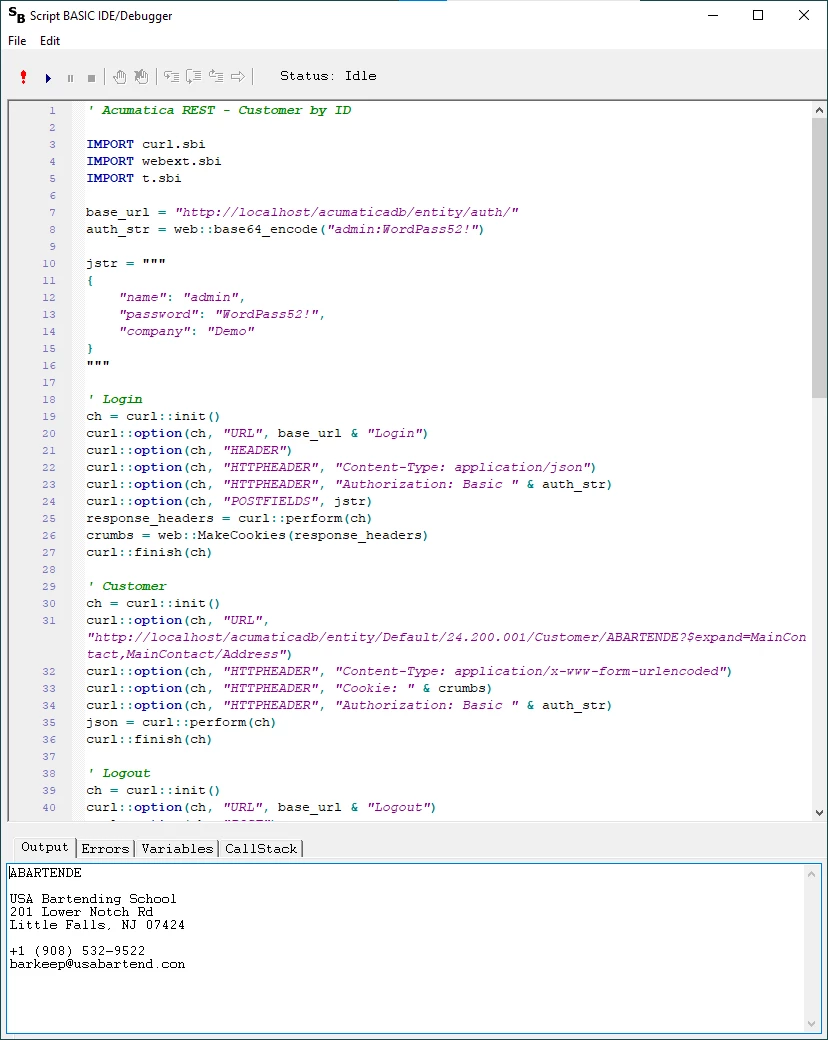
ScriptBasic for Windows 32 bit comes with an Windows UI based IDE/Debugger. This was written in VB6 with VBCCR to use a current Windows UI. ScriptBasic has a debugger pre-processor extension module that was used in the IDE/Debugger project. You can single step, set breakpoints and view all variables in all stack levels.

ScriptBasic IDE/Debugger