Solved

Remote debugging Acumatica code (24R1)

  • February 5, 2026
  • 11 replies
  • 107 views

Forum|alt.badge.img+2

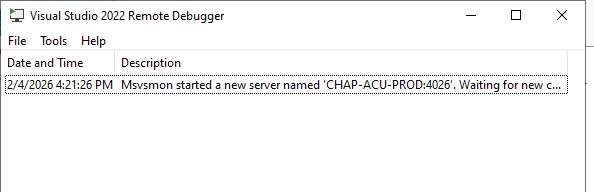
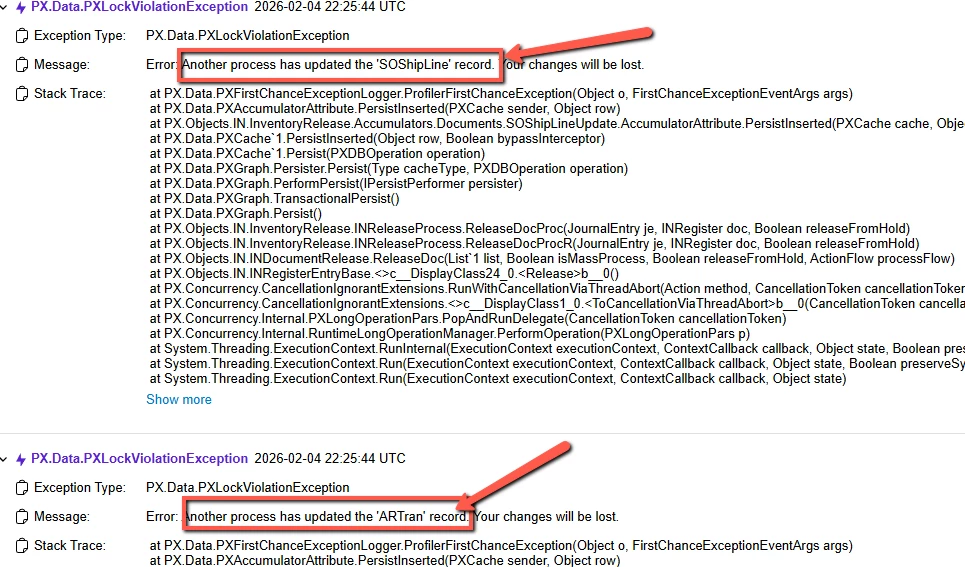
I’m trying to get more detail on a PXLockViolationException trace error so I thought I’d try remote debugging on the server hosting Acumatica.  I started a remote debug session on the server but I’m not sure what to do next.

Question: do I open some Acumatica project on my local machine?  If so, which one?  I’ve only been working with Customization Projects so I not sure how to start a remote debug session for hitting breakpoints coming from a trace.


Best answer by abhimanyuprajapati52

@bpgraves,You don’t need to open a full Acumatica source project to remote debug.

Since Acumatica is already running on IIS on the server, remote debugging typically involves attaching your local Visual Studio to the IIS worker process (w3wp.exe) on that server.

If you are working with a customization library project, open that project locally (the one that produced the deployed DLL), make sure it was published in Debug mode and that the .pdb file is present in the site’s bin folder. Then:

  1. Start msvsmon on the server (which you’ve done).

  2. In Visual Studio → Debug → Attach to Process.

  3. Select the remote server and attach to w3wp.exe.

  4. Reproduce the issue in the browser to hit breakpoints.

If the stack trace is pointing into PX.Objects core classes, you won’t be able to step into that unless you have Acumatica source and matching symbols. Remote debugging is most helpful when verifying whether your customization logic is contributing to the lock violation (for example in Persist overrides, event handlers, or accumulator usage).

For PXLockViolationException specifically, it’s often related to concurrency (row timestamp mismatches, multiple updates to the same record, long operations, etc.), so inspecting cache state and tstamp values during debugging can help narrow it down.


11 replies

abhimanyuprajapati52
Jr Varsity I
Forum|alt.badge.img

@bpgraves,You don’t need to open a full Acumatica source project to remote debug.

Since Acumatica is already running on IIS on the server, remote debugging typically involves attaching your local Visual Studio to the IIS worker process (w3wp.exe) on that server.

If you are working with a customization library project, open that project locally (the one that produced the deployed DLL), make sure it was published in Debug mode and that the .pdb file is present in the site’s bin folder. Then:

  1. Start msvsmon on the server (which you’ve done).

  2. In Visual Studio → Debug → Attach to Process.

  3. Select the remote server and attach to w3wp.exe.

  4. Reproduce the issue in the browser to hit breakpoints.

If the stack trace is pointing into PX.Objects core classes, you won’t be able to step into that unless you have Acumatica source and matching symbols. Remote debugging is most helpful when verifying whether your customization logic is contributing to the lock violation (for example in Persist overrides, event handlers, or accumulator usage).

For PXLockViolationException specifically, it’s often related to concurrency (row timestamp mismatches, multiple updates to the same record, long operations, etc.), so inspecting cache state and tstamp values during debugging can help narrow it down.


Forum|alt.badge.img
  • Freshman II
  • February 5, 2026

Hi ​@bpgraves,

PXLockViolationException cannot be properly debugged using only a Customization Project.
For remote debugging, you must open the full Acumatica ERP Visual Studio solution matching the exact server version and attach to the w3wp.exe process (Acumatica IIS App Pool).


Forum|alt.badge.img+2
  • Author
  • Semi-Pro I
  • February 5, 2026

@bpgraves,You don’t need to open a full Acumatica source project to remote debug.

Since Acumatica is already running on IIS on the server, remote debugging typically involves attaching your local Visual Studio to the IIS worker process (w3wp.exe) on that server.

If you are working with a customization library project, open that project locally (the one that produced the deployed DLL), make sure it was published in Debug mode and that the .pdb file is present in the site’s bin folder. Then:

  1. Start msvsmon on the server (which you’ve done).

  2. In Visual Studio → Debug → Attach to Process.

  3. Select the remote server and attach to w3wp.exe.

  4. Reproduce the issue in the browser to hit breakpoints.

If the stack trace is pointing into PX.Objects core classes, you won’t be able to step into that unless you have Acumatica source and matching symbols. Remote debugging is most helpful when verifying whether your customization logic is contributing to the lock violation (for example in Persist overrides, event handlers, or accumulator usage).

For PXLockViolationException specifically, it’s often related to concurrency (row timestamp mismatches, multiple updates to the same record, long operations, etc.), so inspecting cache state and tstamp values during debugging can help narrow it down.

Thank you but I’m stuck on step 4 right now: there’s no breakpoints set so I’m not hitting anything.  Where do I set the breakpoints?  Do I need to open up code files somewhere?  I’m not debugging a Customization project so I can’t open that.  I’m trying to debug the Release process on the Issue (IN302000) screen. 


npetrosov31
Jr Varsity I
Forum|alt.badge.img+1
  • Jr Varsity I
  • February 5, 2026

Hi ​@bpgraves,


You cannot debug remotely something that is hosted on Acumatica Server. The only thing you can do here is to take a snapshot of the system which you want to debug, then create a local system and restore the snapshot. After that you will be able to debug it. Otherwise you need to create a support ticket with Acumatica team and they will debug it. There is no way that your breakpoints will be hit while trying to debug Acumatica hosted instance


Forum|alt.badge.img+2
  • Author
  • Semi-Pro I
  • February 5, 2026

Hi ​@bpgraves,


You cannot debug remotely something that is hosted on Acumatica Server. The only thing you can do here is to take a snapshot of the system which you want to debug, then create a local system and restore the snapshot. After that you will be able to debug it. Otherwise you need to create a support ticket with Acumatica team and they will debug it. There is no way that your breakpoints will be hit while trying to debug Acumatica hosted instance


Right, it’s not able to hit any of my breakpoints set in the \siteroot\App_Data\CodeRepository\PX.Objects\IN\InventoryRelease\INReleaseProcess.cs.  I just get “No symbols have been loaded” when I create a breakpoint in the code.  I have a local system already.  Do I just need to debug locally but configured with the production database?


abhimanyuprajapati52
Jr Varsity I
Forum|alt.badge.img

@bpgraves,

If you’re getting “No symbols have been loaded”, that usually means the source code you opened does not match the binaries currently running in IIS.

Since you already have a local instance, the recommended approach is:

  • Make sure your local instance is running the exact same Acumatica build/version as production.

  • Restore a snapshot of the production database into your local instance (rather than pointing directly to the live production database).

  • Open the full ERP Visual Studio solution that matches that version.

  • Rebuild the solution in Debug mode.

  • Confirm that the corresponding .pdb files are present in the site’s bin folder.

  • Attach Visual Studio to w3wp.exe of your local instance.

Once the binaries and symbols match, breakpoints inside INReleaseProcess should bind correctly.

Pointing directly to the production database is not required — what matters is that your local code, DLLs, and symbols all match the instance you are debugging.


npetrosov31
Jr Varsity I
Forum|alt.badge.img+1
  • Jr Varsity I
  • February 5, 2026

Hi ​@bpgraves,


You cannot debug remotely something that is hosted on Acumatica Server. The only thing you can do here is to take a snapshot of the system which you want to debug, then create a local system and restore the snapshot. After that you will be able to debug it. Otherwise you need to create a support ticket with Acumatica team and they will debug it. There is no way that your breakpoints will be hit while trying to debug Acumatica hosted instance


Right, it’s not able to hit any of my breakpoints set in the \siteroot\App_Data\CodeRepository\PX.Objects\IN\InventoryRelease\INReleaseProcess.cs.  I just get “No symbols have been loaded” when I create a breakpoint in the code.  I have a local system already.  Do I just need to debug locally but configured with the production database?

if you have it locally just make the dll match in your sources and instance. That means if you try to debug the instance now and checkpoints are not hit you need to rebuild the sources and copy the dll from the sources/debug folder into the instance/bin folder. After that the breakpoints will be hit


Forum|alt.badge.img
  • Jr Varsity I
  • February 5, 2026

Hi ​@bpgraves,
 

To debug the Acumatica ERP source code and catch exceptions like PXLockViolationException, you can follow these steps:

  1. Make sure the PDB files for your Acumatica instance are present in the Bin folder of your ERP instance. These are needed for debugging.

  2. In the instance’s Web.config, set the compilation debug attribute to true:

  3. Open the Acumatica ERP source project in Visual Studio.

  4. Go to Tools → Options → Debugging → General and uncheck “Enable Just My Code”.

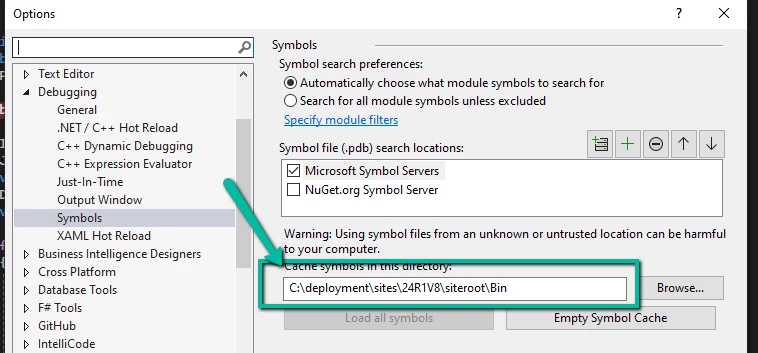
  5. In Debugging → Symbols, add the path to the PDB files from your Acumatica instance.

  6. Find the method or action you want to debug in the ERP code and set a breakpoint.

  7. Attach Visual Studio to the w3wp.exe process running the Acumatica site (remote debugging).

  8. Trigger the action in Acumatica that causes the exception, and your breakpoint will be hit, allowing you to inspect the code and debug.

This setup lets you step through the original ERP code, not just Customization Projects, and see exactly where exceptions like PXLockViolationException occur.


Forum|alt.badge.img+2
  • Author
  • Semi-Pro I
  • February 5, 2026

Hi ​@bpgraves,


You cannot debug remotely something that is hosted on Acumatica Server. The only thing you can do here is to take a snapshot of the system which you want to debug, then create a local system and restore the snapshot. After that you will be able to debug it. Otherwise you need to create a support ticket with Acumatica team and they will debug it. There is no way that your breakpoints will be hit while trying to debug Acumatica hosted instance


Right, it’s not able to hit any of my breakpoints set in the \siteroot\App_Data\CodeRepository\PX.Objects\IN\InventoryRelease\INReleaseProcess.cs.  I just get “No symbols have been loaded” when I create a breakpoint in the code.  I have a local system already.  Do I just need to debug locally but configured with the production database?

if you have it locally just make the dll match in your sources and instance. That means if you try to debug the instance now and checkpoints are not hit you need to rebuild the sources and copy the dll from the sources/debug folder into the instance/bin folder. After that the breakpoints will be hit

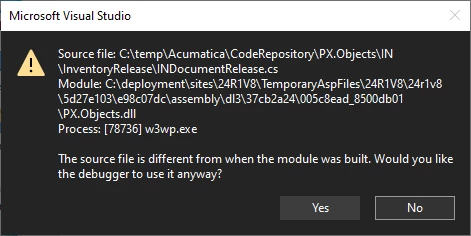
They do match but I’m getting a mismatch within VS…


Forum|alt.badge.img+2
  • Author
  • Semi-Pro I
  • February 5, 2026

Hi ​@bpgraves,
 

To debug the Acumatica ERP source code and catch exceptions like PXLockViolationException, you can follow these steps:

  1. Make sure the PDB files for your Acumatica instance are present in the Bin folder of your ERP instance. These are needed for debugging.

  2. In the instance’s Web.config, set the compilation debug attribute to true:

  3. Open the Acumatica ERP source project in Visual Studio.

  4. Go to Tools → Options → Debugging → General and uncheck “Enable Just My Code”.

  5. In Debugging → Symbols, add the path to the PDB files from your Acumatica instance.

  6. Find the method or action you want to debug in the ERP code and set a breakpoint.

  7. Attach Visual Studio to the w3wp.exe process running the Acumatica site (remote debugging).

  8. Trigger the action in Acumatica that causes the exception, and your breakpoint will be hit, allowing you to inspect the code and debug.

This setup lets you step through the original ERP code, not just Customization Projects, and see exactly where exceptions like PXLockViolationException occur.

Are you talking about adding the path here?


Forum|alt.badge.img
  • Jr Varsity I
  • February 5, 2026

@bpgraves Yes, exactly