Question

PXLockViolationException on ARTran

  • February 6, 2026
  • 8 replies
  • 87 views

Forum|alt.badge.img+2

When I try to release an issue (IN302000), I get PXLockViolationException error:
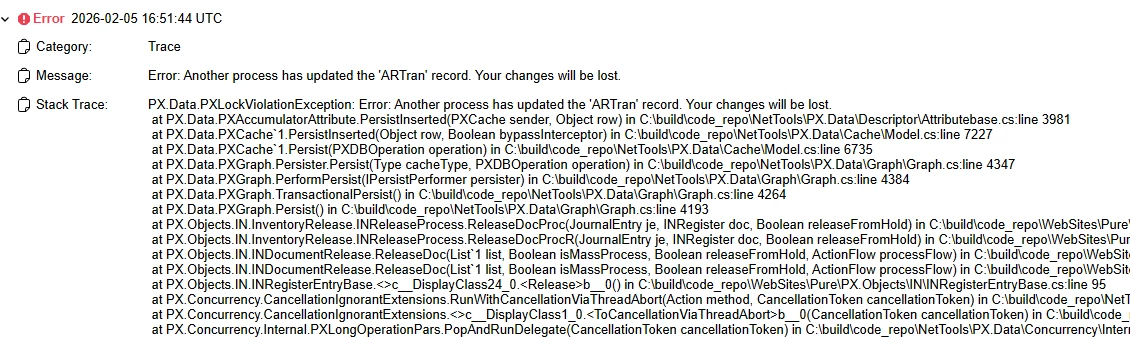
Question: does the tstamp in each ARTran row in the database need to match the PXCache somehow?  Which object in the cache do I need to look for?

8 replies

abhimanyuprajapati52
Jr Varsity I
Forum|alt.badge.img

@bpgraves,
 

Yes — PXLockViolationException is directly related to the tstamp (row version).

When a record is loaded, its tstamp is stored in the PXCache. During Persist, Acumatica compares that value with the current tstamp in the database. If they don’t match, it means something else updated the row and the lock violation is raised.

For ARTran, you should check:

  • Whether any customization is updating the same record during release

  • Whether the record is being modified in another graph instance or long operation

  • Whether any direct DB updates (PXDatabase.Update) are bypassing the cache

The issue is usually caused by multiple updates to the same row within the same process, not by a database mismatch itself.


Forum|alt.badge.img+2
  • Author
  • Semi-Pro I
  • February 6, 2026

@bpgraves,
 

Yes — PXLockViolationException is directly related to the tstamp (row version).

When a record is loaded, its tstamp is stored in the PXCache. During Persist, Acumatica compares that value with the current tstamp in the database. If they don’t match, it means something else updated the row and the lock violation is raised.

For ARTran, you should check:

  • Whether any customization is updating the same record during release

  • Whether the record is being modified in another graph instance or long operation

  • Whether any direct DB updates (PXDatabase.Update) are bypassing the cache

The issue is usually caused by multiple updates to the same row within the same process, not by a database mismatch itself.

Thanks for your response but this is a unique Issue (IN302000 screen) that’s always giving this error when I click the Release button and I need to fix it in the debugger to get the Issue released to close out year-end since it’s holding us up.  I can see the tstamp in the Document I’m trying to release.  I just need to know which corresponding JournalEntry cache to compare it with so I can change the tstamp in the debugger and finally get this Issue released.  There’s 64 objects in the cache but I can’t find a PX.Object.IN.INRegister or ARTran.   How do I find the tstamp I need to reset the one I’m trying to Release?


Jhon Reeve Penuela
Freshman I
Forum|alt.badge.img

Hi ​@bpgraves,

This error “Another process has updated the {Table} record. Your changes will be lost”.

You can get this error when you open two the same screens with the same record from DB and then modify data on both screens and try to Save. Or you may have custom logic that runs some functionality in PXLongOperation (that is, run in multi-threading mode) and one record from DB can be modified by different threads. Then you will get this error during persisting.

You can check this blog  Another process has updated the record, your changes will be lost Acumatica Expert.

I hope this work for you. Thanks.


Forum|alt.badge.img+2
  • Author
  • Semi-Pro I
  • February 9, 2026

Hi ​@bpgraves,

This error “Another process has updated the {Table} record. Your changes will be lost”.

You can get this error when you open two the same screens with the same record from DB and then modify data on both screens and try to Save. Or you may have custom logic that runs some functionality in PXLongOperation (that is, run in multi-threading mode) and one record from DB can be modified by different threads. Then you will get this error during persisting.

You can check this blog  Another process has updated the record, your changes will be lost Acumatica Expert.

I hope this work for you. Thanks.

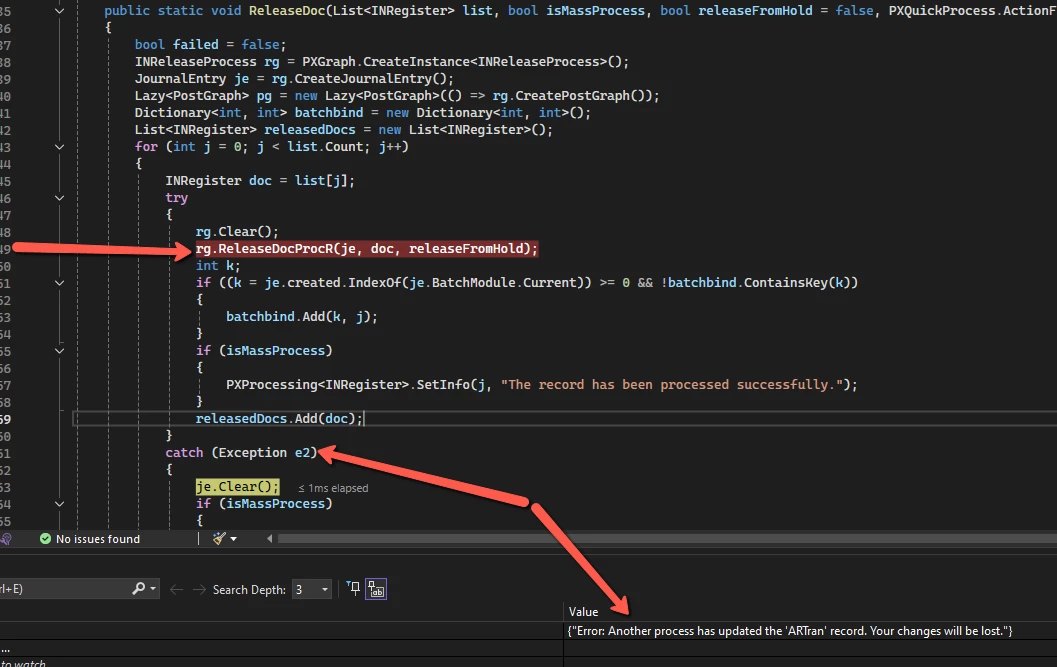
I don’t have any customization published (I’m debugging this on my local machine) and I’m not updating the same record at the same time (unless the Acumatica source code itself is doing this).  This is why I wanted the name of the cache that is being compared so I could change the tstamp of the Document in the debugger.  Can anyone provide this since there is no ARTran cache in this method?  Thank you.


VardanV
Varsity I
Forum|alt.badge.img+1
  • Varsity I
  • February 10, 2026

Hi ​@bpgraves,

As I understand, there are no customizations published on the instance, and the system is functioning in its standard configuration.

Could you please provide the version and build number of the system where this error is occurring?

BTW, if any customization has been added, even a single simple field, please share that information as well—regardless of whether it appears to be related to the ARTran DAC.


Thanks,

VardanV.


Forum|alt.badge.img+3
  • Jr Varsity II
  • February 10, 2026

Hi ​@bpgraves ,

Have you implemented a method delegate for the ReleaseDoc method, or did you copy the base method directly into your custom graph?

If you need to introduce custom logic into the default behavior, it is recommended to use a method delegate. This ensures that, instead of calling the base method directly, your custom graph method is invoked and executed as part of the standard processing flow.
 

Hope above helps!!


Forum|alt.badge.img+2
  • Author
  • Semi-Pro I
  • February 13, 2026

Hi ​@bpgraves,

This error “Another process has updated the {Table} record. Your changes will be lost”.

You can get this error when you open two the same screens with the same record from DB and then modify data on both screens and try to Save. Or you may have custom logic that runs some functionality in PXLongOperation (that is, run in multi-threading mode) and one record from DB can be modified by different threads. Then you will get this error during persisting.

You can check this blog  Another process has updated the record, your changes will be lost Acumatica Expert.

I hope this work for you. Thanks.

I didn't have any luck implementing the DuplicatePersisted on INTran, ARTran, and SOShipLine: I still got the same exact error.


Forum|alt.badge.img+2
  • Author
  • Semi-Pro I
  • February 13, 2026

Hi ​@bpgraves,

As I understand, there are no customizations published on the instance, and the system is functioning in its standard configuration.

Could you please provide the version and build number of the system where this error is occurring?

BTW, if any customization has been added, even a single simple field, please share that information as well—regardless of whether it appears to be related to the ARTran DAC.


Thanks,

VardanV.

This is version 24.112.0026.  The only customization I added was just so I could debug the release process…

    public class INReleaseProcessExt : PXGraphExtension<INReleaseProcess>
    {
        public delegate void ReleaseDocProcDelegate(JournalEntry je, INRegister doc, bool releaseFromHold = false);
        [PXOverride]
        public void ReleaseDocProc(JournalEntry je, INRegister doc, bool releaseFromHold, ReleaseDocProcDelegate baseMethod)
        {
            baseMethod(je, doc, releaseFromHold);
        }

}