
Please provide feedback on the Modern UI if you have issues with it so that Acumatica can focus on improvements to it. Acumatica AI will pick up your feedback for them to focus on improving it prior to the 26R2 release when the classic UI goes away.
- Community
- Discussion Forums
- Other Developer Topics
- Modern UI Issues
Modern UI Issues
- June 10, 2026
- 97 replies
- 2582 views


 +14
+14- Captain II
David Eichner, CPA - If I helped you, please *Like* my post/reply. If I provided an answer to your question, please mark it as *Best Answer*.
- Like
- Share
97 replies

- Freshman I
- August 14, 2026
I have been attempting to export Pivot Tables to excel for filtered set of data and the Pivot is always exporting the data based on the underlying GI information instead of the filtered data.
The Pivot displays in the system the Correct values for the filtered information but when exported to excel it exports values for all information in the GI instead of the Filtered Values.


- Community Manager
- August 18, 2026
Hi Everyone,
I am Melissa Skrbic-Huss, the new Director of Product Design at Acumatica. The team and I reviewed the concerns raised in this thread about the Classic UI transition, particularly the concern about moving exclusively to Modern UI while known issues remain unresolved. That feedback is valid, and addressing those issues has been a clear focus for our engineering team.
Below are a couple of fixes that will be included in 2026 R2, releasing in early fall..
Customization / Modern UI Editor
Resolved errors when adding fields and when converting screens to Modern UI, fixed handling of special characters in project names, and corrected file corruption when exporting and importing customization projects.
Generic Inquiries and Reports
Column width and column order now save correctly. We also fixed missing filter parameters, slow Quick Search, the Back button jumping to page 1, and export-to-Excel issues.
Controls and buttons
Corrected tab order (including the skipped currency field), the note icon not highlighting, and custom dialog and quick-process popups not opening.
Usability and layout
Restored the side-panel scrollbar, fixed popups not resizing, and closed several translation gaps.
Performance
Meaningful speed improvements to the Projects screen, GI screens, the Customers screen, and order processing.
Our goal is straightforward: Modern UI should deliver a better experience than the one it replaces, not simply a newer one. Work is continuing across reported issues, and this thread remains a helpful place to surface anything still affecting your workflows. If you do report an issue, please include the screen name and steps to reproduce it so the team can investigate efficiently.
Thank you for the direct feedback. It continues to inform and prioritize the work.
Melissa



- Jr Varsity I
- August 18, 2026
Would it be possible to have these fixes rolled back into 26R1? I’m sure lots of customers & partners would like to avoid another upgrade if the site has recently moved to 26R1.
One thing I would like fixed is if I get a pop up like this in the image below, when I press enter, instead of select Yes which is highlighted the highlight moves to no and the button needs to be clicked on
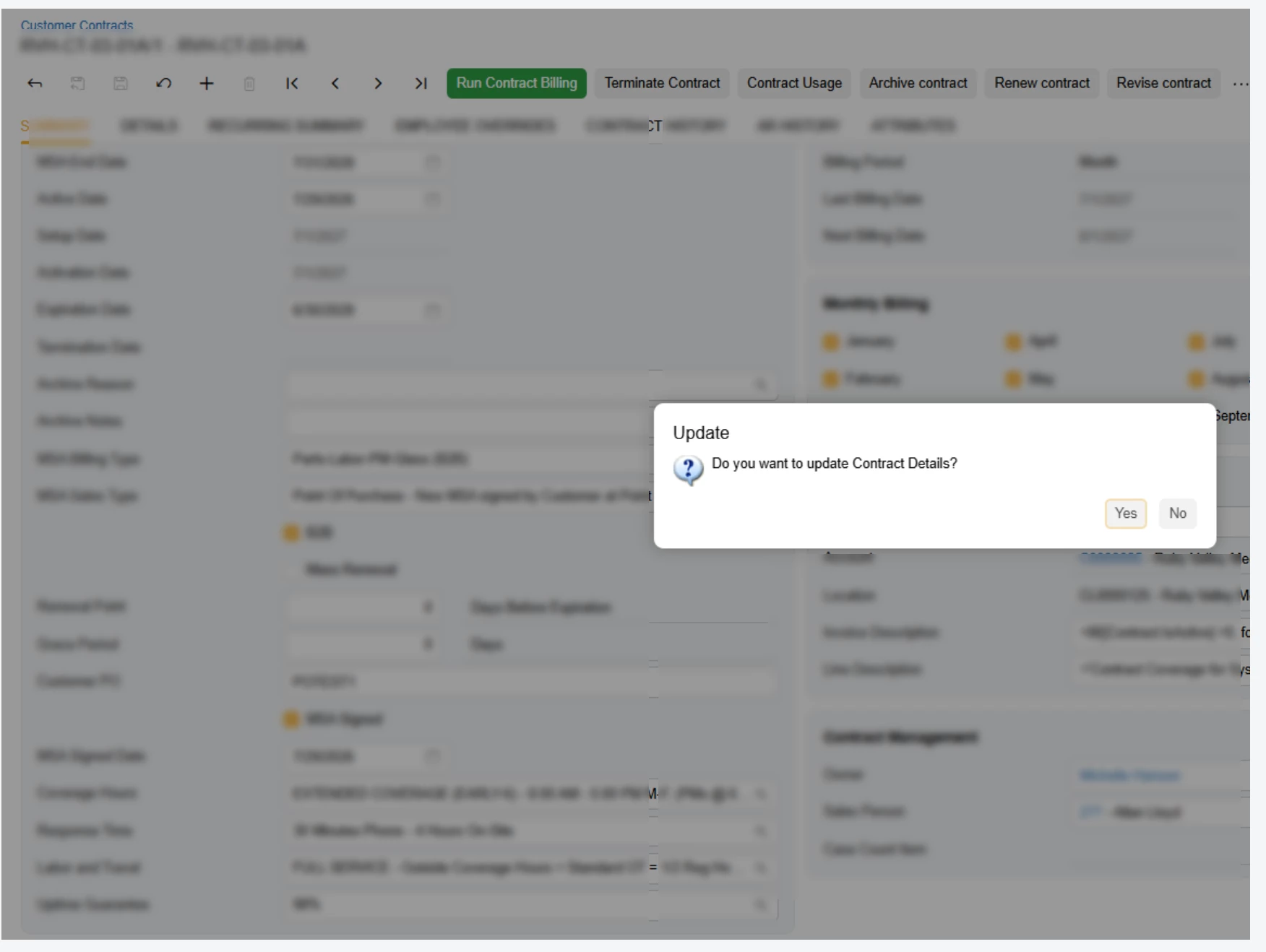
Alan Conroy — Acugen Consulting — Check out my free Acumatica Trace Copier at www.acugenconsulting.com
- August 19, 2026
Customization publishing is definitely much more efficient in a more recent 26R1 update. I was always confused why publishing would build the Modern UI for each tenant because it’s not like you can pick and choose which customizations to publish for each tenant, but now it just builds the files once and copies to the tenants chosen.

- August 20, 2026
Good work, Acumatica team. I’m seeing meaningful speed improvements in the Modern UI on 26R1.
I did a quick comparison between Classic and Modern using a relatively simple import scenario. One thing the comparison highlighted for me is that performance is only part of the overall user experience. Keyboard efficiency matters quite a bit as well.
In Classic, I rely heavily on keyboard navigation, especially Tab and inline search. You’ll see in the video that I rarely need to touch the mouse. Because of that, I can complete this particular scenario in about 45 seconds.
In Modern UI, I’m finding that I have to move between the keyboard and mouse much more frequently. The same scenario takes me about 1:21.
You can also see me struggle a little when trying to locate From Unit within the Conversion menu. Because there are so many fields containing "From Unit" in the search results, finding the specific field I need takes additional time.
A 36-second difference probably sounds trivial on its own, but this is an intentionally simple scenario where I already knew exactly which fields I needed and where they were located. With a more complex import scenario, I could easily see the additional navigation adding another 2-3 minutes to the process.
For me, there are really two opportunities here:
- Efficiency: Make it possible to navigate and configure more of the Modern UI without leaving the keyboard.
- Ergonomics: Reducing the constant movement between keyboard and mouse also reduces arm and shoulder fatigue for users who spend a significant portion of their day working in Acumatica.
I don’t see this as a complaint about Modern UI. There have clearly been improvements, especially in 26R1. I think this is an area where some of the efficiency that made Classic so fast for experienced users could be carried forward into Modern UI.
The closer Modern can get to letting a power user work almost entirely from the keyboard, the better the experience will be.
And of course, I’m still waiting on the day AI can just build the import scenario for us. 😉 That may be the pathway and if it is, ignore my grumblings!
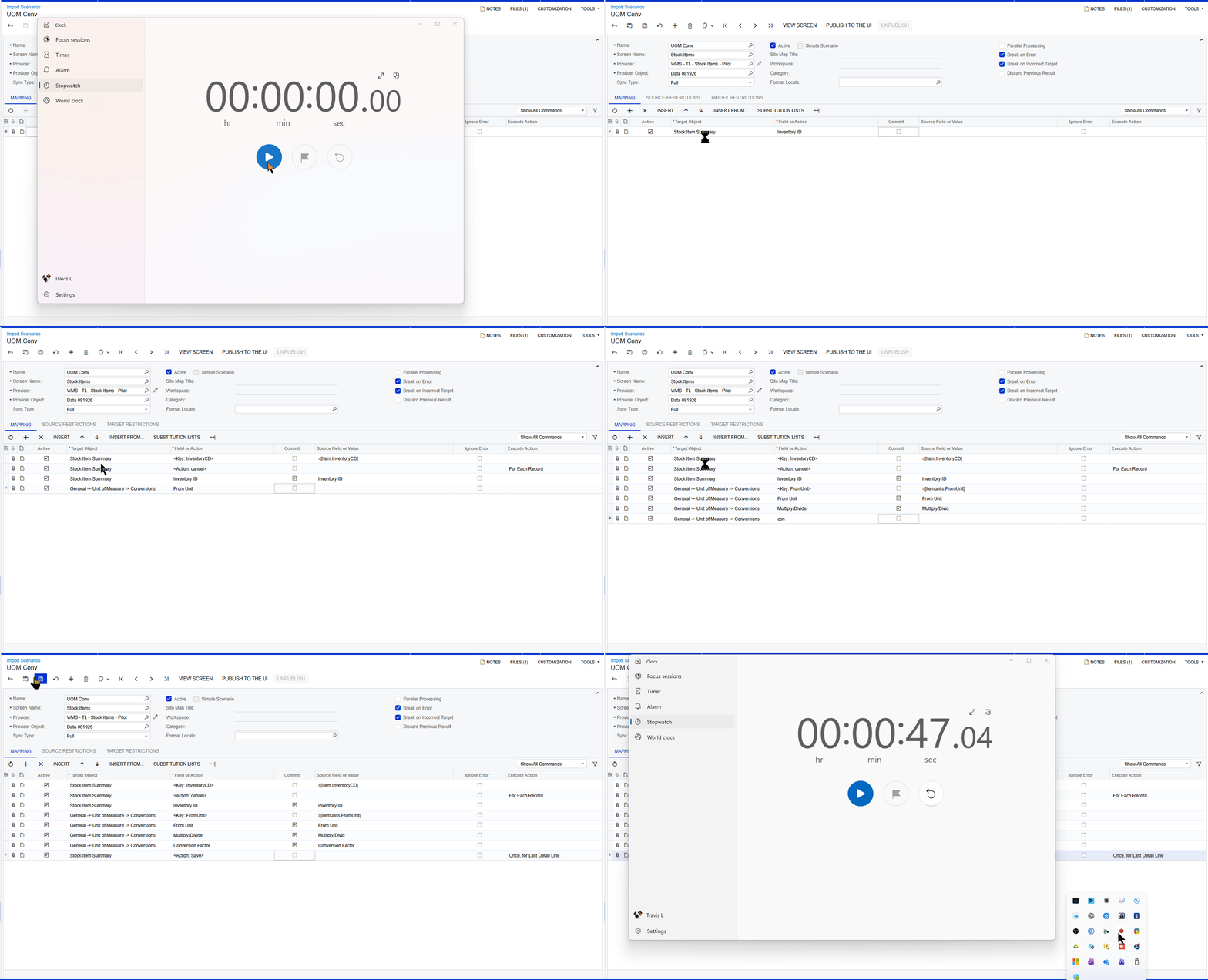
Classic UI
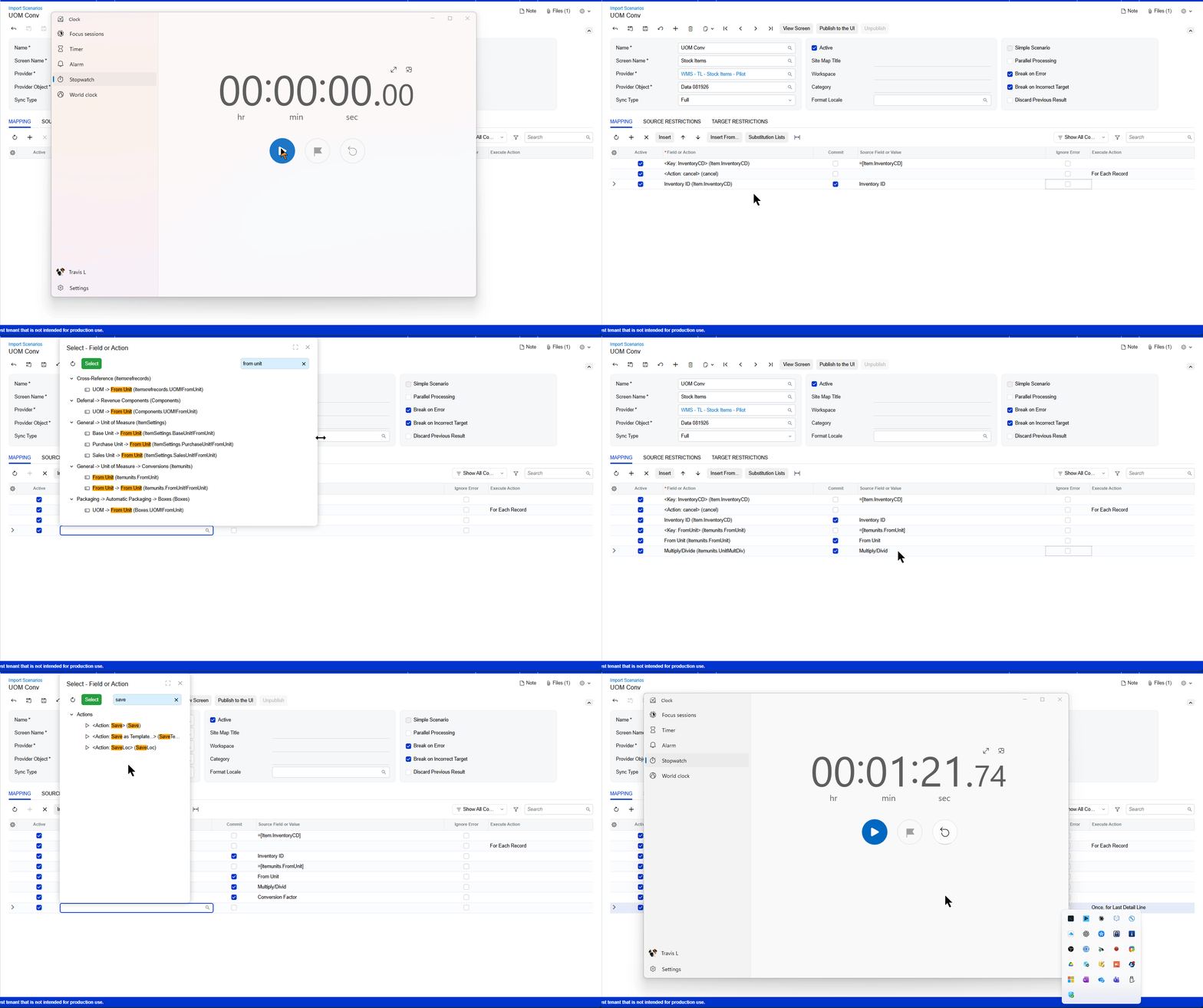
Modern UI
🚀If I have helped you, "Like" my post. If it solves it mark "Best Answer". 🚀 ➡️ www.linkedin.com/in/-travis-lawson-/
 +12
+12- Captain II
- August 20, 2026
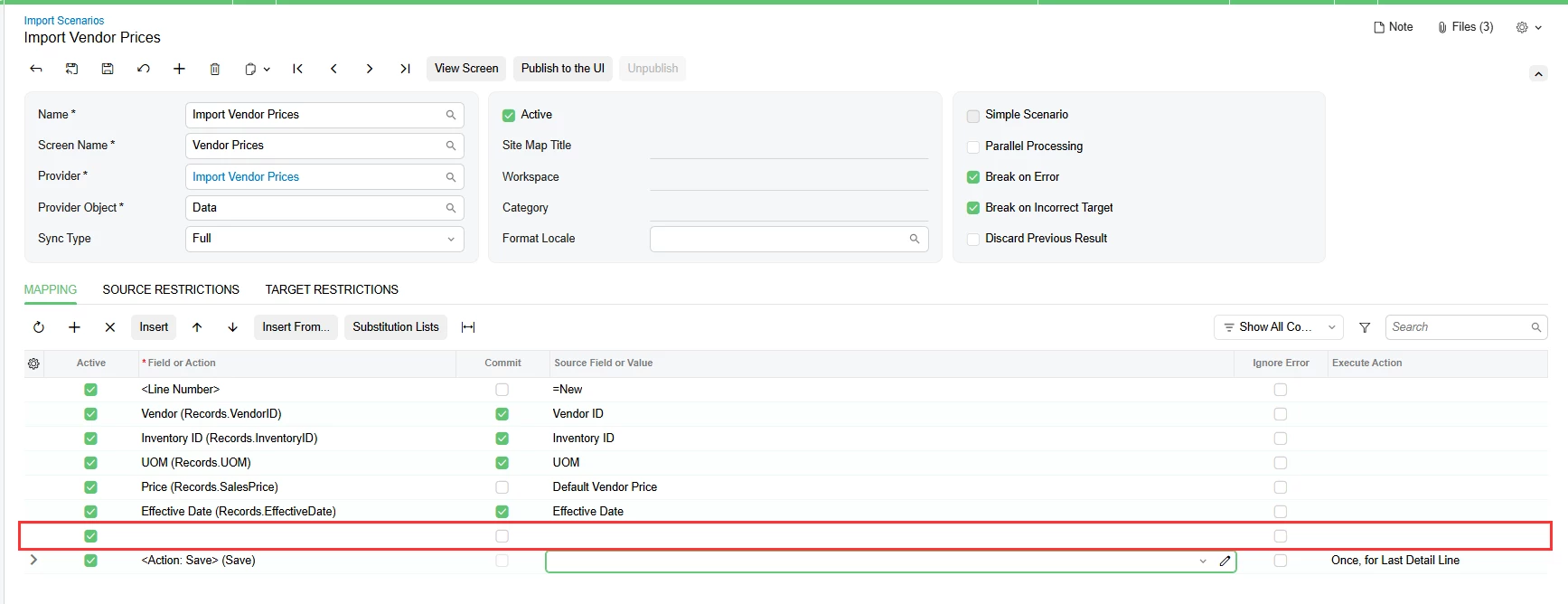
Thanks, what a perfect demonstration. Building an import scenario in modern UI is so confusing, especially if you are not familiar with the data sources. Even the classic UI changes that they introduced in 2025 makes it harder to build one of these. Import scenarios in 2024 were perfect.

- Semi-Pro II
- August 20, 2026
+12- Captain II
- August 20, 2026
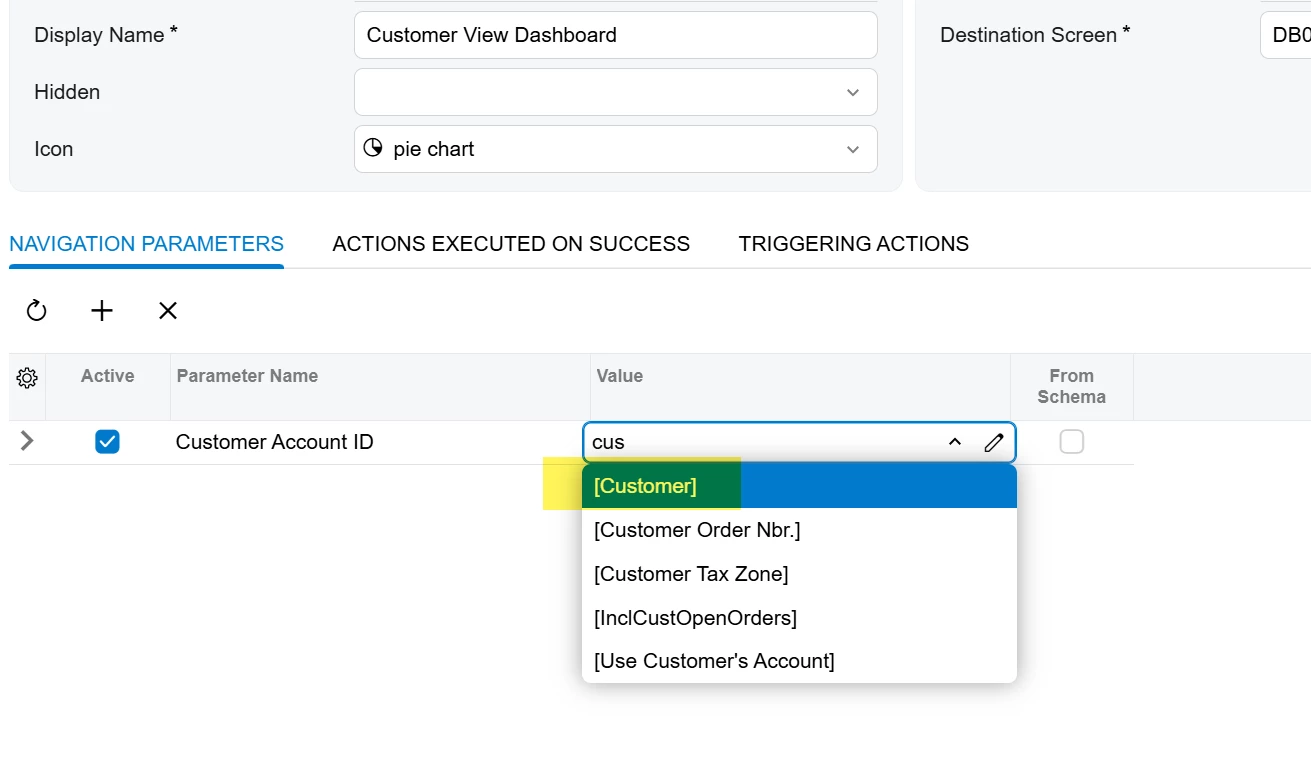
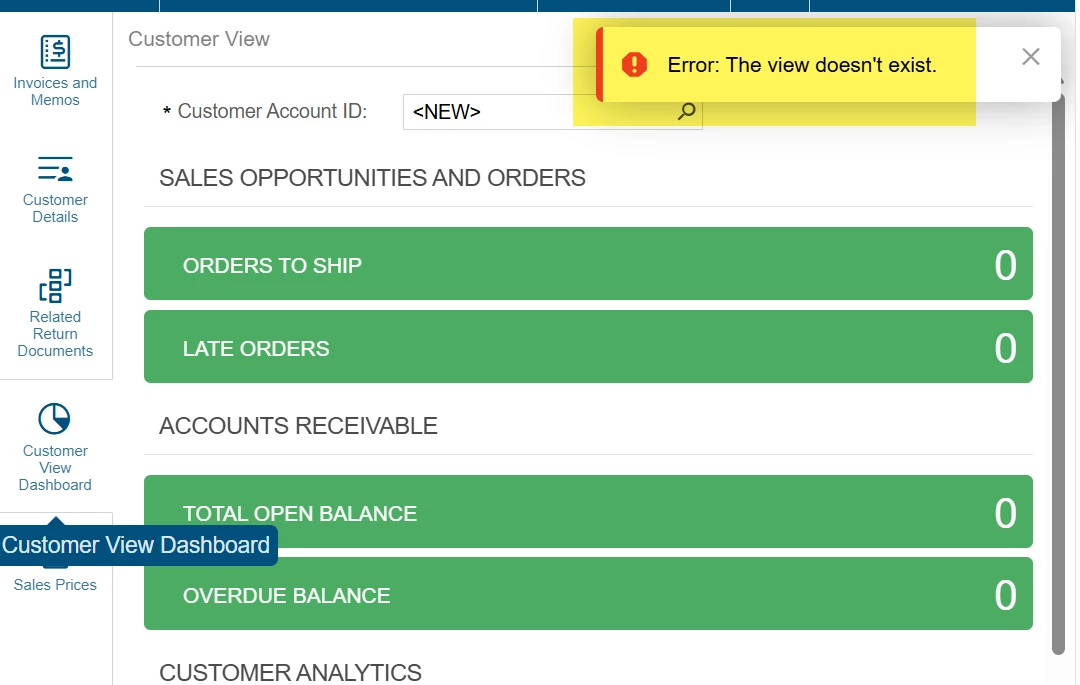
Another issue that I’ve seen a few times in the past few weeks is the new filtering system does not receive the masked value when passing parameters. This issue has come up in GI and dashboard filters/parameters.
For example, when adding a side panel to a dashboard on the sales order screen using the Customer value which is SOOrder.CustomerID. What it should be doing is passing the AcctCD field, but instead is passing the BaccountID field, so it results in various errors. Typically, an integer error on the dashboard, but in this case the error is the “the view doesn’t exist” for this side panel. Trace reveals that the error is the customer ID does not exist.
- Jr Varsity I
- August 20, 2026
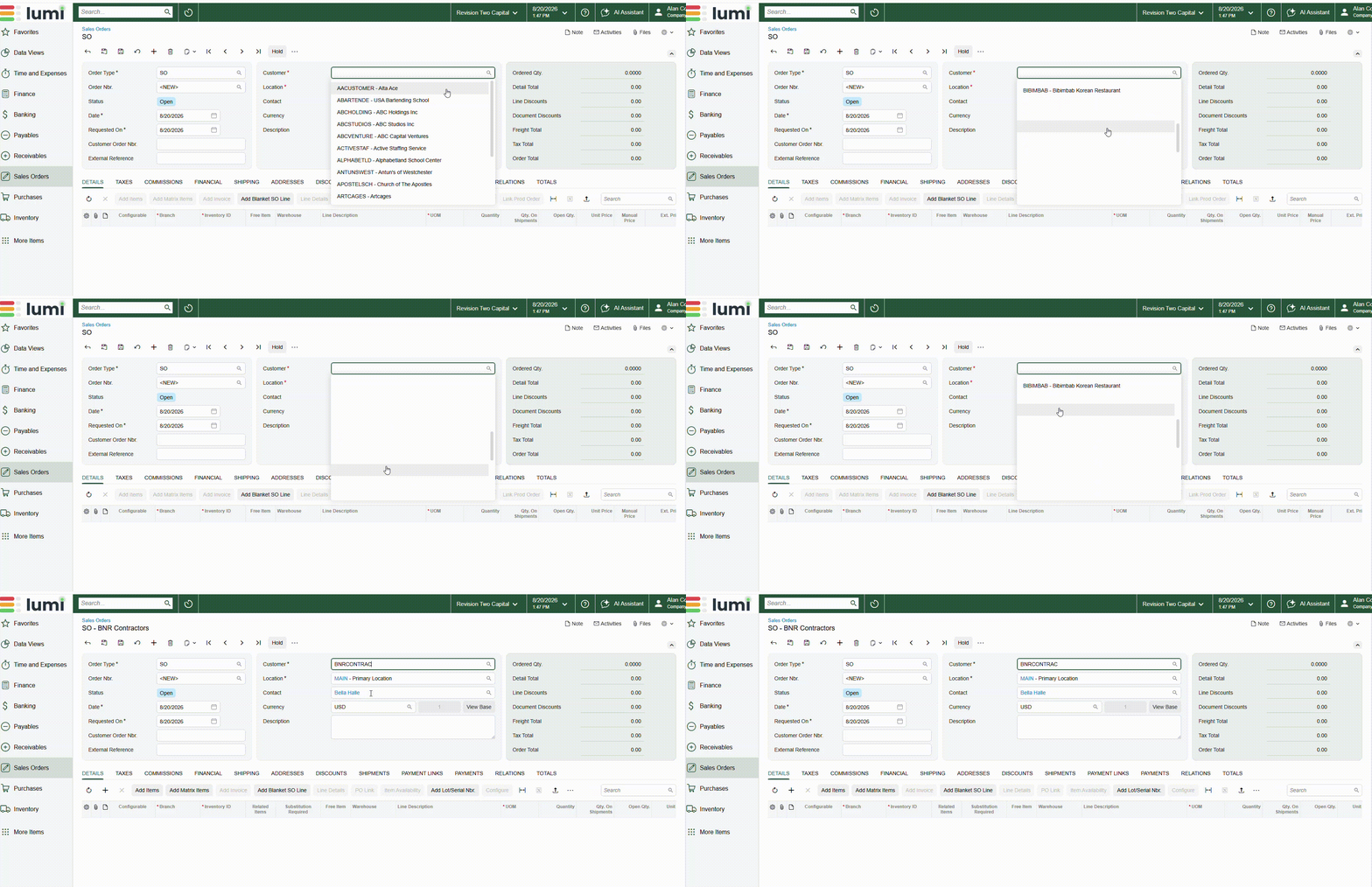
Another issue I have seen on multiple sites is when scrolling the customer list the names start to disappear, you can select them but you have no idea who you are selecting.
Alan Conroy — Acugen Consulting — Check out my free Acumatica Trace Copier at www.acugenconsulting.com
+12- Captain II
- August 21, 2026
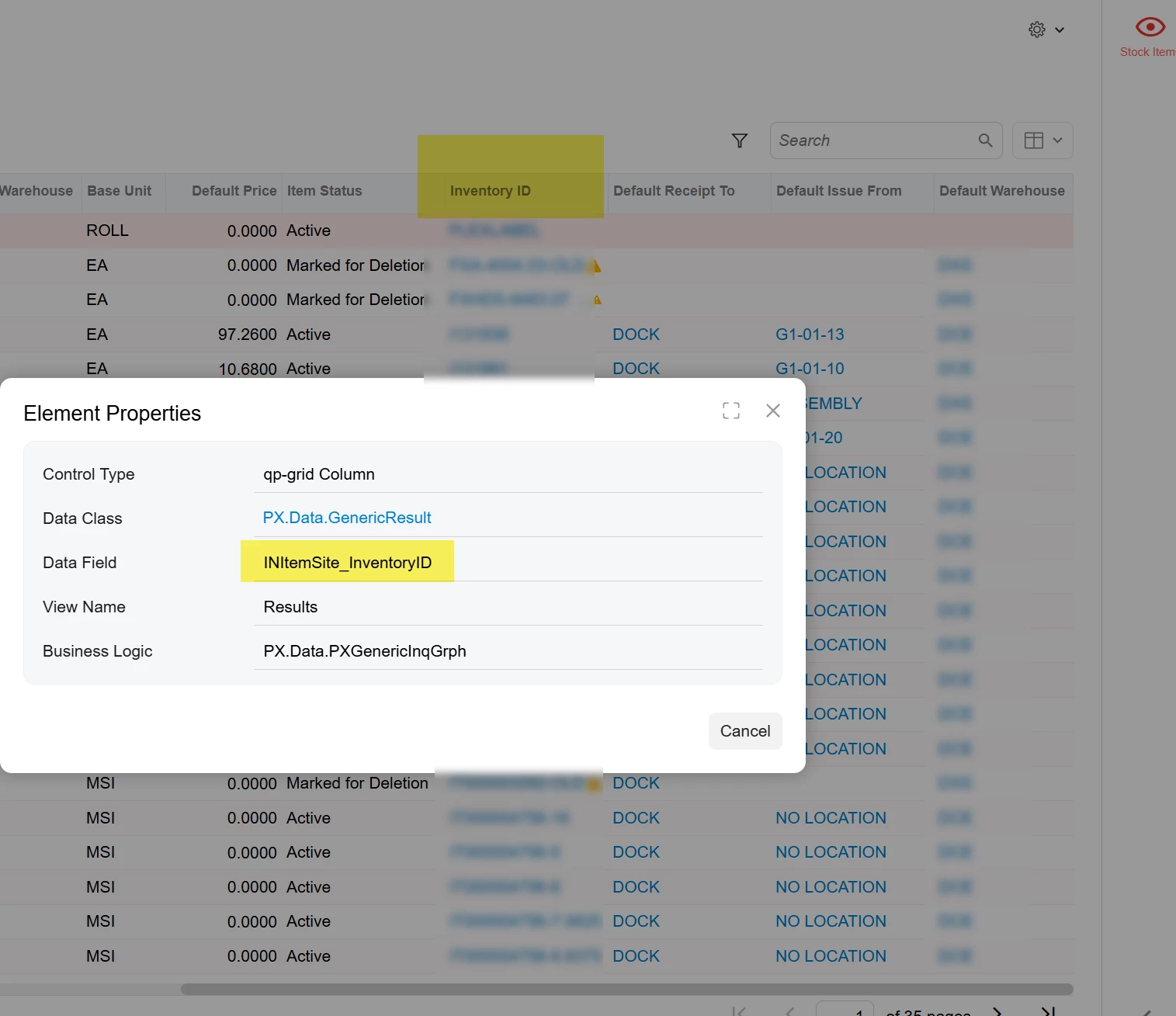
Adding the INItemSite table to GIs in 2026 R1 will cause the INItemSite.inventoryID to display without being added to the results grid, and sometimes more than once. The field cannot be removed from the results. Switching to classic UI resolves the issue.


- Semi-Pro I
- August 25, 2026
Another issue I have seen on multiple sites is when scrolling the customer list the names start to disappear, you can select them but you have no idea who you are selecting.
Believe this is related to this:
Which is scheduled to be fixed in 2026R2
- Semi-Pro I
- August 25, 2026
Would it be possible to have these fixes rolled back into 26R1? I’m sure lots of customers & partners would like to avoid another upgrade if the site has recently moved to 26R1.
One thing I would like fixed is if I get a pop up like this in the image below, when I press enter, instead of select Yes which is highlighted the highlight moves to no and the button needs to be clicked on
I get this, and we’re almost in the same situation. The thing that I’m confident Acumatica is having an issue with is the upcoming deprecation of a Chrome feature that affects classic UI, and the fact that supporting Classic UI while developing modern is the worst of both worlds. They can’t put full focus on the new UI and have to fix bugs in two places.
I’m guessing this is why they’re pushing so hard to get everyone on 2026R2 and not back-porting a lot.

- Jr Varsity II
- August 27, 2026
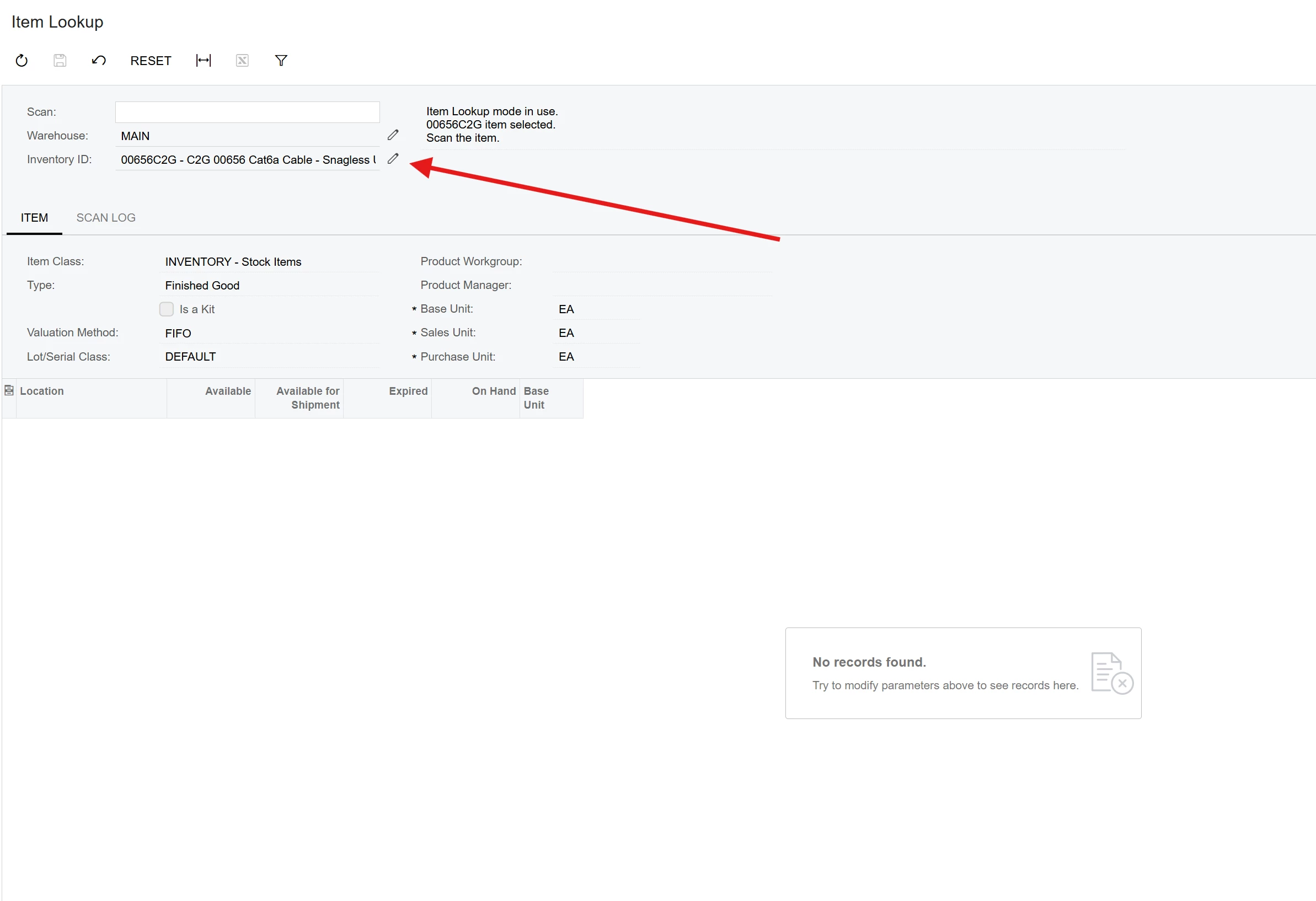
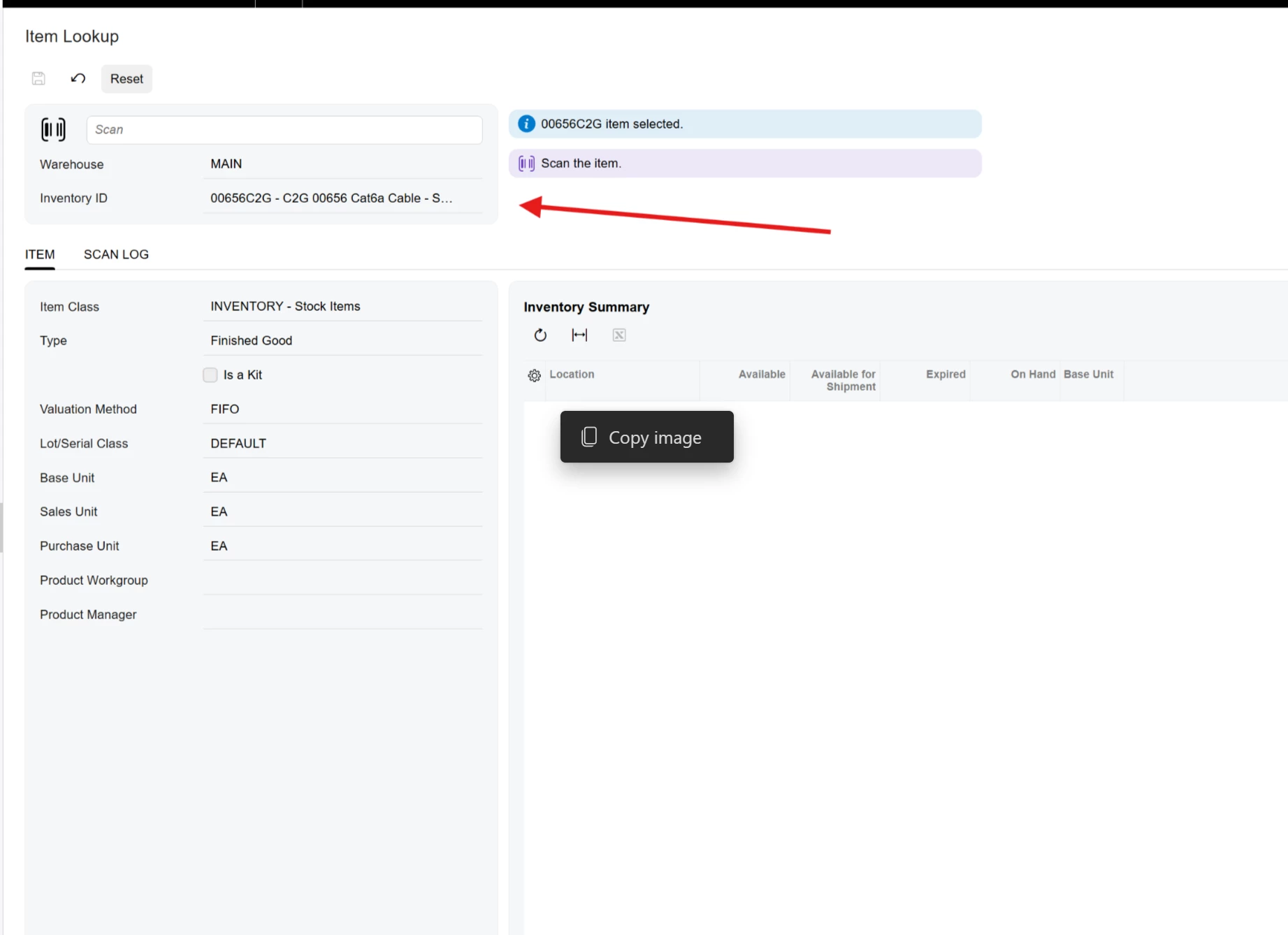
On the “item lookup” screen (IN202520), in classic UI there was a pencil to open up the item details. With Modern UI there is no hyperlink to replace it
- Freshman I
- August 31, 2026
Hi Melissa, is there an update on if/when the shared configuration feature will be available? I’m seeing every customer who is upgrading to the modern UI asking about this. It’s a relatively small but important feature as it feeds in to workflow and important data relative to each Customer. Would love to know what the plans are for reinstating this feature, thanks! Sue
- Semi-Pro I
- August 31, 2026
Another little MUI annoyance: When adding another data source in the GI editor, the default Alias is not prepopulated even after moving to another field, leaving it unclear as to what the value will be until after the user saves.

 +6
+6- Captain II
- September 1, 2026
Here’s one that I haven’t seen mentioned.
It’s not strictly MUI specific, but definitely worse than on Classic.

Can we take a moment to appreciate the sheer amount of empty space on every single screen?
There’s this wide open space that could host all sorts of visual aids.
Then there’s also the extravagant spacing and padding in and around the field sets and grids.
I get wanting it to look “modern” and not cluttered, but this is a data-heavy ERP.
Please, for the love of everything that is good and right, let me see more data without scrolling or navigating to a different screen!!
I’m not always using a 42” monitor, and I don’t need a wide open fairway between each piece of data!😂
(Also worth mentioning that almost every piece of data is visually identical and it’s hard to identify at a glance, what you’re looking at.)
I do have some hope that the UI will be improved and tightened up once the classic is no longer supported.
Michael Shirk, Pine View Buildings, LLC - If a member helped you, please *Like* their post. If a member provided an answer to your question, please mark it as *Best Answer*.
- Jr Varsity II
- September 2, 2026
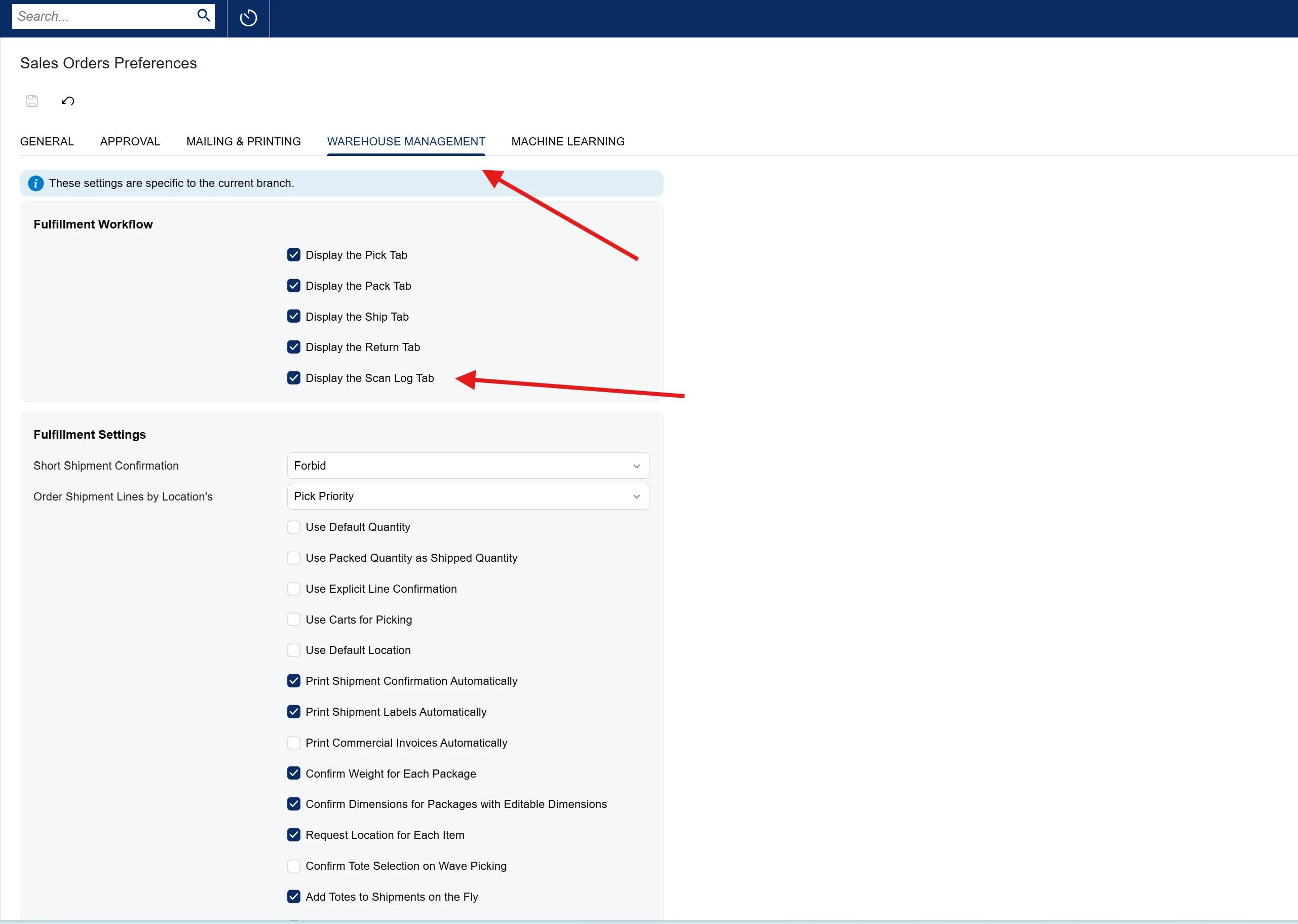
If the “Display the Scan Log Tab” is enabled in Sales Order Preferences > Warehouse Management -
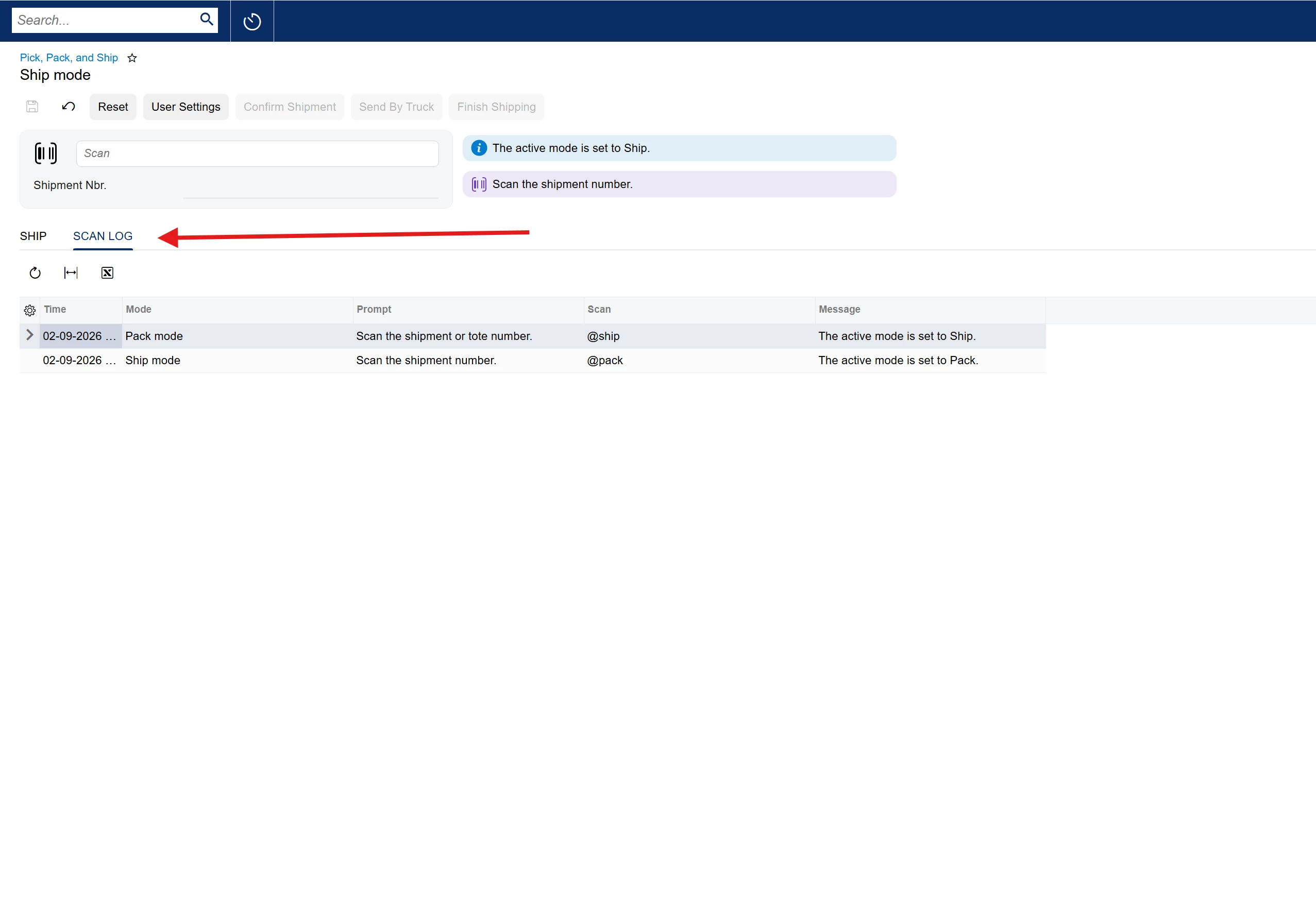
When changing “modes” In the “Pick, Pack, and Ship” Screen, it will display the “Scan Log” as the default tab instead of The “Pack” or “Ship” tab…
Every time switching modes, this comes up first
 +17
+17- September 3, 2026
When changing the Order date on a PO, clicking the ‘Today is xx/xx/xxxx’ button in the date-picker control causes the confirmation dialog to fire twice 🤔
Daryl ⚡Freelance developer 🛒Check out my products 👉🏻deftstrokesdev.com/index.php/products ⏩linkedin.com/in/darylbowman
+12- Captain II
- September 3, 2026
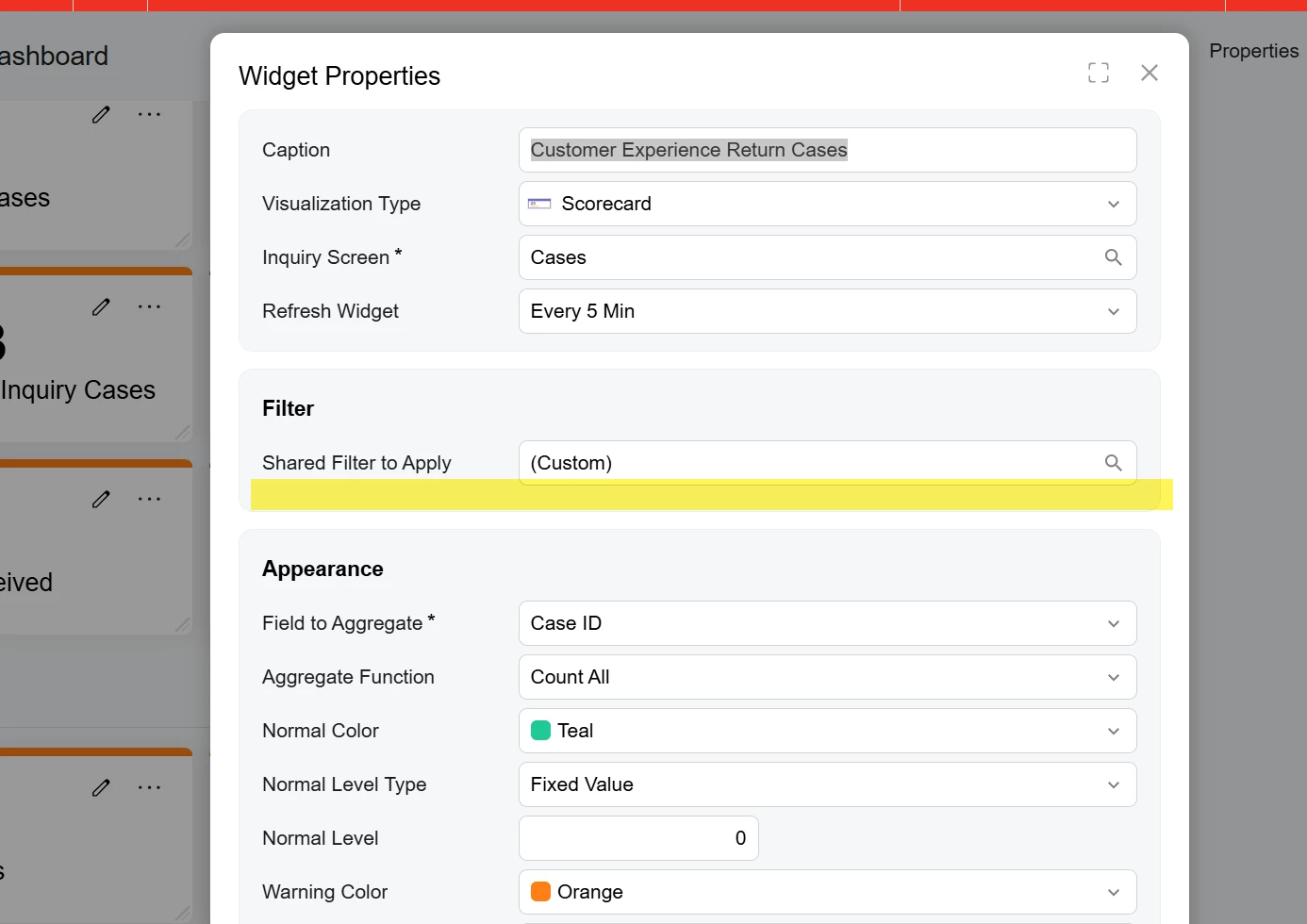
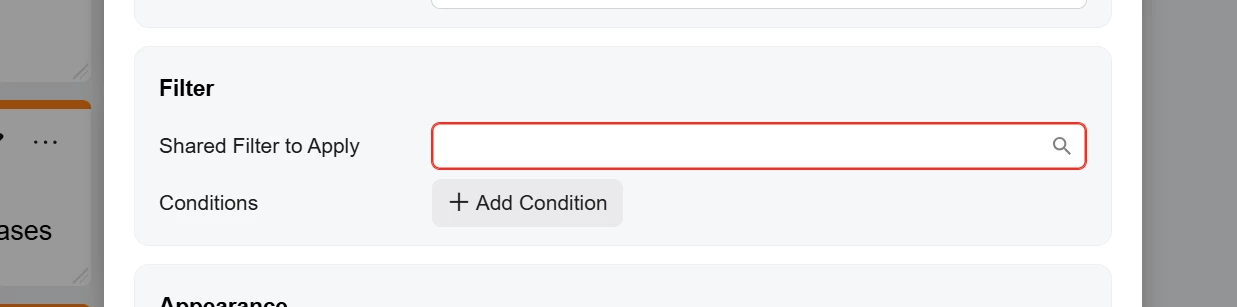
in 2026 R1, when building out new conditions on a dashboard widget, the ability to edit conditions will eventually disappear. I can’t tell you how frustrating this.
Often with dashboard widgets, you will have a widget that will have a lot of conditions and then multiple related widgets that will have the same conditions, but maybe one condition is different such as order status to provide a separate KPI. This is why the copy and paste function in dashboards was immensely helpful. We could build out dashboard very quickly by copying widgets, making a slight variation in the new widget conditions, and then moving on.
This helpfulness is now gone. As shows in the screenshot below, after adding a filter to a widget, we no longer have the ability to edit the widget conditions. This happens after a dashboard get to certain size, not when initially creating the dashboard and the first few widgets. The only fix is to backspace out the filter and to start the condition over, but you better get it right the first time, because you can’t edit it once you save the condition.
The “work-around” I found is to create shared filters on the GI specifically for the dashboard widget because it’s a little faster and I don’t need to start completely over when I forget to add a condition.
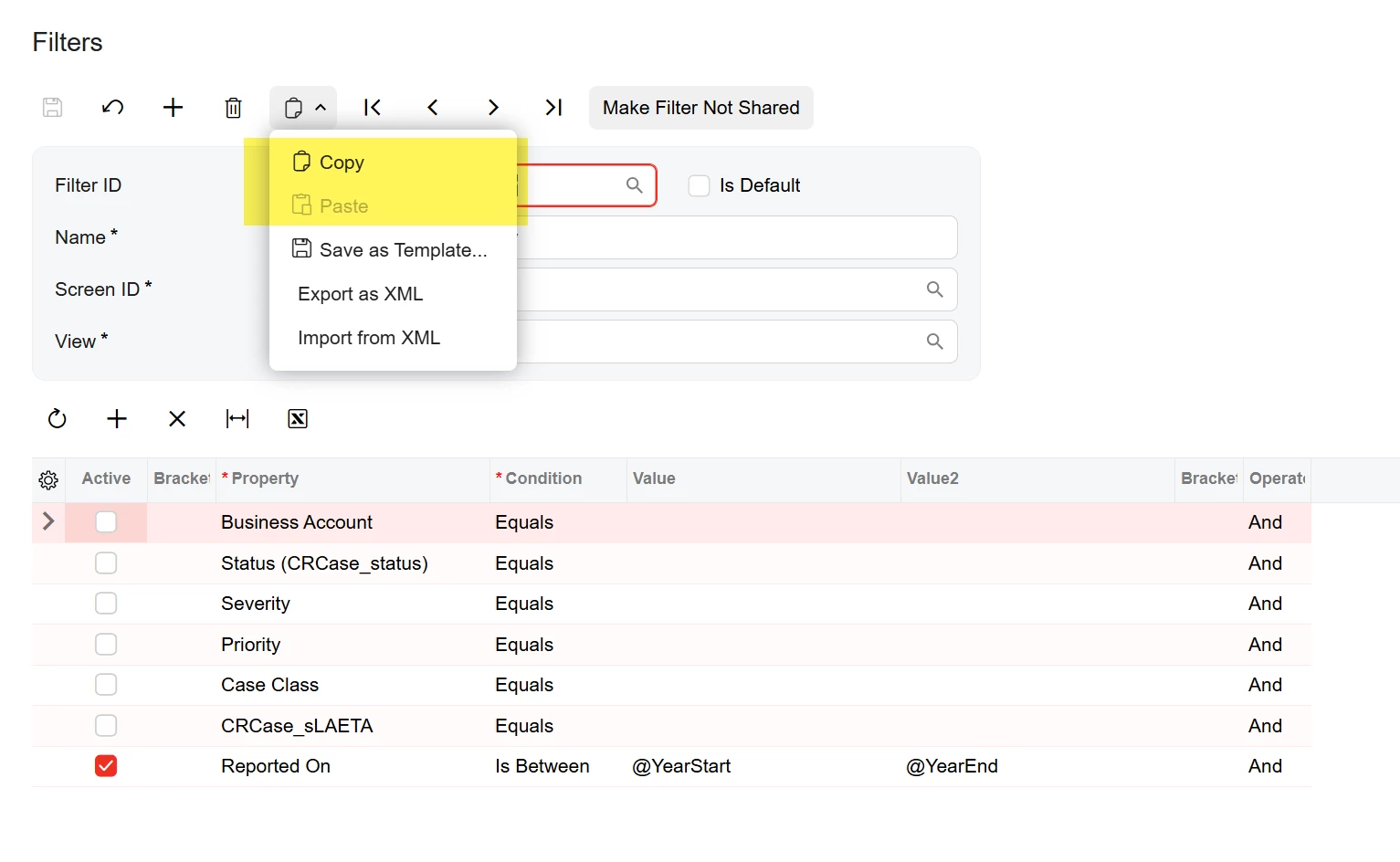
That said, I’m reporting a second issue that the ability to copy and paste GI filters is also broken. Copying and pasting filters through the filter screen is doing the exact same thing copying and pasting dashboards did a few versions ago where the pasted copy shares the same ID, so you could not distinguish between the two dashboards (filters in this case) on the site map.
Building dashboards, today, is 2026 R1 is not fun. It takes forever. I also shared my feelings about advanced filters earlier in this thread. Building brackets (especially layered) in advanced filters is a harder and more frustrating experience than in classic. Why can’t a place brackets over 3+ conditions anymore?

 +1
+1- Jr Varsity III
- September 3, 2026
We have had quite a few customers asking about the issue related to modern browsers, including Google Chrome and Microsoft Edge, removing support for the XSLT web technology beginning November 17, 2026. Most have discovered that they cannot use the MUI in it’s current state for most dashboards, ISV integrations and many other screens.
We have now been informed that Acumatica is has released a service patch (in the most recent update) that addresses this issue and will allow the Classic UI to continue functioning normally after November 17, 2026, and we are now coordinating schedules with around 40 clients to install the patch.
It has now become quite a scurry and services investment to get what functionality we can out of dashboards, GIs, customization packages and other screens to prepare for the R2 MUI only release. I love the look of the MUI but it’s a bear we continue to fight with.
Knowing of this new patch, is there the possibility that Acumatica will now continue to support Classic UI screens into the 2026R2 release?

 +6
+6- Varsity I
- September 4, 2026
This is an example of how unusable the modern ui (26R2 Beta) is to create an import scenario for sales orders. Something that would take minutes in classic. And you can’t just start typing the target object you have to use search.
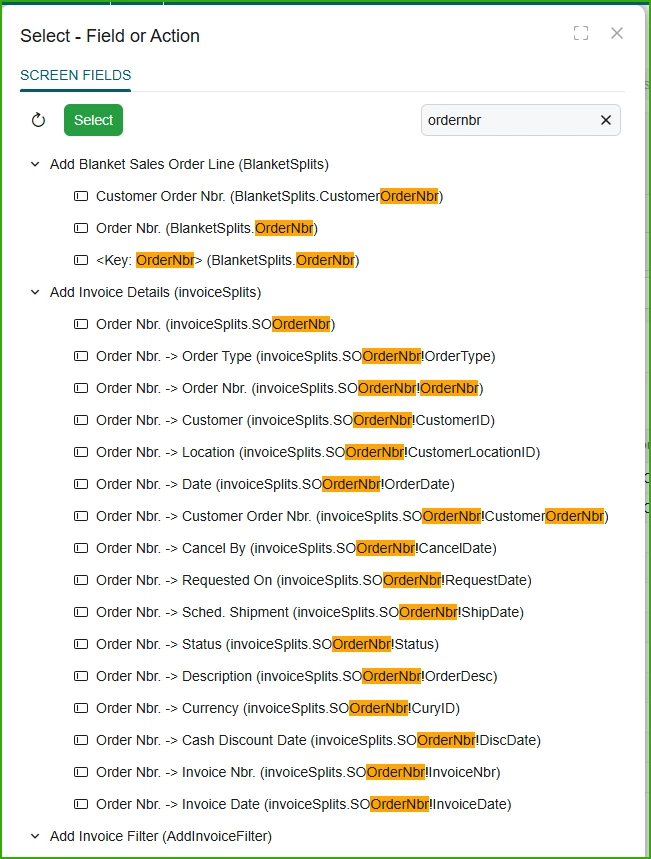
Finally, and scrolling for days. you find, you hope, the correct target
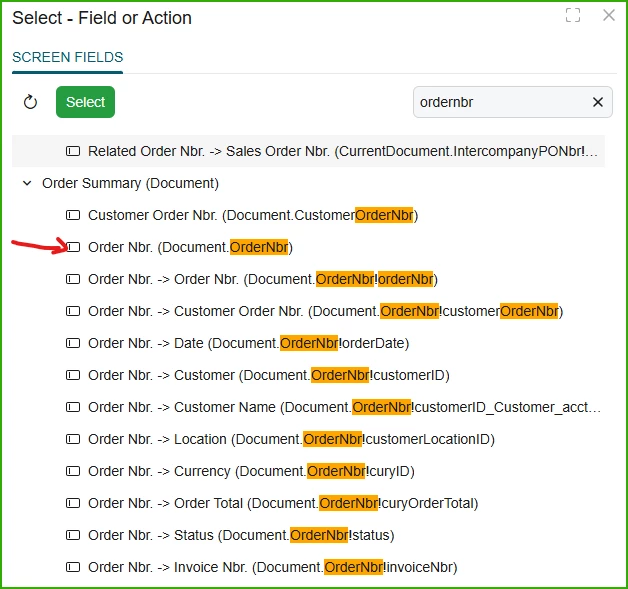
+12- Captain II
- September 4, 2026
Finally, and scrolling for days. you find, you hope, the correct target
“Hope” is so true. Even with a fairly deep knowledge of the tables and relations in this system there is a lot of hope in the new design.
Login to the community
No account yet? Create an account
Social Login
Login with your Acumatica accountEnter your E-mail address. We'll send you an e-mail with instructions to reset your password.
About Acumatica ERP system
Acumatica Cloud ERP provides the best business management solution for transforming your company to thrive in the new digital economy. Built on a future-proof platform with open architecture for rapid integrations, scalability, and ease of use, Acumatica delivers unparalleled value to small and midmarket organizations. Connected Business. Delivered.
© 2008 — 2024 Acumatica, Inc. All rights reserved