
Modern UI Issues

  • June 10, 2026
  • 41 replies
  • 642 views

Show first post

41 replies

MichaelShirk
Captain II
Forum|alt.badge.img+6

When the standard css classes ( “green40”, “red40”, etc. ) for highlighting grid rows are used in a GI, selecting the row changes the color enough to see which row is selected. In the classic UI, this also worked when the class was applied to a custom grid. 

In the modern UI, this no longer works. Selecting a highlighted row in a custom grid, doesn’t show any visual indicator on the row styling. Makes it impossible to see which row is currently selected. 


In GI highlighted grid rows, the styling changed for currently selected row. Missing from MUI custom styled grid. 


Forum|alt.badge.img

Here are some of the issues that we have encountered on the modern UI.  We are on 2025 R2.


  • Bank Deposit screen doesn’t work on Modern UI.
  • When access the Activities field on the AR Invoice screen, It randomly errors out on some but not every invoice.  They did install a hotfix it that sort of works.  We still get and error message but then if we arrow forward and back to the invoice it then works.
  • Project under Construction runs much slower than using the Classic UI.
  • Removal of Tabs on the GI filters make it less user friendly.  Many Complaints from my users that its not as friendly and harder to navigate.
  • Issues with hidden parameters.  I used to frequently copy and paste existing GIs to create new ones but I have run into issues doing this even when the table and joins are the same the new GI doesn’t return any results even before changes are made. Issue seems to be these hidden parameters.


MShields61
Jr Varsity III
Forum|alt.badge.img
  • Jr Varsity III
  • June 18, 2026

2025R2 have encountered these issues, have opened cases or discovered known issues, many are fixed in 26R1 or 26R2:

  • Pivot table issues already mentioned
  • Approvals open incorrect links
  • Time entry cannot just type in time and tab slows entry considerably
  • Shared configuration does not work
  • Project Quotes-Unable to create and review quotes from opportunity
  • Unable to rearrange/modify columns in forms
  • Projects GI-opening a project with many activities will not load
  • ARM Report permissions 
  • Hyperlinks do not return correct data-process bank transactions, Project Tasks
  • Various GI issues
  • Translation Dictionaries-run Collect Strings for changed fields to appear in Modern UI

AndreaGrover35
Jr Varsity II
Forum|alt.badge.img

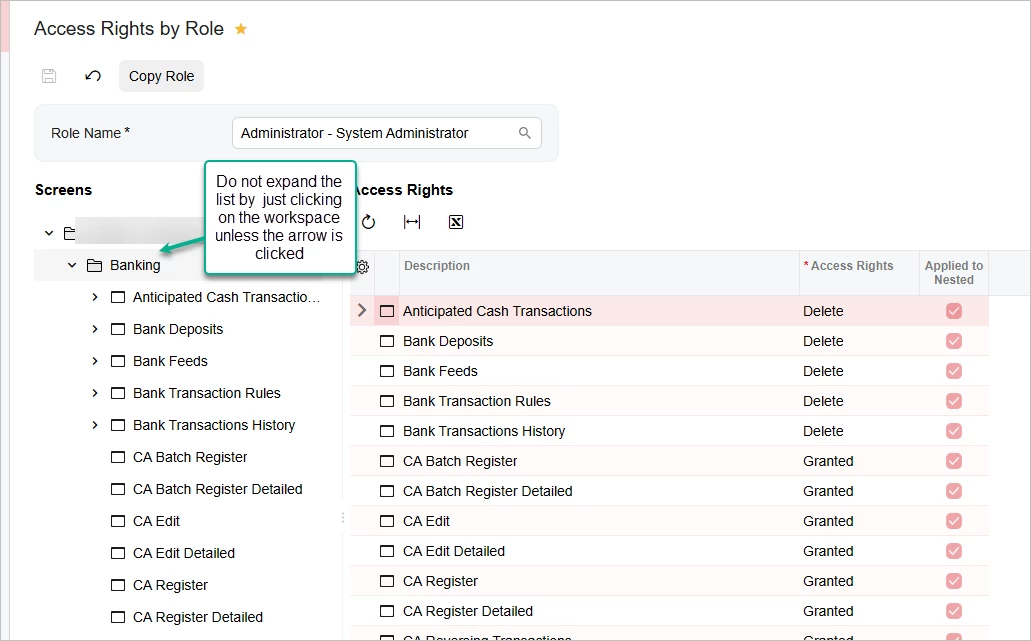
The Access Rights by Role screen should not automatically expand the list of screens under the workspace when clicking on the workspace name.  In Classic UI it stays closed unless you click on the arrow.  In Modern UI it expands by just clicking the word. 

You almost never need to expand the list in the left pane since you set all rights in the Access Rights pane.

This happens in all builds of 2025 R2 and Build 26.100.0175.2


swittrock
Freshman I
Forum|alt.badge.img
  • Freshman I
  • June 22, 2026

From everything I was told leading up to the upgrade to 25R2 and the Modern UI was that speed would be considerably improved.  That is not the case and is actually slower than before.  We have switched several screens back to the Classic UI, for instance the Customer Profile screen.  There were tabs on the Customer Profile that took 5+ minutes to load (Locations and Mailing & Printing).  Mailing & Printing even showed wrong information while in the Modern UI.

Another issue was Stock Item Profiles list, the quick search function didn’t work and we switched back to the Classic UI.

We have many Generic Inquiries that the user custom column configuration reverts back to standard when the user leaves the screen.

Performance is our biggest issue so far, very poor.  But we thought it was slow before also, it just got worse which we were surprised was possible.


Just went live to 2025R2 this month. So far the biggest issue has been the export of GI’s to excel and it ignoring filters. Particularly the Sales Profitability Analysis, we love this GI and the export ignores the current filters and takes the default params on the GI.


dannyfisher34
Freshman II

No more right click action in grid rows?? This is so stupid! We used these actions a lot and if I cant tuck them in grids popup it will cause immense clutter on the screen. 

Acumatica really is missing the mark with the modern ui. It seems like so mech emphasis has been put on the look and feel of things that some of the core functionality has bee completely overlooked. The modern ui fields use up a lot more space on a screen making the overall screen less compact and not to mention development is just confusing and difficult compared to the classic ui. Might be I was just very familiar with editing aspx.

And the fact that the classic ui is being cut off in 26 R1 with the amount of bugs being discovered in the modern ui is very disappointing to say the least.

Am I completely missing something or is anybody else running into these types of issues?


MichaelShirk
Captain II
Forum|alt.badge.img+6

@dannyfisher34  
The primary focus seems to be AI, AI, and more AI. Creates more marketing buzz….. 

Granted, the modern UI implementation is a huge project, and I would expect things to go back a bit before we start going forward again. I really haven’t seen much practical business benefit from the MUI, but I’m hoping that once they’re no longer maintaining two frontend code bases, they’ll be able to make more progress.


bwhite49
Captain II
Forum|alt.badge.img+12
  • Captain II
  • June 23, 2026

@dannyfisher34  
I really haven’t seen much practical business benefit from the MUI, but I’m hoping that once they’re no longer maintaining two frontend code bases, they’ll be able to make more progress.

The one thing that was added with modern UI that adds a little value (the screen editor) does not seem to solve much. It’s great to be able to move fields from the UDF tab to the header or another tab but falls short in a lot of ways. For example, not being able to make a field required makes the screen editor feel “incomplete.” 

I agree that we have lost a lot for almost no benefit which makes all of this very frustrating… and expensive. More time/effort to do the same task means more expensive.


jpimental
Freshman I
  • Freshman I
  • June 23, 2026

I really want functional typeahead!


Forum|alt.badge.img
  • Jr Varsity II
  • June 23, 2026

The convert to modern UI option for customization projects generates broken or unnecessary files 100% of the time in 25R2.


Patch 4 for 25R2 deleted the development folder for modern UI files with no warning and did not reinstate it. I can clone it again from our repository, but I don’t understand the decision-making process behind this.


I also wanted to add a simple label for a custom section in the header of a form, but that was impossible to do unless I restructured the rest of the header. It was trivial to add in classic UI without a restructuring of unrelated content.


courtneyb
Freshman II
Forum|alt.badge.img
  • Freshman II
  • June 23, 2026

  • Freshman I
  • June 23, 2026

Many of the item noted are also communicated to us from our clients:

  • Removal of Tabs on the GI filters make it less user friendly.  Many Complaints from my users that its not as friendly and harder to navigate.
  • Speed is slower
  • Screens are less compact for data

Those are the key items that are consistently noted.


Forum|alt.badge.img
  • Jr Varsity III
  • June 24, 2026

We have been using modern UI on a dozen plus screens for the past few months without too many issues.   This week we made the decision to change all of our screens to the modern UI and now we are seeing more issues.  Here are the ones that I am hearing about from our users this week:

  • Side panels do not always refresh/update with data for the current record that is selected.  In many cases selecting a new record results in the side panel getting cleared and being blank. Closing the side panel and reopening refreshes the side panel with data for the currently selected record.
  • Hyperlinks in side panels work inconsistently.  If there are multiple pages on side panel, they seem to work OK on the first page,  but are unresponsive on subsequent pages.
  • Fields that were previously hyperlinked are not hyperlinked on some screens.   This is hit or miss,  but the one that was brought to my attention this morning was the Mfg Batch # located on the Manufacturing tab/menu of the “Issues Screen” (IN30200).

nwohlschlaeger94
Freshman I
Forum|alt.badge.img

From My AR person:


1.) Is this going to get faster?  There's currently about a 5 second lag between each payment I enter.  

2.) When running through pages, if I click into a customer, payment, invoice, then exit - does it have to revert back to page 1?


swittrock
Freshman I
Forum|alt.badge.img
  • Freshman I
  • June 24, 2026

On a Customer Profile, the Mailing & Printing tab, the system isn’t sending invoices to the 2nd address we have defined.  It is only sending to the primary billing email address.  Worked fine in 2024R2 but not in 2025R2.