Please provide feedback on the Modern UI if you have issues with it so that Acumatica can focus on improvements to it. Acumatica AI will pick up your feedback for them to focus on improving it prior to the 26R2 release when the classic UI goes away.
- Community
- Discussion Forums
- Other Developer Topics
- Modern UI Issues
Modern UI Issues
- June 10, 2026
- 44 replies
- 742 views


 +14
+14- Captain II
David Eichner, CPA - If I helped you, please *Like* my post/reply. If I provided an answer to your question, please mark it as *Best Answer*.
- Like
- Share
44 replies
 +12
+12- Captain II
- June 10, 2026
I think the big one is the removal of tabs on GI filters. This change was not good.
I also struggle with the import scenario builder in modern UI. I have to toggle between the two UIs to find fields, and it takes much longer to build them than they used to.
There are also quite a few bugs. Here are a couple to start…
- Can’t rearrange parameters and conditions in the GI editor anymore.
- Export to excel for GIs is still broken
- Performance seems to decline on screens/GIs using modern UI

 +6
+6- Varsity I
- June 10, 2026
Missing things
- Shared configuration for grids not available.
- Opening a screen from a list (link not side panel) returns you to the first page of the list when you close the screen. Go to a page 6 of the stock items and click the inventory ID to open the stock item maintenance. Close the stock item screen and you are back on page 1.
- Right click to insert row in a list or a GI definition
- after publishing a customization and restart the Screen is Loading message seems to take a much longer time.
- Cannot report time on the Labor screen in MFG by typing 130 for 1 hour and 30 minutes.

 +3
+3- Varsity III
- June 10, 2026
The ‘Upload using mobile app’ button doesn’t work on the Purchase Receipts screen, however it works when switching to Classic UI


- Freshman I
- June 10, 2026
25R2 version:
- We create Opportunities and put the Details of the order on the Details tab. We then click the Create Quote option from the … menu. This brings up the Create Quote dialog box that has two tabs – MAIN and USER-DEFINED FIELDS. We leave the default values on the MAIN tab and put the Product Line in on the USER-DEFINED FIELDS tab. When you go to the USER-DEFINED FIELDS tab, it shows the Name of the UDF “Product Line” and the Value of the UDF. How this works is the initial Value is empty and you click into that field and pick the Product Line from the dropdown menu. However, the Value field is NOT editable. It does nothing when you click or double-click in it. This works fine in the Classic UI.
- Click on File icon on any screen and click Edit to see the Versions. We have many versions of files from our Export Scenarios. We go out and clean these up to just leave a few days. The view shows one page of versions (around 13 or so). If I click the > arrow key to go to next page, it shows the message “Nothing has been found”, the screen is blank, and the arrows for moving forward or backwards have disappeared. This works fine in the Classic UI.
- Mentioned above, but I agree that you can’t order Parameter and Conditions in an GI editor anymore.


- Freshman I
- June 10, 2026
I think the big one is the removal of tabs on GI filters. This change was not good.
I also struggle with the import scenario builder in modern UI. I have to toggle between the two UIs to find fields, and it takes much longer to build them than they used to.
There are also quite a few bugs. Here are a couple to start…
- Can’t rearrange parameters and conditions in the GI editor anymore.
- Export to excel for GIs is still broken
- Performance seems to decline on screens/GIs using modern UI
bump

 +1
+1- Semi-Pro I
- June 11, 2026
The biggest issue I have in Modern UI is not being able to add lines in the middle of a project quote.
This is an absolute necessity. Otherwise we have to add lines at the bottom of the quote and then drag them up.
It is already described very well here:
Modern UI: Bring back right click context menus | Community
Thanks for giving us the opportunity to share our thoughts and ideas.
 +16
+16- June 11, 2026
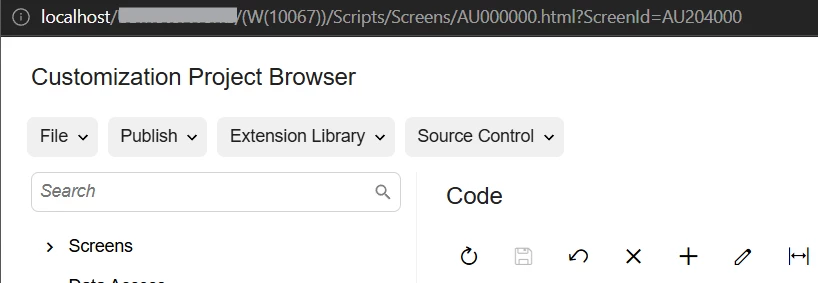
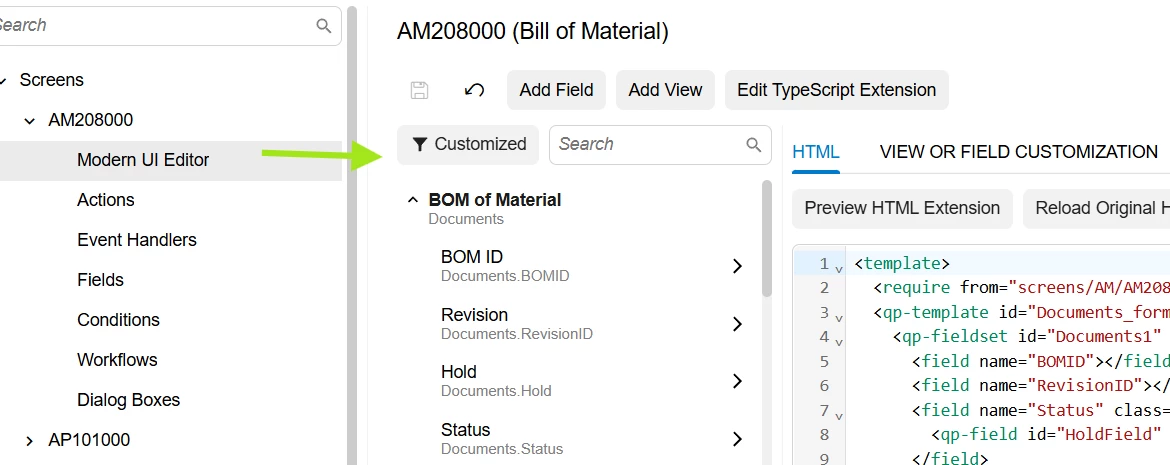
The Modern Customization Project Browser displays the current project name NOWHERE
The usability of the ‘Modern UI Editor’ is so confusing (in my opinion) that it will deter people from making simple customization changes themselves (which is actually great for my business):
Daryl ⚡Freelance developer 🛒Check out my products 👉🏻deftstrokesdev.com/index.php/products ⏩linkedin.com/in/darylbowman
+12- Captain II
- June 11, 2026
I just found this one…
Hidden parameters now take up real estate in GIs
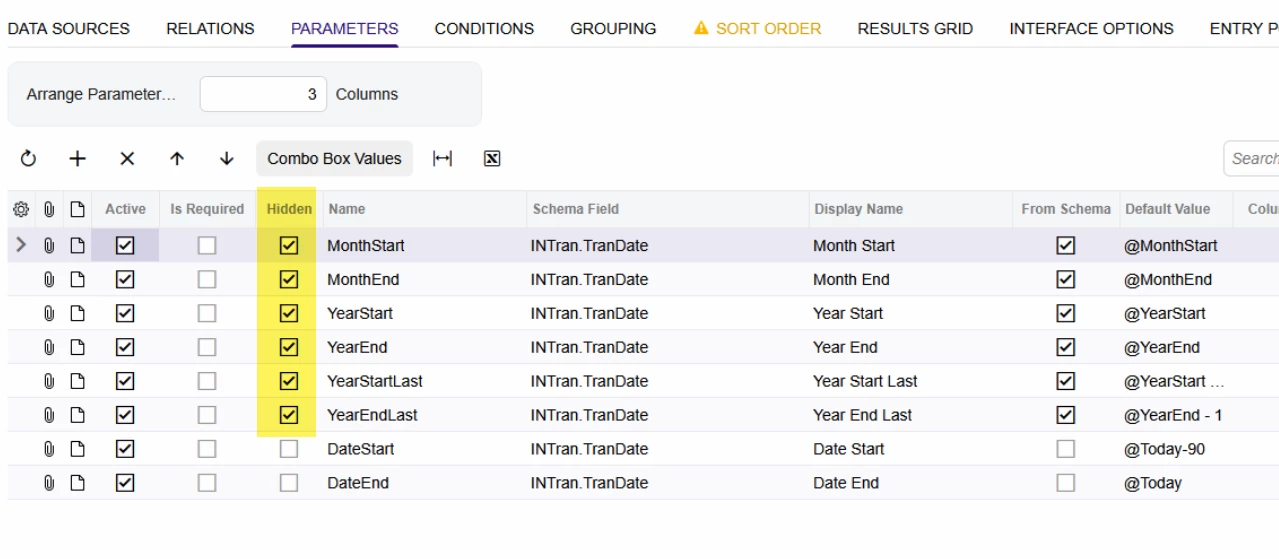
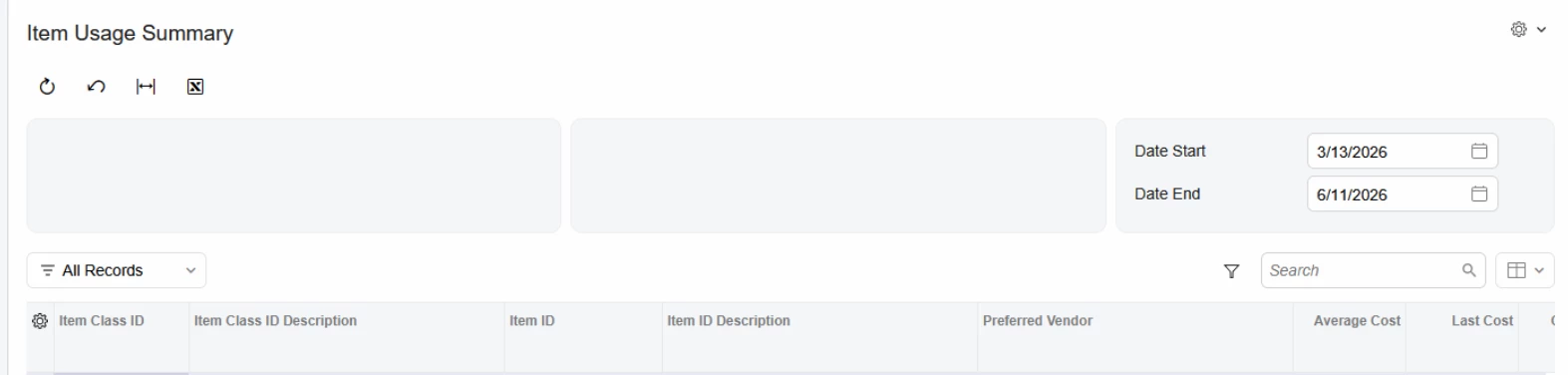
Edit: Changing the arrange parameter field to 1 instead of 3 seems to fix the issue.

 +4
+4- Semi-Pro II
- June 11, 2026
This post looks relevant to this discussion:
Customer struggling to export/move a Pivot for a GI between environments.
+12- Captain II
- June 11, 2026
This post looks relevant to this discussion:
Customer struggling to export/move a Pivot for a GI between environments.
I’ve been having issue with migrating GIs now. It used to be that the inquiry title and screen IDs were the only validation when migrating GIs to a separate tenant. Now, when migrating GIs, you can’t simply change the inquiry title and screen ID and then migrate the GI like we used to be able to do.
Inquiry validation seems to be based on NoteID now. So if the same NoteID exists for an inquiry in the tenant you are copying to, the GI import is going to erase that GI with the same NoteID.
In order to migrate a GI now, you have to Copy and paste the GI in the “From” tenant so that is generates a unique note ID, then you can migrate the GI over to the “To” and not erase the GI with the same NoteID.
+4- Semi-Pro II
- June 11, 2026
This post looks relevant to this discussion:
Customer struggling to export/move a Pivot for a GI between environments.
I’ve been having issue with migrating GIs now. It used to be that the inquiry title and screen IDs were the only validation when migrating GIs to a separate tenant. Now, when migrating GIs, you can’t simply change the inquiry title and screen ID and then migrate the GI like we used to be able to do.
Inquiry validation seems to be based on NoteID now. So if the same NoteID exists for an inquiry in the tenant you are copying to, the GI import is going to erase that GI with the same NoteID.
In order to migrate a GI now, you have to Copy and paste the GI in the “From” tenant so that is generates a unique note ID, then you can migrate the GI over to the “To” and not erase the GI with the same NoteID.
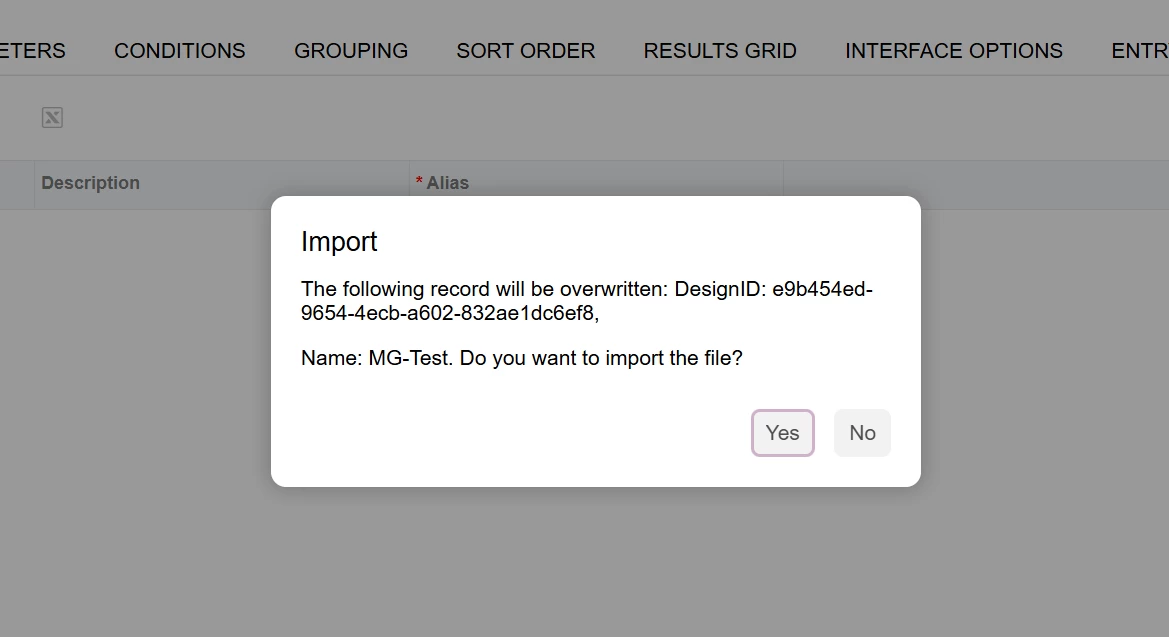
As far as I know, that’s not new, at least if you’re dealing with XML Import/Export. DesignID (Which is I think the database field that you’re referring to as NoteID) has been the primary key for imports via XML for awhile. I keep getting caught out by this.
If you’re exporting/importing, another option is to just modify the DesignID GUID in the XML to force uniqueness.
+12- Captain II
- June 12, 2026
As far as I know, that’s not new, at least if you’re dealing with XML Import/Export. DesignID (Which is I think the database field that you’re referring to as NoteID) has been the primary key for imports via XML for awhile. I keep getting caught out by this.
If you’re exporting/importing, another option is to just modify the DesignID GUID in the XML to force uniqueness.
I remember opening up the XML in notepad and changing the screen ID when there was a conflict a year or two ago. I never had to worry about the NoteID/DesignID up until recently. It was always the Screen ID that the XML import would complain about, but it could be that I may have missed this error.
+6- Varsity I
- June 12, 2026
I thought the NoteID was a GUID and that makes them unique.. A best practice, and not always followed, is to change the screen ID when you publish to something unique to the client or partner. For example, if the client is Jones, then make the screen id JO.NE.xx.xx
+16- June 12, 2026
This is also a known issue:
Daryl ⚡Freelance developer 🛒Check out my products 👉🏻deftstrokesdev.com/index.php/products ⏩linkedin.com/in/darylbowman

- Freshman II
- June 12, 2026
Email Activity screen will not accept multiple images. When pasting in a new image, the first image becomes a copy of the second image. When I switched the screen to Classic, the user was able to add two screenshots to the email body with the same technique that was confounding her in Modern UI.
- Varsity I
- June 15, 2026
We have run into several of the above mentioned issues, and have reported others via cases. I am hoping that this thread is being actively monitored by those who are deciding that 26R1 is truly the last version to allow a roll back to WORKING classic interface functionality. Those become quite difficult to explain to clients when we have to roll back, and will become worse when there is no roll back possibility. I can envision the clients saying - you encouraged (forced) me to upgrade and now XX number of screens no longer work as well as they used to.
+12- Captain II
- June 15, 2026
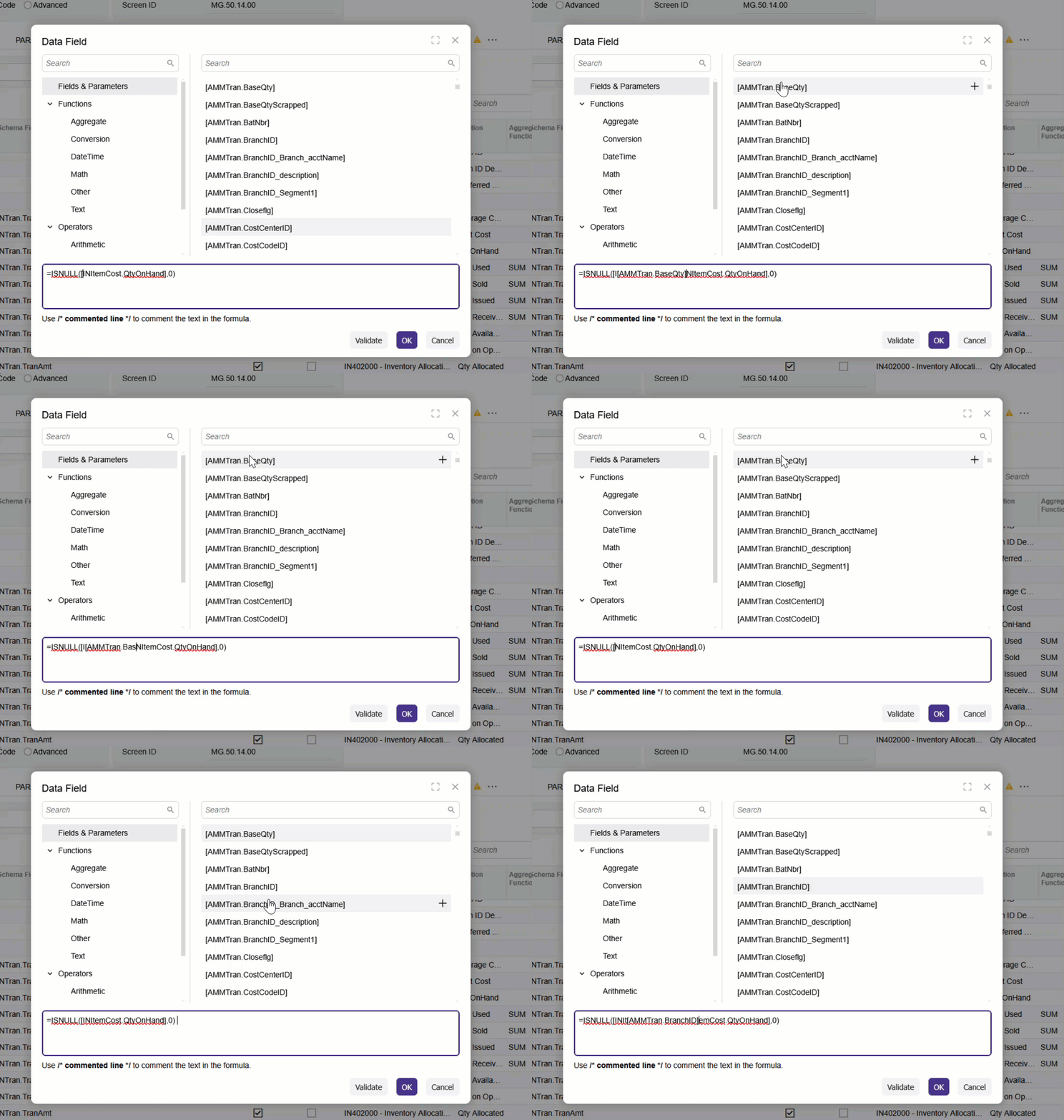
The GI formula builder in the generic inquiry editor has some issues...
- We can’t resize the formula box, so we can’t expand the visibility for long formulas.
- Can’t use “returns” anymore in the editor. While not a functional key, being able to add spaces between parts of the formula when building a formula has been extremely helpful for me in the classic UI.
- Inserting a field into the formula builder will now insert the field randomly, not where the insertion point/marker is as shown below.
- Varsity I
- June 15, 2026
Thank you for the reminder
+12- Captain II
- June 15, 2026
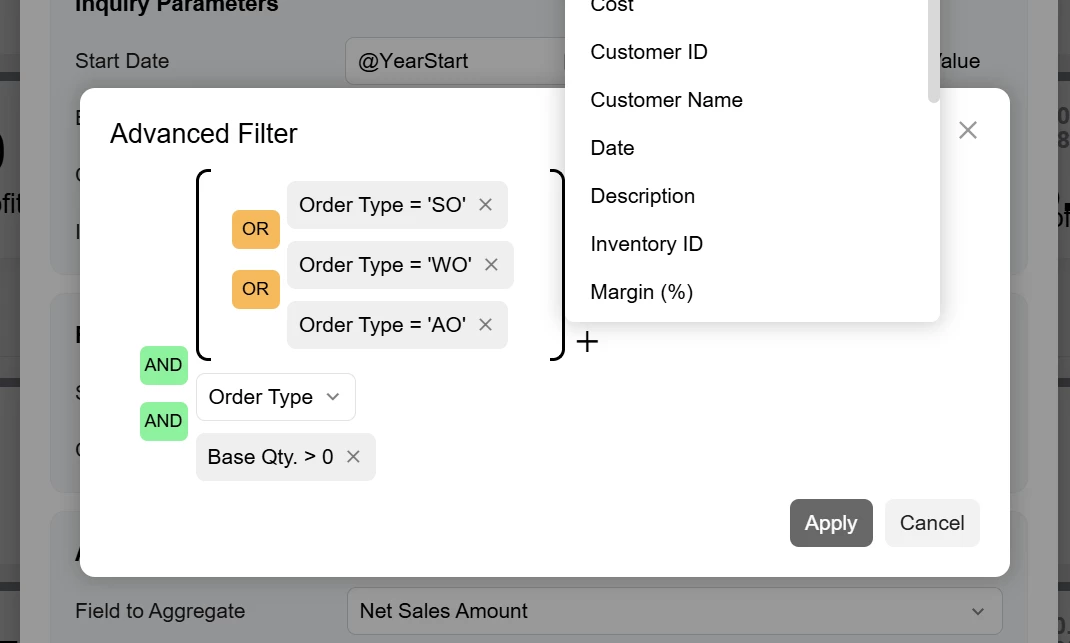
I have not seen anybody complain about the dashboard filters yet. Does anybody find the change “helpful?”
I have a feeling they are going to add this everywhere, and I am a little worried. It looks cool, but it’s hard to know what to do. Adding brackets is not intuitive at all.


- Acumatica Community Manager
- June 15, 2026
Thank you
Chris ~ Let us know how we're doing: https://forms.office.com/r/xmJUdZ1QE5 - A member helped you, please *Like* their post. A member provided an answer to your question, please mark it as *Best Answer*.
+14- Author
- Captain II
- June 15, 2026
Most of the feedback from our internal users and our clients involves not liking the way the data fields are more spread out requiring users to have to page down and up to see the entire tab screen.
David Eichner, CPA - If I helped you, please *Like* my post/reply. If I provided an answer to your question, please mark it as *Best Answer*.
+16- June 16, 2026
Daryl ⚡Freelance developer 🛒Check out my products 👉🏻deftstrokesdev.com/index.php/products ⏩linkedin.com/in/darylbowman


- Captain I
- June 16, 2026
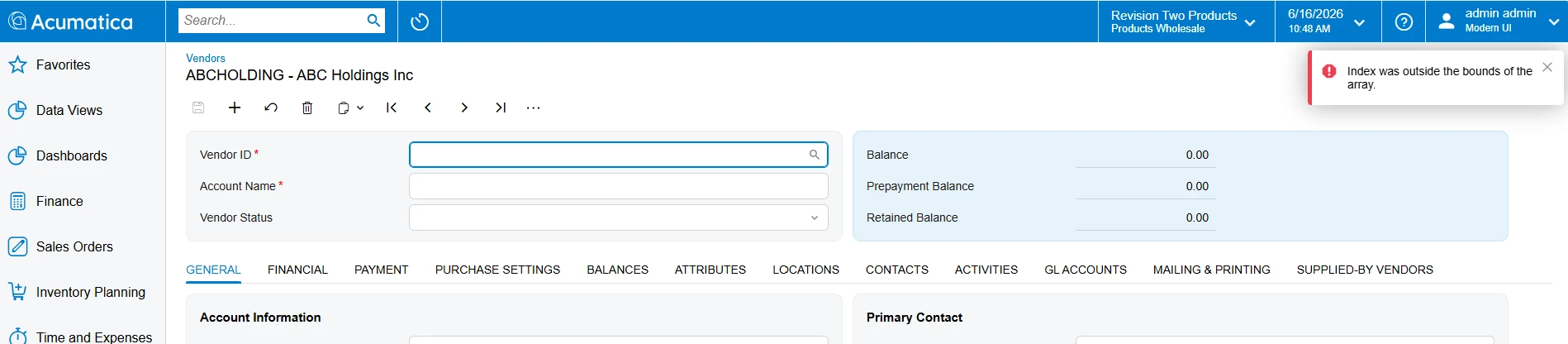
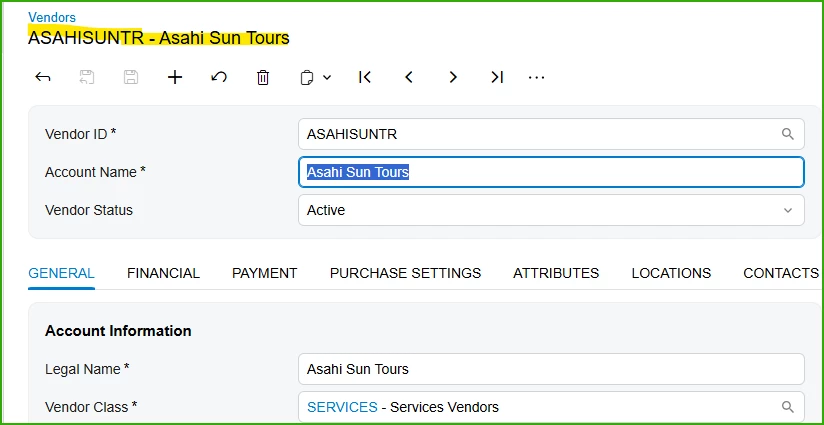
Not sure if this is a Modern UI issue, but we are unable to extend customer to vendor using sales demo data. But when extending to vendor for the same customer in classic UI, the record converts as expected. This is the error we are getting:
+6- Varsity I
- June 17, 2026
Please provide build info when reporting the issue. Worked in Build 26.100.0175.1
Converted to Vendor this customers
+4- Semi-Pro II
- June 17, 2026
Related seeming posts:
Relative date parameters no longer working for user in Modern UI (@YearStart, @WeekEnd, etc) and returning nulls when called as part of report default values.
Similar issues in ARM with parameters in Modern UI differnt from classic UI and not available with MUI on:
Enter your E-mail address. We'll send you an e-mail with instructions to reset your password.
Scanning file for viruses.
Sorry, we're still checking this file's contents to make sure it's safe to download. Please try again in a few minutes.
OKThis file cannot be downloaded
Sorry, our virus scanner detected that this file isn't safe to download.
OK
About Acumatica ERP system
Acumatica Cloud ERP provides the best business management solution for transforming your company to thrive in the new digital economy. Built on a future-proof platform with open architecture for rapid integrations, scalability, and ease of use, Acumatica delivers unparalleled value to small and midmarket organizations. Connected Business. Delivered.
© 2008 — 2024 Acumatica, Inc. All rights reserved