Question

Help! Applying a patch broke my dev instance.

  • September 18, 2026
  • 10 replies
  • 75 views

MichaelShirk
Captain II
Forum|alt.badge.img+6

Using patch tool version 1.18.1.0. I attempted to update my developer instance

from  26.100.0175 to 26.100.0175.5  

I don’t recall seeing an error in the terminal, but I also don’t recall closing the terminal. 

I went to load the site and got the following server error. “ The type or namespace name 'Maintenance' does not exist in the namespace 'PX.Data' (are you missing an assembly reference?)” 
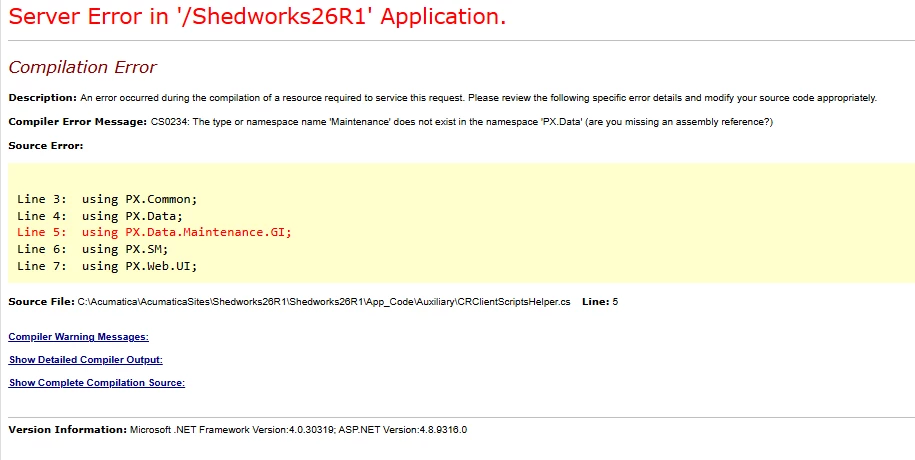


After some digging I discovered that PX.Data.dll was missing from my instance bin folder. 

The patch tool errors now if I try to run any of the commands. 

 

Attempting to run the wizard to upgrade/repair the site also errors on PX.Data.dll. 
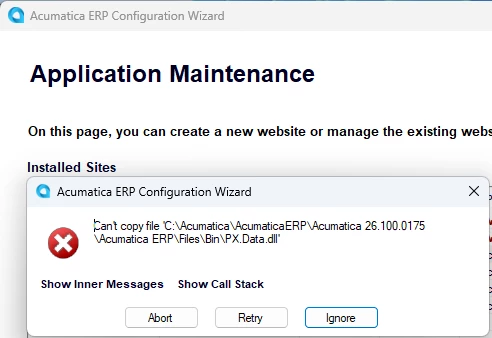
 

Anyone else seen anything like this?

10 replies

JKurtz29
Varsity II
Forum|alt.badge.img+1
  • Varsity II
  • September 18, 2026

I haven’t seen that.  Have you tried going into the ERP Configuration Wizard and use the Perform Application Wizard and selecting the option to upgrade the website?  That should write the files back out to the website.

Once you get back in, you can try patching again, and republishing your customizations.


MichaelShirk
Captain II
Forum|alt.badge.img+6
  • Author
  • Captain II
  • September 18, 2026

@JKurtz29 Perhaps you were typing your response when I updated the post to add that I’ve already tried that!😅


JKurtz29
Varsity II
Forum|alt.badge.img+1
  • Varsity II
  • September 18, 2026

@JKurtz29 Perhaps you were typing your response when I updated the post to add that I’ve already tried that!😅

Or I was just lazy and didn’t read it all :/

I imagine you’ve also tried doing an IISRESET from and administrator command prompt or rebooted your machine to recycle IIS in case it somehow has a file handle in memory or some other strange thing going on?

Have you also tried adding a new instance in a different folder, but pointing to your existing database to see if that works?


andreybudaev87
Acumatica Employee
  • Acumatica Employee
  • September 18, 2026

Hi ​@MichaelShirk 


After PatchTool performs any operation, a log file is written to the disk. Please attach it. 


darylbowman
Captain II
Forum|alt.badge.img+17

Did you try just pasting in PX.Data.dll from a different 26 R1?


MichaelShirk
Captain II
Forum|alt.badge.img+6
  • Author
  • Captain II
  • September 18, 2026

@JKurtz29  Those are the things I’m in the process of trying. 

Thanks! 

@andreybudaev87 Where do those get stored?


andreybudaev87
Acumatica Employee
  • Acumatica Employee
  • September 18, 2026

@MichaelShirk 


In the folder with patchtool.exe


MichaelShirk
Captain II
Forum|alt.badge.img+6
  • Author
  • Captain II
  • September 18, 2026

@darylbowman I tried that, but even with admin permissions I was still blocked. 
Claude and ​@JKurtz29 seem to be right, because after a reboot I could rebuild the site and it loads again. 

When a file is deleted while a process still holds an open handle to it, Windows puts it in a delete-pending state: the name disappears from directory listings, but the entry stays reserved in the directory until the last handle closes. Any attempt to create a new file with that name returns ERROR_ACCESS_DENIED, which .NET surfaces as UnauthorizedAccessException. That matches everything you've seen — invisible file, writable folder, clean ACL, test.txt succeeds, PX.Data.dll doesn't.

Reboot the server, then retry the copy. That releases the handle unconditionally and is faster than hunting it down.

” 

I’ll reattempt the patch now.


MichaelShirk
Captain II
Forum|alt.badge.img+6
  • Author
  • Captain II
  • September 18, 2026

@andreybudaev87 the second attempt did exactly the same thing. 
I’ve attached the log file. 

I ran the patchtool. The process looked like it was running successfully, then suddenly powershell closed. 

I try to open the site and it’s broken again with the same message. 
I checked and PX.Data.dll is also missing from the instance bin folder again. 


andreybudaev87
Acumatica Employee
  • Acumatica Employee
  • September 19, 2026

Hi ​@MichaelShirk 

Thanks for the log. Short version: PatchTool isn't deleting PX.Data.dll, and it isn't crashing on its own. Something outside is killing the process and removing the file — most likely an antivirus / EDR product on that machine.

The patch itself ran fine: everything was downloaded, verified, backed up, and all files were written, including PX.Data.dll. The log then just stops mid-step, with no error and no rollback. That's a hard kill, not a failure.

Two things point away from the patch tool itself:

  • Your PowerShell window closed by itself. If the tool had crashed, PowerShell would have stayed open with an error. A whole console window disappearing means the process tree was killed externally.
  • PX.Data.dll was written successfully and then vanished. The tool has no code path that deletes files from Bin — that looks like a quarantine.

It also reproduces at exactly the same point every time, which suggests a deterministic detection rule.


Could you run these and send the output?

Get-MpThreatDetection | Where-Object {$_.InitialDetectionTime -gt (Get-Date).AddDays(-3)} | Format-List InitialDetectionTime,ThreatID,Resources,ActionSuccess
Get-WinEvent -LogName "Microsoft-Windows-Windows Defender/Operational" -MaxEvents 100 | Where-Object Id -in 1006,1007,1015,1116,1117 | Format-List TimeCreated,Id,Message
Get-WinEvent -FilterHashtable @{LogName='Application','System';StartTime=(Get-Date '2026-09-18 13:40');EndTime=(Get-Date '2026-09-18 13:50')} | Format-List TimeCreated,Id,ProviderName,Message

If you're running third-party security software in addition to Defender, the commands above will come back clean even if that product is the culprit — so please also let us know what else is installed on the box.


If it's confirmed, add exclusions for:

  • C:\Acumatica\AcumaticaSites\Shedworks26R1\ (whole tree)
  • C:\ProgramData\AcumaticaPatchTool\
  • C:\Program Files\AcumaticaTools\NodeJS\
  • the PatchTool.exe, node.exe and npm.cmd processes