Answer

Validation Failed While Publishing Customization Package in MYOB Advanced Build 2024.210.100.3447

  • July 9, 2025
  • 3 replies
  • 129 views

Hi Team,


I have installed MYOB Advanced Build 2024.210.100.3447 [24.210.0019] on my local system and successfully applied a developer license key. After applying the license, the site and standard screens are loading fine.

As a test, I created a simple customization project that adds a boolean field to the Sales Order (SOOrder) header via a cache extension. There are no other changes in the package.

However, when I attempt to publish the customization, I encounter the following error during the validation phase attached a copy for your review.


There are no additional errors or detailed messages provided in the output log.

What I Have Tried

  • Rebuilt the customization project in Visual Studio (no compile-time errors).
  • Confirmed that the field is added using a clean PXCacheExtension of SOOrder.
  • Confirmed no duplicate extension classes.
  • Restarted IIS and cleared temp files in the validation directory.
  • Tried on a fresh copy of the instance.

Request

Can someone advise how to resolve this issue or identify where I can find the detailed cause of the validation failure?
Please let me know if you need more information (such as the exact extension class code or screenshots).

Thanks in advance!
Best answer by Graeme Laughton-Mutu

Hi ​@BhavyaSreeG 


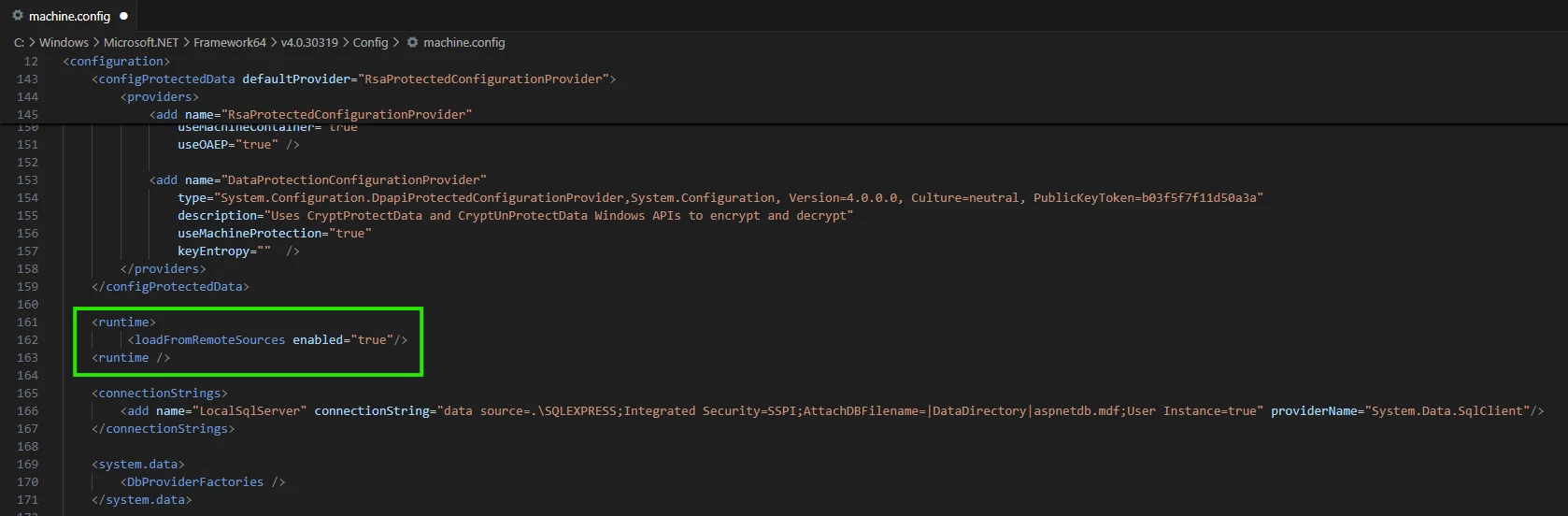
You could try updating the machine.config file  with:

    <runtime>
<loadFromRemoteSources enabled="true"/>
<runtime />

C:\Windows\Microsoft.NET\Framework64\v4.0.30319\Config\machine.config


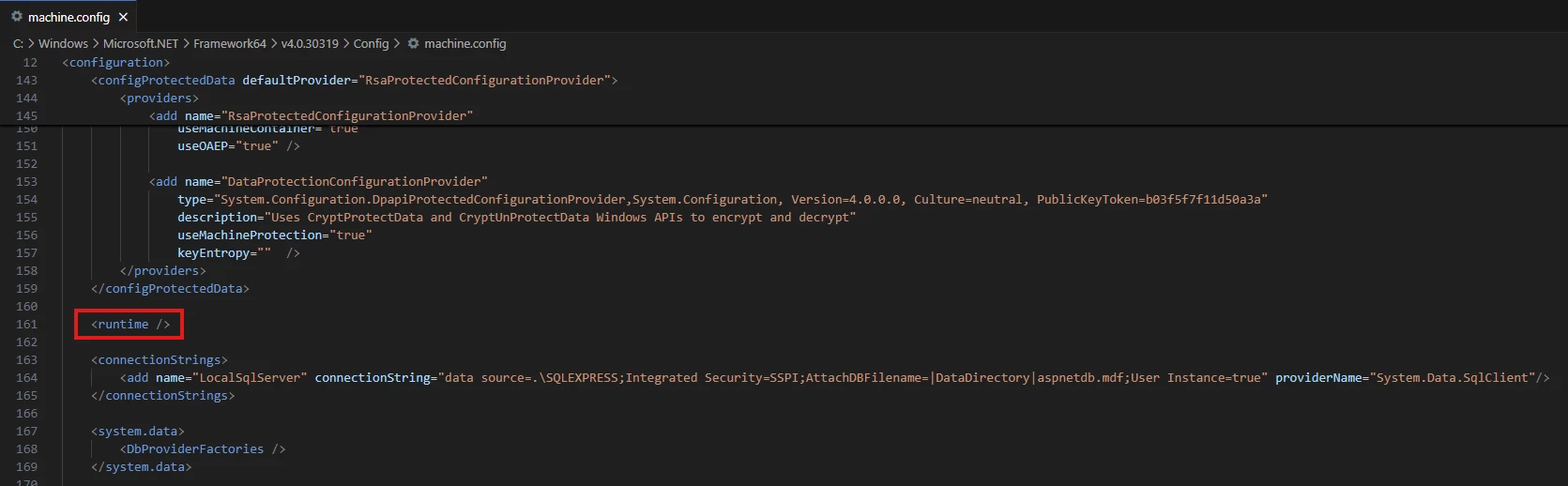
Before:

After:


This fixed a similar issue where the publish process was trying to run px.commandline.exe in the customisation/bin folder for the customisation, but threw this error in the event viewer when running the exe:

https://stackoverflow.com/questions/28339116/not-allowed-to-load-assembly-from-network-location


3 replies

Graeme Laughton-Mutu
Semi-Pro I
Forum|alt.badge.img+1

Hi ​@BhavyaSreeG 


You could try updating the machine.config file  with:

    <runtime>
<loadFromRemoteSources enabled="true"/>
<runtime />

C:\Windows\Microsoft.NET\Framework64\v4.0.30319\Config\machine.config


Before:

After:


This fixed a similar issue where the publish process was trying to run px.commandline.exe in the customisation/bin folder for the customisation, but threw this error in the event viewer when running the exe:

https://stackoverflow.com/questions/28339116/not-allowed-to-load-assembly-from-network-location


  • Author
  • Freshman I
  • July 11, 2025

Hi ​@Graeme Laughton-Mutu 

Thank you so much for your support — the solution worked perfectly.

After adding the runtime code snippet and removing the <runtime /> tag from the machine.config, everything is functioning as expected. I appreciate your guidance!
 

<runtime>
<loadFromRemoteSources enabled="true"/>
</runtime>


Forum|alt.badge.img
  • July 16, 2025

@BhavyaSreeG , I believe you would have fixed the issue. Just thought of sharing there is also another option to fix the issue for a local instance. This issue is because the dll’s inside your site bin folder are locked, use can use this key in your web.config  <add key="CheckCustomizationCompatibility" value="false" /> or another way before publishing the customizations unlock all the dlls in the site bin folder using Powershell script,

$Path = "Site Bin folder path"

Get-ChildItem "$Path" -Recurse | Unblock-File