Solved

Work centers with multiple shifts

  • January 20, 2026
  • 3 replies
  • 35 views

We have a problem in configuring work center. A work center is configured with ‘basis of capacity’ set to crew size, and three shifts are added, each with a different calendar. The calendars are configured with 8 working hours in a day, but the timings are different. 
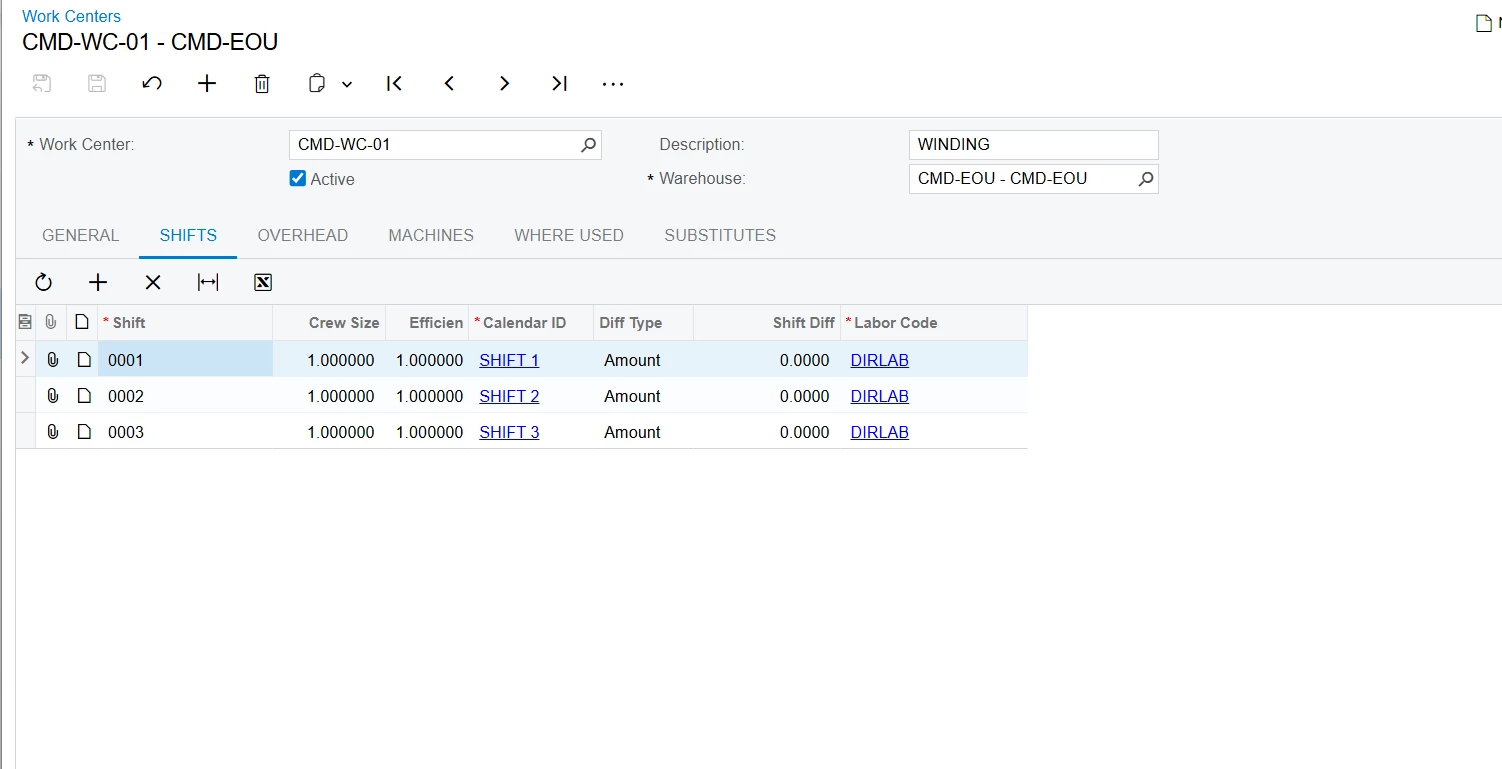
When the MRP runs, the action date calculates based on the crew size and calendar in the first row of shifts but we thought it would consider all the shifts. If all the shifts are considered, the action lead time should be reduced to one-third, as the total working hours of the work center are 24 hours.

We are not sure why Acumatica considers only the shift details in the first row

Best answer by angierowley75

How Fixed MFG Lead Time is designed to work:

When Use Fixed Lead Times on Inventory Planning is checked, the system should calculate the action date (for MRP) based on the lead time of the stock item – observing the Fixed Mfg calendar on Production Preferences.

When Use Fixed Lead Times on Inventory Planning is unchecked, the system should calculate the action date (for MRP) based on the duration of the production observing the calendar of the first shift of the production order operations work center.

Other information to note:

Production Preference “Fixed Mfg Units” drives both scheduling and MRP/DRP.  The number assigned to MFG Lead time on Stock Item is either in days or hours based on this value.

Production Preference “Fixed Mfg Calendar ID” drives both scheduling and MRP/DRP.

Production Preference “Use Fixed Lead Time” only affects how the value of the same-named field defaults when a Production Order is created.

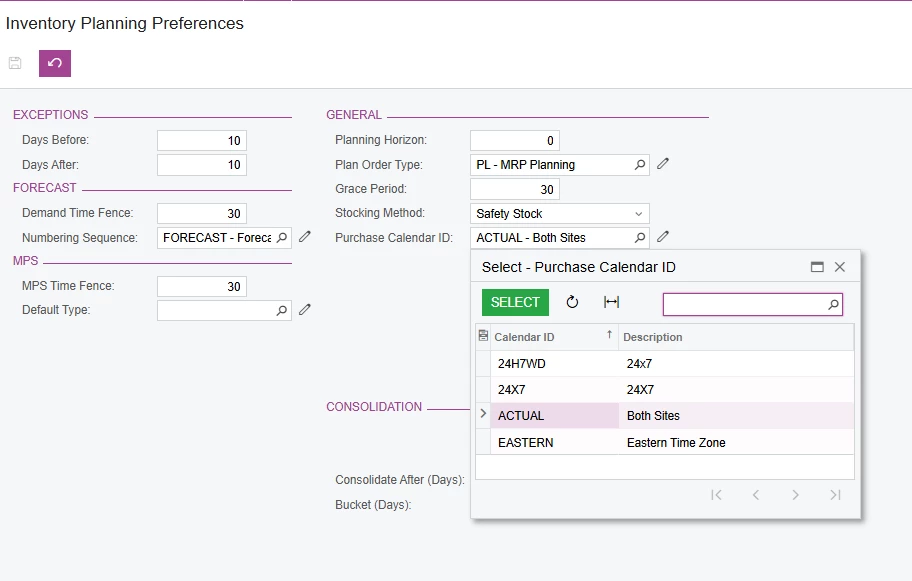
Inventory Planning Preferences Purchase Calendar will be used for a stock item that does not have an associated BOM.
 

Action you can take:

If you would like to recommend that the design be altered, please create an Idea here on the community website and add your business use case so it can be evaluated and weighed with other potential enhancements for a future release.

3 replies

Forum|alt.badge.img+9
  • Captain II
  • January 20, 2026

@karthikvt78 


I think it may be something to do with this setting:


Could you try to change it and then see if it brings in a different calendar? Or removing the field entirely and seeing if that makes a change


  • Author
  • Freshman I
  • January 20, 2026

@karthikvt78 


I think it may be something to do with this setting:


Could you try to change it and then see if it brings in a different calendar? Or removing the field entirely and seeing if that makes a change

Work centers availability is based on shift calendar attached with them. 


angierowley75
Acumatica Moderator
Forum|alt.badge.img+3
  • Acumatica Moderator
  • Answer
  • January 20, 2026

How Fixed MFG Lead Time is designed to work:

When Use Fixed Lead Times on Inventory Planning is checked, the system should calculate the action date (for MRP) based on the lead time of the stock item – observing the Fixed Mfg calendar on Production Preferences.

When Use Fixed Lead Times on Inventory Planning is unchecked, the system should calculate the action date (for MRP) based on the duration of the production observing the calendar of the first shift of the production order operations work center.

Other information to note:

Production Preference “Fixed Mfg Units” drives both scheduling and MRP/DRP.  The number assigned to MFG Lead time on Stock Item is either in days or hours based on this value.

Production Preference “Fixed Mfg Calendar ID” drives both scheduling and MRP/DRP.

Production Preference “Use Fixed Lead Time” only affects how the value of the same-named field defaults when a Production Order is created.

Inventory Planning Preferences Purchase Calendar will be used for a stock item that does not have an associated BOM.
 

Action you can take:

If you would like to recommend that the design be altered, please create an Idea here on the community website and add your business use case so it can be evaluated and weighed with other potential enhancements for a future release.