Question

Viewing 3D CAD Files within Acumatica

  • May 4, 2026
  • 11 replies
  • 60 views

Forum|alt.badge.img+1

Has anyone out there attempted to allow users to view 3D CAD Files (.step) attached to a BOM or Production Order from within their browser?  I assume we would have to use a cloud based file management system that integrates with Acumatica.

Only other option I see for Acumatica-initiated viewing is to download the files to the local machine, then use a free 3D CAD viewer software, like eDrawings (Solidworks).

Obviously we can use a server directory, but the user would need to search the directory for the part number based on the Inventory ID from the Production Order.


11 replies

Forum|alt.badge.img+9
  • Captain II
  • May 5, 2026

@danielklumpp 


AcuPower have developed something for this ​@Yuriy Zaletskyy  should be able to give you more info.


Yuriy Zaletskyy
Jr Varsity II
Forum|alt.badge.img+4

Thanks ​@aiwan !


@danielklumpp you can check this Video for more information or send me DM


Forum|alt.badge.img+1
  • Author
  • Varsity I
  • May 5, 2026

I certainly appreciate the tip and I enjoyed seeing what you’re doing with Engineering workbench.  Our use case is more around viewing FILES attached to a document, particularly a Production Order.  We want our folks on the shop floor to be able to view 3D CAD files and interact with them to see how to build a more complex assembly.


Yuriy Zaletskyy
Jr Varsity II
Forum|alt.badge.img+4

Can you tell me which screens would need that functionality? My team can consider adding that to our product. 


Forum|alt.badge.img+1
  • Author
  • Varsity I
  • May 6, 2026

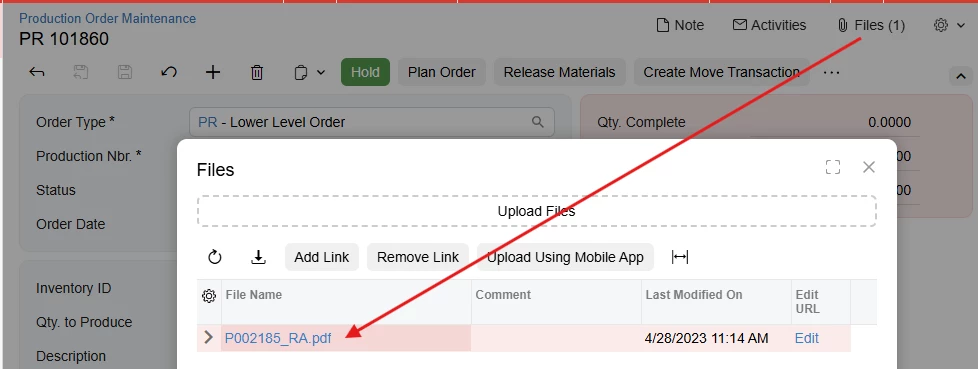
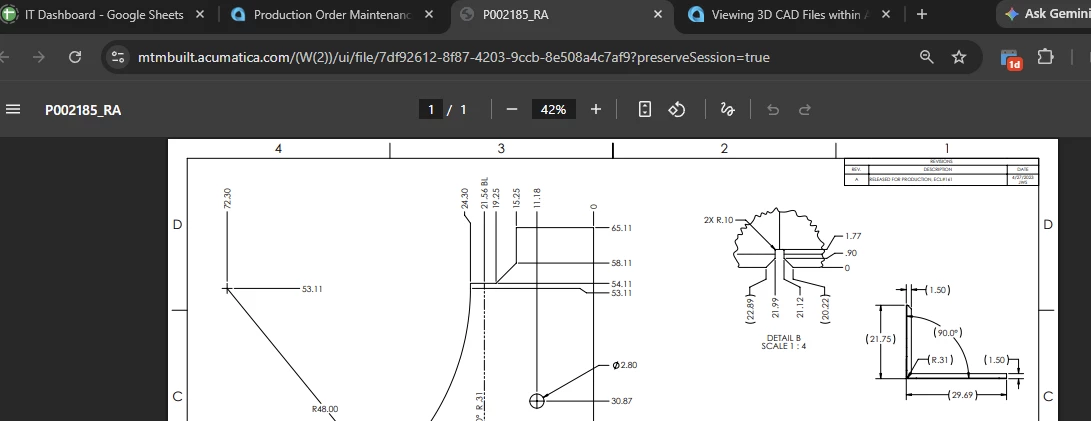
I think the ideal way to architect this is to open a browser tab similar to this:

Click on ‘Files (X)’ on any document (Stock Item, Bill of Material, Sales Order, Bill, etc.)

After clicking, Chrome automatically opens a browser tab and natively displays the PDF.  Could a browser tab open and display a 3D model that allows rotation, part picker, and finding dimensions?


I’m not sure if there’s a way to accomplish this behavior without a browser extension.  We have a kiosk software (that uses its own version of a Chromium browser) installed on our shop floor that may prevent us from using extensions, but if an extension is the only way to accomplish this, we’ll ask our kiosk software vendor to look into utilizing an extension.


Yuriy Zaletskyy
Jr Varsity II
Forum|alt.badge.img+4

@danielklumpp which screens you want to have with that functionality?


Forum|alt.badge.img+1
  • Author
  • Varsity I
  • May 7, 2026

Basically any screen where you are able to pull up FILES, which is pretty much any screen in Acumatica.  I believe you’d only have to write the code one time, then apply to the FILES popup.  Does that make sense?


Yuriy Zaletskyy
Jr Varsity II
Forum|alt.badge.img+4

Files dialogue in Classic UI is not very customizable. In Modern UI it’s more flexible. I’m not sure if that is good idea to make 3D preview across entire system. 


Forum|alt.badge.img+1
  • Author
  • Varsity I
  • May 7, 2026

I see.  In that case, the critical screens for us would be Production Order Maintenance and Bill of Material data entry screens.  I suppose the logic could be, if FILES contains a 3D Cad type file, make visible a button like ‘VIEW 3D MODEL’ which would open another browser tab to view the model.  Or if you can do it right in Acumatica like your Engineering workbench solution, that is even better.  Can you point at a part in the model and get the PN and dimensions?


Yuriy Zaletskyy
Jr Varsity II
Forum|alt.badge.img+4

@danielklumpp I believe yes. Will you be able to provide us with couple of 3D models, which we can use for test drive?


Yuriy Zaletskyy
Jr Varsity II
Forum|alt.badge.img+4

disregard my last question. I’ve re-read you message and got your answer. Keep an eye on your inbox!