

Answer

Unknown overhead variance being calculated in production order

  • June 18, 2025
  • 10 replies
  • 152 views

Hi all,

We currently use core Acumatica as an our ERP and are moving to utilise the Manufacturing module. I’ve created all the cost drivers, the bill of materials, etc for our testing and the BOM calculated cost all matches our Manufacturing models, however, when we generate a sample Production Order against that same BOM it generates a difference in the Variable OH attached, and we can’t determine why.

So, the BOM has a single operation with the following configuration:

  • Setup Time: 00:00
  • Run Units: 384.00
  • Run Time: 01:00 (labour is backflushed)
  • Machine Units: 1,978.710
  • Machine Time: 01:00
  • Queue Time: 00:00
  • Finish Time: 00:00
  • Move Time: 00:00
  • Ignoring Materials because the match the BOM
  • Labour is attached via a shift at a Diff Type = Rate, and a rate of 44.690173/ hour.
  • Overhead is attached via a single Overhead rate, which is variable by Machine Hours, has a factor of 1.0000, and has an overhead rate of $1,957.4300.
  • Typical batch for this BOM is 384 units

Using the BOM Cost Summary calculator, we get the following (which agrees to our external model):
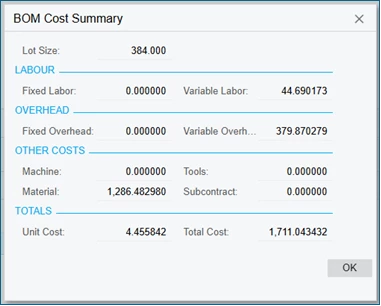
BOM Cost Summary

But when we run a sample production order, we get the following which shows a $21.01 variance being posted which we can’t figure out.
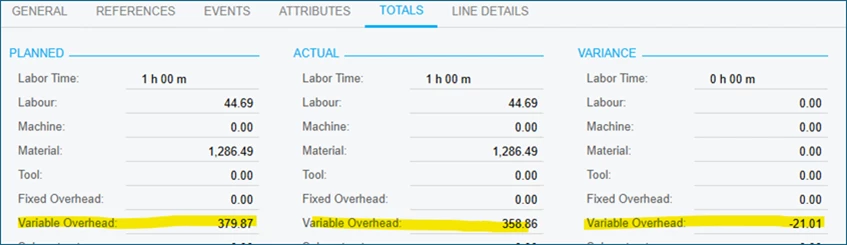
Production Order Totals screen showing Variance

I can’t seem to determine where this variance stems from. I’m assuming its due to a difference in either the per unit rate (maybe a rounding issue, but it seems fairly significant at a batch level), or in the machine hours applied per unit… however, both seem to be unaffected by the BOM Calculation, and I’d have expected both to match (i.e., “BOM” to the Total’s section within the “Production Order Maintenance” screen).

Does anyone have any thoughts or additional things I can track down?

Kind regards,

B

Best answer by mohammadnawaz51

@ccharris01 


10 replies

CherryStreet
Jr Varsity I
Forum|alt.badge.img
  • Jr Varsity I
  • June 18, 2025

Let me know if this works out for you, 😊


🧠 High-Level Understanding

The BOM Cost Summary uses standard configuration, assuming the exact inputs: times, rates, materials, etc.

The Production Order Totals pulls from actuals and cost layers — and can introduce variance due to:

Costing method (Standard vs Actual)

Rounding of machine hours at transaction vs BOM level

Decimal precision differences

UOM conversions

Overhead calculation nuances (especially machine-hour based)


✅ First, Let's Review Your Setup

Here’s what’s good/clear:

You're using Variable OH by Machine Hours

BOM: 384 units per batch, 1.000 machine hour for the run

Overhead Rate: $1,957.43 per machine hour

Machine Units: 1,978.710, Run Time: 1:00, meaning you're running ~1.9787 units per second of machine time (though Acumatica uses hours)

That’s all mathematically clean — so a $21.01 variance is definitely suspicious.


🔍 1. Check Actual Machine Time Posted in Production Order

Even if the operation says 1.000 hour in BOM, Acumatica may have:

Calculated fractional machine time during transaction generation

Applied rounding during actual cost application


➡️ Go to:

Manufacturing → Transactions → Labor/Machine Transactions

Look for the Production Order's machine time. Is it exactly 1.0000 hour, or perhaps 1.0107 or 0.989?

🧠 Even a ~0.0107 hour delta at $1,957.43/hour = $20.96 variance, which is nearly your exact amount.


🔍 2. Check Decimal Precision on Machine Units & Hours

Acumatica stores:

Machine Units with 6 decimals

Machine Time often with 4 decimals

In the BOM screen, your Machine Units is 1,978.710, which is very precise.

But the actual time posted to the production order may involve a precision truncation during runtime calculation like:

ini

Copy

Edit

MachineTime = RunTime × MachineUnits / RunUnits

So:

ini

Copy

Edit

MachineTime = 1.000 × 1978.71 / 384 = 5.1534 hours

vs.

nginx

Copy

Edit

Using truncated 5.1500 hours = difference × $1,957.43 = ~$6

If the actual Machine Time calculated in the Production Order has a slight change due to this, it will affect overhead.


🔍 3. Validate Overhead Application Mode

In Production Preferences, validate:

Manufacturing → Preferences → Manufacturing Preferences

Check:

Apply Overhead = On Operation Close or On Production Close

➡️ This changes when the cost is posted and may affect precision


🔍 4. Compare BOM Cost Summary vs WIP Detail

Go to:

Production Orders → Transactions → WIP Summary / WIP Detail

Look at:

What’s posted as Overhead Absorbed

Compare with:

nginx

Copy

Edit

Machine Hours x Overhead Rate

Do they match to $1,957.43 × X hours?

🧪 Test Suggestion

As a control, try:

Copy the BOM.

Round all time and units to clean, 1.000 or 384.

Create another production order for exactly the same item and qty.

Review actuals → if the variance disappears, it's a rounding/precision effect.


✅ Summary of Likely Cause

🔍 The $21.01 variance is most likely due to:

A slightly different machine hour calculation due to run units and machine units precision

Overhead cost = Machine Time × $1,957.43

Even a 0.0107 hour difference = $21.01


  • Author
  • Freshman I
  • June 19, 2025

Hi there ​@CherryStreet,

Ignoring the fact that is simply just copy and pasted out of a GenAI tool, alot of those screens/ settings don’t exist, and the response isn’t overly helpful.

I also think it’s a precision issue with the machine hour calculation, but there doesn’t seem a way to validate the actual machine hours allocated for the transaction, and confirm that is the issue. 

Build that we are currently on is a 2024 R1 Update 14.

Any questions, let me know.

B


CherryStreet
Jr Varsity I
Forum|alt.badge.img
  • Jr Varsity I
  • June 19, 2025

Correct, it is a tool we built for level 1 and 2 support level issues and assist in customizations.  It’s incredibly accurate so we thought we would help the community with it.  We have built them for a few systems that our consultants have experience with.

Here is what the tool gave us for your reply, let me know if you would like to take it further:


Thanks for confirming the build (2024 R1, Update 14) — that's helpful context. You're likely right: this $21.01 overhead variance is almost certainly due to machine hour calculation precision, especially given your overhead rate of $1,957.43/hour.

To validate that — yes, you can find the actual machine hours allocated in production, though Acumatica doesn’t surface it super obviously. Here's how to see the actual hours used, cross-check against the BOM, and pinpoint whether this discrepancy is truly from precision rounding.


🔍 How to Validate Actual Machine Time Allocated

1. Use the WIP Detail Inquiry Screen

Manufacturing Transactions WIP Detail Inquiry

Steps:

  1. Filter by your Production Order Number
  2. Set the Transaction Type = Machine
  3. Look at:
    • Actual Machine Hours used (Quantity column)
    • Cost posted for that Machine Time

✅ This shows the exact machine time Acumatica used in cost posting.


2. Query AMMTran Table for Machine Time (More Precise)

If you want even higher decimal precision than the WIP screen shows:

Use a Generic Inquiry or SQL query on AMMTran:

Key fields:

  • TranType = "M" (Machine)
  • ProdOrdID = your production order
  • LaborTime (decimal field — in hours)

This value should tell you:

Actual Machine Hours Allocated = X.XXXXX

Then you can run:

Variance = (ActualMachineHours - 1.0000) × $1,957.43

🔍 If it’s 0.0107 hours extra, that would equal **$21.01** — which matches your case perfectly.


3. Optional: Use AMProdMach or AMProdOper for Planned vs Actual

You can also compare:

  • AMProdMach.MachTimeActual
  • AMProdMach.MachTime (Planned)

This tells you what was planned (from the BOM) vs. what the system actually processed and used for costing.


🔧 Why This Happens (Internals)

Acumatica calculates:

MachineTime = (Run Time) × (Machine Units / Run Units)

In your BOM:

  • Run Time: 1.0000 hr
  • Machine Units: 1,978.710
  • Run Units: 384

So:

MachineTime = 1 × 1978.71 / 384 = 5.1534 (but rounded or stored differently)

🔁 Even small precision differences here get amplified by your large $/hr overhead rate.


🧠 ERP Pro Tip 💡

💡 For Cost Accountants: Build a GI that joins AMProdOper, AMProdMach, and AMMTran to spot orders with high overhead variances tied to <1% time deltas.


darylbowman
Captain II
Forum|alt.badge.img+15

@CherryStreet - The Acumatica Community is not particularly welcoming of purely AI answers. AI is popular enough that most people now understand it’s possible to paste a question in and get an answer out. That doesn’t mean it’s the right answer, in fact, quite often, it’s not, especially when configuration is involved. This is a couple of reasons why. I believe the official policy, as it stands, is that all AI answers must be prefaced with a disclaimer. My personal suggestion would be not to answer questions you have no actual real-world experience with. Using AI to get some helpful ideas is not the same as littering the forum with AI ‘suggestions’.


CherryStreet
Jr Varsity I
Forum|alt.badge.img
  • Jr Varsity I
  • June 19, 2025

I do preface with a disclaimer when using AI, and I completely spaced doing it on this one.  However, I will say that our tool is the most accurate we’ve tested so far. so if you ever need assistance, we’re happy to help.


CherryStreet
Jr Varsity I
Forum|alt.badge.img
  • Jr Varsity I
  • June 19, 2025

And as an FYI, we have Consultants that started with 2018 R1 so we have plenty of “real-world” experience.  😉 Thanks!


  • Freshman I
  • June 19, 2025

As I have learned this week - 

The Totals tab on Production Maintenance is based on your Production Quantity.  This is okay if you are always building 1.  In our Mfg we use STD cost and that is based on a fixed lot size.  If the Production Order (WO) quantity is not the same as your lot size quantity, the total tab will recalculate Planned Costs, which is then compared to actuals costs producing the Variance Costs.

HOWEVER - the actual variance amount posted to the GL will be the net difference of units x std costs vs total actual costs.  This amount is shown in the center column as Adjustment.  

cch


angierowley75
Acumatica Moderator
Forum|alt.badge.img+3
  • Acumatica Moderator
  • June 20, 2025

@Chris Hackett - Please see AI comments above


mohammadnawaz51
Jr Varsity I
Forum|alt.badge.img+4

@ccharris01 


Chris Hackett
Community Manager
Forum|alt.badge.img
  • Acumatica Community Manager
  • June 20, 2025

Thank you ​@angierowley75 , ​@CherryStreet and I have discussed how AI may be used in the community per our current Terms https://community.acumatica.com/site/terms





