Answer

Unable to Close Production Order Due to Missing Move Transaction

  • November 19, 2024
  • 15 replies
  • 260 views

Forum|alt.badge.img

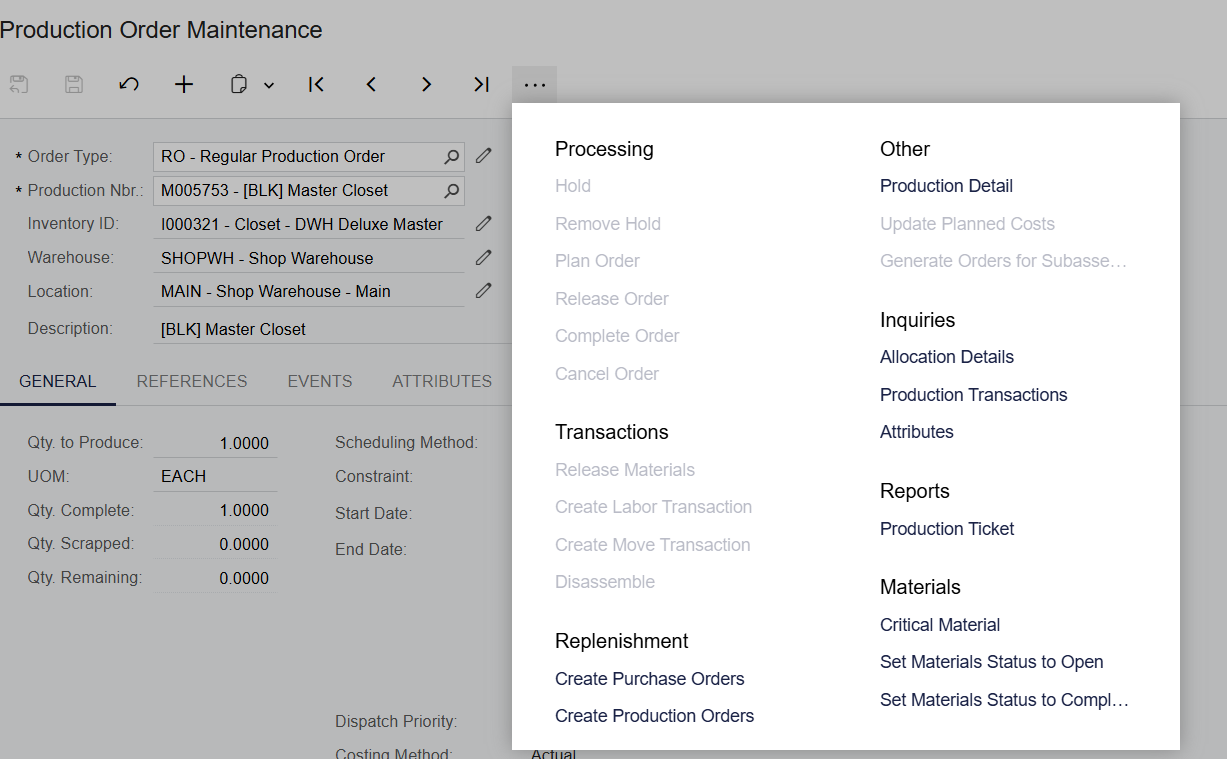
We are unable to close a production order. It might have been forcefully completed or a move transaction deleted. Need guidance to resolve this and close the production order. Inventory module cannot be closed due to this error.

Missing Move Transaction: When I click one of the move transaction numbers, it doesn’t react. It seems like it was forcefully deleted. Production order status: Completed.

How can I resolve this to close the books?

Best answer by vanessaafonso02

Try using the ‘Transactions by Production Order’ Inquiry (AM000011). 
You can filter by Production order or just filter for transactions that have not been released.  

This will help identify any pending transactions for the period you are trying to close. 

15 replies

Debbie Baldwin
Acumatica Moderator
Forum|alt.badge.img+2
  • Acumatica Product Manager
  • November 19, 2024

@sbhattarai  - what does the trace say when you try and close it - can you show a screenshot?


Forum|alt.badge.img
  • Author
  • Freshman I
  • November 19, 2024
The option to close is grayed out.


Forum|alt.badge.img+8
  • Captain II
  • November 19, 2024

Hi ​@sbhattarai 


the AMBatch table, which holds the data for moves, is forcefully locked out upon release of a move. It would be rather difficult to delete it.


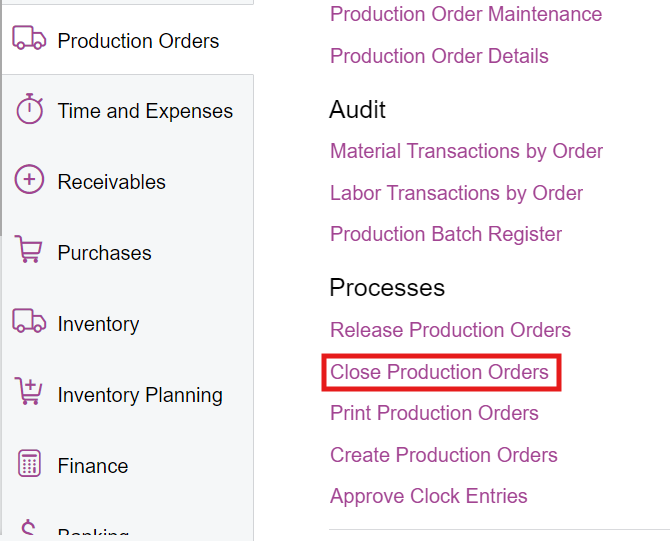
Are you able to access the ‘Close Production Orders’ screen? If so could you please show us the error you receive, and if you can, the trace.


Aleks


Forum|alt.badge.img
  • Author
  • Freshman I
  • November 19, 2024

Yes, but the option to close is grayed out. 

Move Transactions P0234470 is inactive. Not sure if it was deleted.


Forum|alt.badge.img+8
  • Captain II
  • November 19, 2024

the move transaction P023469 is the Move transaction which completes the order.


To close the order you should use this screen:


Let me know if i am misunderstanding anything!


Forum|alt.badge.img+8
  • Captain II
  • November 19, 2024

You should have three transactions per move, therefore the move screen numbers going up in threes.

Material accounts for the material used, Cost for the labour/backflush and overhead, and the Move transaction creates the finished goods.


Forum|alt.badge.img
  • Author
  • Freshman I
  • November 19, 2024

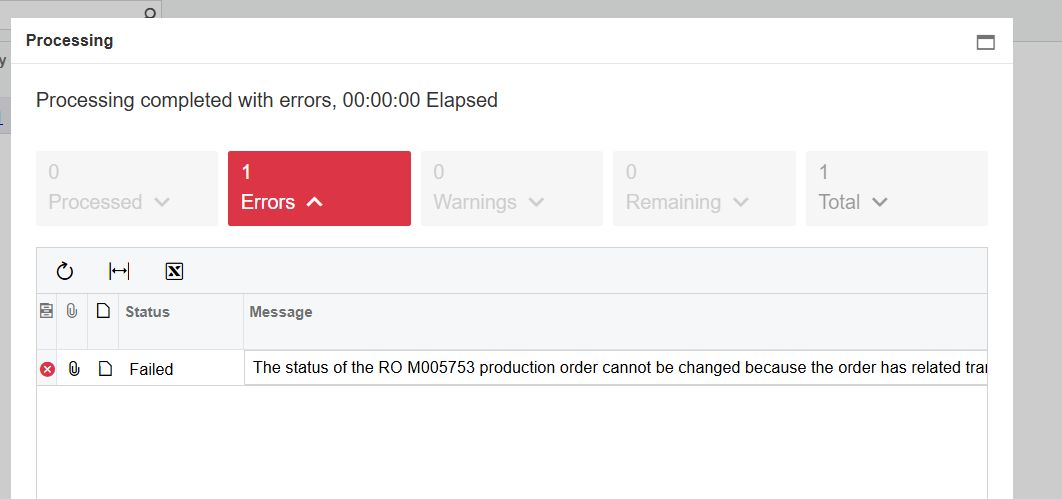
Thank you for your response. I think I misunderstood. Here is the error message I received, “

“The status of the RO M005753 production order cannot be changed because the order has related transactions that are not released. You must release or delete all the related transactions first.”


Forum|alt.badge.img+8
  • Captain II
  • November 19, 2024

Got ya!


if you go to your move screen, you should have a ‘Balanced’ move transaction which contains that production order. 9/10 times this is what causes the issue for us.


You should be able to either delete this. Or you may have to allow production qty to be greater than order qty in the production order types screen.


Aleks


vanessaafonso02
Acumatica Employee
Forum|alt.badge.img+1
  • Acumatica Support Team
  • Answer
  • November 19, 2024

Try using the ‘Transactions by Production Order’ Inquiry (AM000011). 
You can filter by Production order or just filter for transactions that have not been released.  

This will help identify any pending transactions for the period you are trying to close. 


Forum|alt.badge.img
  • Author
  • Freshman I
  • November 19, 2024

Resolved. Thank you very much.

Best Regards,  


Forum|alt.badge.img+2
  • Captain II
  • November 20, 2024

This is user caused error but I see it on these forums over and over -


For anyone that watches a less experienced user enter move transactions, the cause is obvious. If you’re backflushing inventory, there is no warning of missing/critical materials until you hit release on the move transaction. Because move transactions are entered in a pop-up window, users close the window to go fix the underlying issue without any idea that they’ve left a balanced transaction attached to the production order. Once the underlying issue is fixed, the user will return to their production order and create a new move

The production order doesn’t list open transactions and there’s no warning when a new move is created. 


Things Acumatica could do to fix this

  • Warning when entering a move transaction that there are open move transactions in a balanced status
  • Warning when entering a move transaction that there are critical materials that will prevent the move from being released
  • Warning that you are closing a window with a balanced move transaction attached 
  • Table or list of associated transactions with current status on the events tab of production orders


I find I have to routinely go through and delete unreleased move transactions every couple of weeks to keep things clean. Most users have no idea this issue is happening in the background


dgodsill97
Varsity I
Forum|alt.badge.img+3
  • Varsity I
  • September 9, 2025

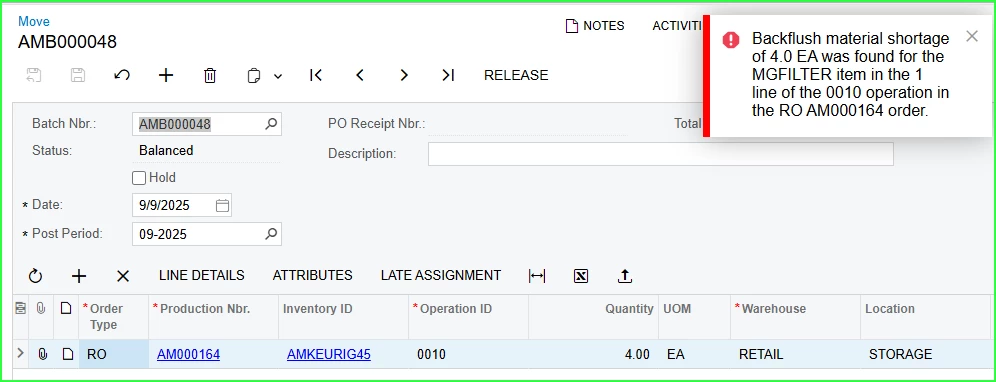
How is the user reporting the Move?  If from the Production Order, you do get the message on the pp-up form.  From the mobile app?  This with Under Issue Backflush Material set to Do Not Allow. 


Forum|alt.badge.img+2
  • Captain II
  • September 11, 2025

This is an issue with how people interact with UX as much as anything else. Yes - There is a pop-up that warns you of short materials. But what’s the next logical step for the user? Delete the move? or close the window? 

If you watch people interact with the screen and this scenario, you’ll see that 99% of the time, they’re going to click the X in the upper right to close the pop-up window and go deal with the materials shortage


  • If there was a warning when entering a new move transaction that there are open move transactions in a balanced status and a link provided to delete or edit those first, I’m sure people would correct the error
  • If there was a warning when entering a new move transaction that there are critical materials that will prevent the move from being released and you had to click OK to get to the balanced transaction, I think most people would click cancel.
  • If there was a warning that you are closing a window with a balanced move transaction attached, you’d probably get a majority of people to click cancel and then delete the move
  • If the production order events tab had a table or list of associated transactions with current status (similar to shipments on an SO or purchase receipts on a PO) - Maybe you could train people to go and look there before entering new moves


As-is, the system is designed for people to fail and I say that’s a failure of the system


Forum|alt.badge.img+2
  • Captain II
  • October 15, 2025

@Debbie Baldwin - Related to my comments above, there is one other somewhat critical issue with the management of balanced production transactions as it relates to managing financial periods

As I’ve noted, it is very easy for a user to mistakenly create and not delete or release production transactions when materials are short and the system does not flag these well enough for most users to correct their mistakes.


Additionally, when we try to then close a financial period that contains a balanced production transaction the system will not allow it, however neither the linked “Unreleased Documents” or “Documents Not Posted to Inventory” with only a simple error stating “Unreleased production documents exist for the financial period.”  - This does not provide the specificity a financial controller or others might need to determine who in the organization to reach out to and I feel those “Unreleased production documents” should be details in the Unreleased IN Documents report (IN656600)


I would love the opportunity to demonstrate these issues and help in providing any feedback to see them corrected in a future release


Forum|alt.badge.img+2
  • Captain II
  • November 13, 2025

@travislawson has created a product idea that seems very much related to this thread - I would suggest that others add their vote here


I do still feel there’s more that could be done beyond the events tab but at least this would help in uncovering those unreleased transactions