Solved

Tracking Material and Production Labor Costs in Projects in Acumatica

  • March 26, 2025
  • 7 replies
  • 200 views

Preeti Rayen
Freshman I


We have a project with multiple tasks from initiation to signoff. For this project, we’re creating Production Orders for multiple Finished Goods.

  • Labor Transactions: When labor transactions are created for a production order, they generate a GL transaction that posts to the WIP (Work-in-Progress) account. Upon closing the production, the labor costs move to the Finished Goods (FG) inventory.

  • Shipping/Issuing Finished Goods: When the finished goods are shipped or issued, the costs move to COGS (Cost of Goods Sold) and update the Material account group in the project.

Is this flow and my understanding correct?


The main challenge I’m facing is tracking the production labor costs that have been reported back to the project, particularly when there is a budget allocated for labor costs.

  • Labor Budgeting: How can I ensure that the actual production labor costs are properly tracked against the budget that was allocated for labor within the project?

  • Linking Labor to the Project: How do I make sure that the labor costs, reported through production orders, are reflected in the project’s budget tracking?




Best answer by angierowley75

correct - you have to choose to capture the labor cost as a component of production or track the costs to the department.

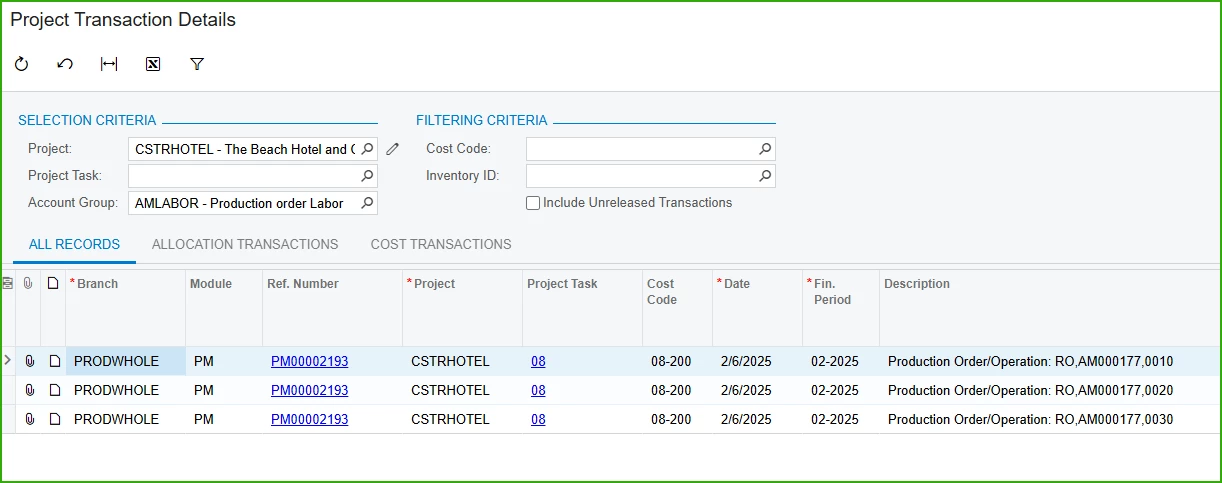
If you are just looking to build a report, the labor transaction of the production order may reference the project to which the production order is linked.  Depends on which version you are running - I think this was added in 2024R2

7 replies

angierowley75
Acumatica Moderator
Forum|alt.badge.img+3
  • Acumatica Moderator
  • March 26, 2025

Labor cost of the Production are applied the the Item being produced.

If I am manufacturing a widget - the cost of the widget would be all the material, labor, and overhead I reported against it.

People that want to report labor to the Project instead of the production order should set the labor rate on the production order to zero and have their resource track time directly to the project.


Preeti Rayen
Freshman I
  • Author
  • Freshman I
  • March 26, 2025

@angierowley75 - Thank you for the response. If the labor is tracked directly to the project and not through production order? the the cost of the item will only include material + overhead + etc.. without the labor correct?


angierowley75
Acumatica Moderator
Forum|alt.badge.img+3
  • Acumatica Moderator
  • Answer
  • March 26, 2025

correct - you have to choose to capture the labor cost as a component of production or track the costs to the department.

If you are just looking to build a report, the labor transaction of the production order may reference the project to which the production order is linked.  Depends on which version you are running - I think this was added in 2024R2


debbiereed72
Varsity I
Forum|alt.badge.img
  • Varsity I
  • January 13, 2026

Hello ​@angierowley75!  I am trying to figure this out still.  From what I see above, there is not a way to get time to post to BOTH the Project and the Production Order. This is a problem.  We have a big project where we want to track all the time that goes into the project. But we also want to track the labor cost to the Production Order to get correct cost on the production order. Is there really no way to do this?


Thank you!


angierowley75
Acumatica Moderator
Forum|alt.badge.img+3
  • Acumatica Moderator
  • January 13, 2026

You track labor to the production, and the cost of the labor is included in the finished good production cost, which is tracked on the project.

If you want to track labor without any cost to the production order and then also track labor to the project, you can do that by setting the labor rate to zero - so you capture hours without cost to the production order.  You can then create labor transactions with cost to the project.

It is not recommended to capture labor hours and cost in both production and labor cost to the project because you would be inflating your costs.


debbiereed72
Varsity I
Forum|alt.badge.img
  • Varsity I
  • January 13, 2026

Thank you for your quick response!  I’m sorry, I feel really dumb, ​@angierowley75 … How is the finished good production cost posted to the project?


dgodsill97
Varsity I
Forum|alt.badge.img+5
  • Varsity I
  • January 20, 2026

With a fairly simple customization you can post labor, or any other production cost. to a project by creating a project transaction that does not update the GL.  You only need a customization to update the production transaction with a custom field to indicate it has been posted to the project.  Basically add user fields for the production document type and batch number to PMTran so that you don’t post the transaction again,  The data source for labor would be the production cost transaction with transactions types of labor or backflush labor.  See the help article I wrote https://help.acumatica.com/Help?ScreenId=ShowWiki&pageid=1ce567e9-7d64-4f0d-aa14-d894a35a8fc3 to find the doc type and transaction types.  You could also a checkbox to the production transaction record to indicate it had been posted to a project which may improve performance without having to look at PM Tran.