

Answer

tips on copy and paste a line to next record or line in a sales or purchase order

  • January 8, 2022
  • 3 replies
  • 546 views

Forum|alt.badge.img

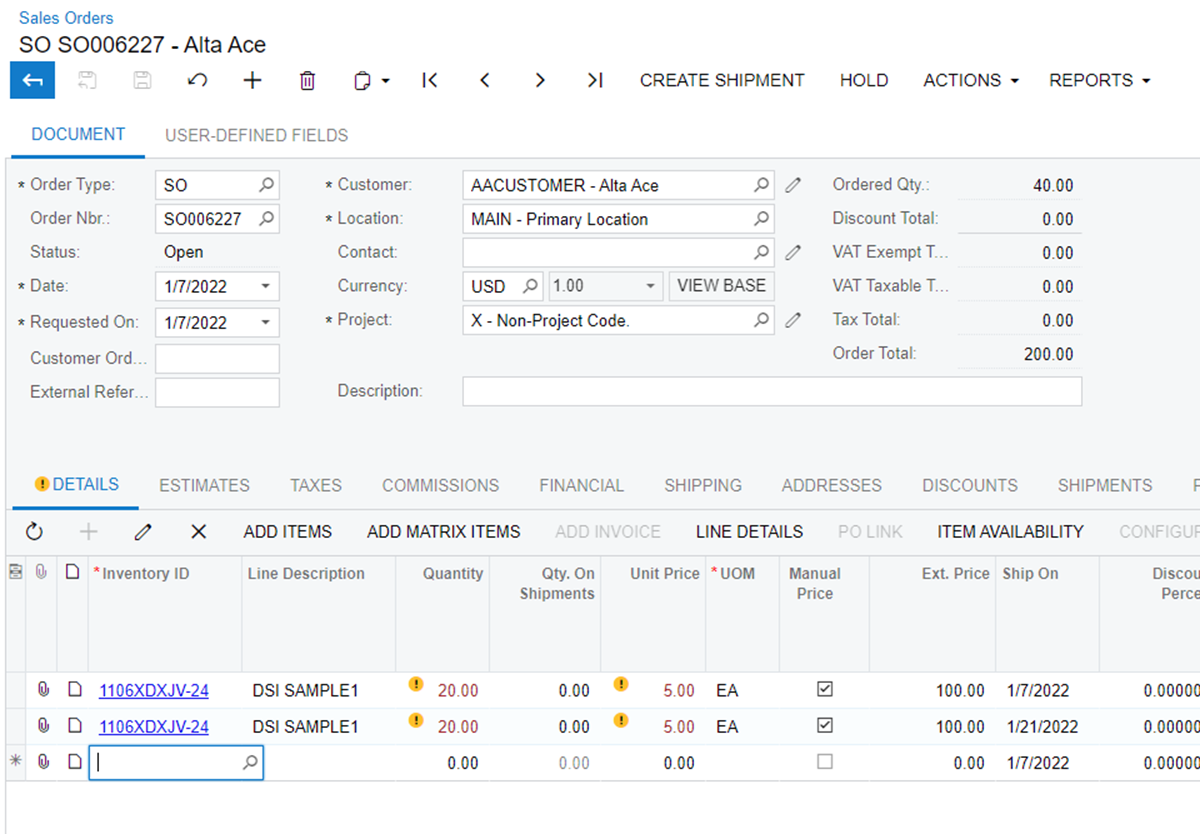
hello, since there is no delivery schedule, is there a shortcut to copy and paste a line of record to next… and all is left to do is changing the delivery date or the shiping QTY?

i.e below, how do i copy and paste line 1 to line 2 and 3 rather than manually input them?

Thank you

Zoey
 

Best answer by Naveen Boga

Hi @zoeymuff  OOB, we do not have a feature to copy the lines. It requires a customization to copy the line.

I have worked on the below approach for one of my projects, hope this helps you!

Sales Order Customization

  • Introduce a new action at SOLine Grid level i.e. “Copy Line”
  • When we click on this button, you can have a logic to copy the current line and insert a new line.


3 replies

Naveen Boga
Captain II
Forum|alt.badge.img+19
  • Captain II
  • Answer
  • January 8, 2022

Hi @zoeymuff  OOB, we do not have a feature to copy the lines. It requires a customization to copy the line.

I have worked on the below approach for one of my projects, hope this helps you!

Sales Order Customization

  • Introduce a new action at SOLine Grid level i.e. “Copy Line”
  • When we click on this button, you can have a logic to copy the current line and insert a new line.


Forum|alt.badge.img
  • Author
  • Jr Varsity II
  • January 8, 2022

Thank you Naveen again, 

is the customization easily achievable within native acumatica or it is quite scientific?

Zoey


Naveen Boga
Captain II
Forum|alt.badge.img+19
  • Captain II
  • January 8, 2022

Hi @zoeymuff  Yes, it is easily achievable with in native Acumatica.

