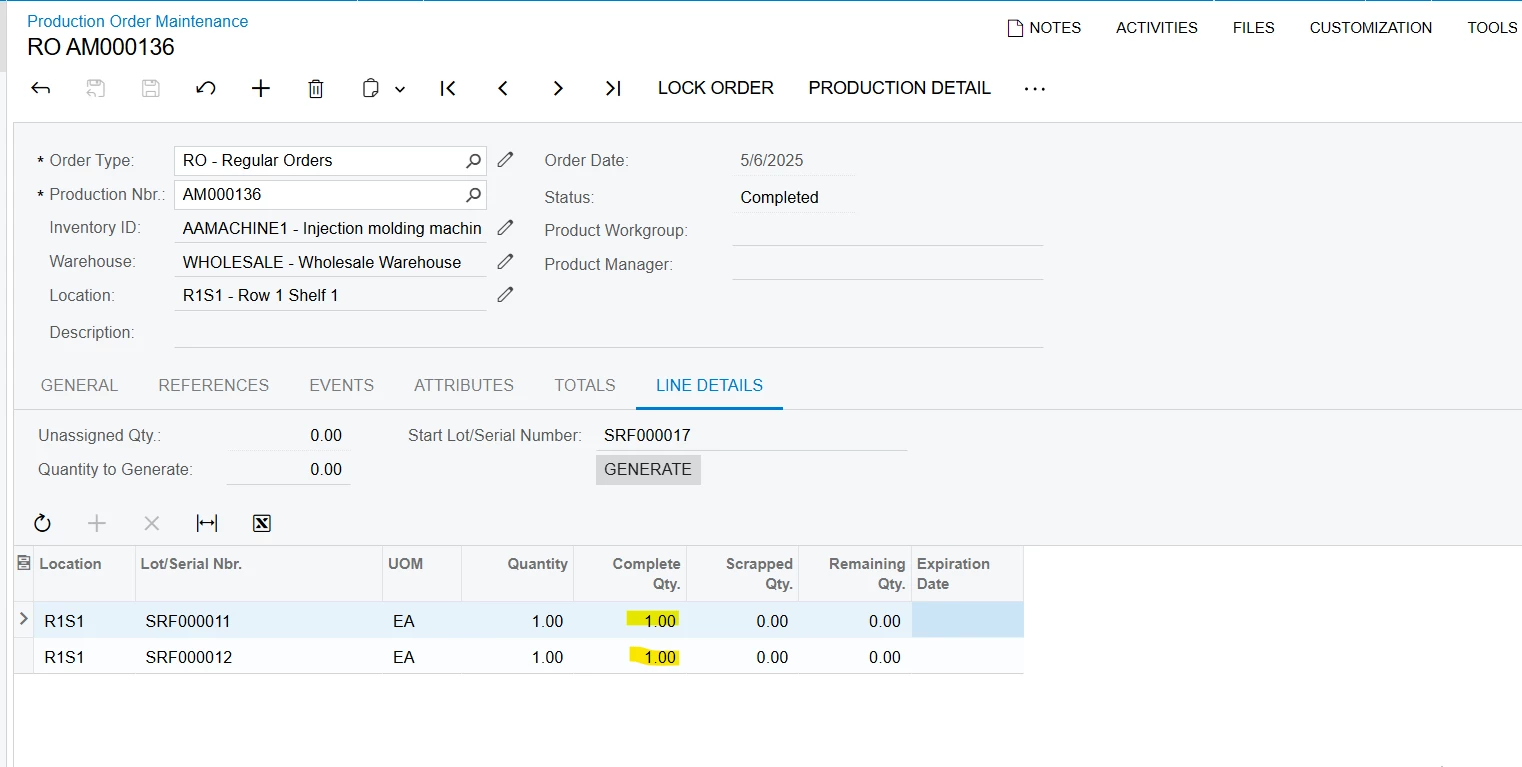
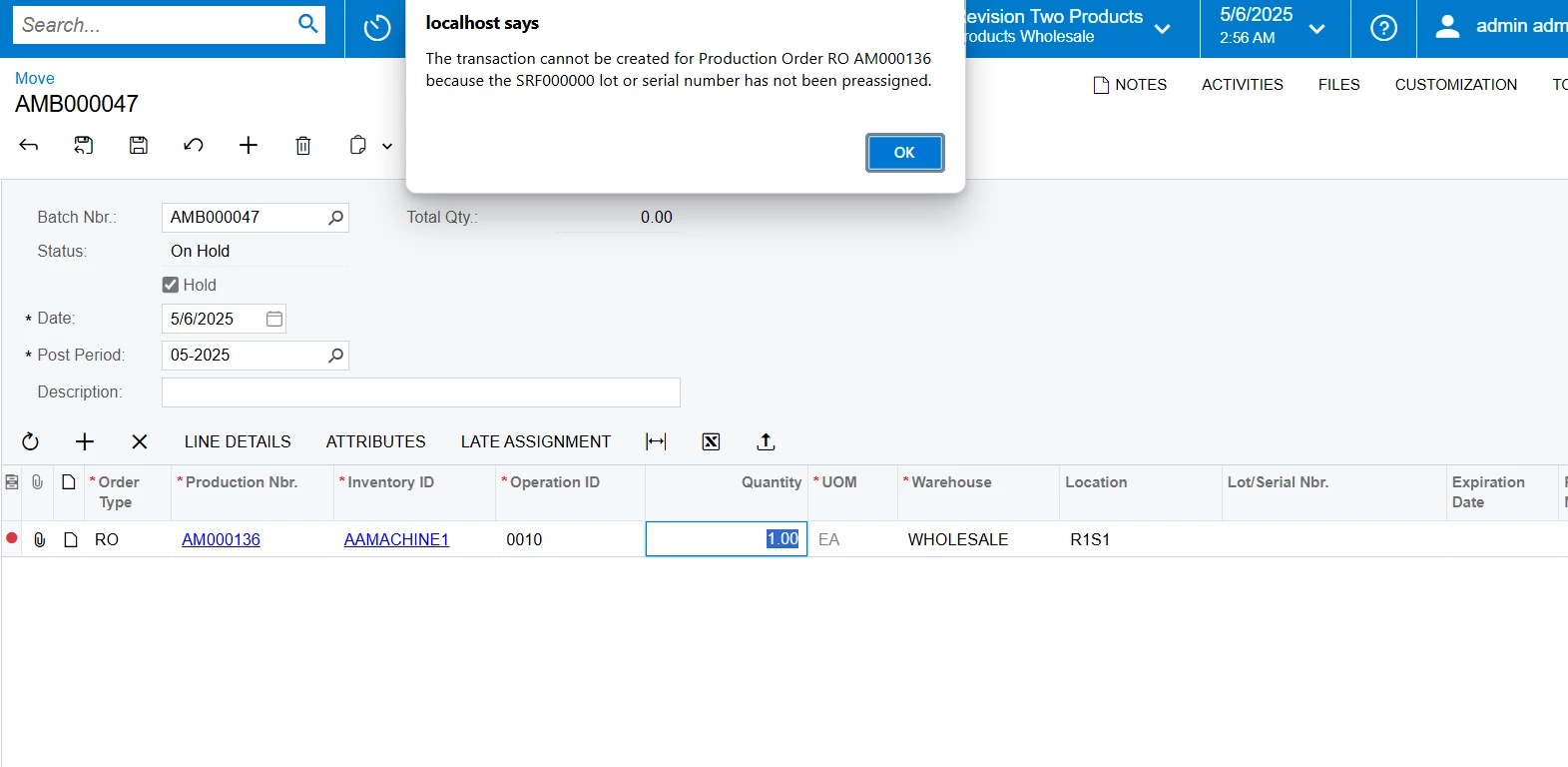
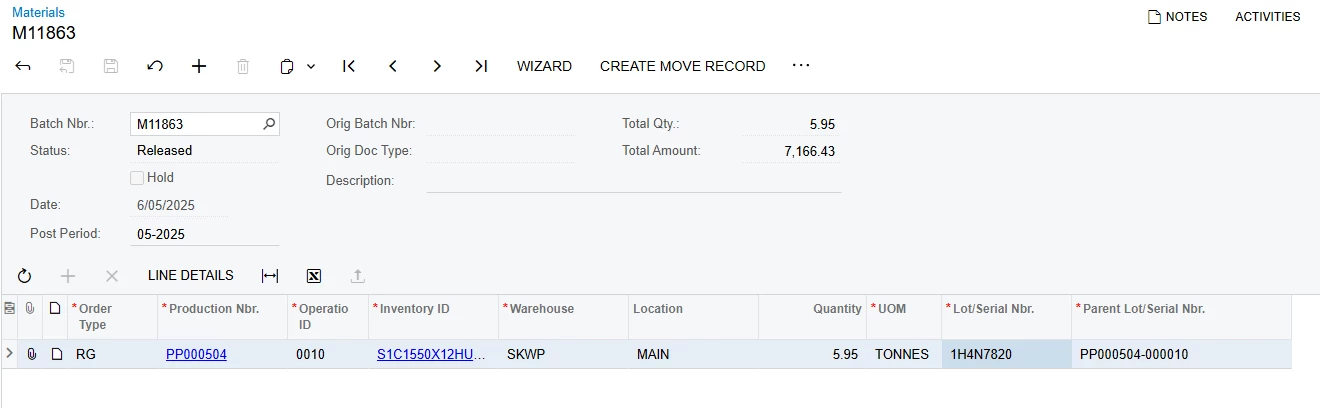
I am trying to create the move transaction (AM302000) automatically after releasing the material record when the custom button (Create Move Record) is clicked in the materials screen (AM300000).
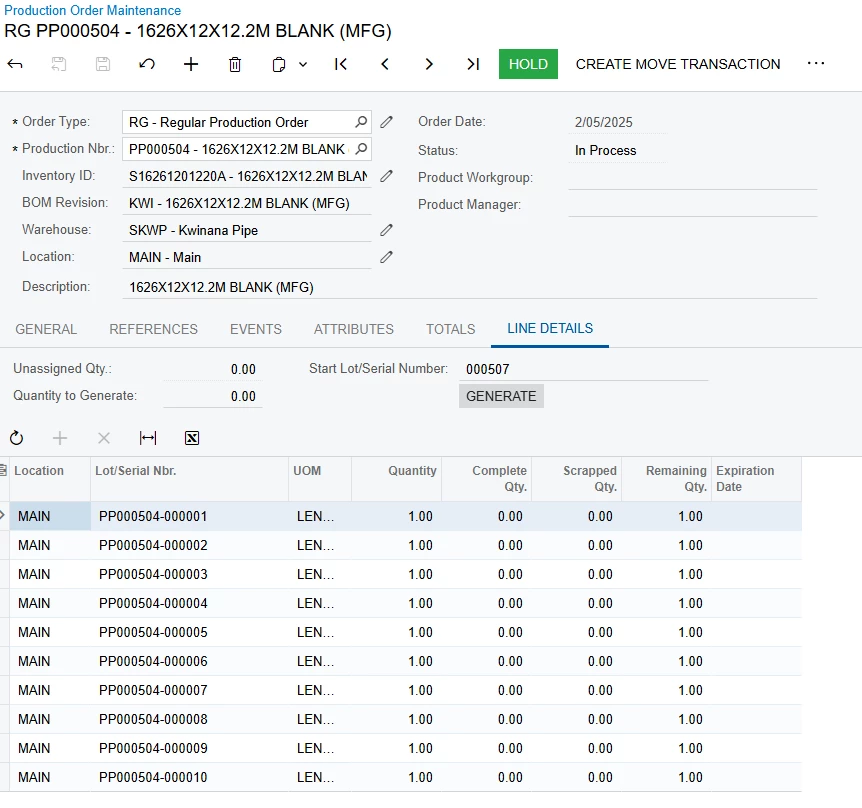
This is the code I have attempted below it is now creating the move transaction successfully for records where Lot/Serial Number and Parent Lot/Serial Number are the same but gives the following error for records where Lot/Serial Number and Parent Lot/Serial Number are different.
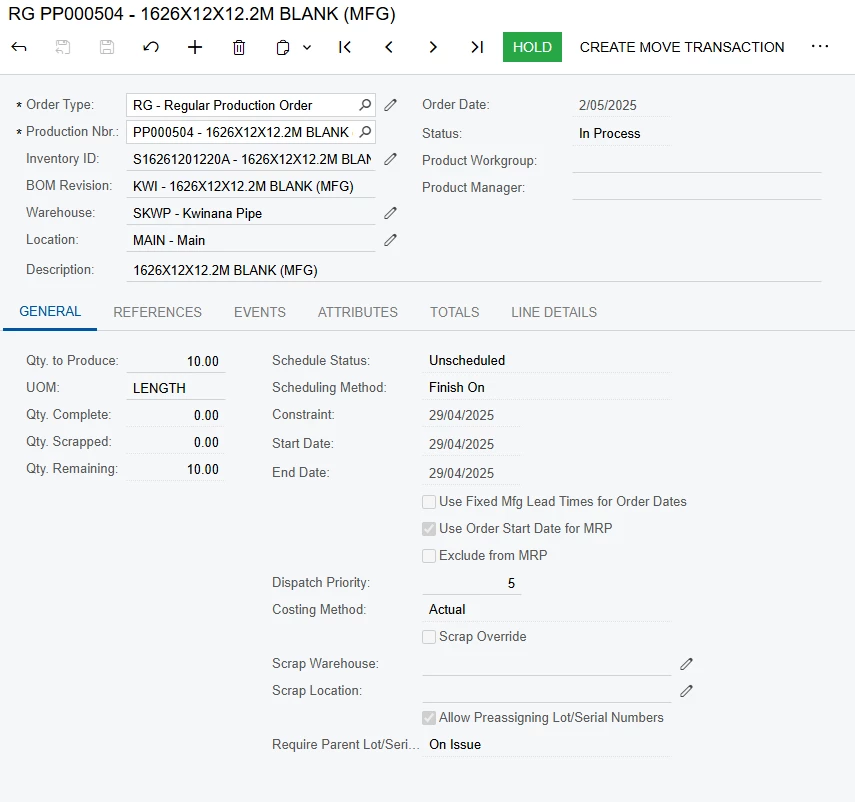
The transaction cannot be created for Production Order RG PP000504 because the 1H4N7820 lot or serial number has not been preassigned.
namespace PX.Objects.AM
{
  public class MaterialEntry_Extension : PXGraphExtension<PX.Objects.AM.MaterialEntry>
  {
// New action button to create move record after material release
        public PXAction<AMBatch> CreateMoveRecord;
        [PXButton(CommitChanges = true)]
        [PXUIField(DisplayName = "Create Move Record", MapEnableRights = PXCacheRights.Update, MapViewRights = PXCacheRights.Select)]
        protected void createMoveRecord()
        {
            if (Base.batch.Current == null || Base.batch.Current.Status != "R") // R = Released
            {
                throw new PXException("Move records can only be created from released material transactions.");
            }

            AMBatch moveBatch = CreateMoveTransactionsFromBatch(Base.batch.Current);

            if (moveBatch != null)
            {
                // Redirect to the Move Entry screen with the new batch
                var moveGraph = PXGraph.CreateInstance<MoveEntry>();
                moveGraph.batch.Current = moveGraph.batch.Search<AMBatch.batNbr>(moveBatch.BatNbr);


              // Automatically release the move batch
        //try
        //{
        //    moveGraph.release.Press();
       // }
       // catch (Exception ex)
       // {
       //     throw new PXException($"Move Batch {moveBatch.BatNbr} was created but failed to release: {ex.Message}", ex);
       // }

                //throw new PXRedirectRequiredException(moveGraph, "Move Batch " + moveBatch.BatNbr + " Created");
                // Create redirect exception with WindowMode.New to open in a new tab
        var redirectException = new PXRedirectRequiredException(moveGraph, "Move Batch " + moveBatch.BatNbr + " Created");
        redirectException.Mode = PXBaseRedirectException.WindowMode.New;
        throw redirectException;
            }
        }

[PXMergeAttributes(Method = MergeMethod.Merge)]
        [PXRestrictor(
            typeof(Where<SubNotLessThanZero<AMProdItemSplit.qty,
                Add<AMProdItemSplit.qtyComplete, AMProdItemSplit.qtyScrapped>>,
                NotEqual<decimal0>>),
            "Remaining Quantity is 0.")]
        protected virtual void _(Events.CacheAttached<AMMTranSplit.parentLotSerialNbr> e)
        {
        }

        [PXMergeAttributes(Method = MergeMethod.Merge)]
        [PXRestrictor(
            typeof(Where<SubNotLessThanZero<AMProdItemSplit.qty,
                Add<AMProdItemSplit.qtyComplete, AMProdItemSplit.qtyScrapped>>,
                NotEqual<decimal0>>),
            "Remaining Quantity is 0.")]
        protected virtual void _(Events.CacheAttached<AMMTran.parentLotSerialNbr> e)
        {
        }

        protected virtual void _(Events.RowSelected<AMMTran> e)
        {
            if (e.Row == null) return;

            var row = (AMMTran)e.Row;
            AMBatch batch = Base.batch.Current;

            // Make LotSerialNbr required
            PXUIFieldAttribute.SetRequired<AMMTran.lotSerialNbr>(Base.transactions.Cache, true);
            PXUIFieldAttribute.SetRequired<AMMTran.parentLotSerialNbr>(Base.transactions.Cache, true);

            // Enable both fields at the cache level first
            Base.transactions.Cache.AllowUpdate = true;
            PXUIFieldAttribute.SetEnabled(Base.transactions.Cache, null, true);

            // Then enable specific fields
            PXUIFieldAttribute.SetEnabled<AMMTran.lotSerialNbr>(Base.transactions.Cache, null, true);
            PXUIFieldAttribute.SetEnabled<AMMTran.parentLotSerialNbr>(Base.transactions.Cache, null, true);

            // Enable for the specific row
            PXUIFieldAttribute.SetEnabled<AMMTran.lotSerialNbr>(Base.transactions.Cache, row, true);
            PXUIFieldAttribute.SetEnabled<AMMTran.parentLotSerialNbr>(Base.transactions.Cache, row, true);

            if (batch != null && !string.IsNullOrWhiteSpace(row.LotSerialNbr) &&
                !string.IsNullOrWhiteSpace(row.ParentLotSerialNbr))
            {
                Base.batch.Cache.SetValue<AMBatch.hold>(batch, false);
                Base.batch.Update(batch);
            }

            // Show/hide the Create Move Record button based on batch status
            bool isReleased = batch != null && batch.Status == "R";
            CreateMoveRecord.SetEnabled(isReleased);
        }

        #endregion

        // Helper method to create move transactions from a material batch
        private AMBatch CreateMoveTransactionsFromBatch(AMBatch sourceBatch)
        {
            try
            {
                PXTrace.WriteInformation($"Starting CreateMoveTransactionsFromBatch for source batch: {sourceBatch.BatNbr}");

                var moveGraph = PXGraph.CreateInstance<MoveEntry>();

                // Create new move batch
                var moveBatch = moveGraph.batch.Insert(new AMBatch
                {
                    TranDate = sourceBatch.TranDate,
                    FinPeriodID = sourceBatch.FinPeriodID,
                    Hold = false
                });

                if (moveBatch == null)
                {
                    PXTrace.WriteError("Failed to insert move batch - batch is null");
                    throw new PXException("Failed to create move batch.");
                }

                PXTrace.WriteInformation($"Created move batch: {moveBatch.BatNbr}");
                moveGraph.batch.Current = moveBatch;

                // Get source transactions
                var materialTrans = PXSelect<AMMTran,
                    Where<AMMTran.batNbr, Equal<Required<AMMTran.batNbr>>,
                    And<AMMTran.docType, Equal<Required<AMMTran.docType>>>>>
                    .Select(moveGraph, sourceBatch.BatNbr, sourceBatch.DocType);

                PXTrace.WriteInformation($"Found {materialTrans.Count} source transactions to copy");

                int transactionCount = 0;
                foreach (AMMTran mtran in materialTrans)
                {
                    transactionCount++;
                    PXTrace.WriteInformation($"Processing transaction #{transactionCount}: LineNbr={mtran.LineNbr}, InventoryID={mtran.InventoryID}");

                    var parentLotSerial = string.IsNullOrEmpty(mtran.ParentLotSerialNbr)
                        ? mtran.LotSerialNbr
                        : mtran.ParentLotSerialNbr;


                    // Create move transaction
                    var moveTran = new AMMTran
                    {
                        OrderType = mtran.OrderType,
                        ProdOrdID = mtran.ProdOrdID,
                        OperationID = mtran.OperationID,
                        SiteID = mtran.SiteID,
                        LocationID = mtran.LocationID,
                        //add UOM and inventory
                        //InventoryID = mtran.InventoryID,
                        //UOM = mtran.UOM
                    };

                    var insertedTran = moveGraph.transactions.Insert(moveTran);
                    if (insertedTran != null)
                    {
                        //moveGraph.transactions.SetValueExt<AMMTran.prodOrdID>(insertedTran, mtran.ProdOrdID);
                        moveGraph.transactions.SetValueExt<AMMTran.lotSerialNbr>(insertedTran, mtran.LotSerialNbr);
                        moveGraph.transactions.SetValueExt<AMMTran.parentLotSerialNbr>(insertedTran, parentLotSerial);
                        moveGraph.transactions.SetValueExt<AMMTran.qty>(insertedTran, 1m);
                        //moveGraph.transactions.SetValueExt<AMMTran.inventoryID>(insertedTran, mtran.InventoryID);
                        //moveGraph.transactions.SetValueExt<AMMTran.uOM>(insertedTran, mtran.UOM);
                        moveGraph.transactions.Update(insertedTran);
                    }
                    else
                    {
                        PXTrace.WriteError($"Failed to insert move transaction for line {mtran.LineNbr}");
                    }
                }

                // Save all changes
                moveGraph.Actions.PressSave();
                PXTrace.WriteInformation($"Saved {transactionCount} move transactions for batch {moveBatch.BatNbr}");

                 // Store the batch number for release
       // string batchNbr = moveBatch.BatNbr;

        // SIMPLEST RELEASE APPROACH:
        // Create a fresh instance of MoveEntry and release by batch number
       // var releaseGraph = PXGraph.CreateInstance<MoveEntry>();
       // releaseGraph.batch.Current = releaseGraph.batch.Search<AMBatch.batNbr>(batchNbr);

       // if (releaseGraph.batch.Current != null)
       // {
       //     PXTrace.WriteInformation($"Releasing batch {batchNbr}");
       //     releaseGraph.release.Press();
        //}


                return moveBatch;
            }
            catch (Exception ex)
            {
                PXTrace.WriteError($"Error in CreateMoveTransactionsFromBatch: {ex}");
                throw new PXException($"Error creating move transactions: {ex.Message}");
            }
        }
  }
}
This is the detailed error log:
Error in CreateMoveTransactionsFromBatch: System.Exception: The transaction cannot be created for Production Order RG PP000504 because the 1H4N7820 lot or serial number has not been preassigned.
   at PX.Objects.AM.MoveEntryBase`1.ValidateLotSerialInformation() in C:\build\code_repo\WebSites\Pure\PX.Objects.AM\AM\MoveEntryBase.cs:line 174
   at PX.Objects.AM.MoveEntryBase`1.Persist() in C:\build\code_repo\WebSites\Pure\PX.Objects.AM\AM\MoveEntryBase.cs:line 119
   at PX.Data.PXSave`1.<HandlerInternal>g__Persist|3_2() in C:\build\code_repo\NetTools\PX.Data\Descriptor\Action\CommonActions.cs:line 98
   at PX.Data.PXSave`1.<HandlerInternal>d__3.MoveNext() in C:\build\code_repo\NetTools\PX.Data\Descriptor\Action\CommonActions.cs:line 81
   at PX.Data.PXAction`1.<Press>d__38.MoveNext() in C:\build\code_repo\NetTools\PX.Data\Descriptor\Action\PXAction.cs:line 1301
   at PX.Data.PXAction`1.<Press>d__38.MoveNext() in C:\build\code_repo\NetTools\PX.Data\Descriptor\Action\PXAction.cs:line 1235
   at PX.Data.PXActionCollection.PressSave(PXAction caller) in C:\build\code_repo\NetTools\PX.Data\Graph\Collection.cs:line 1456
   at PX.Objects.AM.MaterialEntry_Extension.CreateMoveTransactionsFromBatch(AMBatch sourceBatch)