
Answer

Question when updating Safety Stock on Stock Item > Updates ALL warehouse detail records

  • December 8, 2025
  • 7 replies
  • 50 views

dominicpolicicchio03
Freshman I
Forum|alt.badge.img

When updating the Safety Stock and other settings on the INVENTORY PLANNING tab of a stock item, the new value carries over to all existing item warehouse details records for the item. Shouldn’t it only carry over to whatever the default warehouse is? It seems undesirable for it to update all warehouse detail records because each warehouse could have its own safety stock. This is on 25R1 25.101.0153.5.


I understand that when multiple warehouses are available that the planning settings should be updated on the individual item warehouse details records. However, it becomes confusing for users when there may only be 2 warehouses (one ‘Main’ and a secondary back up warehouse). It’s easier to simply update the safety stock on the stock item and have that setting carry over to the warehouse detail record for the default warehouse, rather than also updating the secondary warehouse.


Is this expected behavior?
Best answer by lauraj46

Hi ​@dominicpolicicchio03 ,

Yes, that would work. If the override is selected on the Item Warehouse Details then changes to the stock item will not affect it.

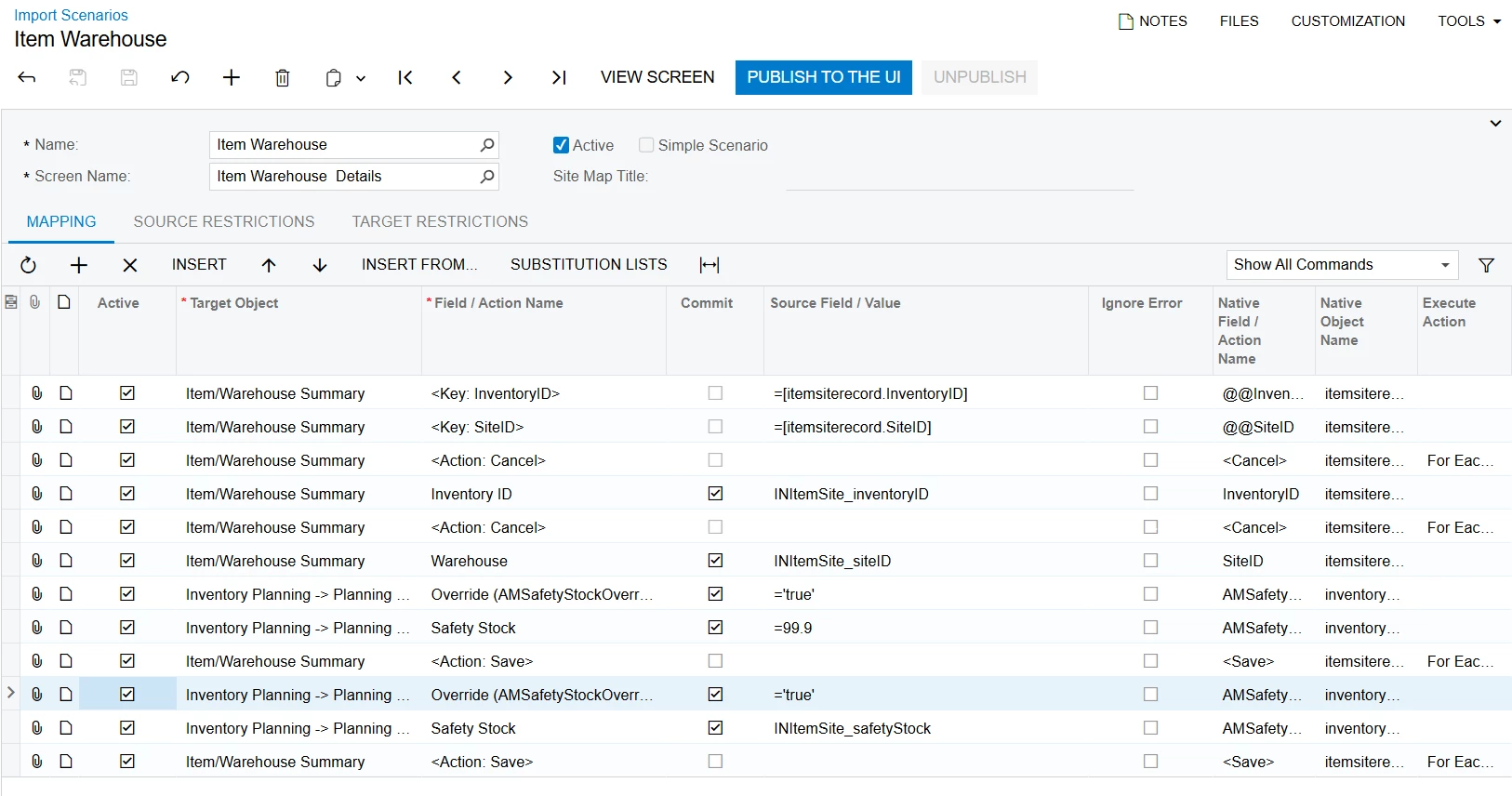
I tried ticking the override checkbox manually, and noticed that the change is not saved when the warehouse value matches the stock item value.  By changing the value to something else and then back to the original value I was able to set the override on the Warehouse. You could use an import scenario to update the override checkbox en masse.  You would need to create a generic inquiry and corresponding data provider based on the INItemSite DAC.  The scenario would look something like this:

Hope this helps!

Laura

7 replies

lauraj46
Captain II
Forum|alt.badge.img+8
  • Captain II
  • December 8, 2025

Hi ​@dominicpolicicchio03 ,

This is the expected behavior.  The inventory planning values on the main stock item screen are the default for all warehouses.  The override checkbox is used to override the values for a specific warehouse.  


dominicpolicicchio03
Freshman I
Forum|alt.badge.img

Got it. Thanks ​@lauraj46  So, I suppose that if a “main” warehouse is used for the most part and there are 1 or 2 other warehouses used for other things, all of those detail records should have the “override” checkbox checked for all planning settings. And set those manually?


lauraj46
Captain II
Forum|alt.badge.img+8
  • Captain II
  • Answer
  • December 9, 2025

Hi ​@dominicpolicicchio03 ,

Yes, that would work. If the override is selected on the Item Warehouse Details then changes to the stock item will not affect it.

I tried ticking the override checkbox manually, and noticed that the change is not saved when the warehouse value matches the stock item value.  By changing the value to something else and then back to the original value I was able to set the override on the Warehouse. You could use an import scenario to update the override checkbox en masse.  You would need to create a generic inquiry and corresponding data provider based on the INItemSite DAC.  The scenario would look something like this:

Hope this helps!

Laura


dgodsill97
Varsity I
Forum|alt.badge.img+3
  • Varsity I
  • December 9, 2025

All Inventory Planning (MRP/DRP) and Inventory Replenishment is performed at the Item Warehouse level because that is where supply, on hand, and demand are processed.  Safety Stock, Reorder Point, and Max Qty should only be set at the item warehouse level; setting them on the Stock Item would result in all warehouses having these value which is usually not desired.  Vendor order quantity modifiers (min order qty/max order qty/lot size) can be set on the stock item since they typically apply to all warehouses but can be overridden..  Order quantity modifiers for manufactured items should be set at the item warehouse if the sites have different constraints or processing methods.


dgodsill97
Varsity I
Forum|alt.badge.img+3
  • Varsity I
  • December 10, 2025

When we import planing parameters from legacy ERP system or template, we always import into the Item Warehouse Details.

You can also override the planning method or exclude some warehouses from MRP/DRP.  


dominicpolicicchio03
Freshman I
Forum|alt.badge.img

Thanks ​@lauraj46 ! I know Acumatica had something similar as a known issue in 24R1 where the values on the item warehouse detail record did not save, I wonder if this is related. I don’t necessarily like the fact that if the value matches the stock item, the “override” checkbox does not save. I guess I understand the system logic of why it is not saving, but I feel like the override should stay regardless of the value that is entered.


Thanks again!


dgodsill97
Varsity I
Forum|alt.badge.img+3
  • Varsity I
  • December 10, 2025

It’s complicated.  You have to check Override Replenishment Settings and specify a Replenishment Method to enable the overrides for Safety Stock and the other values.

And if you want to review the settings, find the GI MFGItemSettings.