Sticky

Production Scheduling Whitepaper

  • September 17, 2024
  • 10 replies
  • 693 views

angierowley75
Acumatica Moderator
Forum|alt.badge.img+3

The purpose of the Production Scheduling Whitepaper is to increase the reader’s knowledge of the scheduling processes available within Acumatica. It is strongly recommended to first complete the M100, M200 and M210 manufacturing education courses and be familiar with Acumatica processes and general work center and work calendar configurations. 

Upon completion of reading this document readers should understand:  

  • Available scheduling methods within Acumatica  
  • How Acumatica determines start and end dates for each scheduling method 
  • What inputs are considered for each scheduling method 

The following concepts are NOT addressed in detail in this document as they are well covered in either Acumatica’s online help or the M100, M200, or M210 manufacturing education courses.  

  • How to configure work centers  
  • How to configure tools  
  • How to configure machines  
  • For Finite Scheduling, when to run APS Maintenance

 The following topics were excluded in the first version of this whitepaper but may be added in the future:

  • Machine Scheduling
  • Tool Scheduling
  • Capable to Promise functionality


10 replies

Jennifer Douglas
Varsity I
Forum|alt.badge.img+1

Where can I find information about scheduling using a multi level BOM where the products are being created and consumed almost simultaneously?  The work centers are connected and our cartons as they are completed, are immediately consumed to create Master Cases.  


angierowley75
Acumatica Moderator
Forum|alt.badge.img+3
  • Author
  • Acumatica Moderator
  • September 17, 2024

@Jennifer Douglas  that doesn’t sound like something our native scheduling functionality would handle well - have you evaluated LYNQ or Lillyworks Protected Flow?


Forum|alt.badge.img

@angierowley75 is it possible to schedule multiple production orders for different items in the same work center at the same time based on available capacity by quantity? I tried doing this with machines, but it’s spreading each production order across multiple machines instead of scheduling order 1 at machine 1, order 2 at machine 2, etc.


jdobish
Pro III
Forum|alt.badge.img+2
  • Pro III
  • December 11, 2024

I was looking for something related to longer lead times operations, and I didn’t see any mention of the day format vs the hours format in this. Was this an oversight? 


angierowley75
Acumatica Moderator
Forum|alt.badge.img+3
  • Author
  • Acumatica Moderator
  • December 12, 2024

@jeremyd45 I don’t follow your scenario - the white paper assumes a basic level of understanding on how to configure BOMs - but if there is a scenario you feel should be added, we can put it on the to-do list.


jdobish
Pro III
Forum|alt.badge.img+2
  • Pro III
  • March 17, 2025

@angierowley75 I have just remembered that this was an open item on my action items. When using the Days, the system will calculate as 24hours, whereas the scheduling calendar looks at the work center calendar. If you are trying to get your schedule to match up to the hours inputted for costing,there is a lot of manual calculation that has to be done. 

I do have a case open, but figured I would mention it here as well. 

For example, if you have a calendar that is 24 hours x 7 days a week, you can schedule each day from 12:00am to 11:59pm, and a day equals a day on both the calendar, and 24 hours for the labor hours. However, if you work a 4 day work week, with 10 hours per day (standard 4x10 week) you have to either put 40 hours (which the system will then convert to 3days and 4 hours) or you have to do the math to get it to work out. Once you have done the math, the schedule will be accurate, and you would have the schedule push 4 days with the correct costing. 

However, most people would assume that if they only work 4 days, they could just put 4 days in the operation time and it would apply to whatever the working calendar is. In my situation described above, if you put in 4 days, it  pushes it to 96 hours, which then adds 56 hours to your costing and also pushes your schedule (assuming 10 x 4 schedule) 16 days into the future because the math is looking at the work center calendar. 


Ghazalshokrollahi
Jr Varsity III
Forum|alt.badge.img

Hi ​@angierowley75 , 

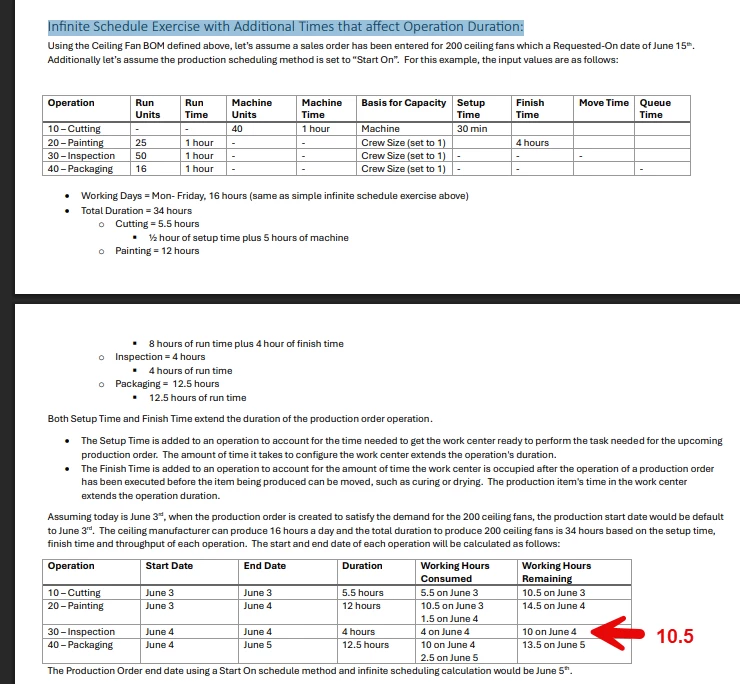
Great Article Thanks for sharing. Would it be possible to add page numbers to these white papers? I have found a typo here and as a result in the following section to this too . 

Infinite Schedule Exercise with Additional Times that affect Operation Duration: I believe this should be 10.5 

Thanks 

Ghazal 


Ghazalshokrollahi
Jr Varsity III
Forum|alt.badge.img

Hi ​@angierowley75  

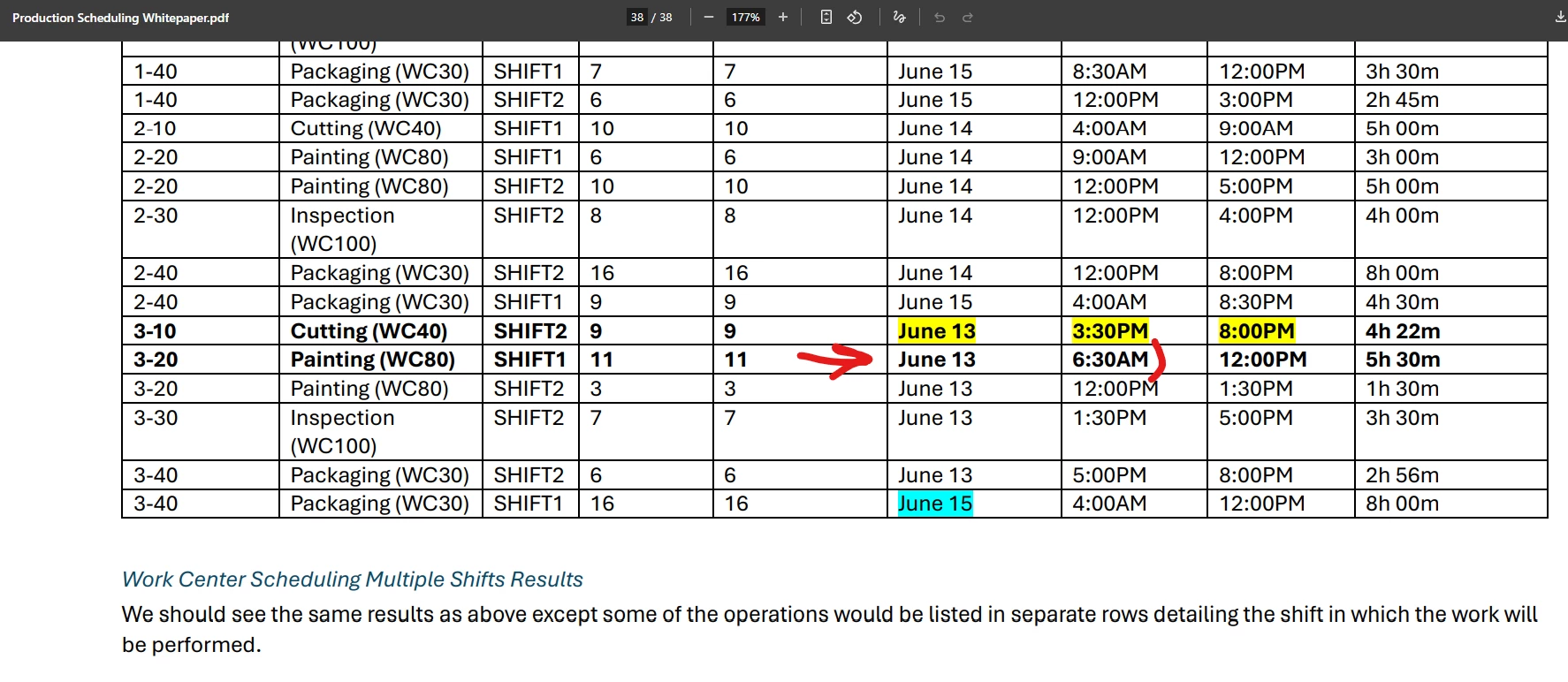
Would you please explain how the calculation date here worked? this is on the last page  of this document , how come a painting Process is happening before the cutting? thanks 


Ghazalshokrollahi
Jr Varsity III
Forum|alt.badge.img

Hi ​@angierowley75 , 

I appreciate if you can clarify items below for me. 

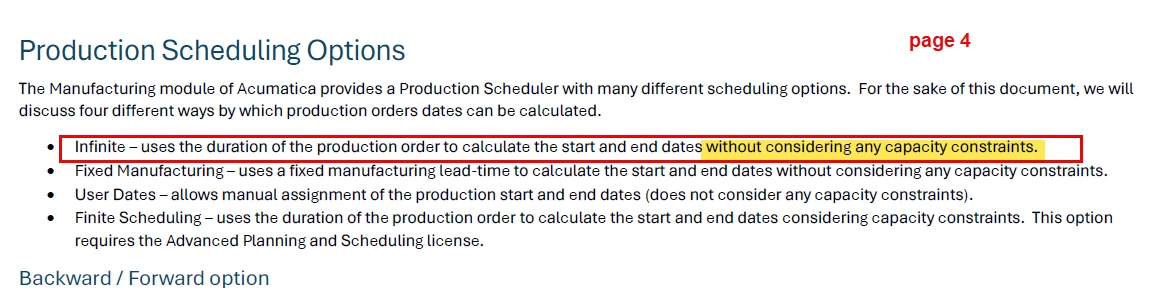
1: Based on White paper page 4 and 5, Capacity and constrains are not considered in infinite scheduling. why page 5 under infinite scheduling we are even discussing this? 

 2: page 11 ,13 examples are for infinite scheduling where Acumatica won’t consider the capacity . why do we use efficiency, crew size in those examples? 

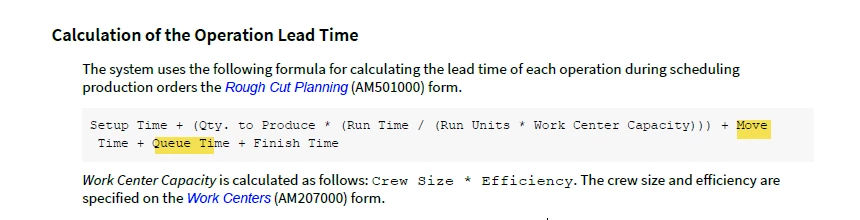
3: The formula on page 15 should be applicable for finite Scheduling and based on Acumatica training material M120 extended scenarios it also includes Move and Queue but White paper is missing that. 

I appreciate you clarifying these areas please. 

Thanks 

Ghazal 


angierowley75
Acumatica Moderator
Forum|alt.badge.img+3
  • Author
  • Acumatica Moderator
  • July 17, 2025

@Ghazalshokrollahi 

Efficiency and crew size affect the duration of the operation … the start and end times.  When these values are set for infinite, the system does not consider if other operations need the same WC at the same time… thus ignoring capacity.

I do not understand your point about Move/Queue Time… these are used to determine the duration of the operation - regardless of if the scheduling method is Infinite or Finite.

I have revised the Whitepaper to resolve the errors you found and have added page #s.