

Answer

Planning Bucket Help

  • October 21, 2024
  • 3 replies
  • 146 views

Forum|alt.badge.img

Hey everyone, I have looked at all of the online help regarding planning buckets and I still don’t have a good grasp as to what a planning bucket actually is and how I should set them up. Can anyone help further explain what they are for? Thanks!

Best answer by andrewm

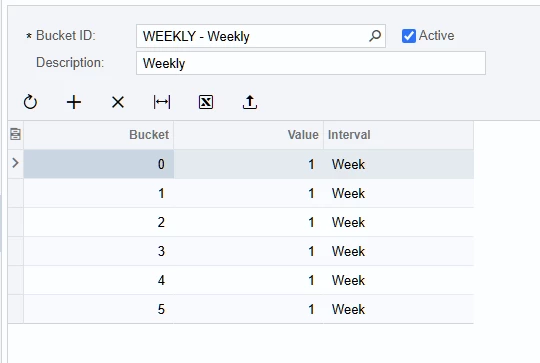
Planning Buckets are to be used along with Inventory Planning Requirements by Item. Here is an example of a Bucket type for “Weekly” along with how it displays via Inventory Planning Requirements by Item.

You will notice that Bucket 0 actually looks one week or interval backwards for anything that is “past due”. You can continue to look backwards by adding additional buckets like -1, -2, -3, -4 etc… Bucket 1 is this week, Bucket 2 is next week etc. One important thing to note is that if you want to see Past Due values, Acumatica will only show you the value if you have a bucket created. For example, today is 10/21/2024. If I had something past due in September and I am looking 2 weeks back, it does not appear.  

The “Value” here is always 1 because I am incrementing by 1 week each bucket. If I specified 2 or 3 here then it would actually jump 2 or 3 weeks when running Inventory Planning Requirements by Item. You can easily mess around with your Buckets/Values and re-run the report to see how it changes.

The interval can also be changed to Days, Weeks, Months or Years. I typically just make a Bucket ID for Weekly, Monthly, and Daily. Depends how far in advance the user needs to plan. You may want to create a handful of different Bucket ID’s, i.e 14 days, 7 days, 6 weeks, 12 weeks, 3 months etc.

As for what Inventory Planning Requirements by Item is telling you: you start at the top left and go left to right, then down one row. Beginning Quantity + Actual Supply - Actual Demand = Net Quantity. Actual Supply and Actual Demand are Jobs, Sales Orders, Purchase Orders etc that have been created.


Then you have Net Quantity - Planned Supply - Planned Demand = End Quantity. The “Planned Supply” here are the “Requirement Plans” that Acumatica suggests when you run Inventory Planning Display. For example, if you are short and need to purchase 100 lbs, Acumatica creates a “Requirement Plan” for 100 lbs. The Planned Demand comes from Forecasts and things like “planning orders” that create additional material demand.
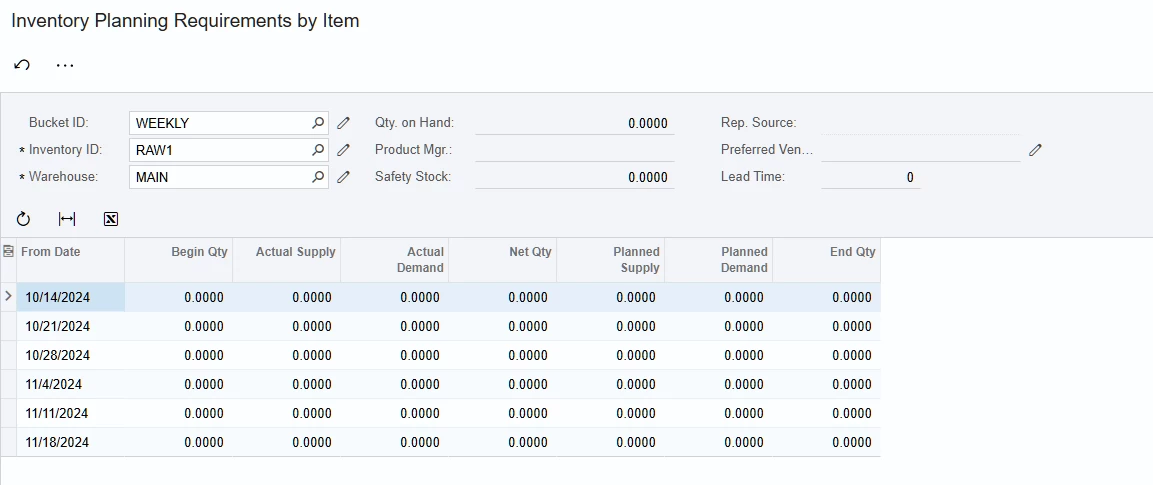


I am a fan of looking at MRP this way as well as using “consolidations”. It gives you a more broad view of the planning requirements for that item over some time frame. You can also drill into the Results by Item from this screen (…) if you want to see the details of your supply and demand.

3 replies

Forum|alt.badge.img+1
  • Answer
  • October 21, 2024

Planning Buckets are to be used along with Inventory Planning Requirements by Item. Here is an example of a Bucket type for “Weekly” along with how it displays via Inventory Planning Requirements by Item.

You will notice that Bucket 0 actually looks one week or interval backwards for anything that is “past due”. You can continue to look backwards by adding additional buckets like -1, -2, -3, -4 etc… Bucket 1 is this week, Bucket 2 is next week etc. One important thing to note is that if you want to see Past Due values, Acumatica will only show you the value if you have a bucket created. For example, today is 10/21/2024. If I had something past due in September and I am looking 2 weeks back, it does not appear.  

The “Value” here is always 1 because I am incrementing by 1 week each bucket. If I specified 2 or 3 here then it would actually jump 2 or 3 weeks when running Inventory Planning Requirements by Item. You can easily mess around with your Buckets/Values and re-run the report to see how it changes.

The interval can also be changed to Days, Weeks, Months or Years. I typically just make a Bucket ID for Weekly, Monthly, and Daily. Depends how far in advance the user needs to plan. You may want to create a handful of different Bucket ID’s, i.e 14 days, 7 days, 6 weeks, 12 weeks, 3 months etc.

As for what Inventory Planning Requirements by Item is telling you: you start at the top left and go left to right, then down one row. Beginning Quantity + Actual Supply - Actual Demand = Net Quantity. Actual Supply and Actual Demand are Jobs, Sales Orders, Purchase Orders etc that have been created.


Then you have Net Quantity - Planned Supply - Planned Demand = End Quantity. The “Planned Supply” here are the “Requirement Plans” that Acumatica suggests when you run Inventory Planning Display. For example, if you are short and need to purchase 100 lbs, Acumatica creates a “Requirement Plan” for 100 lbs. The Planned Demand comes from Forecasts and things like “planning orders” that create additional material demand.


I am a fan of looking at MRP this way as well as using “consolidations”. It gives you a more broad view of the planning requirements for that item over some time frame. You can also drill into the Results by Item from this screen (…) if you want to see the details of your supply and demand.


Forum|alt.badge.img+1
  • October 21, 2024

One other super specific detail that I forgot to mention is how Acumatica uses the Business Date when running this report. I previously worked with another ERP and regardless of the Business Date, the report would always start on a Monday (when running Weekly) or the 1st of the month when using Monthly buckets. It’s a lot cleaner in my opinion when you are looking at the data in terms of actual weeks rather than Wednesday through Wednesday, Thursday through Thursday or 10/21-11/21 etc…

Today is Monday so the weekly buckets will look fine today if you test it. The way I have found to get around this is to set the Business Date to the first of the month or to a Monday. You may need to run Regenerate Inventory Planning to get the report to update. It has been a while since I tested this.

I think if Acumatica were to add a “Start Date” to Inventory Planning Requirements by Item it would be a bit more user friendly.


Forum|alt.badge.img+1
  • October 21, 2024


Then you have Net Quantity - Planned Supply - Planned Demand = End Quantity. The “Planned 


Couldn’t edit my post for some reason but I made a typo here. It should be Net Quantity + Planned Supply - Planned Demand = End Quantity.