Answer

No Default Mark For at Item Warehouse Detail level?

  • September 18, 2025
  • 8 replies
  • 95 views

MichaelShirk
Captain II
Forum|alt.badge.img+5

We run manufacturing operations at multiple warehouses. We use the same BOMs at all warehouses because the same materials are consumed. 
However, due to much higher manufacturing volume at our main facility, there are materials that are stocked at that warehouse, but are custom order at the lowest volume facility. 

Acumatica has the “Dflt. Mark For” checkbox on the stock item level which, when the “Purchase” option is selected for an item, then system will suggest a purchase order when that item appears on a production order. However, I don’t see this option on the Item Warehouse Detail level, which we really need for those items that are regularly stocked at some warehouses, but only ordered on an as-needed basis at other warehouses. 

Am I missing something, or is Acumatica missing this simple feature?

Best answer by Debbie Baldwin

@MichaelShirk - can you please add an idea? Thanks so much!

8 replies

  • Freshman I
  • September 22, 2025

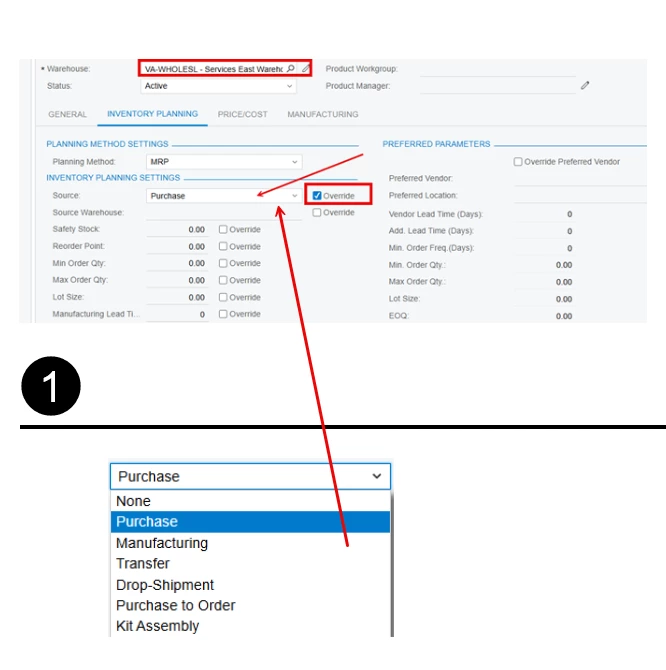
When you go into the Warehouse Detail you have the option on the Inventory Planning tab to select the source to be different in the specific warehouse.  It can be even a transfer from the other warehouses depending on the configuration.


MichaelShirk
Captain II
Forum|alt.badge.img+5
  • Author
  • Captain II
  • September 22, 2025

@vwilson92 I thought that was it at first to, but then I read the documentation. That is specifically for how the item will be replenished when inventory replenishment is processed. This doesn’t mark the item for purchase when it appears on the Production Order Materials.


MichaelShirk
Captain II
Forum|alt.badge.img+5
  • Author
  • Captain II
  • September 22, 2025

@Debbie Baldwin  Any information on this? 
If this doesn’t exist currently, I’ll create an idea for it. It seems like a basic requirement that a lot of manufacturers would have.


dgodsill97
Varsity I
Forum|alt.badge.img+3
  • Varsity I
  • September 22, 2025

 A better solution might be to not to mark for purchase and use Critical Materials or MRP.  Both will net against existing available.  Mark for’s do not consider existing inventory and you may be purchasing something you do not need.


Debbie Baldwin
Acumatica Moderator
Forum|alt.badge.img+2
  • Acumatica Product Manager
  • Answer
  • September 23, 2025

@MichaelShirk - can you please add an idea? Thanks so much!


MichaelShirk
Captain II
Forum|alt.badge.img+5
  • Author
  • Captain II
  • September 30, 2025

I’ve created the idea here.


MichaelShirk
Captain II
Forum|alt.badge.img+5
  • Author
  • Captain II
  • September 30, 2025

 A better solution might be to not to mark for purchase and use Critical Materials or MRP.  Both will net against existing available.  Mark for’s do not consider existing inventory and you may be purchasing something you do not need.

@dgodsill97  critical materials has a Production Nbr. parameter and you have to look up one production order at a time, which wouldn’t be efficient for a purchasing manager. 
We’re not able to use MRP because all of our materials originate from our product configurations, which are very complex with over a thousand configurable SKUs and over two hundred options each.


dgodsill97
Varsity I
Forum|alt.badge.img+3
  • Varsity I
  • October 1, 2025

In a features and option environment planning bills are often used to drive forecasts in MRP to ensure sufficient components are available vs. using reorder points/safety stock.  Periodically, based on the percentage of options actually used, the planning bill(s) are revised. For example, what percentage customer order this color or style. If you are looking for some guidance on planning and forecasting I can recommend a consultant who lead the forecasting and planning at a major kitchen cabinet manufacturer.

I am assuming there is a gap in days between the sales order being configured and the production order created. You could create a GI to list the options selected with the sales order promise date to at least gain some visibility for purchasing.  The configuration results tables have the options selected for each configuration.  The tables are defined here in the article it wrote, https://help.acumatica.com/Help?ScreenId=ShowWiki&pageid=1ce567e9-7d64-4f0d-aa14-d894a35a8fc3


Using Configuration Results in a Report

For example, to produce a query of all sales order lines with a configured item you can use AMConfigurationResults and link it to SOLine by using the following: OrdTypeRef = OrderType, OrdNbrRef = OrderNbr, and OrdLineRef = LineNbr.

Getting a list of the options selected for a configuration result is a bit more complex. Link the data as follows:

  • AMConfigResultsOption to AMConfigurationResults by using ConfigResultsId
  • AMConfigResultsOption to AMConfigResultsFeature by using ConfigResultsId, FeatureLineNbr. Use the Included flag to get only the options that were selected.
  • AMConfigResultsFeature to AMConfigurationFeature by using ConfigurationID, Revision, and AMConfigResultsFeatureFeatureLineNbr = AMConfigurationFeature.LineNbr to get the FeatureID