Solved

New Stock Item or Non-Stock Item bringing in incorrect Description

  • November 12, 2024
  • 9 replies
  • 198 views

Forum|alt.badge.img

Anyone see this before - For New Items - 

<NEW> tag plus a totally different item Description
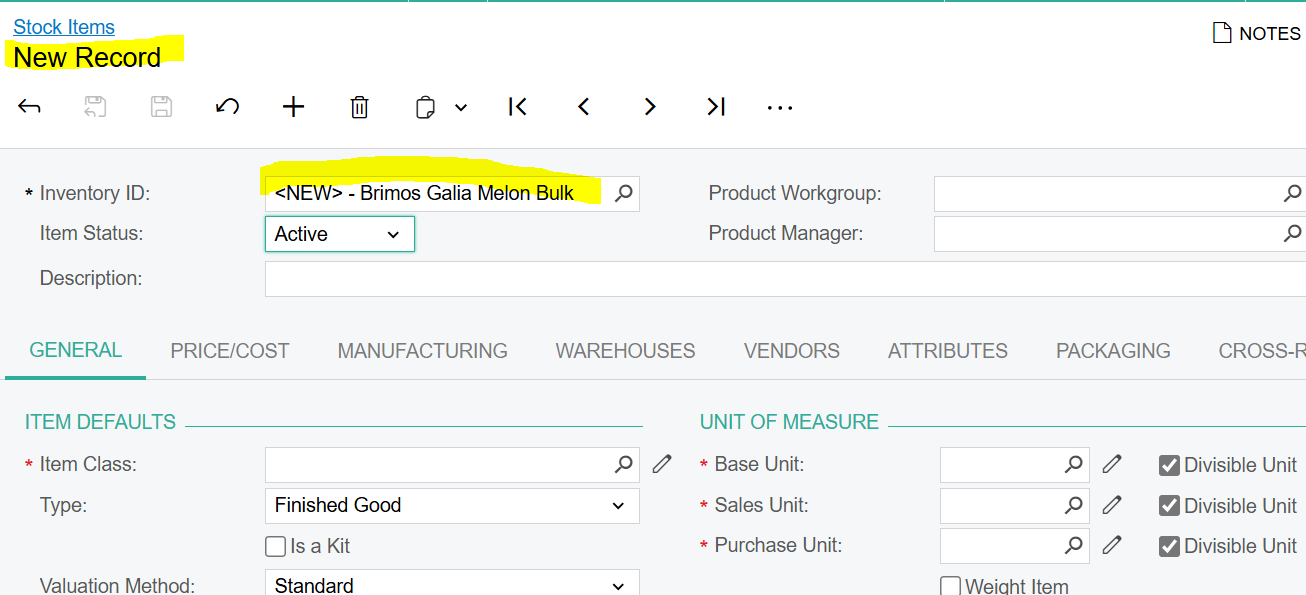
 

Nor New - I have not even put in a Description yet …..

Best answer by mianniello80

Hello ​@sshaw55 


I just had this issue with a current client. The steps to resolve are below.
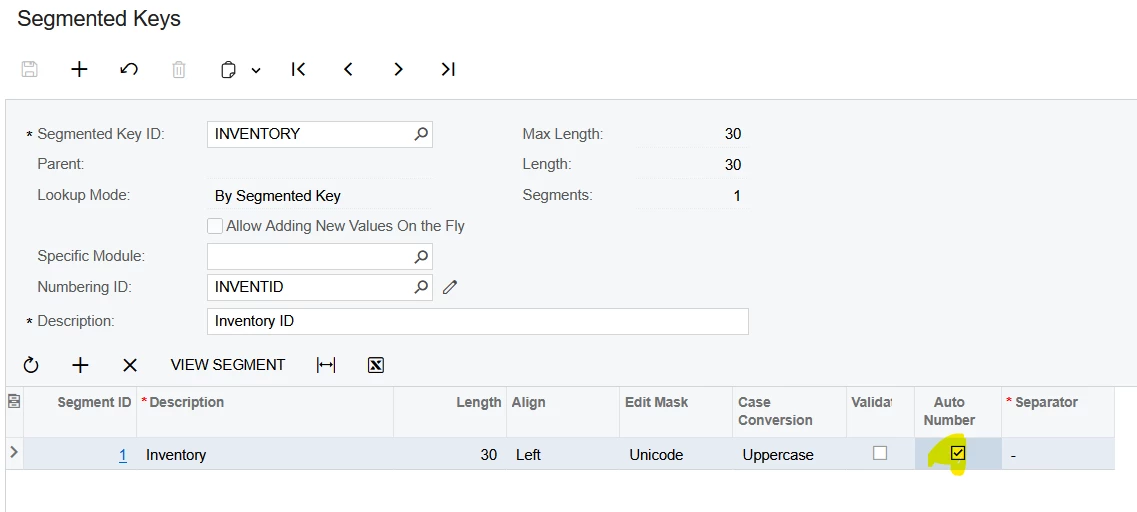
  1. On the Segmented Keys for Inventory - Turn off Auto Numbering
  2. Create a New Stock Item → Manually input  the ID as <NEW> fill out required information, then save.
  3. On the newly created <NEW> Stock Item → Use the Change ID action and change the ID (something like DELETE for example) and save.
  4. Delete this Stock Item
  5. Turn on the Auto Numbering Checkbox agai.
    1. Create new stock item, the description displaying issue is resolved.


9 replies

josborn02
Varsity III
Forum|alt.badge.img+1
  • Varsity III
  • November 12, 2024

I have seen some similar odd behavior in the Stock Items screen.  I’d log out and back in, clear your chache, etc. and try again.  If it persists I’d submit a ticket with Acumatica.


Forum|alt.badge.img
  • Author
  • Freshman II
  • November 12, 2024

Thank you - it is a persistent issue - and happening for me as well as client (who reported it) - so totally different computers


angierowley75
Acumatica Moderator
Forum|alt.badge.img+3
  • Acumatica Moderator
  • November 13, 2024

I would recommend working with Acumatica support so they can investigate the issue, as this is not expected behavior.


Forum|alt.badge.img
  • Author
  • Freshman II
  • November 13, 2024

Thank you!  I thought I was losing it - but had never seen that myself!


Chris Hackett
Community Manager
Forum|alt.badge.img
  • Acumatica Community Manager
  • January 22, 2025

Hi ​@sshaw55 were you able to find a solution? Thank you!


Forum|alt.badge.img
  • Author
  • Freshman II
  • January 28, 2025

No solution :(


Forum|alt.badge.img+1

Are you using automatic numbering?  What it seems like to me is at one time someone added the <NEW> Item ID into the database and that’s why it’s coming up.  

What happens if you hit delete on that?


mianniello80
Varsity II
Forum|alt.badge.img
  • Varsity II
  • Answer
  • April 10, 2025

Hello ​@sshaw55 


I just had this issue with a current client. The steps to resolve are below.

  1. On the Segmented Keys for Inventory - Turn off Auto Numbering
  2. Create a New Stock Item → Manually input  the ID as <NEW> fill out required information, then save.
  3. On the newly created <NEW> Stock Item → Use the Change ID action and change the ID (something like DELETE for example) and save.
  4. Delete this Stock Item
  5. Turn on the Auto Numbering Checkbox agai.
    1. Create new stock item, the description displaying issue is resolved.


Chris Hackett
Community Manager
Forum|alt.badge.img
  • Acumatica Community Manager
  • April 10, 2025

Thank you for sharing your solution with the community ​@mianniello80!