Answer

Multiple child production order move/completion

  • June 19, 2025
  • 7 replies
  • 118 views

Forum|alt.badge.img

Is there any functionality in Acumatica where you can enter a production order number and a list of child production orders are display and you can select which child production orders you want to process moves/completions on?

This would be sort of like creating or printing production orders.
Best answer by angierowley75

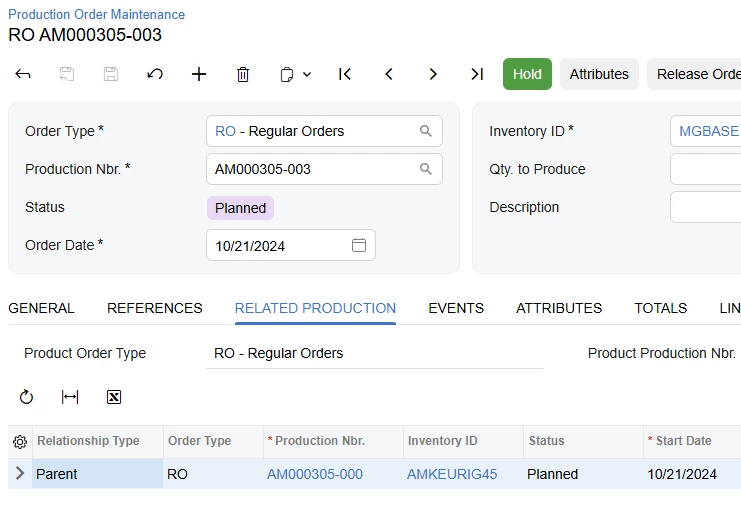
As of 2024R2 there is a tab on the Production Order Maintenance screen which will show related Production Orders. (Parent and Child Production Orders which are linked to the current one)


7 replies

angierowley75
Acumatica Moderator
Forum|alt.badge.img+3
  • Acumatica Moderator
  • June 20, 2025

This does not yet exist as part of the standard software solution.

Please review the ‘Mass Move’ idea here on communities, upvote, and add your use case.


CherryStreet
Jr Varsity I
Forum|alt.badge.img
  • Jr Varsity I
  • June 20, 2025

Are you looking to find only the child production orders of the parent order you are entering?  I could be wrong but out-of-the-box Acumatica doesn't automatically show hierarchy for this purpose.  A simple GI filtering child orders buy Parent Order ID.  To perform the completions would take a customization. 


Forum|alt.badge.img
  • Author
  • Jr Varsity III
  • June 20, 2025

Our main final product is a configured item with multiple options, the item travels through an assembly line which has subassembly stations.  We would like to enter these options as components of the main product and turn these options into production orders (I hope I’m painting a good picture here).  One subassembly could have multiple options/production orders for the same main product on the assembly line.  If we had functionality that could do a MOVE on all these options at the same time, we could setup a computer at the station where the operator could log in into this MULTI/MOVE function and - select the work center - select the PARENT production order and process the MOVE on the child production orders, once the physical work is done.  I know more thought needs to be done here, but that is the main idea.


For now, my idea, is to work on a solution where the operator can access a dashboard which will show all the subassembly widgets showing pending released production orders, the operator would open the widget and the operator will be taken to an inquiry displaying parent production order and child production orders for that subassembly, where each child production order would be linked to the MOVE function, then the operator will process a move one by one.  This process should also save on paper print outs.


angierowley75
Acumatica Moderator
Forum|alt.badge.img+3
  • Acumatica Moderator
  • Answer
  • June 20, 2025

As of 2024R2 there is a tab on the Production Order Maintenance screen which will show related Production Orders. (Parent and Child Production Orders which are linked to the current one)


ChrisOkamuro52
Acumatica Employee
  • Acumatica Employee
  • June 20, 2025

Our main final product is a configured item with multiple options, the item travels through an assembly line which has subassembly stations.  We would like to enter these options as components of the main product and turn these options into production orders (I hope I’m painting a good picture here).  One subassembly could have multiple options/production orders for the same main product on the assembly line.  If we had functionality that could do a MOVE on all these options at the same time, we could setup a computer at the station where the operator could log in into this MULTI/MOVE function and - select the work center - select the PARENT production order and process the MOVE on the child production orders, once the physical work is done.  I know more thought needs to be done here, but that is the main idea.


For now, my idea, is to work on a solution where the operator can access a dashboard which will show all the subassembly widgets showing pending released production orders, the operator would open the widget and the operator will be taken to an inquiry displaying parent production order and child production orders for that subassembly, where each child production order would be linked to the MOVE function, then the operator will process a move one by one.  This process should also save on paper print outs.


A few questions:

  1. are the options really subassemblies, where multiple options can be worked on simultaneously, for the final product?
  2. what’s the preferred solution: to see the relationship information on the floor, at a data collection kiosk computer, and have the transaction perform a move/issue to the parent (PUSH), or happening as a single action on the parent, moving and issuing all of the children at once (PULL)
  3. are there any lot/serial considerations for the children?

Forum|alt.badge.img
  • Author
  • Jr Varsity III
  • June 20, 2025
  1. are the options really subassemblies, where multiple options can be worked on simultaneously, for the final product?
    1. Yes, they would be.
  2. what’s the preferred solution: to see the relationship information on the floor, at a data collection kiosk computer, and have the transaction perform a move/issue to the parent (PUSH), or happening as a single action on the parent, moving and issuing all of the children at once (PULL)
    1. Both really but the preferred process because of the simpleness would be a single action to execute all the options at once.
  3. are there any lot/serial considerations for the children?
    1. Yes, that is a future consideration.

ChrisOkamuro52
Acumatica Employee
  • Acumatica Employee
  • June 20, 2025

Thanks for the additional information