Solved

MRP Planning – Stock Item Level Configurations

  • December 29, 2025
  • 2 replies
  • 48 views

HI, 

I would like to confirm the MRP configuration at the stock item level in line with the latest 2025 R1 updates. I have completed the configuration and tested a few MRP cycles, which are attached for your reference.

Could you please help confirm whether the configured process flows are aligned with the expected standard behavior? Additionally, I would appreciate clarification on a few questions related to the results observed during testing.


Best answer by angierowley75

I read through the document - I only saw 3 application specific questions, which I have listed both the question and answer below.  

Q1 If we go to the Manufacturing tab, we can see the planning results as informational. Is this applicable only when the replenishment source is Manufacturing?

A1 - No, the Manufacturing Tab displays only when the Manufacturing module is enabled on the  enable/disable features screen.  The fields are displayed mainly for backward compatability as the fields used to be maintained on the Manufacturing tab planning values were moved to the Inventory Planning tab for usability reasons.

Q2 - Is there any override option at the Item Warehouse level or the Stock Item level to change the Stocking method from Safety Stock to Reorder Point?

A2 - No.  In your version, the configuration exists only at the system/global level.  We are working to change this for 2026R2 or later.  Additionally, MRP does not consider min/max values - these fields exist to support the Inventory Replenishment function.

Q3 - Also, what is the purpose of the Manufacturing tab, and what controls are available on the Manufacturing tab in the Item Warehouse Details form?

A3 - only to provide all settings related to manufacturing in a single spot.  The production order default values are provided for convenience.

Questions specific to the implementation of MFG and MRP should be directed to someone who knows your business intimately - I cannot provide guidance on the implementation approach.

If any other functional questions were missed, please reply and call them out.

It may be helpful to review all the Release Notes between the version you are coming from and 2025R2. 

Also, are you aware of the published Whitepaper? (link below)



2 replies

angierowley75
Acumatica Moderator
Forum|alt.badge.img+3
  • Acumatica Moderator
  • Answer
  • December 29, 2025

I read through the document - I only saw 3 application specific questions, which I have listed both the question and answer below.  

Q1 If we go to the Manufacturing tab, we can see the planning results as informational. Is this applicable only when the replenishment source is Manufacturing?

A1 - No, the Manufacturing Tab displays only when the Manufacturing module is enabled on the  enable/disable features screen.  The fields are displayed mainly for backward compatability as the fields used to be maintained on the Manufacturing tab planning values were moved to the Inventory Planning tab for usability reasons.

Q2 - Is there any override option at the Item Warehouse level or the Stock Item level to change the Stocking method from Safety Stock to Reorder Point?

A2 - No.  In your version, the configuration exists only at the system/global level.  We are working to change this for 2026R2 or later.  Additionally, MRP does not consider min/max values - these fields exist to support the Inventory Replenishment function.

Q3 - Also, what is the purpose of the Manufacturing tab, and what controls are available on the Manufacturing tab in the Item Warehouse Details form?

A3 - only to provide all settings related to manufacturing in a single spot.  The production order default values are provided for convenience.

Questions specific to the implementation of MFG and MRP should be directed to someone who knows your business intimately - I cannot provide guidance on the implementation approach.

If any other functional questions were missed, please reply and call them out.

It may be helpful to review all the Release Notes between the version you are coming from and 2025R2. 

Also, are you aware of the published Whitepaper? (link below)



  • Author
  • December 30, 2025

Hello ​@angierowley75 ,

Thank you very much for your feedback. You have clearly answered what was required. Based on your explanation, I have rewritten below what I understand to be correct regarding the changes in 2025 R2.

01) A1. 

The Manufacturing tab in the Stock Item form is applicable only when the Manufacturing feature is enabled. In older releases, manufacturing calculations used the values maintained on this tab. In newer releases, the system still retains these values for backward compatibility; however, MRP now considers only the values maintained on the Planning (Inventory Planning) tab.


02) A2 – Clarification Required

As mentioned, MRP does not consider Min/Max values when the planning method is MRP. I would like to clarify where these values are configured, how they are used, and provide a further example, along with the recommended best practice.

Example:

  • Planning parameters are first configured on the Planning tab in the Stock Item form.

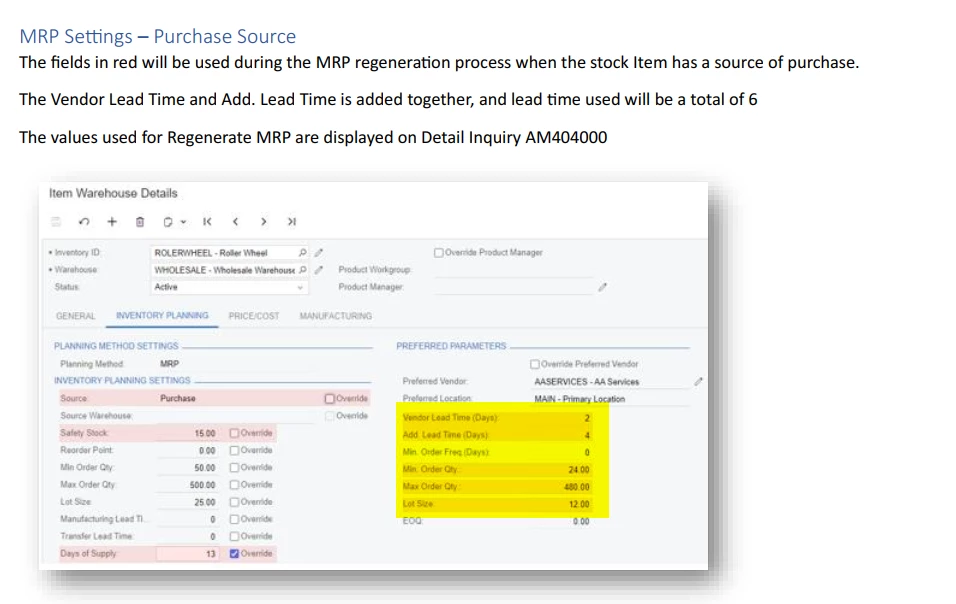
  • When the Source is set to Purchase, these values appear in the Item Warehouse Details form on the left-hand side.

  • When the Vendor tab in the Stock Item form is updated, the system populates the Preferred Parameters section on the Planning tab in the Item Warehouse Details form with values such as Minimum Order Quantity and Maximum Order Quantity, as demonstrated in Point 3 of my previously attached test document.

  • When MRP is run, it considers the vendor Minimum Order Quantity and Maximum Order Quantity maintained in this section.

Based on the screenshot below, when the source is Purchasing, the fields highlighted in yellow are informational and record the vendor default values in this section.

During an MRP Run

  • If the source is Purchasing, MRP considers the values from the Preferred Parameters (yellow section).
  • If no values are maintained on the Vendor tab in the Stock Item form, the Preferred Parameters section remains blank, and MRP considers the values from the left-hand side of the Item Warehouse Details form.


03). A3 - 

The Manufacturing tab does not control MRP planning. The planning fields shown on the Stock Item Manufacturing tab and the Manufacturing tab in the Item Warehouse Details form are informational and defaulted only.

Actual MRP calculations and replenishment decisions are based on the Inventory Planning tab.


Thank you