Solved

MRP Inventory Planning and Minimum Order Qty

  • February 11, 2026
  • 3 replies
  • 27 views

Looking for some clarification & guidance. We are testing the Inventory Planning in Acumatica and one of the things I have noticed is the Min Order Qty on the Inventory Planning Tab of a Stock Item does not seem to utilized during the Planning Regeneration.

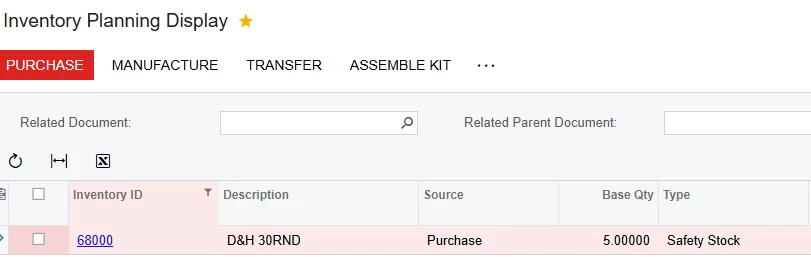
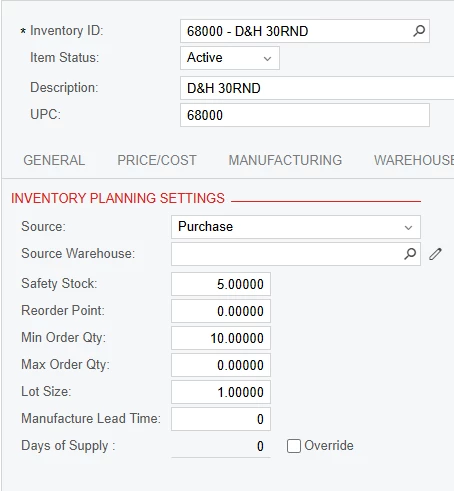
In the example below, Stock Item 68000 has Safety Stock = 5, Min Order Qty = 10. I currently have Qty On Hand = 0.

I would think that when Regeneration occurs, it would look at demand (currently 0), then check Safety Stock, determine in this case we need to place an order to fulfill the safety stock demand, and then use Min Order Qty if value exists. However, it doesn’t seem to use it at all. Only workaround I have found, is to set Min Order Qty on the Vendor Tab for the default Vendor and that does seem to work. If it is intended to be Vendor Dependent, then it seems odd this setting is there.

Reading the Form Reference, I can see it get’s populated from the Item Class, but still not sure why the Inventory Planning doesn’t use it. 
 

Best answer by dgodsill97

If there is a default vendor and the replenishment source is Purchase, the min/max/lot default from the vendor otherwise they default from the Inventory Planning tab or Manufacturing tab depending on which features are enabled.

3 replies

Debbie Baldwin
Acumatica Moderator
Forum|alt.badge.img+2
  • Acumatica Product Manager
  • February 11, 2026

@austinjenkins27  - have you seen our MRP Whitepaper? 


dgodsill97
Varsity I
Forum|alt.badge.img+5
  • Varsity I
  • Answer
  • February 11, 2026

If there is a default vendor and the replenishment source is Purchase, the min/max/lot default from the vendor otherwise they default from the Inventory Planning tab or Manufacturing tab depending on which features are enabled.


@Debbie Baldwin I have not yet but have downloaded and will give it a read, thank you very much!


@dgodsill97 Thanks, that does clarify it for me!