Solved

MRP Grouping Quantities When Creating Produxtion Tickets

  • Oct 19, 2021 11:19 PM UTC
  • 8 replies
  • 407 views
  • Translate All

Forum|alt.badge.img

Does anyone know of a way to generate production tickets from MRP for the total quantities that are in demand for an item.  Currently it is showing the same item multiple times and if you generate tickets it will create one by one instead of a sum of the quantity.  If we manually sum the qty and create a work order for that quantity, mrp still shows the demand one by one until it’s complete.  Quite cumbersome to keep on track.  Any suggestions?

Best answer by kristianharianja

That’s what Group Planning is used for. The system groups/consolidates all planned orders on an item with a date within the number of days that you specify for that item, see screen shot below. The first planned order selected determines the starting date for grouping.

Note that MRP will still show MRP plan (demand) for item individually in MRP Display and that is useful to track where the demand comes from but you use group planning to create production order in with sum/consolidated qty.
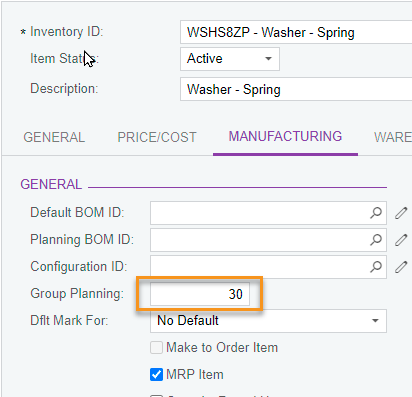


For more detail and see example, check link below:
https://help-2021r1.acumatica.com/(W(5))/Help?ScreenId=ShowWiki&pageid=0061f06b-a125-4dff-be21-40998e23af81




View original

8 replies

kristianharianja
Semi-Pro I
Forum|alt.badge.img+3

That’s what Group Planning is used for. The system groups/consolidates all planned orders on an item with a date within the number of days that you specify for that item, see screen shot below. The first planned order selected determines the starting date for grouping.

Note that MRP will still show MRP plan (demand) for item individually in MRP Display and that is useful to track where the demand comes from but you use group planning to create production order in with sum/consolidated qty.


For more detail and see example, check link below:
https://help-2021r1.acumatica.com/(W(5))/Help?ScreenId=ShowWiki&pageid=0061f06b-a125-4dff-be21-40998e23af81


Translate

Forum|alt.badge.img
  • Author
  • Freshman II
  • Oct 20, 2021 3:31 AM UTC

Ah that’s really helpful thank you.  I will test this out. 

Translate

jdobish
Captain II
Forum|alt.badge.img+2
  • Captain II
  • Oct 21, 2021 9:44 PM UTC

It would be helpful to be able to set this at the item class level so you would not have to worry about it on every single stock item.  It would also be helpful if there was an indicator on the screen to provide a subtotal for the group, or let you know that it is a group production type. (Yes, there is the group number, but a simple indicator could also help)

Translate

jdobish
Captain II
Forum|alt.badge.img+2
  • Captain II
  • Dec 13, 2021 10:24 PM UTC

An update to this, you can manually add in the group number (it may be obvious to some, but I wanted to put it out there) when you choose the Purchase or Manufacture process button. You can override or add in a group number and it will consolidate.  It would be nice if it gave you a total somewhere though. 

Translate

Forum|alt.badge.img+1
  • Semi-Pro II
  • Feb 2, 2022 3:40 PM UTC

RE: It would be helpful to be able to set this at the item class level so you would not have to worry about it on every single stock item. 

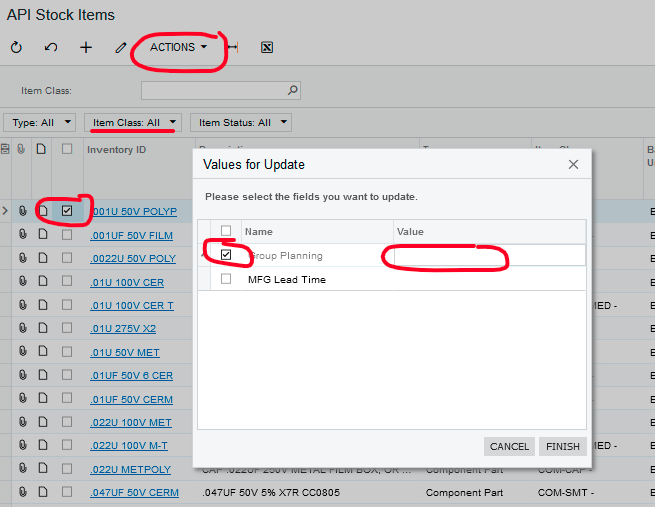
You can use a generic inquiry to update this at the item class level. Select or create an inquiry that includes the field(s) which you want to update globally by Item Class. On the “Entry Point” tab check the box next to “Enable Mass Record Update”. A new tab will appear called “Mass Update Fields”. Add Group Planning (and other fields as needed). In the inquiry there should now be an “Actions” drop down where you can select Update or Update All. Group Planning can be selected in the pop up window and the Value entered. (Test on one or two parts initially….)

Hope this helps..

Translate

aslagle96
Freshman II
  • Freshman II
  • Jul 17, 2026 2:13 AM UTC

Did the “Group Planning” field get removed?  I’m not seeing it in my instance.

Translate

dominicpolicicchio03
Freshman I
Forum|alt.badge.img

Did the “Group Planning” field get removed?  I’m not seeing it in my instance.

I believe this has been revamped as ‘Days of Supply’ on the Inventory Planning Preferences screen. Once this is turned on, the days of supply field on each stock item will be available on the Inventory Planning tab. You can set the number of days you want MRP to group plan records for each item.

Translate

aslagle96
Freshman II
  • Freshman II
  • Jul 28, 2026 8:15 PM UTC

Did the “Group Planning” field get removed?  I’m not seeing it in my instance.

I believe this has been revamped as ‘Days of Supply’ on the Inventory Planning Preferences screen. Once this is turned on, the days of supply field on each stock item will be available on the Inventory Planning tab. You can set the number of days you want MRP to group plan records for each item.


Thanks!  Found it.

Translate