Question

Move Cost Transaction was not generated after performing the Move.

  • November 9, 2025
  • 12 replies
  • 107 views

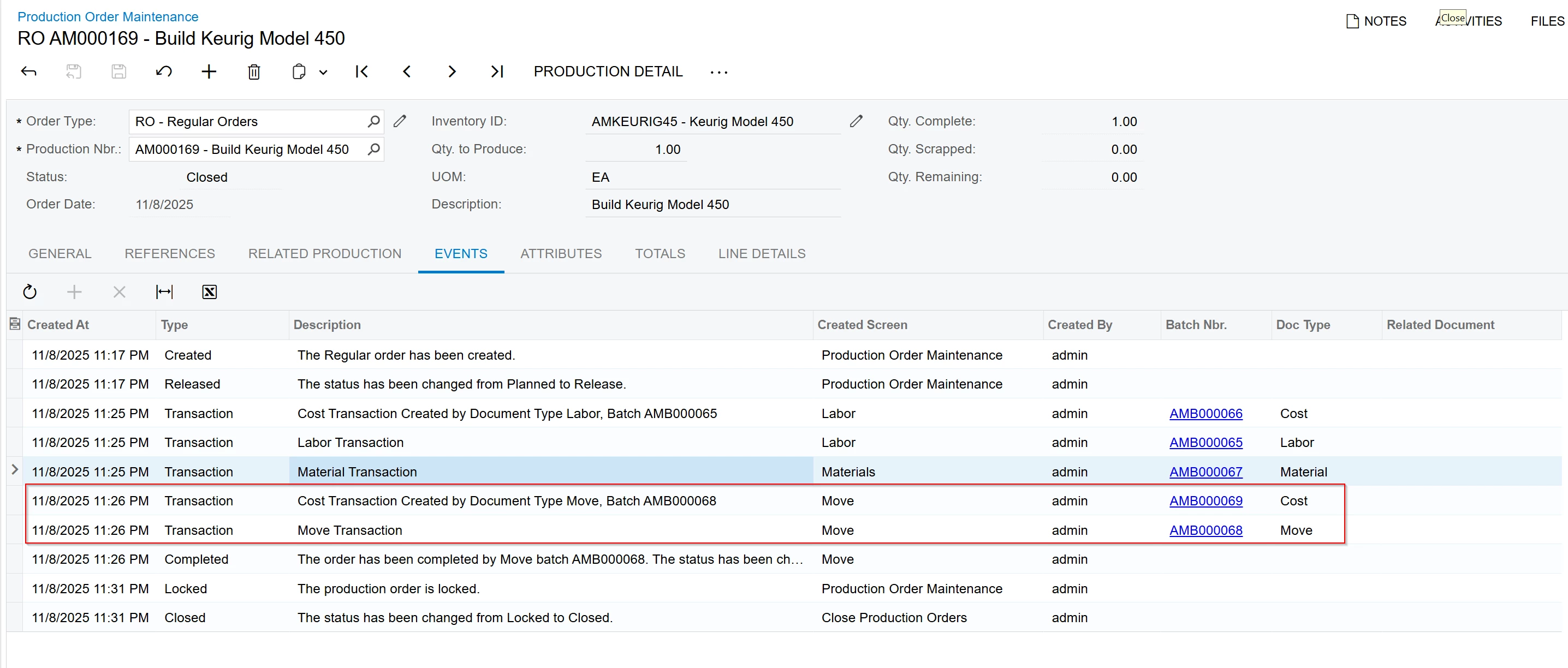
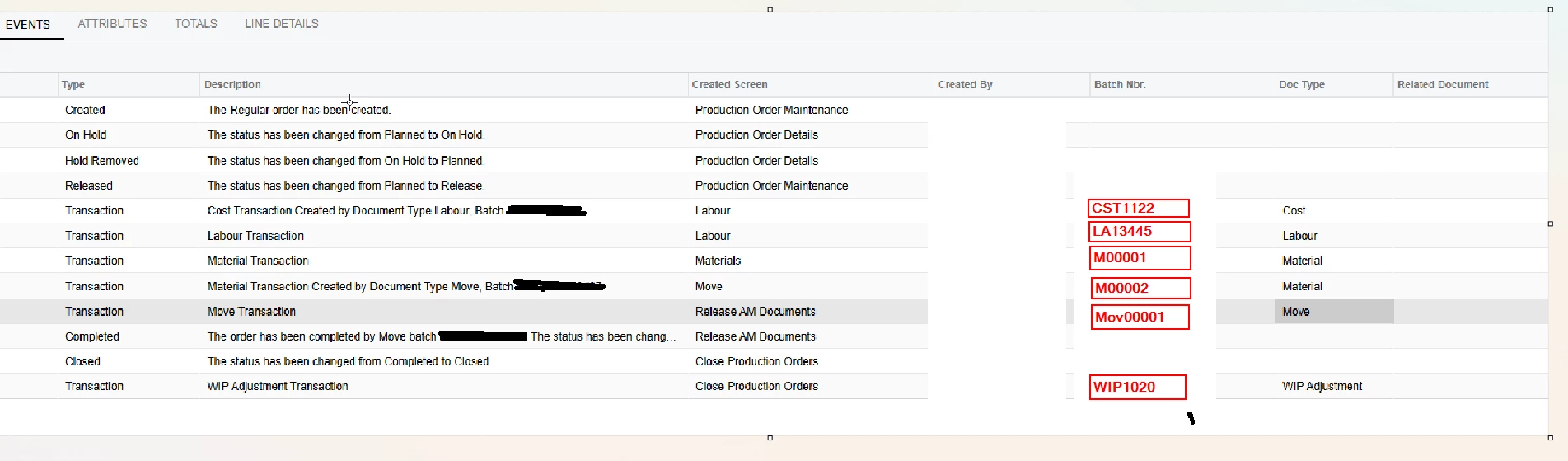
As shown in the screenshot below, we understand that when a Move transaction is performed, the system should create both:

  1. The Move Transaction, and

  2. The corresponding Cost Transaction.

This is not the actual screenshot; it was taken from the local system. In our case, we can only see the yellow-highlighted Move transaction line. The Cost Transaction shown above does not appear in the Production Order.
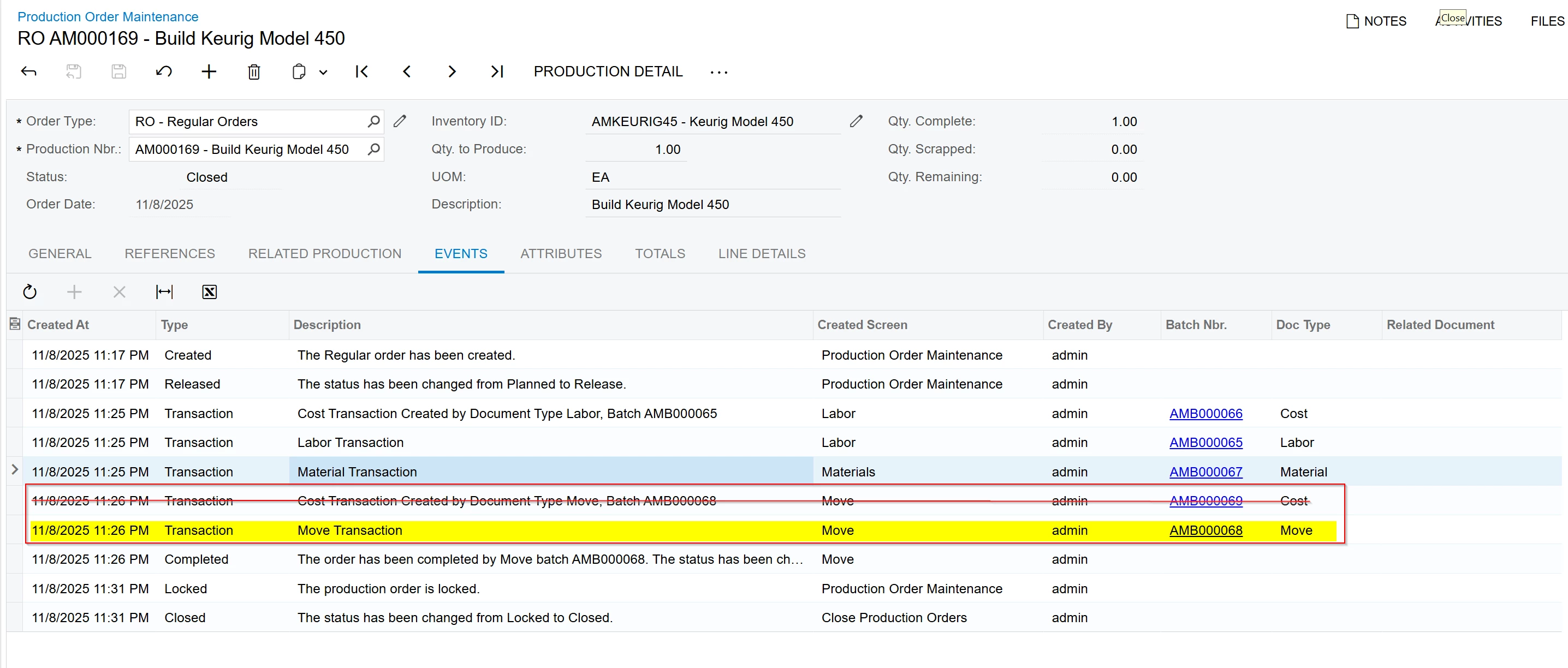
 

We have identified an issue where, after completing a Move transaction, the Cost Transaction is not being created for that specific Move.
As a result, the system generates a WIP Adjustment Transaction when closing the Production Order instead.

We reviewed two Production Orders for the same Item Code, and confirmed that both orders have the same Event History and appear to be configured identically.
In one Production Order, the Move did generate a Cost Transaction, while in the other, it did not.
There are also no Parent Production Orders associated with these cases, and the No project Association. 
We have found a few Production Orders with the same behavior, and these orders do have Projects linked to them. 

Has anyone encountered this issue before?
Is there any known reason why the Cost Transaction would fail to generate when performing a Move transaction?



12 replies

dgodsill97
Varsity I
Forum|alt.badge.img+3
  • Varsity I
  • November 10, 2025

Cost Transactions are generated when there is Labor , Overhead , Machine and/or Tooling amounts.  Secondly, it the first Move recognized all these costs, and the costs of the preceding operations, there is no need to generate a Cost transaction.  Can you provide the Production Transaction details so we can see the quantities reported?


angierowley75
Acumatica Moderator
Forum|alt.badge.img+3
  • Acumatica Moderator
  • November 10, 2025

Also, please supply the version/build of Acumatica ERP you are using.


Thank you for the update.

Please see the screenshot showing the transaction steps. I have removed the exact transaction details for privacy.

The issue is that when performing the Move transaction, the corresponding Move Cost transaction is not being created.

In the example below, you can see that the Move transaction was created, however the Cost transaction was not generated. I attempted to replicate this in the Test environment, but the issue could not be reproduced there.


The version of the Product

Build 2024.114.300.3025 [24.114.0020] 


dgodsill97
Varsity I
Forum|alt.badge.img+3
  • Varsity I
  • November 11, 2025

Please create a support case so they can see the all the details of the production and its transactions like the costing method, the production details, the quantity moved, etc.  They may not be able to assist as you are on an unsupported version.


PaulMainard55
Captain I
Forum|alt.badge.img+2

@nethupulacumatica,

Are we backflushing labour or applying overhead for any of the work centers/operations associated with the Move?  As ​@dgodsill97 suggested, if the work centers and operations are not backflushing labour, or has no form of overhead allocation associated with it, no cost transaction will be generated.

Another question for you is, are we using Standard Costing methods for your manufactured items? 

The creation of a WIP Adjustment transaction does not necessarily indicate a costing problem.  A WIP Adjustment transaction occurs when there’s a difference between the costs going into the production order and costs transferred from the production order to Finished Goods.  The failure of the system to create a “Cost” transaction would not, in of itself, result in a WIP variance requiring the generation of a WIP Adjustment. These transactions can be generated under a number of conditions.

Manufactured items using an “Actual” costing method (i.e., Specific, Average, or FIFO), might not record WIP Adjustment transaction, even if no cost transaction was generated.  It would just bring the finished goods into inventory at a lower cost than expected; although it’s more likely that an “Average Cost” item will generate a WIP Adjustment than the others under these conditions due to the nature of Specific and FIFO costing methods.

On the other hand, items using the Standard costing method could generate a WIP Adjustment even if all costs were properly absorbed in the production order.  The WIP adjustment would be generated if the Standard cost applied to the finished product is different than the actual costs incurred during production.

@dgodsill97’s suggestion of reviewing the Project Transactions, and not just the Events log would be helpful.  Further, I would recommend reviewing the Production Order Details and reviewing the configuration of each of the applicable work centers to confirm they are configured for the backflushing of labour, or the allocation of overhead or other costs outside of materials.  

Let us know what you find. 

Good luck!


Hello, 

@PaulMainard55 ​@dgodsill97 ​@angierowley75 

Thank you all for the great feedback. I really appreciate it. 🙂

I have created a document that includes more information about this issue. We tried to replicate it in the local environment, but we were unable to reproduce the problem.


dgodsill97
Varsity I
Forum|alt.badge.img+3
  • Varsity I
  • November 13, 2025

Show us the Inventory Receipt created by the Move.  If the item was received, it was received at a zero cost or the inventory receipt was not released.  


PaulMainard55
Captain I
Forum|alt.badge.img+2

Show us the Inventory Receipt created by the Move.  If the item was received, it was received at a zero cost or the inventory receipt was not released.  

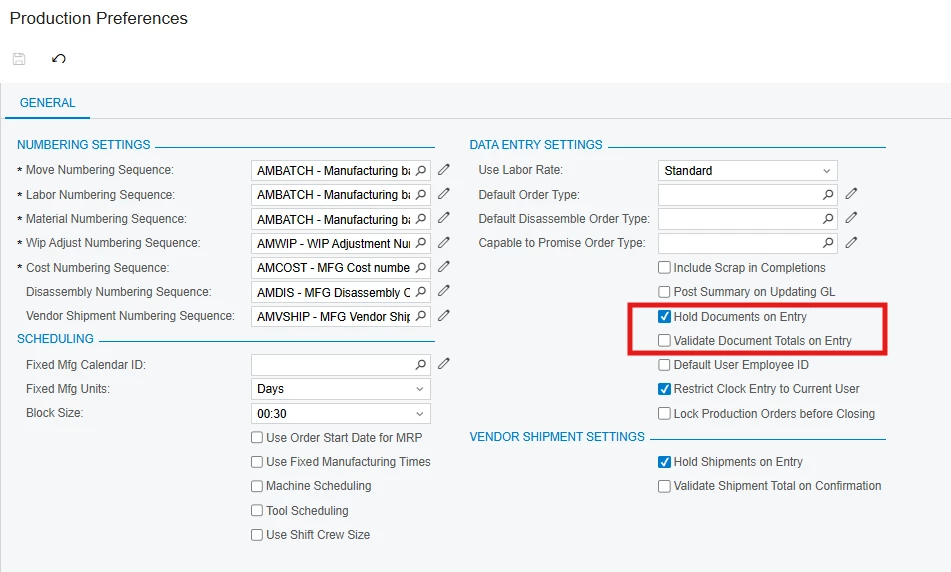
Agree - The events log doesn’t indicate whether any corresponding transactions were posted.  This can be found in the “Production Transactions” inquiry.  There’s an issue I dealt with recently where the posting settings in the Production model was set to place transactions “On Hold” by default.  This created all kinds of issues where the downstream transactions generated from production moves and the like remained on hold and were not posted, including GL Transactions.  I believe this is a known issue. 

@nethupulacumatica  - Please refer to your your Production Transactions inquiry (instead of the Events log) to review the status of your transactions.  Also, considering drilling into as many downstream transactions as you can to confirm that those were posted as well.  

As ​@dgodsill97 points out, look for the Issue transaction that should have been generated from the final move to confirm it was released.  

Good luck.


Hi All,

Thank you for all the responses. 🙂

I have attached a document with further details for your review.


dgodsill97
Varsity I
Forum|alt.badge.img+3
  • Varsity I
  • November 13, 2025

The new release process in 25R2 resolves a lot of the transactional issue with manufacturing.  However, the receipt does not allocate to the sales order - I reported the bug and it is in R&D.


dominicpolicicchio03
Freshman I
Forum|alt.badge.img

The fact that you can’t reproduce in the test environment leads me to believe that there is a small difference in the BOM/Production Order Details, work center, production order type, production preferences, or maybe something strange with the stock item. Also, what is the costing method for the production order? Actual, Estimated, or Standard? And does that differ from your test environment example?


Hello All,

I was unable to provide an update earlier as I was busy with some projects.

@dominicpolicicchio03, the costing method is Actual. I could not find any differences in the Stock Item.

In this scenario, the issue is not happening frequently. I assume it is not related to the Stock Item configuration, because we can see that production orders for the same Stock Item sometimes create the Move Cost Transaction while others do not.

What we are doing now is investigating whether we can create this WIP Cost Transaction automatically when we identify that it has not been created.