Inventory Planning Min/Max/Lot values not being respected by MRP when Vendor is set on Stock Item

  • August 13, 2026
  • 4 replies
  • 31 views

Forum|alt.badge.img

Running 2025R2

We recently discovered that the values set on the Inventory Planning Settings Tab are not being respected by MRP when a Vendor(s) is defined on the Vendors tab of the stock item.    The values set for Min/Max/Lot on the Vendor tab overrides what is defined on the inventory planning settings tab. 
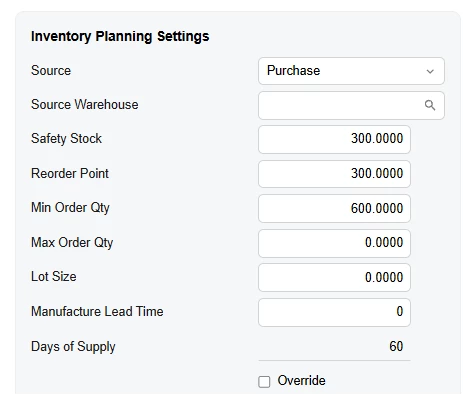
 

Here is a screen Shot showing what we have set on the stock item
​​​
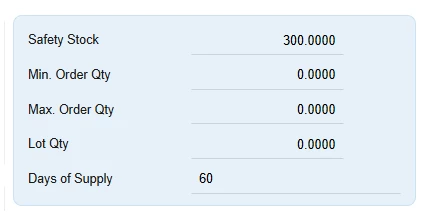
Here is what the inventory planning display is showing.


The above screen shots came from a stock item that had a vendor set,  but the Min/Max/Lot on that vendor line were set to zero which is what was passed through to MRP.  Result was that our purchasing group only purchased the exact demand needed (40) versus the min inventory plan of 600 because MRP provided the recommendation of 40.


It is our opinion that the logic behind this is flawed.   We believe that the Inventory Planning Setting values should always be respected by MRP.  The values on the Vendor line of the Stock item should NOT influence the MRP planning recommendations and should be used at the time of PO generation to ensure the qty’s on the PO is respecting the Min/Max/Lot requirements of the vendor being purchased from.        


Hope this makes sense and others can confirm they are seeing the same behaviour. 

4 replies

  • Freshman I
  • August 13, 2026

Hi Matt - Can you confirm that this “Vendor” line on the stock item record has the DEFAULT checkbox marked as True (i.e. this is the default vendor for the stock item)?


If the above statement is the case, then I can confirm that your articulation of the MRP is the expected/intended behavior. MRP will first look at the vendors tab to see if a default vendor is present. If there is a default vendor, then those inventory planning parameters listed on the vendor line will be used by MRP. If there is no default vendor for the pertinent stock item, then the parameters defined in the “Inventory Planning” tab are used. 
 

The vendor-specific logic would generally be viewed as an extra layer of resolution. For example, you could have multiple vendors for a stock item that have different lead times, MOQ’s, Lot Sizes, etc. 

If you always wanted the default inventory planning settings to be used, you could uncheck the default vendor for your items. However, this does mean that for any PO you try and make in the system that leverages the default vendor for efficiency (i.e. Create Purchase Orders screen), you’d need to add the vendor each time.

Alternatively, you could set your default vendor inventory planning parameters per item to the same as the default inventory planning parameters for the item. If you only source the item from one vendor, I would presume the parameters present for the item were largely influenced by this vendor anyways. 

Thanks!


Forum|alt.badge.img
  • Author
  • Jr Varsity III
  • August 13, 2026

Ron,

Yes that was checked, I have unchecked it and confirmed that the Inventory Planning settings are respected. 


You made the following statement:

The vendor-specific logic would generally be viewed as an extra layer of resolution. For example, you could have multiple vendors for a stock item that have different lead times, MOQ’s, Lot Sizes, etc. 

I understand this logic,  and my understanding is that those values represent what “rules” each specific vendor has.  For example if we are just talking about MOQ,  Vendor A won’t accept PO’s for less then 500 pieces of this item, while Vendor B will accept PO’s for any qty (ie Min=0).         Assuming this is an accurate understanding,  then I feel the following approach you suggested is contradictory to the intent of the system:

Alternatively, you could set your default vendor inventory planning parameters per item to the same as the default inventory planning parameters for the item. If you only source the item from one vendor,


Furthermore you stated:

I would presume the parameters present for the item were largely influenced by this vendor anyways. 

I can tell you for us this is not the case and these values are rarely based on vendor MOQ.   Our Min/Max and Lot qtys are based on how we want to manage our inventory, how often we want to be bringing materials into our facility,  how much space said material takes up and typical valuation of that inventory.       


In our opinion the default checkbox should not influence where MRP gets its parameters from.  The MRP recommended values should always come from the inventory planning settings.  The Default checkbox should however drive which vendor is selected when using the create PO screen, and the Min/Max/Lot values set for the vendor selected should be used to override the MRP recommended qty at the time of PO creation if (and only if) the recommended qty falls outside the Min/Max/Lot qty set for that vendor.   

For example if MRP is recommends we purchase 50 Pieces and our default Vendor A has a Min order of 100 pieces,  the PO should be generated for 100 pieces.   OR if MRP recommends we purchase 21 pieces and the default vendor has no Min/Max but a Lot qty of 10, then the PO should be generated for 30.   On the other hand if the vendor has no Min/Max/Lot qty set or if the MRP recommended qty falls inside the Min/Max/Lot boundaries set on the vendor, then the PO should be generated for the MRP recommended qty.  


All that being said,  we understand this behaviour is probably not going to change without significant customer feedback.  So in the meantime while we are waiting for that to happen 😀we will be unchecking the default checkbox on our vendors. 


  • Freshman I
  • August 13, 2026

@MattWSM Understood. Your distinction between “Inventory Management Protocol” vs “Vendor Supplied Parameters” does make sense. I suppose one may start to question why a PO was made different than the value MRP suggested, but again I could see the desire for either scenario. 

This seems like an apt “Inventory Planning Preferences” type setting. Scenario could be a check box for:

1) Pull inventory planning parameters from default vendor line
2) Pull inventory planning parameters from inventory planning tab


Forum|alt.badge.img
  • Author
  • Jr Varsity III
  • August 13, 2026

That approach would make sense then it would be flexible to align with different ways of thinking when it comes to MRP recomendations.