Solved

how to show aging category for production order in generic inquiry

  • February 11, 2026
  • 6 replies
  • 64 views

Forum|alt.badge.img

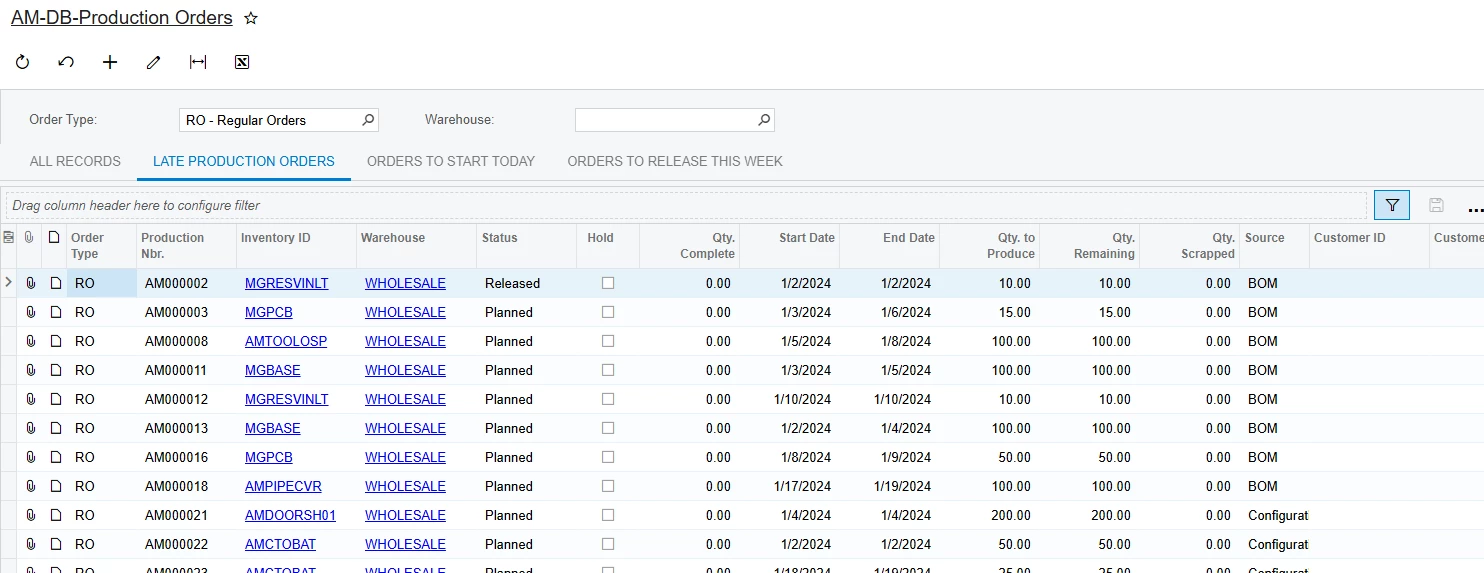
Hello experts, I was looking to create a Generic Inquiry for Aging category of production order , I found this Generic inquiry for reference can anyone suggest me is it fine for the reference but still i am confused is it possible can we  show the aging category in this GI Report ?


Best answer by aryanjadhav50

Hi ​@vishalsharma49,

As we already have Start Date and End Date, we can calculate Aging directly in the Generic Inquiry. Create a field in the Results Grid named DaysLate and use:

=DateDiff('d', [AMProdItem.EndDate], Now())

This shows how many days the order is late (positive = late, zero or negative = not due).


If you also need Aging Category, create another field named AgingCategory with:

=IIF(
  DateDiff('d',[AMProdItem.EndDate],Now()) <= 0, 'Not Due',
  IIF(
    DateDiff('d',[AMProdItem.EndDate],Now()) <= 7, '1-7 Days Late',
    IIF(
      DateDiff('d',[AMProdItem.EndDate],Now()) <= 15, '8-15 Days Late',
      IIF(
        DateDiff('d',[AMProdItem.EndDate],Now()) <= 30, '16-30 Days Late',
        '30+ Days Late'
      )
    )
  )
)

I have used the base table as AMProdItem
Please let me know if any specific requirement is there.

 

Hi,Aryanjadhav 

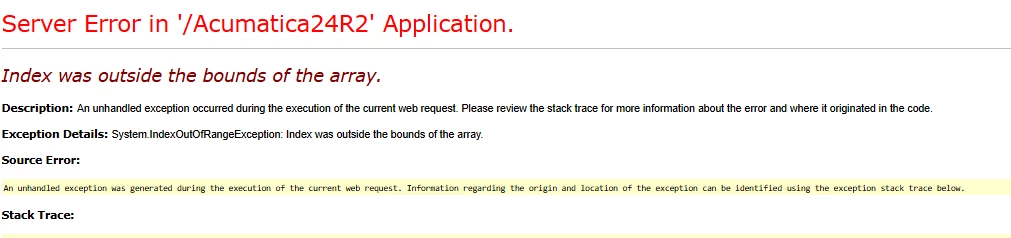
I tried with the above solution but i am getting some techincal error while using  this aging category.

This is the operation which i used ,

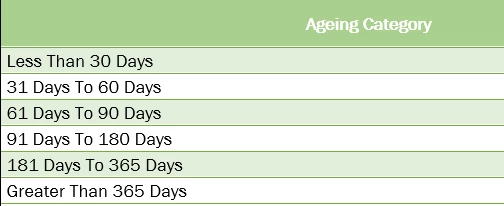
=IIF(  DateDiff('d',[AMProdItem.EndDate],Now()) <= 30, '1-30',  IIF(    DateDiff('d',[AMProdItem.EndDate],Now()) <= 60, '31-60 Days Late',    IIF(      DateDiff('d',[AMProdItem.EndDate],Now()) <= 90, '61-90 Days Late',      IIF(        DateDiff('d',[AMProdItem.EndDate],Now()) <= 180, '91-180 Days Late',  IIF(        DateDiff('d',[AMProdItem.EndDate],Now()) <= 365, '181-365 Days Late', )))))

please try following formula in the previous one we missed the last condition 

=IIF(
    DateDiff('d',[AMProdItem.EndDate],Now()) <= 30, '1-30 Days Late',
    IIF(
        DateDiff('d',[AMProdItem.EndDate],Now()) <= 60, '31-60 Days Late',
        IIF(
            DateDiff('d',[AMProdItem.EndDate],Now()) <= 90, '61-90 Days Late',
            IIF(
                DateDiff('d',[AMProdItem.EndDate],Now()) <= 180, '91-180 Days Late',
                IIF(
                    DateDiff('d',[AMProdItem.EndDate],Now()) <= 365, '181-365 Days Late',
                    'Greater Than 365 Days'
                )
            )
        )
    )
)

please let me know its working on your system or not.


6 replies

aryanjadhav50
Jr Varsity I
Forum|alt.badge.img
  • Jr Varsity I
  • February 11, 2026

Hi ​@vishalsharma49,

As we already have Start Date and End Date, we can calculate Aging directly in the Generic Inquiry. Create a field in the Results Grid named DaysLate and use:

=DateDiff('d', [AMProdItem.EndDate], Now())

This shows how many days the order is late (positive = late, zero or negative = not due).


If you also need Aging Category, create another field named AgingCategory with:

=IIF(
  DateDiff('d',[AMProdItem.EndDate],Now()) <= 0, 'Not Due',
  IIF(
    DateDiff('d',[AMProdItem.EndDate],Now()) <= 7, '1-7 Days Late',
    IIF(
      DateDiff('d',[AMProdItem.EndDate],Now()) <= 15, '8-15 Days Late',
      IIF(
        DateDiff('d',[AMProdItem.EndDate],Now()) <= 30, '16-30 Days Late',
        '30+ Days Late'
      )
    )
  )
)

I have used the base table as AMProdItem
Please let me know if any specific requirement is there.



Yes , it is possible to show the Aging Category for Production Order in GI. Since Manufacturing does not provide built-in aging Directly. So we can calculate through the DateDiff func on EndDate and StartDate and then try to create the aging Category.

AgingDays

DateDiff(day, [AMProdItem.EndDate], Now()) 


AgingCategory

IIf([AgingDays] <= 7, '0-7 Days', IIf([AgingDays] <= 15, '8-15 Days',

IIf([AgingDays] <= 30, '16-30 Days', 'Above 30 Days')))


Forum|alt.badge.img
  • Author
  • Freshman I
  • February 11, 2026

Hi ​@vishalsharma49,

As we already have Start Date and End Date, we can calculate Aging directly in the Generic Inquiry. Create a field in the Results Grid named DaysLate and use:

=DateDiff('d', [AMProdItem.EndDate], Now())

This shows how many days the order is late (positive = late, zero or negative = not due).


If you also need Aging Category, create another field named AgingCategory with:

=IIF(
  DateDiff('d',[AMProdItem.EndDate],Now()) <= 0, 'Not Due',
  IIF(
    DateDiff('d',[AMProdItem.EndDate],Now()) <= 7, '1-7 Days Late',
    IIF(
      DateDiff('d',[AMProdItem.EndDate],Now()) <= 15, '8-15 Days Late',
      IIF(
        DateDiff('d',[AMProdItem.EndDate],Now()) <= 30, '16-30 Days Late',
        '30+ Days Late'
      )
    )
  )
)

I have used the base table as AMProdItem
Please let me know if any specific requirement is there.
 

Hi,Aryanjadhav 

I tried with the above solution but i am getting some techincal error while using  this aging category.

This is the operation which i used ,

=IIF(  DateDiff('d',[AMProdItem.EndDate],Now()) <= 30, '1-30',  IIF(    DateDiff('d',[AMProdItem.EndDate],Now()) <= 60, '31-60 Days Late',    IIF(      DateDiff('d',[AMProdItem.EndDate],Now()) <= 90, '61-90 Days Late',      IIF(        DateDiff('d',[AMProdItem.EndDate],Now()) <= 180, '91-180 Days Late',  IIF(        DateDiff('d',[AMProdItem.EndDate],Now()) <= 365, '181-365 Days Late', )))))


aryanjadhav50
Jr Varsity I
Forum|alt.badge.img
  • Jr Varsity I
  • Answer
  • February 11, 2026

Hi ​@vishalsharma49,

As we already have Start Date and End Date, we can calculate Aging directly in the Generic Inquiry. Create a field in the Results Grid named DaysLate and use:

=DateDiff('d', [AMProdItem.EndDate], Now())

This shows how many days the order is late (positive = late, zero or negative = not due).


If you also need Aging Category, create another field named AgingCategory with:

=IIF(
  DateDiff('d',[AMProdItem.EndDate],Now()) <= 0, 'Not Due',
  IIF(
    DateDiff('d',[AMProdItem.EndDate],Now()) <= 7, '1-7 Days Late',
    IIF(
      DateDiff('d',[AMProdItem.EndDate],Now()) <= 15, '8-15 Days Late',
      IIF(
        DateDiff('d',[AMProdItem.EndDate],Now()) <= 30, '16-30 Days Late',
        '30+ Days Late'
      )
    )
  )
)

I have used the base table as AMProdItem
Please let me know if any specific requirement is there.
 

Hi,Aryanjadhav 

I tried with the above solution but i am getting some techincal error while using  this aging category.

This is the operation which i used ,

=IIF(  DateDiff('d',[AMProdItem.EndDate],Now()) <= 30, '1-30',  IIF(    DateDiff('d',[AMProdItem.EndDate],Now()) <= 60, '31-60 Days Late',    IIF(      DateDiff('d',[AMProdItem.EndDate],Now()) <= 90, '61-90 Days Late',      IIF(        DateDiff('d',[AMProdItem.EndDate],Now()) <= 180, '91-180 Days Late',  IIF(        DateDiff('d',[AMProdItem.EndDate],Now()) <= 365, '181-365 Days Late', )))))

please try following formula in the previous one we missed the last condition 

=IIF(
    DateDiff('d',[AMProdItem.EndDate],Now()) <= 30, '1-30 Days Late',
    IIF(
        DateDiff('d',[AMProdItem.EndDate],Now()) <= 60, '31-60 Days Late',
        IIF(
            DateDiff('d',[AMProdItem.EndDate],Now()) <= 90, '61-90 Days Late',
            IIF(
                DateDiff('d',[AMProdItem.EndDate],Now()) <= 180, '91-180 Days Late',
                IIF(
                    DateDiff('d',[AMProdItem.EndDate],Now()) <= 365, '181-365 Days Late',
                    'Greater Than 365 Days'
                )
            )
        )
    )
)

please let me know its working on your system or not.


Forum|alt.badge.img
  • Author
  • Freshman I
  • February 12, 2026

Hi ​@vishalsharma49,

As we already have Start Date and End Date, we can calculate Aging directly in the Generic Inquiry. Create a field in the Results Grid named DaysLate and use:

=DateDiff('d', [AMProdItem.EndDate], Now())

This shows how many days the order is late (positive = late, zero or negative = not due).


If you also need Aging Category, create another field named AgingCategory with:

=IIF(
  DateDiff('d',[AMProdItem.EndDate],Now()) <= 0, 'Not Due',
  IIF(
    DateDiff('d',[AMProdItem.EndDate],Now()) <= 7, '1-7 Days Late',
    IIF(
      DateDiff('d',[AMProdItem.EndDate],Now()) <= 15, '8-15 Days Late',
      IIF(
        DateDiff('d',[AMProdItem.EndDate],Now()) <= 30, '16-30 Days Late',
        '30+ Days Late'
      )
    )
  )
)

I have used the base table as AMProdItem
Please let me know if any specific requirement is there.
 

Hi,Aryanjadhav 

I tried with the above solution but i am getting some techincal error while using  this aging category.

This is the operation which i used ,

=IIF(  DateDiff('d',[AMProdItem.EndDate],Now()) <= 30, '1-30',  IIF(    DateDiff('d',[AMProdItem.EndDate],Now()) <= 60, '31-60 Days Late',    IIF(      DateDiff('d',[AMProdItem.EndDate],Now()) <= 90, '61-90 Days Late',      IIF(        DateDiff('d',[AMProdItem.EndDate],Now()) <= 180, '91-180 Days Late',  IIF(        DateDiff('d',[AMProdItem.EndDate],Now()) <= 365, '181-365 Days Late', )))))

please try following formula in the previous one we missed the last condition 

=IIF(
    DateDiff('d',[AMProdItem.EndDate],Now()) <= 30, '1-30 Days Late',
    IIF(
        DateDiff('d',[AMProdItem.EndDate],Now()) <= 60, '31-60 Days Late',
        IIF(
            DateDiff('d',[AMProdItem.EndDate],Now()) <= 90, '61-90 Days Late',
            IIF(
                DateDiff('d',[AMProdItem.EndDate],Now()) <= 180, '91-180 Days Late',
                IIF(
                    DateDiff('d',[AMProdItem.EndDate],Now()) <= 365, '181-365 Days Late',
                    'Greater Than 365 Days'
                )
            )
        )
    )
)

please let me know its working on your system or not.


Thanks ​@aryanjadhav50  Aryan it works .


Forum|alt.badge.img
  • Author
  • Freshman I
  • February 17, 2026

Hi ​@vishalsharma49,

As we already have Start Date and End Date, we can calculate Aging directly in the Generic Inquiry. Create a field in the Results Grid named DaysLate and use:

=DateDiff('d', [AMProdItem.EndDate], Now())

This shows how many days the order is late (positive = late, zero or negative = not due).


If you also need Aging Category, create another field named AgingCategory with:

=IIF(
  DateDiff('d',[AMProdItem.EndDate],Now()) <= 0, 'Not Due',
  IIF(
    DateDiff('d',[AMProdItem.EndDate],Now()) <= 7, '1-7 Days Late',
    IIF(
      DateDiff('d',[AMProdItem.EndDate],Now()) <= 15, '8-15 Days Late',
      IIF(
        DateDiff('d',[AMProdItem.EndDate],Now()) <= 30, '16-30 Days Late',
        '30+ Days Late'
      )
    )
  )
)

I have used the base table as AMProdItem
Please let me know if any specific requirement is there.
 

Hi,Aryanjadhav 

I tried with the above solution but i am getting some techincal error while using  this aging category.

This is the operation which i used ,

=IIF(  DateDiff('d',[AMProdItem.EndDate],Now()) <= 30, '1-30',  IIF(    DateDiff('d',[AMProdItem.EndDate],Now()) <= 60, '31-60 Days Late',    IIF(      DateDiff('d',[AMProdItem.EndDate],Now()) <= 90, '61-90 Days Late',      IIF(        DateDiff('d',[AMProdItem.EndDate],Now()) <= 180, '91-180 Days Late',  IIF(        DateDiff('d',[AMProdItem.EndDate],Now()) <= 365, '181-365 Days Late', )))))

please try following formula in the previous one we missed the last condition 

=IIF(
    DateDiff('d',[AMProdItem.EndDate],Now()) <= 30, '1-30 Days Late',
    IIF(
        DateDiff('d',[AMProdItem.EndDate],Now()) <= 60, '31-60 Days Late',
        IIF(
            DateDiff('d',[AMProdItem.EndDate],Now()) <= 90, '61-90 Days Late',
            IIF(
                DateDiff('d',[AMProdItem.EndDate],Now()) <= 180, '91-180 Days Late',
                IIF(
                    DateDiff('d',[AMProdItem.EndDate],Now()) <= 365, '181-365 Days Late',
                    'Greater Than 365 Days'
                )
            )
        )
    )
)

please let me know its working on your system or not.


Thanks ​@aryanjadhav50  Aryan it works .

Hi ​@aryanjadhav50  i am facing issue while making changes in this formula using start date instead of end date showing error message i.e Cannot interpret the token ' ' at position 75