Answer

How to link a sales order to a production order when the numbering sequence for the production order are set to manual numbering?

  • November 17, 2022
  • 6 replies
  • 1651 views

2022R1: The numbering sequence for production orders is set to manual numbering. A sales order is created for the item to be manufactured.  A production order is manually created for the the item (since you can’t create a production order from the sales order, or use the “Create Production Orders” process when the numbering sequence is set to Manual).  The production order status is PLANNED, the sales order status is OPEN.

When I go to the Production Order Maintenance>Reference tab and click on “Link Sales Order”, the sales order is not found, and therefore can’t be linked.

When I go to the Sales Order and click “Link Prod Order”, the Production Order is listed, but the checkbox will not remain selected - to clarify, after the checkbox is clicked, it is automatically cleared during processing.

Is there a way to make this link when manual numbering is set for production orders? 

Best answer by lynnem29

Updating with the resolution from Acumatica Support:

This is scenario when you create a Sales Order first and then create a Production Order from it.
1. Create a SO with item Mark for Production
2. Actions> Create Production order
3. In the Pop-Up window enter manual Production nbr
4. Click on Create button
5 Production Order created

If you created a Production Order first then separately created a Sales Order you can link them under Production Orders screen, References Tab>>Select Customer, click Link Sales Order. Select SO, SAVE.

The problem may occur if you try to create a Prod Order from SO with blank Production nbr in the Pop-Up (see the step 3). In this case Prod Order type will be auto-populated but Production order not created, and you will not see such SO lines for link with other Production Orders:

To correct it, just simply clear this value.

6 replies

angierowley75
Acumatica Moderator
Forum|alt.badge.img+3
  • Acumatica Moderator
  • November 17, 2022

Is the sales order item, customer, and quantity the same on the Sales Order Line as the Production Order?  The sales order selection has some logic behind it - but you should be able to link them if they align.


  • Author
  • Freshman II
  • November 17, 2022

Yes, they align.


angierowley75
Acumatica Moderator
Forum|alt.badge.img+3
  • Acumatica Moderator
  • November 17, 2022

I would recommend you reach out to support for assistance.  Might be setup or a bug.


  • Author
  • Freshman II
  • November 17, 2022

Thanks, Angie.  I did submit it to support.  I’ll update here with their reply.


  • Author
  • Freshman II
  • Answer
  • November 23, 2022

Updating with the resolution from Acumatica Support:

This is scenario when you create a Sales Order first and then create a Production Order from it.
1. Create a SO with item Mark for Production
2. Actions> Create Production order
3. In the Pop-Up window enter manual Production nbr
4. Click on Create button
5 Production Order created

If you created a Production Order first then separately created a Sales Order you can link them under Production Orders screen, References Tab>>Select Customer, click Link Sales Order. Select SO, SAVE.

The problem may occur if you try to create a Prod Order from SO with blank Production nbr in the Pop-Up (see the step 3). In this case Prod Order type will be auto-populated but Production order not created, and you will not see such SO lines for link with other Production Orders:

To correct it, just simply clear this value.


Forum|alt.badge.img
  • Freshman I
  • April 10, 2023

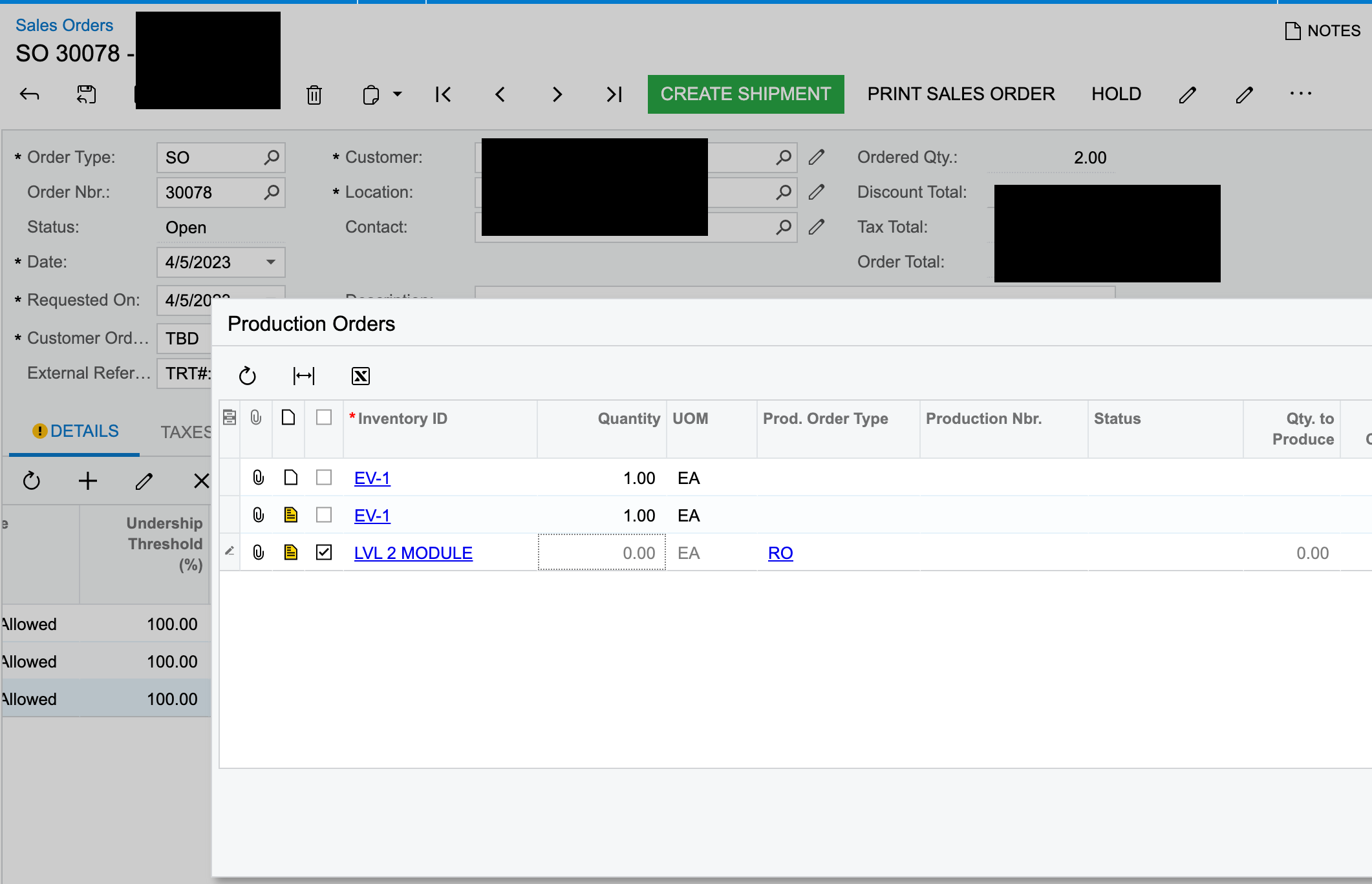
Hi @angierowley75 I’m running into an issue described in the suggestion where the Prod Order has a blank Prod nbr. Our numbering sequence is set to auto. Do you have any suggestions? Thank you!

The problem may occur if you try to create a Prod Order from SO with blank Production nbr in the Pop-Up (see the step 3). In this case Prod Order type will be auto-populated but Production order not created, and you will not see such SO lines for link with other Production Orders:

To correct it, just simply clear this value.