Solved

How to Create Move Transaction on Release in the Materials Screen

  • February 16, 2025
  • 8 replies
  • 191 views

Forum|alt.badge.img+2

I am trying to create the move transaction (AM302000) automatically when the release button is clicked in the materials screen (AM300000) 
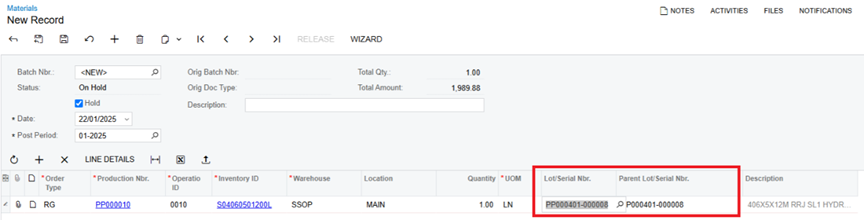
On release of this materials transaction the development will create and release the Move 
Transaction with the below populated from the Materials Screen
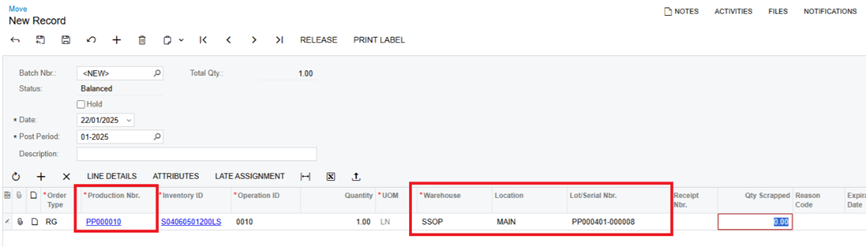
This is the override of the release button I have attempted below but it is not creating the new move transaction but there are no validation errors.

   #region Release Override            
public delegate IEnumerable ReleaseDelegate(PXAdapter adapter);

[PXOverride]
public IEnumerable Release(PXAdapter adapter, ReleaseDelegate baseMethod)
{
// First, execute the base release method to ensure original functionality
var documents = baseMethod(adapter).Cast<AMBatch>().ToList();

// Process move transactions after base release
foreach (AMBatch batch in documents)
{
if (batch.Status == "R") // Check if the batch is Released
{
CreateMoveTransactions(batch);
}
}

return documents;
}
#endregion

#region Private Methods
private void CreateMoveTransactions(AMBatch batch)
{
// Create a new graph for Move Entry
var moveGraph = PXGraph.CreateInstance<MoveEntry>();

// Get all material transactions for this batch
var materialTrans = SelectFrom<AMMTran>
.Where<AMMTran.batNbr.IsEqual<@P.AsString>>
.View.Select(Base, batch.BatNbr)
.RowCast<AMMTran>();

foreach (AMMTran mtran in materialTrans)
{
// Create the Move transaction
var moveTran = new AMMTran
{
ProdOrdID = mtran.ProdOrdID, // Production Nbr
SiteID = mtran.SiteID, // Warehouse
LocationID = mtran.LocationID, // Location
LotSerialNbr = mtran.ParentLotSerialNbr, // Lot/Serial Nbr
InventoryID = mtran.InventoryID,
UOM = mtran.UOM,
Qty = mtran.Qty,
TranType = "M" // Move transaction type
};

// Insert the move transaction into MoveEntry graph
moveGraph.transactions.Insert(moveTran);
}

// Save and process the move transactions
moveGraph.Actions.PressSave();


}
#endregion

Please let me know if there is anything missing, thank you!
 

Best answer by TharidhiP

Thanks everyone for the suggestions, I have updated the code and it generates new move transactions from the materials screen. 

I did not specify the document type, as the graph already determines it. The BatNbr should not be set on a transaction line because it is assigned at the header level (AMBatch) during saving. Similarly, TranDate is automatically populated. Separating the Insert and Update operations for the new line worked. During the Insert, set OrderType and ProdOrdID, then use the returned value to apply further updates.

private void CreateMoveTransactions(AMBatch batch)
{

var moveGraph = PXGraph.CreateInstance<MoveEntry>();

// Create batch with mandatory fields
var moveBatch = moveGraph.batch.Cache.CreateInstance() as AMBatch;
if (moveBatch != null)
{
// Only set essential fields - let graph handle DocType
moveBatch.TranDate = batch.TranDate;
moveBatch.FinPeriodID = batch.FinPeriodID;
moveBatch.Hold = false;

// Insert the batch and let the graph handle the numbering
moveBatch = moveGraph.batch.Insert(moveBatch);
moveGraph.batch.Current = moveBatch;

if (moveBatch == null)
{
throw new PXException("Failed to create move batch.");
}

// Query existing material transactions
var materialTrans = SelectFrom<AMMTran>
.Where<AMMTran.batNbr.IsEqual<@P.AsString>
.And<AMMTran.docType.IsEqual<@P.AsString>>>
.View.Select(moveGraph, batch.BatNbr, batch.DocType)
.RowCast<AMMTran>();

foreach (AMMTran mtran in materialTrans)
{
// Refresh the material transaction data
var refreshedMTran = (AMMTran)PXSelect<AMMTran,
Where<AMMTran.batNbr, Equal<Required<AMMTran.batNbr>>,
And<AMMTran.docType, Equal<Required<AMMTran.docType>>,
And<AMMTran.lineNbr, Equal<Required<AMMTran.lineNbr>>>>>>
.Select(moveGraph, mtran.BatNbr, mtran.DocType, mtran.LineNbr)
.FirstOrDefault();

if (refreshedMTran == null) continue;

// Create and insert the base transaction first
var moveTran = moveGraph.transactions.Insert(new AMMTran
{
OrderType = refreshedMTran.OrderType,
ProdOrdID = refreshedMTran.ProdOrdID
});

if (moveTran != null)
{
// Update additional fields after insert
moveTran.OperationID = refreshedMTran.OperationID;
moveTran.SiteID = refreshedMTran.SiteID;
moveTran.LocationID = refreshedMTran.LocationID;
moveTran.LotSerialNbr = refreshedMTran.ParentLotSerialNbr;
moveTran.Qty = 1m;

// Update the transaction with additional fields
moveGraph.transactions.Update(moveTran);
PXTrace.WriteInformation($"Move transaction created successfully");
}
}

try
{
// Save
moveGraph.Actions.PressSave();
PXTrace.WriteInformation("All move transactions saved successfully.");
}
catch (Exception ex)
{
PXTrace.WriteError($"Error saving move transactions: {ex.Message}");
throw new PXException("Failed to create move transactions.", ex);
}
}
}

Thank you!

8 replies

Forum|alt.badge.img+2

A move transaction is created based on the combination of the production order and operation ID. The operation must be included in the move transaction . If the production order has multiple operations, all operations associated with that order must be included in a single move transaction as multiple lines


brendanhennelly02
Acumatica Employee

This is an interesting request. Normally a user would enter in a move transaction which can automatically process the material transaction (via backflush). Why does the user want to enter in material to then process a move transaction?

Some thoughts on the code example you posted I see some key fields missing.

  • For query to AMMTran I would make sure to include the DocType which is part of the key.
  • For insert to move
    • Include the OrderType, OperationID
    • Do not set InventoryID and UOM (as this should come from the order/item)
    • Do not set TranType (‘M’ is not a valid TranType anyhow)
  • The code examples assumes always a qty of 1 for a lot/serial tracked item (if a user enters in more than qty 1 this code will not work (need to use AMMTranSplit)

I think the best way to figure out which fields need to be set, is look at what fields the user needs to set in the UI, these are the same fields you will set in your code. For example, InventoryID and TranType is not set in the UI, but OperationID is.


Forum|alt.badge.img+2
  • Author
  • Pro III
  • February 20, 2025

Thank you ​@ranjithduraisamy72 ​@brendanhennelly02 for the suggestions, I reviewed my code and updated to reflect operationID and orderType setting when creating AMMTran records. Yes, the code is set to work when qty is set to 1.00 as per the business requirement.


I updated the code as per your suggestion and now I can see a validation error saying "Object reference not set to an instance of an object." after the PXTrace.WriteInformation("Attempting to save move transactions..."); line. Am I missing any fields, I have added my updated code for review.

private void CreateMoveTransactions(AMBatch batch)
{
PXTrace.WriteInformation($"CreateMoveTransactions started for batch: {batch.BatNbr}");

var moveGraph = PXGraph.CreateInstance<MoveEntry>();

// Ensure the batch is set correctly
PXTrace.WriteInformation($"Searching for existing move batch: {batch.DocType} - {batch.BatNbr}");

var moveBatch = AMBatch.PK.Find(moveGraph, batch.DocType, batch.BatNbr);
if (moveBatch == null)
{
PXTrace.WriteInformation("Move batch not found. Creating a new one...");

moveBatch = new AMBatch
{
DocType = batch.DocType,
BatNbr = batch.BatNbr,
Hold = false,
TranDate = batch.TranDate,
FinPeriodID = batch.FinPeriodID,
TranDesc = $"Auto-created from Material Release {batch.BatNbr}"
};
moveBatch = moveGraph.batch.Insert(moveBatch);
moveGraph.batch.Current = moveBatch;
}

PXTrace.WriteInformation($"Move batch created/loaded: {moveBatch.BatNbr}");

// Reload AMMTran records to ensure consistency
PXTrace.WriteInformation($"Loading AMMTran records for batch: {batch.BatNbr}");

var materialTrans = SelectFrom<AMMTran>
.Where<AMMTran.batNbr.IsEqual<@P.AsString>>
.View.Select(moveGraph, batch.BatNbr)
.RowCast<AMMTran>()
.ToList();

PXTrace.WriteInformation($"Loaded {materialTrans.Count} AMMTran records.");

foreach (AMMTran mtran in materialTrans)
{
PXTrace.WriteInformation($"Processing AMMTran: {mtran.BatNbr} - {mtran.LineNbr}");

var refreshedMTran = (AMMTran)PXSelect<AMMTran,
Where<AMMTran.batNbr, Equal<Required<AMMTran.batNbr>>,
And<AMMTran.lineNbr, Equal<Required<AMMTran.lineNbr>>>>>
.Select(moveGraph, mtran.BatNbr, mtran.LineNbr)
.FirstOrDefault();

if (refreshedMTran == null)
{
PXTrace.WriteWarning($"Skipped move transaction for {mtran.BatNbr}-{mtran.LineNbr}, record not found.");
continue;
}

PXTrace.WriteInformation($"Creating move transaction for ProdOrdID: {refreshedMTran.ProdOrdID}");

var moveTran = new AMMTran
{
OrderType = refreshedMTran.OrderType, // Added OrderType
OperationID = refreshedMTran.OperationID, // Include OperationID
ProdOrdID = refreshedMTran.ProdOrdID,
SiteID = refreshedMTran.SiteID,
LocationID = refreshedMTran.LocationID,
LotSerialNbr = refreshedMTran.ParentLotSerialNbr,
Qty = refreshedMTran.Qty,
TranDate = moveBatch.TranDate,

};

// Check for potential null values
PXTrace.WriteInformation($"MoveTran values - ProdOrdID: {moveTran.ProdOrdID}, SiteID: {moveTran.SiteID}, " +
$"LocationID: {moveTran.LocationID}, LotSerialNbr: {moveTran.LotSerialNbr}, " +
$"Qty: {moveTran.Qty}, TranDate: {moveTran.TranDate}");

// Ensure transactions view is initialized
if (moveGraph.transactions.Cache == null)
{
PXTrace.WriteError("MoveGraph transactions view is null.");
throw new PXException("MoveGraph transactions cache is not initialized.");
}

// Insert transaction
try
{
moveGraph.transactions.Insert(moveTran);
PXTrace.WriteInformation("Move transaction inserted successfully.");
}
catch (Exception insertEx)
{
PXTrace.WriteError($"Error inserting move transaction: {insertEx.Message}");
throw;
}
}

try
{
PXTrace.WriteInformation("Attempting to save move transactions...");
moveGraph.Actions.PressSave();
PXTrace.WriteInformation("Move transactions saved successfully.");
}
catch (PXLockViolationException lockEx)
{
PXTrace.WriteError($"Lock violation detected: {lockEx.Message}");
throw new PXException("A concurrent update occurred while processing move transactions. Please try again.");
}
catch (Exception ex)
{
PXTrace.WriteError($"Error creating move transactions: {ex.Message}");
throw new PXException("Failed to create move transactions.", ex);
}
}

Thank you!


Forum|alt.badge.img+2

@TharidhiP I believe in the AMtran inventory id will default but please check by adding the production inventory id in your code.


Forum|alt.badge.img+2
  • Author
  • Pro III
  • February 21, 2025

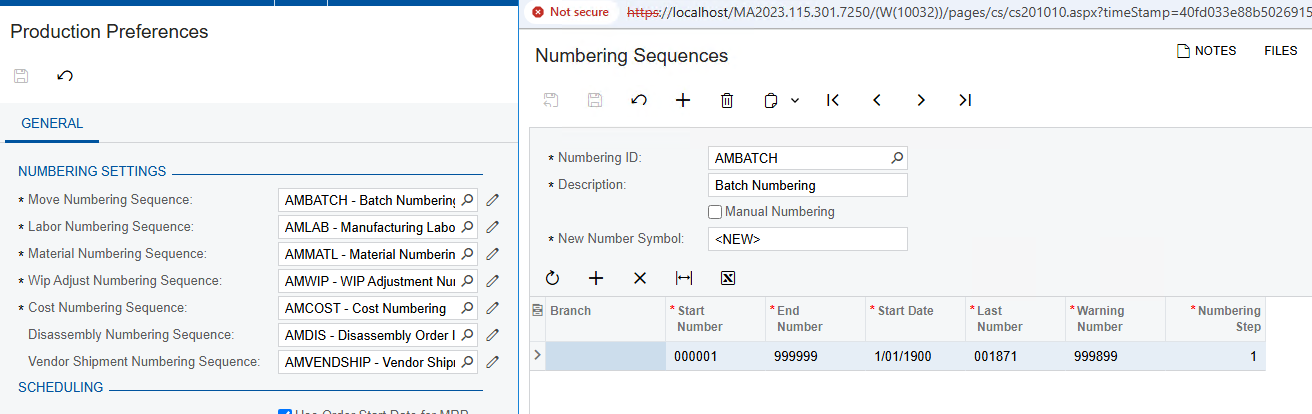
Hi ​@ranjithduraisamy72 I did some modifications and now get the below as the error message. I already have a numbering sequence setup for move transactions.

Exception Type:    
PX.Objects.CS.AutoNumberException
Message:    
CS Error: Cannot generate the next number for the  sequence.

Here is the updated code: 

private void CreateMoveTransactions(AMBatch batch)
{
PXTrace.WriteInformation($"CreateMoveTransactions started for batch: {batch.BatNbr}");

var moveGraph = PXGraph.CreateInstance<MoveEntry>();

// Create batch with mandatory fields and explicitly set the numbering sequence
var moveBatch = moveGraph.batch.Cache.CreateInstance() as AMBatch;
if (moveBatch != null)
{
moveBatch.DocType = "Move";
moveBatch.TranDate = batch.TranDate;
moveBatch.FinPeriodID = batch.FinPeriodID;
moveBatch.Hold = false;


// Insert the batch and let the graph handle the numbering
moveBatch = moveGraph.batch.Insert(moveBatch);
moveGraph.batch.Current = moveBatch;

if (moveBatch == null || string.IsNullOrEmpty(moveBatch.BatNbr))
{
throw new PXException("Failed to generate batch number using AMBATCH sequence.");
}

try
{
// Save the batch first to ensure numbering is committed
moveGraph.Actions.PressSave();
PXTrace.WriteInformation($"Move batch created successfully with number: {moveBatch.BatNbr}");
}
catch (Exception ex)
{
PXTrace.WriteError($"Error saving move batch: {ex.Message}");
throw new PXException($"Failed to save move batch: {ex.Message}", ex);
}

// Updated query to include DocType
var materialTrans = SelectFrom<AMMTran>
.Where<AMMTran.batNbr.IsEqual<@P.AsString>
.And<AMMTran.docType.IsEqual<@P.AsString>>>
.View.Select(moveGraph, batch.BatNbr, batch.DocType)
.RowCast<AMMTran>()
.ToList();

foreach (AMMTran mtran in materialTrans)
{
var refreshedMTran = (AMMTran)PXSelect<AMMTran,
Where<AMMTran.batNbr, Equal<Required<AMMTran.batNbr>>,
And<AMMTran.docType, Equal<Required<AMMTran.docType>>,
And<AMMTran.lineNbr, Equal<Required<AMMTran.lineNbr>>>>>>
.Select(moveGraph, mtran.BatNbr, mtran.DocType, mtran.LineNbr)
.FirstOrDefault();

if (refreshedMTran == null) continue;

var moveTran = moveGraph.transactions.Cache.CreateInstance() as AMMTran;
if (moveTran != null)
{
moveTran.OrderType = refreshedMTran.OrderType;
moveTran.ProdOrdID = refreshedMTran.ProdOrdID;
moveTran.OperationID = refreshedMTran.OperationID;
moveTran.SiteID = refreshedMTran.SiteID;
moveTran.LocationID = refreshedMTran.LocationID;
moveTran.LotSerialNbr = refreshedMTran.ParentLotSerialNbr;
moveTran.DocType = "Move";
moveTran.BatNbr = moveBatch.BatNbr;
moveTran.Qty = 1m;
moveTran.TranDate = moveBatch.TranDate;

moveGraph.transactions.Insert(moveTran);
PXTrace.WriteInformation($"Move transaction inserted successfully for BatNbr: {moveTran.BatNbr}");
}
}

try
{
moveGraph.Actions.PressSave();
PXTrace.WriteInformation("All move transactions saved successfully.");
}
catch (Exception ex)
{
PXTrace.WriteError($"Error saving move transactions: {ex.Message}");
throw new PXException("Failed to create move transactions.", ex);
}
}
}


Forum|alt.badge.img+2

@TharidhiP Please verify that your last number in the numbering sequence matches your last move transaction number. If they do not match, correct your numbering sequence.
Normally this error will pop up when system unable to generate the new number.

If the issue persists, please create a support case.


Forum|alt.badge.img+2
  • Author
  • Pro III
  • Answer
  • February 25, 2025

Thanks everyone for the suggestions, I have updated the code and it generates new move transactions from the materials screen. 

I did not specify the document type, as the graph already determines it. The BatNbr should not be set on a transaction line because it is assigned at the header level (AMBatch) during saving. Similarly, TranDate is automatically populated. Separating the Insert and Update operations for the new line worked. During the Insert, set OrderType and ProdOrdID, then use the returned value to apply further updates.

private void CreateMoveTransactions(AMBatch batch)
{

var moveGraph = PXGraph.CreateInstance<MoveEntry>();

// Create batch with mandatory fields
var moveBatch = moveGraph.batch.Cache.CreateInstance() as AMBatch;
if (moveBatch != null)
{
// Only set essential fields - let graph handle DocType
moveBatch.TranDate = batch.TranDate;
moveBatch.FinPeriodID = batch.FinPeriodID;
moveBatch.Hold = false;

// Insert the batch and let the graph handle the numbering
moveBatch = moveGraph.batch.Insert(moveBatch);
moveGraph.batch.Current = moveBatch;

if (moveBatch == null)
{
throw new PXException("Failed to create move batch.");
}

// Query existing material transactions
var materialTrans = SelectFrom<AMMTran>
.Where<AMMTran.batNbr.IsEqual<@P.AsString>
.And<AMMTran.docType.IsEqual<@P.AsString>>>
.View.Select(moveGraph, batch.BatNbr, batch.DocType)
.RowCast<AMMTran>();

foreach (AMMTran mtran in materialTrans)
{
// Refresh the material transaction data
var refreshedMTran = (AMMTran)PXSelect<AMMTran,
Where<AMMTran.batNbr, Equal<Required<AMMTran.batNbr>>,
And<AMMTran.docType, Equal<Required<AMMTran.docType>>,
And<AMMTran.lineNbr, Equal<Required<AMMTran.lineNbr>>>>>>
.Select(moveGraph, mtran.BatNbr, mtran.DocType, mtran.LineNbr)
.FirstOrDefault();

if (refreshedMTran == null) continue;

// Create and insert the base transaction first
var moveTran = moveGraph.transactions.Insert(new AMMTran
{
OrderType = refreshedMTran.OrderType,
ProdOrdID = refreshedMTran.ProdOrdID
});

if (moveTran != null)
{
// Update additional fields after insert
moveTran.OperationID = refreshedMTran.OperationID;
moveTran.SiteID = refreshedMTran.SiteID;
moveTran.LocationID = refreshedMTran.LocationID;
moveTran.LotSerialNbr = refreshedMTran.ParentLotSerialNbr;
moveTran.Qty = 1m;

// Update the transaction with additional fields
moveGraph.transactions.Update(moveTran);
PXTrace.WriteInformation($"Move transaction created successfully");
}
}

try
{
// Save
moveGraph.Actions.PressSave();
PXTrace.WriteInformation("All move transactions saved successfully.");
}
catch (Exception ex)
{
PXTrace.WriteError($"Error saving move transactions: {ex.Message}");
throw new PXException("Failed to create move transactions.", ex);
}
}
}

Thank you!


Chris Hackett
Community Manager
Forum|alt.badge.img
  • Acumatica Community Manager
  • February 26, 2025

Thank you for sharing your solution with the community ​@TharidhiP!