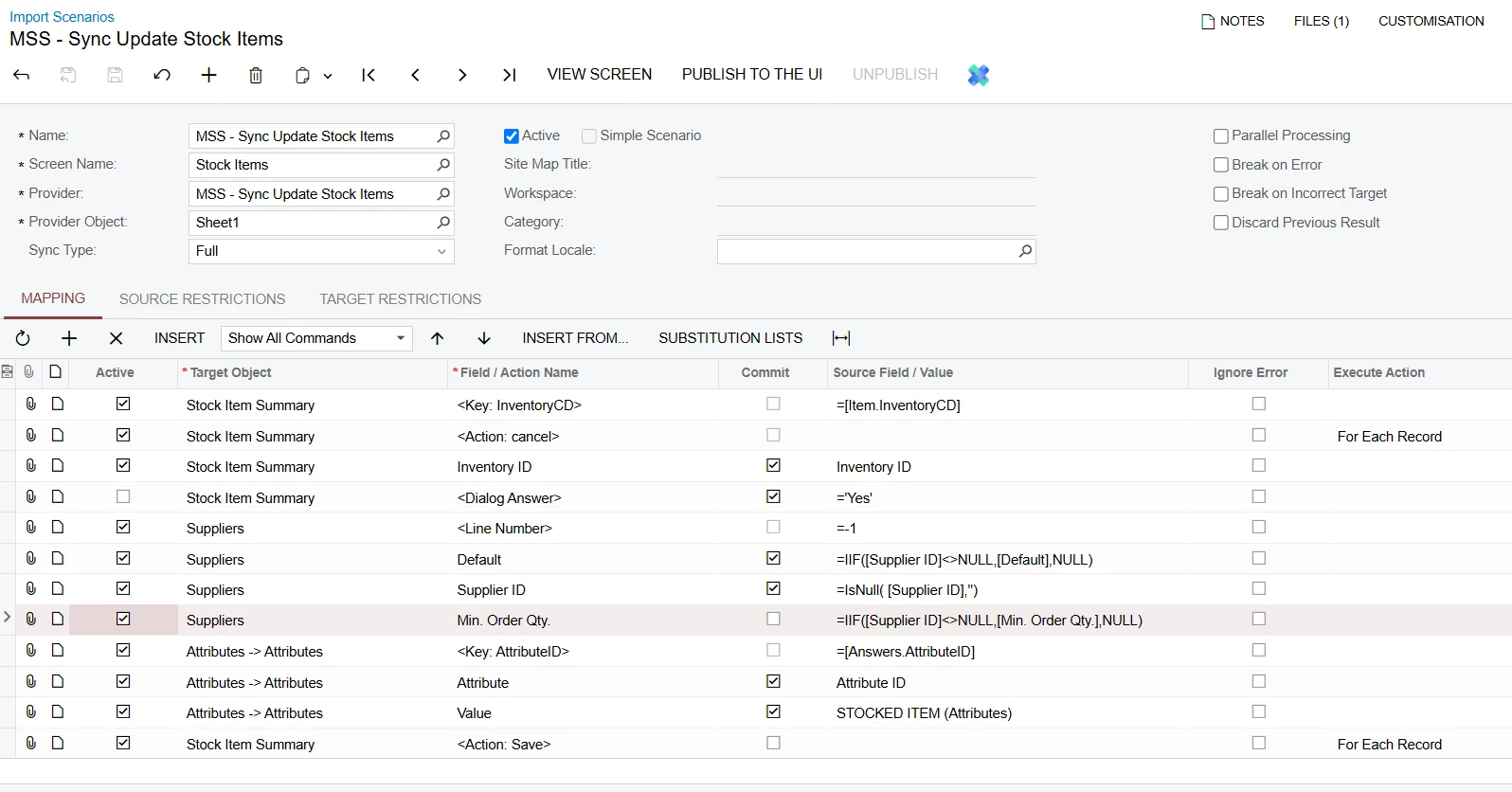
Hi all. I am trying to update stock items with a default supplier, minimum order qty and attributes. However, I keep getting an error Field: Supplier ID, Value: , Error: 'Supplier ID' cannot be found in the system.
Please see below mapping and let me know what I am missing:
Best answer by PaulMainard55
Hi @MarkD ,
It looks like you may be working in v25 r1 or r2? I’m asking because the schema object is labeled as “Suppliers”; it used to be “Vendors”.
I have a couple of suggestions for you when it comes to importing vendors/suppliers to Stock Items. One is using “Source Restrictions” and the other is a syntax/order of operations mapping change.
Based on your description of the issue, it sounds like you’re importing a list of Inventory Items, but not all of them has a vendor assigned to them. I presume this is why you’re trying to use an “IsNull” or an “iif” command to cast a Null value if your data row has a null in the vendor field. If this is the case, try using this instead:
Go to your “Source Restrictions” tab, and add this setting:
Field Name: Supplier ID; Condition: Is Not Empty
Here’s an example of one of my imports that uses this (note - my data provider schema is different):
Doing this will filter out any data rows that have nulls in your Supplier ID column. This “may” kill two birds, because the missing UOM error you’re getting often indicates a problem with the record you’re entering. The “iif” formula is creating a row with a Vendor ID with a null value, but you can’t do that since the Vendor ID is a required field.
With that said, the error you’re describing is also related to situations where you’re trying add a new row for vendor that’s already included in the grid. That’s because the System Command of <LineNbr> and it’s corresponding value of ‘-1’, is the “add line” command.
I’ve found it necessary to change this logic when importing to this tab by defining a new key. To do this, highlight the <LineNbr> system command, and click the “Insert” command in the middle ribbon. In the new line, select your “Suppliers” Target Object; and in the “Field/Action Name” enter “@@SupplierID”. In the “Source Field/Value” column, you want to select the Internal Field “[VendorItems.VendorID]” (see screenshot).
The [VendorItems.VendorID] field is the database object to which you’re writing the Supplier ID (see arrow).
This command essentially defines the Vendor ID as the key identifier for the Suppliers tab. As such, it allows the system to either update the row containing the Vendor ID in question, or adds it if it’s missing. Notice also that I disable the <LineNbr> command because I only want the new line to be added when appropriate.
Give this a try and let us know if it worked for you.
It looks like you may be working in v25 r1 or r2? I’m asking because the schema object is labeled as “Suppliers”; it used to be “Vendors”.
I have a couple of suggestions for you when it comes to importing vendors/suppliers to Stock Items. One is using “Source Restrictions” and the other is a syntax/order of operations mapping change.
Based on your description of the issue, it sounds like you’re importing a list of Inventory Items, but not all of them has a vendor assigned to them. I presume this is why you’re trying to use an “IsNull” or an “iif” command to cast a Null value if your data row has a null in the vendor field. If this is the case, try using this instead:
Go to your “Source Restrictions” tab, and add this setting:
Field Name: Supplier ID; Condition: Is Not Empty
Here’s an example of one of my imports that uses this (note - my data provider schema is different):
Doing this will filter out any data rows that have nulls in your Supplier ID column. This “may” kill two birds, because the missing UOM error you’re getting often indicates a problem with the record you’re entering. The “iif” formula is creating a row with a Vendor ID with a null value, but you can’t do that since the Vendor ID is a required field.
With that said, the error you’re describing is also related to situations where you’re trying add a new row for vendor that’s already included in the grid. That’s because the System Command of <LineNbr> and it’s corresponding value of ‘-1’, is the “add line” command.
I’ve found it necessary to change this logic when importing to this tab by defining a new key. To do this, highlight the <LineNbr> system command, and click the “Insert” command in the middle ribbon. In the new line, select your “Suppliers” Target Object; and in the “Field/Action Name” enter “@@SupplierID”. In the “Source Field/Value” column, you want to select the Internal Field “[VendorItems.VendorID]” (see screenshot).
The [VendorItems.VendorID] field is the database object to which you’re writing the Supplier ID (see arrow).
This command essentially defines the Vendor ID as the key identifier for the Suppliers tab. As such, it allows the system to either update the row containing the Vendor ID in question, or adds it if it’s missing. Notice also that I disable the <LineNbr> command because I only want the new line to be added when appropriate.
Give this a try and let us know if it worked for you.
It looks like you may be working in v25 r1 or r2? I’m asking because the schema object is labeled as “Suppliers”; it used to be “Vendors”.
I have a couple of suggestions for you when it comes to importing vendors/suppliers to Stock Items. One is using “Source Restrictions” and the other is a syntax/order of operations mapping change.
Based on your description of the issue, it sounds like you’re importing a list of Inventory Items, but not all of them has a vendor assigned to them. I presume this is why you’re trying to use an “IsNull” or an “iif” command to cast a Null value if your data row has a null in the vendor field. If this is the case, try using this instead:
Go to your “Source Restrictions” tab, and add this setting:
Field Name: Supplier ID; Condition: Is Not Empty
Here’s an example of one of my imports that uses this (note - my data provider schema is different):
Doing this will filter out any data rows that have nulls in your Supplier ID column. This “may” kill two birds, because the missing UOM error you’re getting often indicates a problem with the record you’re entering. The “iif” formula is creating a row with a Vendor ID with a null value, but you can’t do that since the Vendor ID is a required field.
With that said, the error you’re describing is also related to situations where you’re trying add a new row for vendor that’s already included in the grid. That’s because the System Command of <LineNbr> and it’s corresponding value of ‘-1’, is the “add line” command.
I’ve found it necessary to change this logic when importing to this tab by defining a new key. To do this, highlight the <LineNbr> system command, and click the “Insert” command in the middle ribbon. In the new line, select your “Suppliers” Target Object; and in the “Field/Action Name” enter “@@SupplierID”. In the “Source Field/Value” column, you want to select the Internal Field “[VendorItems.VendorID]” (see screenshot).
The [VendorItems.VendorID] field is the database object to which you’re writing the Supplier ID (see arrow).
This command essentially defines the Vendor ID as the key identifier for the Suppliers tab. As such, it allows the system to either update the row containing the Vendor ID in question, or adds it if it’s missing. Notice also that I disable the <LineNbr> command because I only want the new line to be added when appropriate.
Give this a try and let us know if it worked for you.
Hi Paul. This does not only answered my question, but also helped me and others reading your answer understand this better. For example, why do people inactivate the <Line Number> line - this was a question in my mind every time I create an import scenario. It wasn’t explained in Acumatica Open University either and GPT didn’t recommend the “@@” command. I was wondering if there is a resource available for this?
Btw, do I still need to use the Source Restriction plus those lines you mentioned in mapping tab?
I am using MYOB Acumatica which is technically same system as Acumatica. It is just rebranded to MYOB for ANZ customers which I think is the reason why we call it “Suppliers” instead of “Vendors” and the versions is always delayed here. Right now, the latest version from memory is 2024 whilst you are in 2025 already. Many thanks for your help!
@MarkD - I’m so glad you found this helpful. I appreciate your letting us know. Ah - so you’re down under - that makes sense as to why the schema looked differently.
Regarding your source restriction question; given that your original post indicates that you’re attempting to include a condition to deal with nulls, the answer is “yes”. Again, the Supplier ID value is a required field and cannot be null.
What I would do is just simply map your “Supplier ID” column in your data provider without any conditions and then use the Source Restriction as suggested. Aternatively, you could simply remove data rows containing nulls from your data set. This will be a much simpler approach and should be sufficient to complete your import.
@MarkD - I’m so glad you found this helpful. I appreciate your letting us know. Ah - so you’re down under - that makes sense as to why the schema looked differently.
Regarding your source restriction question; given that your original post indicates that you’re attempting to include a condition to deal with nulls, the answer is “yes”. Again, the Supplier ID value is a required field and cannot be null.
What I would do is just simply map your “Supplier ID” column in your data provider without any conditions and then use the Source Restriction as suggested. Aternatively, you could simply remove data rows containing nulls from your data set. This will be a much simpler approach and should be sufficient to complete your import.
Good luck!
That’s what I did while waiting for an answer and it was much easier. Though, I am still curious how gurus like you do it. Very handy! Cheers mate
Cheers to you, @MarkD. You’re too kind and I will gladly take the “guru” moniker.
I’ve been working on the platform since its inception (almost 16 years) and learned at the feet of Acumatica’s CTO and his diciples. You could say that I’ve built a few import scenarios and learned a few tricks over the years 😉. You’ll get there sooner than I did.
I’m all too happy to share my knowledge with those needing assistance. I hope you enjoy working with the platform.