ETO Manufacturing and Inventory Item Maintenance

  • October 17, 2025
  • 11 replies
  • 90 views

PaulMainard55
Captain II
Forum|alt.badge.img+2

Hi Community,

I’m looking to get your thoughts on ETO manufacturing and custom-built subassemblies.  Our client does a tremendous amount of Engineer-to-Order manufacturing.  In many cases, their solutions may ultimately be built once, which may also include a reasonably large portion of their subassemblies, such as laser-cut sheet metal parts.  The custom products and subassemblies often fit nicely into a handful of product classes, but in their current state, they are often creating new SKUs for ETO product and subassembly.  These parts are virtually never in inventory beyond the time necessary to issue them to a production order or ship the FG to the customer.  

The client will be using CADLink, which will be used to generate SKUs, BOMs, and to update Production Orders. We can continue down this path, which is fine.  With that said, it feels as though there could be some potential benefit of creating skeleton SKUs and BOMs representing generic versions of these products. 

This is a solution I’ve used previously, where we’d create a MTO generic part and created a skeleton BOM that had only the routing.  We would then generate the Production-to-Order Production Order and then import the materials afterwards.  We would leverage other data elements to identify the items ordered and manufactured based on what was coming downstream from the CAD solution.  

We also leveraged Serial/Lot Numbering and Specific Costing for COGS and Margin Analysis.  Using Serial/Lot Attributes are also helpful for cross-referencing purposes between Acumatica and the CAD platform.  In our minds, tracking the raw material usage and cost is the primary concern; the specific applications within Acumatica doesn’t have much meaning beyond drawings and maybe dims.  

Our thinking around this approach is that the ETO designs and specs can live within the CAD solution; including the one-time parts that are also designed and manufactured.  This could reduce the amount of noise and master record bloat within the ERP solution.  Also, this approach can provide more flexibility within Acumatica in situations of redesigns or revisions since generic SKUs can take on any size, shape, and material requirements.  

My question to the community is, are there others out there who have taken a similar approach or did you go for total parity?  What led to the decision?  If you took the approach proposed here, how did you “sell it”?

Tagging ​@Chris Hackett and ​@angierowley75 to help with further engagement.


Thanks all.

11 replies

Debbie Baldwin
Acumatica Moderator
Forum|alt.badge.img+2
  • Acumatica Product Manager
  • November 20, 2025

@PaulMainard55 - did you get a response on this? If not - reach out via email and we can brainstorm. 


dgodsill97
Varsity I
Forum|alt.badge.img+3
  • Varsity I
  • November 26, 2025

If only Estimates where multi-level!  I think CADLink or CADTalk can create Estimates and Estimates can directly create Production Orders as long as all the inventory items are created.  The advantage avoiding creating Bills of Material for ETO.

Most ETO business I have worked with use Projects and tie the production order for the FG to the project.  Jeremy Sharp of Trebea is working on some Project enhancements to add Materials to Projects.


PaulMainard55
Captain II
Forum|alt.badge.img+2
  • Author
  • Captain II
  • November 26, 2025

If only Estimates where multi-level!  I think CADLink or CADTalk can create Estimates and Estimates can directly create Production Orders as long as all the inventory items are created.  The advantage avoiding creating Bills of Material for ETO.

Most ETO business I have worked with use Projects and tie the production order for the FG to the project.  Jeremy Sharp of Trebea is working on some Project enhancements to add Materials to Projects.

@dgodsill97 - thanks for chiming in.  The idea of creating estimates from CADLink has some appeal, and yes, “Muliti-level Estimates” would be an interesting approach. 

Our client will be leveraging project.  We will use the Project-based sales order (maybe) in conjunction with the above.  The question remains; if we were to treat ETO Items similar to how we might do with configurable products, where we create a BOM with nothing but routing, would that be a reasonable approach? 

It’s interesting that you bring-up multi-level estimates/BOMs, because based on our discovery, they phantom route everything and each production order is flattened, although not in the way that you might expect. 

Their legacy system does not assign Materials to Operation Steps/Work Centers.  They added a custom text field to their production order “Materials” section to indicate which work centers the materials pass through.  I actually would prefer that if they either create child ProdOrders, or phantom route properly to truly embed the materials routing before or after parent’s assembly operation.  

My thinking has been along the lines of creating a series of ETO BOMs that includes standard routing along with embedded subassemblies and then use CADLink to update the production order(s), instead of creating unique SKUs and BOMs?  This is following a “configurable” product paradigm, but allowing PDM to be the product configurator.  

I think this requires a longer conversation...


dgodsill97
Varsity I
Forum|alt.badge.img+3
  • Varsity I
  • November 26, 2025

I agree.  Having a “template” BOM would speed things up.since templates were never implemented for bills of material.  Updating Production Details is complex when the order is in process but that may not be a concern.


PaulMainard55
Captain II
Forum|alt.badge.img+2
  • Author
  • Captain II
  • November 26, 2025

I agree.  Having a “template” BOM would speed things up.since templates were never implemented for bills of material.  Updating Production Details is complex when the order is in process but that may not be a concern.

@dgodsill97 Oh - it’s a concern.  In fact, I would prefer to simply update Production Details midway through the production order if possible.  ETO revisions midstream are a thing and we’re looking to do just that through CADLink.  With that said, I think that rather than phantom routing, child production orders provides better firewalls in the manufacturing process in cases where a subassembly revision is required.  Easier to do this in a child order than from within a flat phantom-routed work order, would you agree?


dgodsill97
Varsity I
Forum|alt.badge.img+3
  • Varsity I
  • December 1, 2025

I agree.  Having a “template” BOM would speed things up.since templates were never implemented for bills of material.  Updating Production Details is complex when the order is in process but that may not be a concern.

@dgodsill97 Oh - it’s a concern.  In fact, I would prefer to simply update Production Details midway through the production order if possible.  ETO revisions midstream are a thing and we’re looking to do just that through CADLink.  With that said, I think that rather than phantom routing, child production orders provides better firewalls in the manufacturing process in cases where a subassembly revision is required.  Easier to do this in a child order than from within a flat phantom-routed work order, would you agree?

I would agree.  There used to be in the help for Production Details a section on what could be changed but the overlords of documentation tossed that out.


Forum|alt.badge.img
  • Jr Varsity III
  • December 12, 2025

I agree.  Having a “template” BOM would speed things up.since templates were never implemented for bills of material.  Updating Production Details is complex when the order is in process but that may not be a concern.

@dgodsill97 Oh - it’s a concern.  In fact, I would prefer to simply update Production Details midway through the production order if possible.  ETO revisions midstream are a thing and we’re looking to do just that through CADLink.  With that said, I think that rather than phantom routing, child production orders provides better firewalls in the manufacturing process in cases where a subassembly revision is required.  Easier to do this in a child order than from within a flat phantom-routed work order, would you agree?

Hey Paul, I'm curious how you are going about this, your experience with CADLink, and if you had any thoughts on using the Production Order as the main document for any engineering design work instead of BOMs.

Currently, I’m in the same boat. Our business is a Manufacturing ETO business that produces electrical equipment. We have around 5-8 product lines, but within those product lines are an almost infinite number of custom configurations that are suited to fit our customer’s needs.

As of right now we do something similar where we use a BOM as a template with only the routing, work centers, and parts that are constant for each configuration. We then create the Production Order at the time of SO entry and use that as the driving document to hone in on all the larger components as well as engineering driven components (manufactured and electrical parts).

Then based on communication with the customer, the material within the production order can change or be revised. We also use this production order to drive our engineering drawings as well as 3D models and parts (based off of the contents of the production orders and engineering processes). 

I am just starting to implement our fabrication department and have been exploring CADTalk / CADLink. It has been a struggle to implement the fabricated parts without a 3rd party solution since these parts are typically custom as well and labeled after the specific SO#...would have been to much for one person to constantly load those fab. parts and create BOMs for them without it.

Thank you!


dgodsill97
Varsity I
Forum|alt.badge.img+3
  • Varsity I
  • December 12, 2025

Once you start production you are doomed to a life of constant changes:because you needed to start production before all the components are known so you can meet the customer delivery date. 

  • the customer has changes.
  • The engineers cannot leave things alone.
  • A component is not available or not in time and you need to substitute something else.
  • A more important customer (the CEO’s golfing buddy) needs some of the components you already issued to the less important customer.
  • And of course service needs a part because another customer is down.
  • etc.

If you can get CADLink or CADTalk to update production orders that would seem to be good solution,  You can maybe create am import schedule or use the API to update the production materials.


Forum|alt.badge.img
  • Jr Varsity III
  • December 12, 2025

Once you start production you are doomed to a life of constant changes:because you needed to start production before all the components are known so you can meet the customer delivery date. 

  • the customer has changes.
  • The engineers cannot leave things alone.
  • A component is not available or not in time and you need to substitute something else.
  • A more important customer (the CEO’s golfing buddy) needs some of the components you already issued to the less important customer.
  • And of course service needs a part because another customer is down.
  • etc.

If you can get CADLink or CADTalk to update production orders that would seem to be good solution,  You can maybe create am import schedule or use the API to update the production materials.

Hahaha, you hit the nail right on the head...those are all situations that we have gone through. It seems that CADLink could be our best option as I believe they are able to edit/add materials in the Production Order level. 


Seems that that may be the best step forward. Thanks!


PaulMainard55
Captain II
Forum|alt.badge.img+2
  • Author
  • Captain II
  • December 12, 2025

Hey Paul, I'm curious how you are going about this, your experience with CADLink, and if you had any thoughts on using the Production Order as the main document for any engineering design work instead of BOMs.

Currently, I’m in the same boat. Our business is a Manufacturing ETO business that produces electrical equipment. We have around 5-8 product lines, but within those product lines are an almost infinite number of custom configurations that are suited to fit our customer’s needs.

As of right now we do something similar where we use a BOM as a template with only the routing, work centers, and parts that are constant for each configuration. We then create the Production Order at the time of SO entry and use that as the driving document to hone in on all the larger components as well as engineering driven components (manufactured and electrical parts).

Then based on communication with the customer, the material within the production order can change or be revised. We also use this production order to drive our engineering drawings as well as 3D models and parts (based off of the contents of the production orders and engineering processes). 

I am just starting to implement our fabrication department and have been exploring CADTalk / CADLink. It has been a struggle to implement the fabricated parts without a 3rd party solution since these parts are typically custom as well and labeled after the specific SO#...would have been to much for one person to constantly load those fab. parts and create BOMs for them without it.

Thank you!
 

@jdunmire  - thanks for reaching out and joining the conversation.  

I don’t have a ton of direct experience with CADLink, but based on my conversations with them, their tool can update both BOMs and Production Orders.

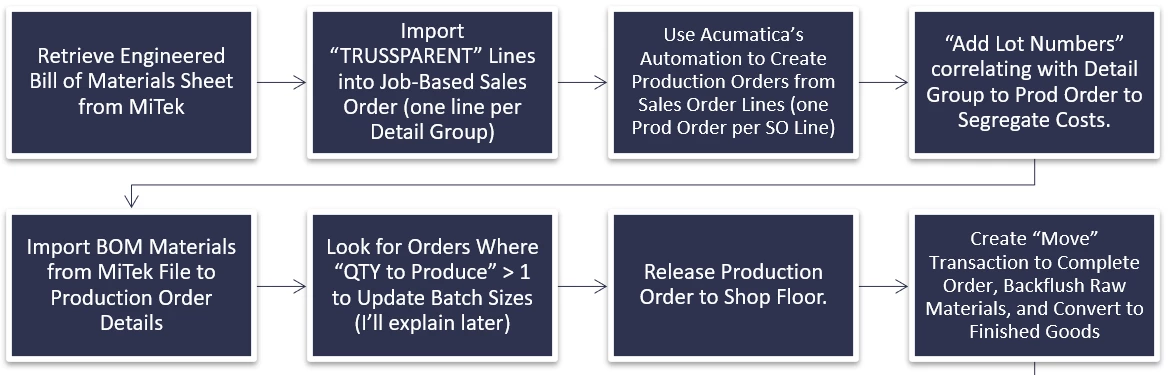
Last year, we took a client live that built prefab, ETO’ed trusses, floors, and walls.  What we decided to do was to create generic SKUs for each of these products as Make-to-Order items, and associating them with nothing but operations/work centers.

Their CAD platform produced a materials listing (more like a cut sheet) in a CSV format that had two line types for each truss; one that identfied the truss by project, floor, and location, the quantity of trusses needed, and the number of pieces of cut lumber, summarized by dimensions.

We used this data to generate the Project Sales Order Lines (trusses) and used a concatenation of Job#, floor, and location in the description, which was passed onto the production order’s description so we could indentify them, while also using that data to preassign the lot number to support specific costing. Also, the lot number serves as the glue to trace the customer’s order to the production order and materials used.

Using the same flat file, we updated the Production Order to add the material lines to their corresponding production orders.  Once the materials were in, we used a GI and import scenario to update the batch sizes in the material lines to match the order quantity so as not to overbudget/over backflush the material. 

We weren’t using CADLink/CADTalk for this, but I got the idea based on my experience using Acumatica’s product configurator, which, at the end of the day, does the same thing; converts the configuration settings to a production order (the materials don’t live in the BOM).  

For the client I’m working on, this may not be a solution and you may find that it might not be a solution for your company either, but it is an option if you see no point in creating stock numbers that will only be used once.  

I think that using a CAD integration makes the issue around managing SKUs, BOMs and the like a little less painful, except the ECOs.  My solution is that if a new subassembly is required, just add it to the production and, if needed, create a child production order for ir.  


Not sure if that helps you, but I feel like ETO products and Configurable products are one in the same, so the priciples in generating production orders can be shared.  


PaulMainard55
Captain II
Forum|alt.badge.img+2
  • Author
  • Captain II
  • December 12, 2025

@jdunmire - by the way, per the other thread we’re engaged in, the path of using child production orders vs phantom routing would almost be a requriement.  If they want to use phantom routing, then you’ll have to have discrete BOMs for your subassemblies.