

Answer

Editing Stock Item information in Bulk

  • February 11, 2022
  • 5 replies
  • 850 views

hstone
Freshman II
Forum|alt.badge.img

This may be a pretty basic questions but I am learning, If I need to edit the stock item safety stock in a warehouse, is there a way to do that in bulk? It would take a very long time to clean up this data if I have to open every single item in item warehouse details and edit them. There has to be a better way! TIA!

Best answer by PaulMainard55

@hstone - The best way to do this is by way of an import scenario.  This is a little advanced, but if you have an Acumatica partner at your disposal, they can help you with this.  Note - this requires that you have access to the Integration module. 


The first step is to create an Excel-based Data Provider (Integration→ Profiles → Data Providers).  If you have your inventory listing in an Excel table with a “Safety Stock” column, you would upload this into the Data Providers screen (there should be some good documentation on how to do this in the Help Wiki), and then you could build an Import Scenario to load the data into the screen.  

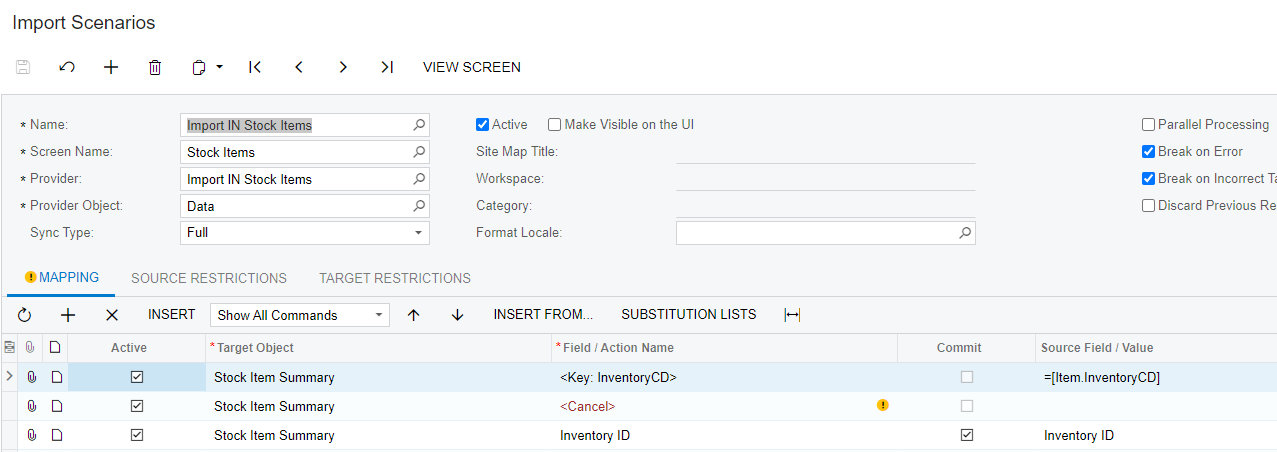
Once your data provider is created, you can begin to build your import scenario.  In the screenshot below, ignore the top two lines and simply enter the third line (Stock Item Summary - Inventory ID and the Source Field Value which comes from your data provider or Excel spreadsheet).  Then you want to make sure that when you build your import scenario that you include a command to “override” your saftey stock settings and then map your safety stock value to the correct field.  Always end your import scenario with a “Save” command.  

You should find plenty of preconfigured Import scenarios, including the one in the screenshot below that can provide some insight as to how to do this.  
 

If all else fails, I’m sure your Acumatica partner can assist in training you on how to do this.  Once you build one or two of these, you’ll get the hang of it and become an importing wizard.  

I hope this points you in the correct direction.  Good luck.

5 replies

  • Jr Varsity I
  • February 11, 2022

Use a data importer to import the information, you’ll need to drop all your stock item codes into an excel sheet and upload them with the data you want to change 


PaulMainard55
Captain I
Forum|alt.badge.img+2
  • Captain I
  • Answer
  • February 11, 2022

@hstone - The best way to do this is by way of an import scenario.  This is a little advanced, but if you have an Acumatica partner at your disposal, they can help you with this.  Note - this requires that you have access to the Integration module. 


The first step is to create an Excel-based Data Provider (Integration→ Profiles → Data Providers).  If you have your inventory listing in an Excel table with a “Safety Stock” column, you would upload this into the Data Providers screen (there should be some good documentation on how to do this in the Help Wiki), and then you could build an Import Scenario to load the data into the screen.  

Once your data provider is created, you can begin to build your import scenario.  In the screenshot below, ignore the top two lines and simply enter the third line (Stock Item Summary - Inventory ID and the Source Field Value which comes from your data provider or Excel spreadsheet).  Then you want to make sure that when you build your import scenario that you include a command to “override” your saftey stock settings and then map your safety stock value to the correct field.  Always end your import scenario with a “Save” command.  

You should find plenty of preconfigured Import scenarios, including the one in the screenshot below that can provide some insight as to how to do this.  


If all else fails, I’m sure your Acumatica partner can assist in training you on how to do this.  Once you build one or two of these, you’ll get the hang of it and become an importing wizard.  

I hope this points you in the correct direction.  Good luck.


hstone
Freshman II
Forum|alt.badge.img
  • Author
  • Freshman II
  • February 11, 2022

That is a great explanation. I do wish now that I had the Integration Module. I am not sure if that is something my company would allow me access to or not. Thank you very much for your response, at least now I know what to ask for in the future.


  • Freshman I
  • February 11, 2022

@hstone Just to make sure you understand that he Integration Module is in the core of Acumatica.  If you cannot see it, it is a permissions issue.


hstone
Freshman II
Forum|alt.badge.img
  • Author
  • Freshman II
  • February 11, 2022

Thank you! I can ask the person who manages our permissions for that ability. I appreciate the info.
