Answer

Disallow completion of production orders related to unreleased move transactions

  • September 2, 2025
  • 6 replies
  • 121 views

scottstilson
Freshman I
Forum|alt.badge.img

At the end of most months, we end up with move transactions that are stuck in the On Hold status because they’re related to production orders that are in the Completed status. How can we disallow the completion of a production order if it is related to a move transaction that is not in the Released status?

Best answer by PaulMainard55

@scottstilson - No - you’re totally on point. The system should look to see the extent to which a production order has moves on hold or unreleased.  These things should not happen and there most definitely should be included in the business logic of the system to prevent these things from happening. 

I wouldn’t characterize the issue as a “bug” in as much of a design flaw and functional gap that should be plugged by the developer. At least, I expect that would be Acumatica’s position; if it’s functioning as designed, it’s not considered a bug - but that’s just nuance. :-) 

I was merely pointing out how common your scenario is and it’s typical cause as guidance to offer what I hoped would be useful to you.  To ​@dgodsill97’s point, this should be added as an enhancement by way of the see/share ideas forum to at least get it on the product managers’ radars and hopefully get an enhancement developed.  

Until that happens though, developing some tools that will at least provide visibility and help to correct and cull such transactions may prove helpful.  The developer is quite keen to enhance the system’s functionality and rid it of undesired behavior.  It just takes a little time, so temporary work-arounds may be necessary in the meantime.

Best of luck!

6 replies

dgodsill97
Varsity I
Forum|alt.badge.img+3
  • Varsity I
  • September 2, 2025

It’s good idea and you can enter it as a Product Idea.  Currently, the only check is when you attempt to close a production.

The only check is for under issued materials in the Data Entry section of production order types; if you are backflushing materials on the Move, that will prevent the production order completion is you set the Under Issue Materials to Do Not Allow..  If you have Allow Backward Reporting set in the Order Type any unreported operation quantities are set to the qty completed from the next operation.  If you are using the Estimated Costing method for production orders the labor cost from the Move, if any, has been factored into the receipt cost of completed item as well as any materials not issued.


What is the reason the Moves are on hold?  Are they duplicates?


scottstilson
Freshman I
Forum|alt.badge.img
  • Author
  • Freshman I
  • September 4, 2025

Yes, they’re duplicate move transactions. Thus, unfortunately, your suggestion about setting Under Issue Materials to “Do Not Allow” isn’t relevant because the material has already been issued. What’s stuck is a duplicate transaction of one that’s been released.


dgodsill97
Varsity I
Forum|alt.badge.img+3
  • Varsity I
  • September 4, 2025

Unfortunately, the seems to happen a lot when the user gets an error and doesn’t know what to do particularly when scanning.  If there are just a few delete them. If many you can write a GI to find them in AMMTran/AMBatch where the status is not released and remove them with an import.  Sometimes a related transaction (Cost, Inventory Receipt) may have been released and you will need Acumatica to assist.  25R2 implements a new production transaction type that address much better the issue of related documents that were released.

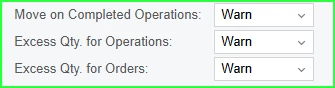
There are other Data Entry settings that might help.  The last two are 25R1 only,


PaulMainard55
Captain I
Forum|alt.badge.img+2
  • Captain I
  • September 13, 2025

Hi Scott,

I hope you’re well and it’s good to see you here. 

To echo Dennis’ comment, it is a common problem I see as well, particularly when backflushing.  What often happens is that a user will attempt to create a move and there’s not enough available inventory to complete the move.  This causes the user to often “abandon” the move transaction, make the necessary inventory adjustment, and then try again by creating a new move, as opposed to completing the move that was created initially.

I think a GI to identify these would be helpful, but defining criteria to isolate duplicates could be tricky.  Are you all completing moves for each Work Center, or generating one or two bulk moves and leap-frogging steps?  What I’m thinking is that if there’s a way you all could define a standard move count, you might be able build a query that summarizes your move count and identify production orders where their move counts exceed your standard.  If successful, you could use if as a touchstone before completing and closing your Prod Order.

Knowledge and training users to delete failed Moves when such an error is generated would be a good place to start. If I recall, I think you all are also backflusing labor, so be mindful of any potential labor postings generated when the move is created.  Also, don’t forget your Critical Materials screen as it can be that ounce of prevention needed to prevent this from happening. 🙂


scottstilson
Freshman I
Forum|alt.badge.img
  • Author
  • Freshman I
  • September 15, 2025

Thanks, Paul. Happy to see you here, too!

You describe some potentially useful workarounds. Still, they’re workarounds. It stands that the software allows the completion of production orders in the presence of unreleased related move transactions. Is there a real-word scenario in which having an unreleased move transaction related to a complete production order makes real-world, business sense? Otherwise, I’m tempted of this phenonemon as bug of sorts.


PaulMainard55
Captain I
Forum|alt.badge.img+2
  • Captain I
  • Answer
  • September 15, 2025

@scottstilson - No - you’re totally on point. The system should look to see the extent to which a production order has moves on hold or unreleased.  These things should not happen and there most definitely should be included in the business logic of the system to prevent these things from happening. 

I wouldn’t characterize the issue as a “bug” in as much of a design flaw and functional gap that should be plugged by the developer. At least, I expect that would be Acumatica’s position; if it’s functioning as designed, it’s not considered a bug - but that’s just nuance. :-) 

I was merely pointing out how common your scenario is and it’s typical cause as guidance to offer what I hoped would be useful to you.  To ​@dgodsill97’s point, this should be added as an enhancement by way of the see/share ideas forum to at least get it on the product managers’ radars and hopefully get an enhancement developed.  

Until that happens though, developing some tools that will at least provide visibility and help to correct and cull such transactions may prove helpful.  The developer is quite keen to enhance the system’s functionality and rid it of undesired behavior.  It just takes a little time, so temporary work-arounds may be necessary in the meantime.

Best of luck!